
1. Product Overview
The Youshiko YC9442 Wireless Weather Station provides real-time weather monitoring with a color LCD display and a wireless remote sensor. It tracks indoor and outdoor temperatures, humidity, and barometric pressure, offering weather forecasts through intuitive icons. Key features include a radio-controlled clock, indoor comfort level indicator, and temperature alerts.
The main display unit can be powered by the included AC adapter or 2 AA batteries (not included). When operating on batteries, the display automatically turns off after approximately 10 seconds to conserve power. The display remains continuously lit when using the AC adapter, and its brightness can be adjusted.

Image 1.1: Youshiko YC9442 Wireless Weather Station main display unit and remote sensor.
2. Package Contents
Please verify that all items are present in your package:
- 1 x Youshiko YC9442 Main Display Unit
- 1 x Wireless Remote Sensor (YC9312)
- 1 x UK Power Adapter
- 1 x User Manual
3. Setup
3.1 Powering the Main Unit
- Insert 2 x AA batteries (not included) into the battery compartment on the back of the main unit, observing correct polarity.
- Alternatively, connect the included UK power adapter to the 'Input: DC5V 1.2A' port on the back of the main unit and plug it into a power outlet.
- When powered by the AC adapter, the display will remain continuously lit. When powered by batteries only, the display will automatically turn off after approximately 10 seconds to save power.
3.2 Installing Sensor Batteries
- Open the battery compartment on the back of the wireless remote sensor.
- Insert 2 x AA batteries (not included), ensuring correct polarity.
- Close the battery compartment securely.

Image 3.1: Rear view of the main unit and remote sensor, illustrating battery compartments and connection ports.
3.3 Sensor Placement
The wireless sensor has a transmission range of up to 60 meters (196 feet) in open air. For optimal performance, place the sensor in a shaded, dry location outdoors, away from direct sunlight and precipitation. The weather station supports up to 3 remote sensors, though only one is included in the package. Additional YC9312 sensors can be purchased separately.

Image 3.2: Illustration of the maximum transmission distance between the main unit and the remote sensor.
3.4 Radio Controlled Clock (RCC) Setup
Upon initial power-up, the weather station will automatically attempt to synchronize with the radio-controlled time signal (RCC). For users in the UK and Ireland, the system uses the MSF signal. For the rest of Europe, it uses the DCF-77 signal.
During the RCC synchronization process, which typically takes up to 7 minutes, the display may temporarily dim or turn off to minimize interference. Once synchronization is complete, the display will return to normal, and the time will be automatically set.
Ensure the weather station is placed away from electronic devices such as televisions, computers, mobile phones, and Wi-Fi routers to avoid interference during RCC reception.

Image 3.3: Explanation of European radio control time signals (MSF and DCF-77).
For more information on radio time signals, you may refer to:
4. Operating Instructions
4.1 Display Overview
The multi-color LCD display provides a comprehensive overview of current weather conditions and time information. It typically shows:
- Weather Forecast Icons (Sunny, Partly Cloudy, Rainy, Heavy Rain, Snowy)
- Indoor Temperature and Humidity
- Outdoor Temperature and Humidity
- Barometric Pressure
- Time (12/24h format), Date, and Day of the Week
- Alarm Time
- Indoor Comfort Level Indicator
- Temperature Alerts (Ice Alert, Outdoor Hi/Lo Alert)

Image 4.1: Overview of the main display unit and its various indicators.
4.2 Adjusting Display Brightness
The main unit features 4 brightness modes and an option to turn the display off completely. Use the dedicated button (often labeled with a sun icon or 'Brightness') on the unit to cycle through the brightness levels or turn the display off.
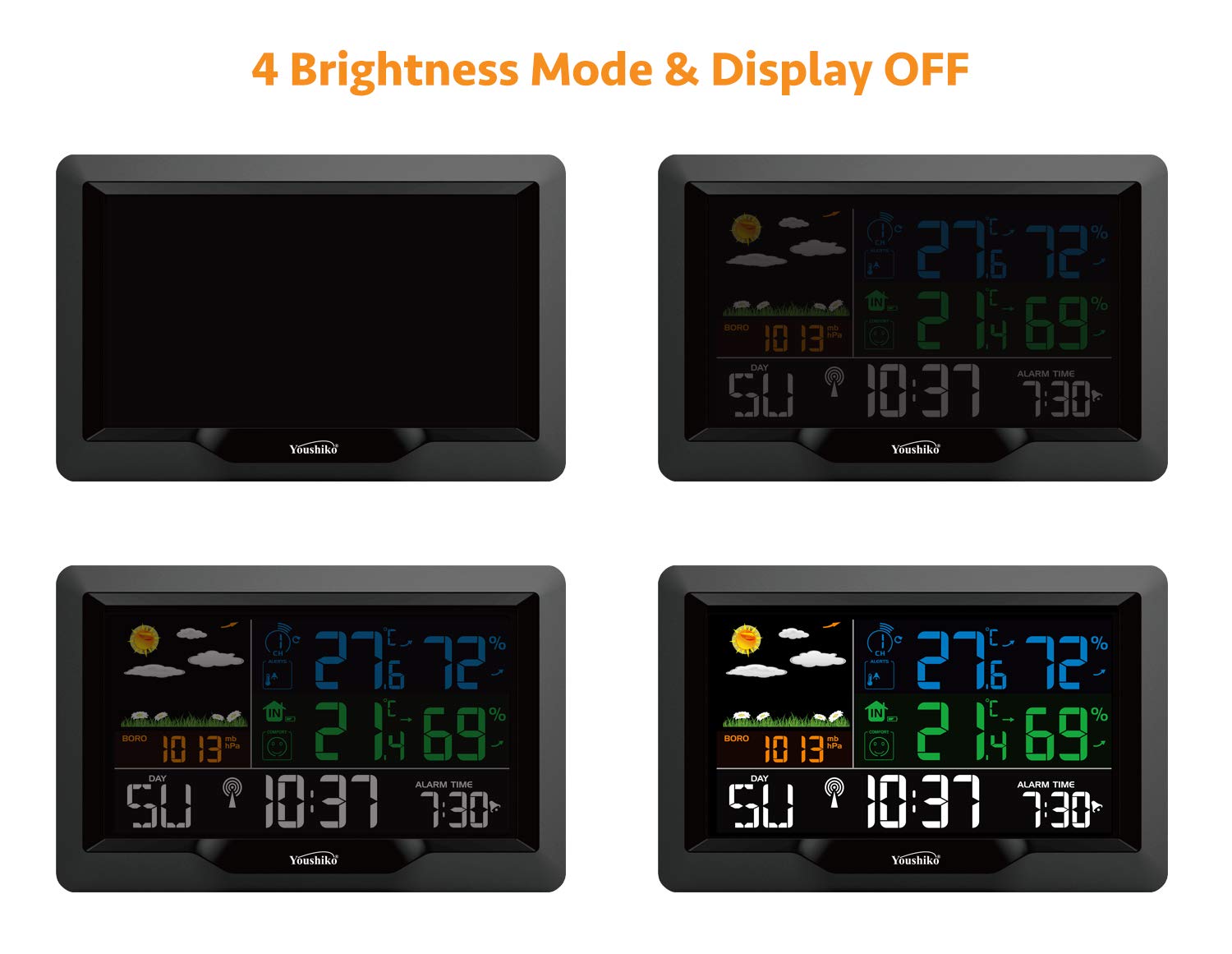
Image 4.2: Visual representation of the four brightness modes and the display-off option.
4.3 Weather Forecast
The weather station predicts weather conditions for the next 12-24 hours based on changes in barometric pressure. The forecast is displayed using animated icons such as Sunny, Partly Cloudy, Rainy, Heavy Rain, and Snowy.
4.4 Temperature and Humidity Readings
The station displays both indoor and outdoor temperatures in Celsius (°C) or Fahrenheit (°F). Indoor temperature ranges from 0°C to 50°C, while the remote sensor measures temperatures from -40°C to 70°C. Humidity is measured from 20% RH to 95% RH.
4.5 Indoor Comfort Level
The display includes an indicator for indoor comfort level, calculated based on the indoor temperature and humidity. This feature provides a quick visual reference for the comfort conditions within your home.
4.6 Temperature Alerts
- Ice Alert: An ice alert symbol appears and flashes when the outdoor temperature is between -1°C and +1°C (30.2°F and 33.8°F), indicating potential icy conditions.
- Outdoor Temperature Alert: You can set high and low temperature thresholds for outdoor readings. If the outdoor temperature exceeds these limits, an alert will be triggered, and the corresponding icon will flash.
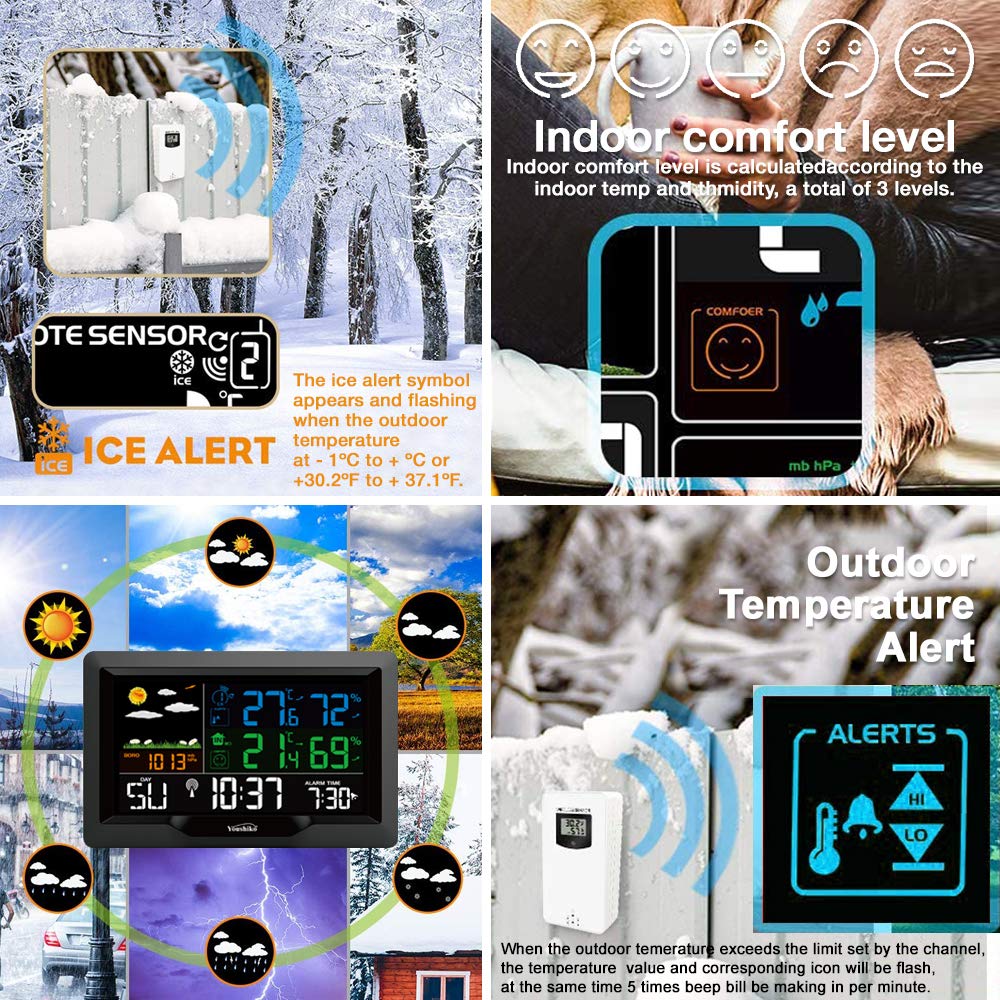
Image 4.3: Visual examples of Ice Alert, Indoor Comfort Level, Outdoor Temperature Alert, and weather forecast icons.
4.7 Time and Date Settings
The radio-controlled clock automatically sets the time, including automatic adjustments for daylight saving time. The display shows the time in 12-hour or 24-hour format, along with the calendar date and day of the week.
4.8 Alarm Function
The weather station includes an alarm function with a snooze feature. Refer to the detailed user manual for specific instructions on setting and activating the alarm.
4.9 USB Charging Port
The main display unit is equipped with a USB output port (DC5V 1A) that allows you to charge compatible devices such as smartphones or tablets.

Image 4.4: The USB charging port in use, demonstrating device charging capability.
5. Maintenance
- Clean the display and unit surfaces with a soft, dry cloth. Avoid abrasive cleaners or solvents.
- Ensure the remote sensor is kept free from dirt, dust, and debris for accurate readings.
- Replace batteries in both the main unit and remote sensor when the low battery indicator appears on the display.
6. Troubleshooting
- No Display/Dim Display: Check AC adapter connection or replace batteries in the main unit. If on battery power, the display will turn off after 10 seconds; press any button to reactivate.
- No Outdoor Reading: Ensure batteries are correctly installed in the remote sensor. Verify the sensor is within the 60-meter transmission range and not obstructed by thick walls or metal objects. Try re-pairing the sensor with the main unit (refer to the full user manual for pairing instructions).
- Inaccurate Readings: Ensure both the main unit and sensor are placed away from direct sunlight, heat sources, or strong electromagnetic interference (e.g., TVs, computers, mobile phones, Wi-Fi hubs).
- RCC Time Not Syncing: Place the main unit near a window and away from electronic interference. The synchronization process can take up to 7 minutes. If issues persist, manually set the time (refer to the full user manual).
7. Specifications
| Feature | Specification |
|---|---|
| Model Number | YC9442 |
| Display Type | LCD Color Display |
| Indoor Temperature Range | 0°C to 50°C (32°F to 122°F) |
| Outdoor Temperature Range | -40°C to 70°C (-40°F to 158°F) |
| Humidity Range | 20% RH to 95% RH |
| Barometric Pressure Range | 600 hPa/mb to 1100 hPa/mb (17.72 inHg to 32.50 inHg) |
| Remote Sensor Transmission Range | Up to 60 meters (196 feet) in open area |
| Main Unit Power Source | AC Adapter (included) or 2 x AA Batteries (not included) |
| Sensor Power Source | 2 x AA Batteries (not included) |
| USB Output | DC5V 1A |
| Package Dimensions | 21.59 x 14.48 x 7.87 cm |
| Weight | 540 grams |
8. Warranty and Support
This Youshiko YC9442 Weather Station is offered by a UK-based company and comes with a UK warranty and after-sales support. For specific warranty terms, service requests, or if you require a digital PDF version of this user manual, please contact your supplier or refer to the official Youshiko website.


