
Introduction
This manual provides comprehensive instructions for the installation, operation, maintenance, and troubleshooting of your Stetsom Vulcan 5000 1 Ohm Car Amplifier. Please read this manual thoroughly before using the product to ensure proper function and safety. The Stetsom Vulcan 5000 is a mono full-range amplifier designed for automotive sound systems, offering 5000 Watts RMS power output and a frequency response from 10Hz to 12kHz, suitable for subwoofers, woofers, drivers, and tweeters.

Figure 1: Angled view of the Stetsom Vulcan 5000 1 Ohm Car Amplifier.
Setup
Proper installation is crucial for optimal performance and safety. It is recommended that installation be performed by a qualified professional.
Power Connections
Connect the power cables to the amplifier's power input terminals. Ensure the cables are of appropriate gauge to handle the 5000 Watts RMS output. The amplifier requires robust power and ground connections for stable operation. The power input terminals are designed for cables up to 13mm².
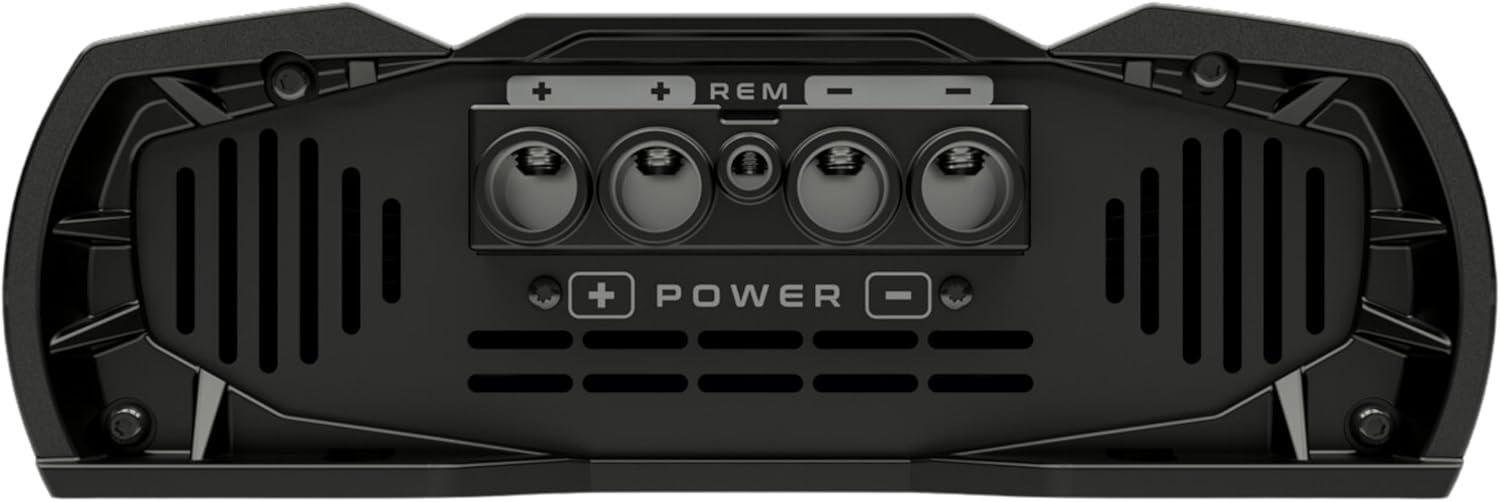
Figure 2: View of the power input terminals on the Stetsom Vulcan 5000 amplifier.

Figure 3: Recommended wiring diagram for power, ground, and remote turn-on connections, including a 250A fuse and auxiliary battery recommendation.
Input Connections (RCA)
Connect your audio source (e.g., head unit) to the amplifier's RCA input connectors. Although the amplifier is a single-channel (mono) unit, it features L/R RCA inputs, which are internally mixed to mono for optimal signal processing.

Figure 4: Input side of the amplifier showing the RCA connectors for audio signal input.
Speaker Connections
Connect your speakers or subwoofers to the amplifier's speaker output terminals. These terminals are designed to accommodate cables up to 4mm².
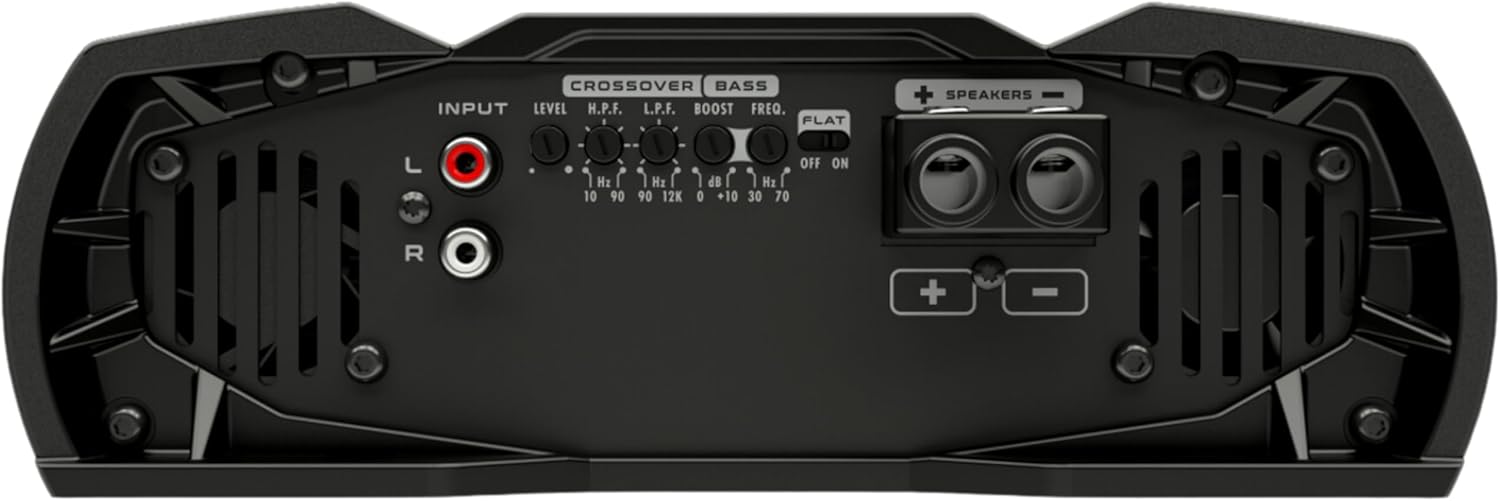
Figure 5: Output side of the amplifier, featuring terminals for speaker connections.
Operating Controls
The Stetsom Vulcan 5000 amplifier features several controls to fine-tune your audio experience. The following video demonstrates similar controls found on Stetsom amplifiers, providing a visual guide to their function.
Video 1: Overview of Stetsom amplifier controls, demonstrating input level, crossover, bass boost, and flat key functions. (Note: This video features a Stetsom Bravo Full 1200w RMS amplifier, but the control principles are similar to the Vulcan series.)
Input Level Adjustment
The 'LEVEL' control (visible at 0:36 in Video 1) allows you to adjust the input signal sensitivity. This is crucial for matching the output of your audio source to the amplifier, preventing distortion and ensuring clear sound reproduction.
Crossover Settings (HPF & LPF)
The amplifier includes High Pass Filter (HPF) and Low Pass Filter (LPF) controls for precise frequency management. The HPF (visible at 0:46 in Video 1) is variable from 10Hz to 90Hz, allowing higher frequencies to pass through. The LPF (visible at 0:52 in Video 1) is adjustable from 90Hz to 15kHz, allowing lower frequencies to pass. These filters help direct specific frequency ranges to appropriate speakers (e.g., low frequencies to subwoofers, higher frequencies to full-range speakers).
Bass Boost
The 'BASS BOOST' control (visible at 1:00 in Video 1) allows you to enhance low-frequency output. You can adjust the boost from 0 to +10dB and select the frequency range for the boost, typically from 30Hz to 70Hz (visible at 1:08 in Video 1). Use this feature to add impact to your bass without overdriving your speakers.
Flat Key
The 'FLAT KEY' switch (visible at 1:13 in Video 1) provides a bypass function for the amplifier's internal processing. When activated, it eliminates all previous adjustments made to the crossover and bass boost settings, returning the amplifier to its original, flat frequency response. This can be useful for diagnostic purposes or when you prefer to use external processing.
Maintenance
Regular maintenance ensures the longevity and optimal performance of your Stetsom Vulcan 5000 amplifier.
- Cleaning: Periodically clean the amplifier's exterior with a soft, dry cloth. Avoid using harsh chemicals or abrasive cleaners. Ensure ventilation grilles are free from dust and debris.
- Ventilation: Ensure the amplifier has adequate airflow around it. Do not block the cooling fans or place the amplifier in an enclosed space without proper ventilation. Overheating can lead to reduced performance and damage.
- Cable Inspection: Regularly check all power, ground, remote, input, and speaker cables for any signs of wear, fraying, or loose connections. Secure any loose connections immediately.
Troubleshooting
If you encounter issues with your amplifier, refer to the following table for common problems and their solutions.
| Problem | Possible Cause | Solution |
|---|---|---|
| No Power | Blown fuse, loose power/ground connection, no remote signal. | Check and replace fuse (250A recommended). Verify all power, ground, and remote connections are secure. Ensure head unit is sending a remote turn-on signal. |
| No Sound Output | Loose RCA cables, incorrect input level, speaker wires disconnected, amplifier in protection mode. | Check RCA cable connections. Adjust input 'LEVEL'. Verify speaker wire connections. Check for protection light (PROT) and resolve underlying issue (e.g., overheating, short circuit). |
| Distorted Sound | Input level too high, speaker impedance mismatch, damaged speakers. | Reduce input 'LEVEL'. Ensure speaker impedance matches amplifier's 1 Ohm stable rating. Inspect speakers for damage. |
| Amplifier Overheating | Insufficient ventilation, impedance too low, prolonged high-power usage. | Ensure proper ventilation around the amplifier. Verify speaker impedance. Reduce volume or allow amplifier to cool down. |
Specifications
Key technical specifications for the Stetsom Vulcan 5000 1 Ohm Car Amplifier:
- Brand: Stetsom
- Model: VULCAN5000
- Power Output: 5000 Watts RMS
- Channels: 1 channel (Mono)
- Impedance Compatibility: 1 Ohm Stable
- Frequency Response: 10Hz to 12kHz
- Input Options: RCA input (L/R internally mixed to mono)
- Equalization & Sound Control: Crossover (HPF 10-90Hz, LPF 90-15kHz), Bass Boost (0 to +10dB, 30-70Hz frequency selection)
- Voltage: 12 Volts (Operating range 9-17 Volts, rated at 14.4 Volts)
- Maximum Supply Voltage: 16 Volts
- Minimum Supply Voltage: 9 Volts
- Operating Temperature: Up to 55 Degrees Celsius
- Material Type: Aluminum
- Mounting Type: Freestanding Mount
- Product Dimensions (L x W x H): 33.02 x 23.14 x 9.4 cm (13 x 9.11 x 3.7 inches)
- Item Weight: 4.29 kg (9.25 lb)

Figure 6: Stetsom Vulcan 5000 amplifier with key dimensions indicated.
Warranty Information
Stetsom products are manufactured to the highest quality standards. For specific warranty terms and conditions, please refer to the warranty card included with your product or visit the official Stetsom website. Keep your proof of purchase for any warranty claims.
Customer Support
For technical assistance, product inquiries, or support, please contact Stetsom customer service through their official channels. Detailed contact information can typically be found on the product packaging or the Stetsom official website.


