
EMOS P4534
EMOS LED Work Light P4534 User Manual
Model: P4534
Rechargeable Camping Lamp with Power Bank, Waterproof Portable LED Spotlight
1. Introduction
Thank you for choosing the EMOS LED Work Light P4534. This versatile and robust work light is designed for various applications, from construction sites and workshops to outdoor activities and emergency situations. Featuring COB LED technology, a built-in power bank, and a durable, waterproof design, it provides reliable illumination wherever you need it.
This manual provides essential information for the safe and efficient operation, maintenance, and troubleshooting of your EMOS LED Work Light. Please read it thoroughly before first use and keep it for future reference.
2. Safety Information
Always observe the following safety precautions to prevent injury or damage to the device:
- Do not look directly into the LED light when it is on, as it can cause eye damage.
- Keep the device away from extreme temperatures, direct sunlight, and open flames.
- Do not attempt to disassemble, modify, or repair the device yourself. Refer all servicing to qualified personnel.
- Ensure the charging port cover is securely closed when not charging to maintain IP44 water resistance.
- Use only the provided USB cable or a compatible certified cable for charging.
- Keep out of reach of children.
- Dispose of the battery and device according to local regulations. Do not dispose of in household waste.
3. Product Overview
Familiarize yourself with the components of your EMOS LED Work Light:

Figure 1: Front view of the EMOS LED Work Light P4534, showcasing the main COB LED panel and robust green and black casing.
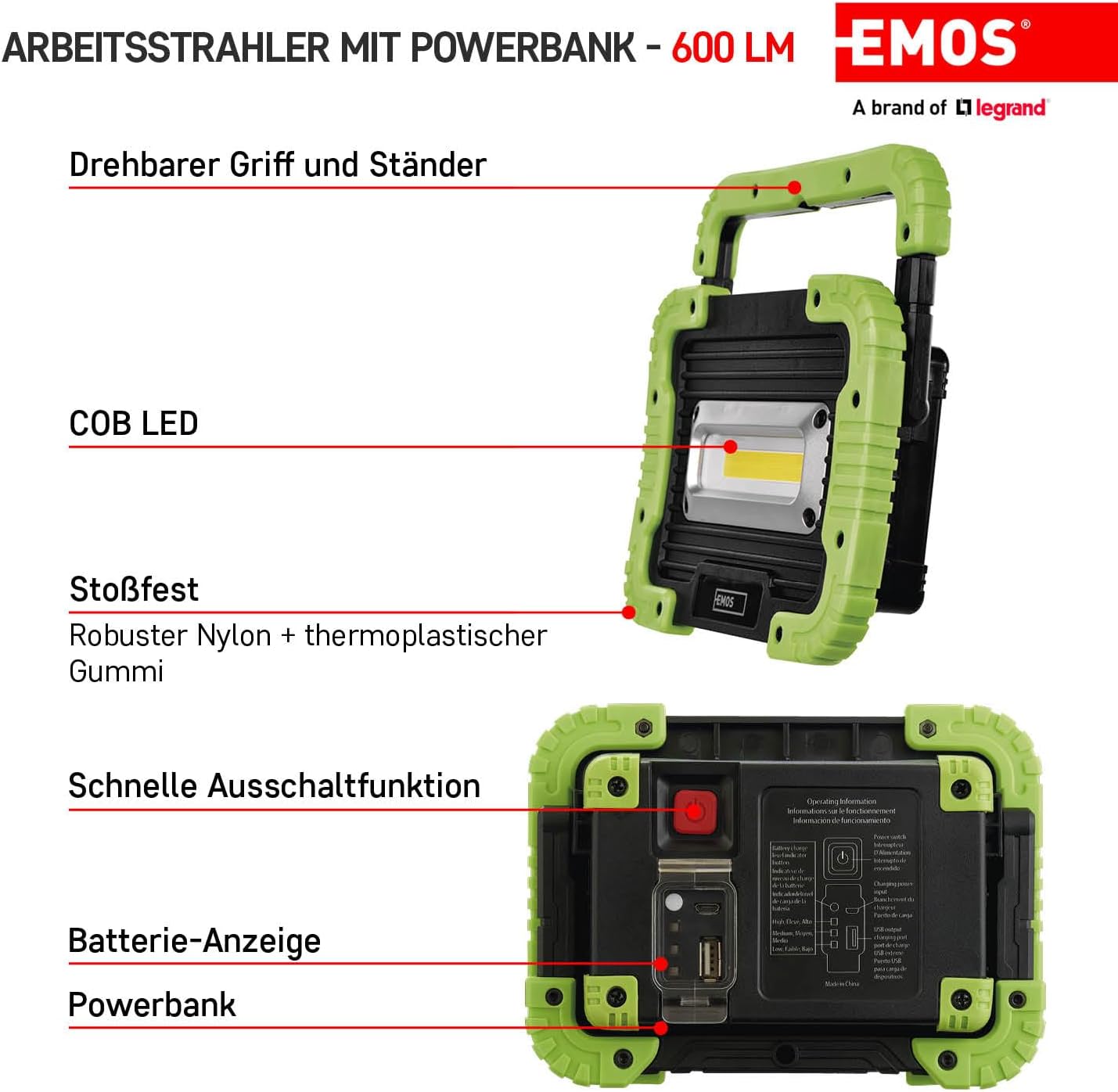
Figure 2: Key components of the work light, including the rotatable handle/stand, COB LED, shock-resistant housing (robust nylon + thermoplastic rubber), quick shut-off button, battery indicator, and power bank ports.
- COB LED Panel: Main light source.
- Adjustable Handle/Stand: Allows for easy carrying and positioning of the light.
- Power Button: Controls power and light modes.
- Battery Indicator: Shows the current battery charge level.
- Micro-USB Charging Port: For recharging the internal battery.
- USB-A Output Port: For using the device as a power bank.
- Durable Casing: Made from robust nylon and thermoplastic rubber for shock resistance and IP44 splash protection.
4. Setup
4.1 Initial Charging
Before first use, fully charge the EMOS LED Work Light. The integrated 3000 mAh Li-Ion battery comes with overcharge and over-discharge protection.
- Locate the Micro-USB charging port on the side of the device, usually protected by a rubber cover.
- Open the cover and insert the smaller end of the provided USB cable into the Micro-USB port.
- Connect the larger end of the USB cable to a standard USB power adapter (e.g., smartphone charger, computer USB port) or a power bank.
- The battery indicator lights will illuminate to show the charging progress. All lights will be solid when fully charged.
- Once fully charged, disconnect the USB cable and securely close the rubber cover to maintain water resistance.

Figure 3: Close-up view of the Micro-USB charging port and the included USB cable.
5. Operating Instructions
5.1 Turning On/Off and Changing Light Modes
The EMOS LED Work Light features two distinct lighting modes:
- COB LED 100%: Full brightness mode (600 lm).
- COB LED 50%: Reduced brightness mode (300 lm) for extended runtime.
- To Turn On: Press the power button once. The light will turn on in COB LED 100% mode.
- To Change Mode: Press the power button again to switch to COB LED 50% mode.
- To Turn Off (Quick Shut-off): Press the power button a third time to turn the light off. Alternatively, if the light has been on in a specific mode for more than 5 seconds, a single press will turn it off directly, regardless of the current mode.
5.2 Using as a Power Bank
The integrated battery can also be used to charge other mobile devices.
- Open the rubber cover protecting the USB-A output port.
- Connect your mobile device's charging cable to the USB-A output port on the work light.
- The work light will begin charging your device.
- Once charging is complete, disconnect the cable and securely close the rubber cover.
5.3 Adjusting the Stand
The adjustable handle doubles as a stand, allowing you to position the light at various angles for optimal illumination.
- Simply rotate the handle to the desired angle to prop up the work light on a flat surface.
- The handle can also be used to carry the light or hang it from a hook.
6. Maintenance
6.1 Cleaning
To maintain the performance and appearance of your work light:
- Wipe the surface with a soft, damp cloth.
- Do not use abrasive cleaners, solvents, or strong chemicals, as they may damage the finish.
- Ensure the charging ports are free of dust and debris.
6.2 Battery Care and Storage
For optimal battery life and performance:
- Recharge the battery regularly, even if the light is not used frequently.
- Avoid completely draining the battery before recharging.
- Store the device in a cool, dry place when not in use for extended periods.
- The battery includes overcharge and over-discharge protection, but it is still recommended to disconnect the charger once fully charged.
7. Troubleshooting
If you encounter issues with your EMOS LED Work Light, refer to the following common problems and solutions:
| Problem | Possible Cause | Solution |
|---|---|---|
| Light does not turn on. | Battery is depleted. | Charge the work light fully. |
| Light does not charge. | Faulty USB cable or power adapter; charging port is dirty. | Try a different USB cable and power adapter. Clean the charging port gently. Ensure the cable is fully inserted. |
| Light flickers or is dim. | Low battery. | Recharge the battery. |
| Power bank function not working. | Work light battery is too low; incorrect cable or device. | Ensure the work light has sufficient charge. Use the correct charging cable for your mobile device. |
If the problem persists after trying these solutions, please contact EMOS customer support.
8. Specifications
| Feature | Specification |
|---|---|
| Model Number | P4534 |
| Light Source Type | COB LED |
| Brightness | 600 lm (100% mode), 300 lm (50% mode) |
| Beam Range | Up to 35 m |
| Battery Type | Integrated 3000 mAh Li-Ion (3.7V) |
| Battery Life (Runtime) | 2.5 hours (100% mode), 3.5 hours (50% mode) |
| Charging Port | Micro-USB |
| Power Bank Output | USB-A |
| Water Resistance Rating | IP44 (Splash-proof) |
| Shock Resistance | Yes |
| Material | Robust Nylon + Thermoplastic Rubber |
| Product Dimensions (L x W x H) | 17 cm x 12.5 cm x 4.5 cm |
| Item Weight | 454 grams |
| Scope of Delivery | 1x Work Light + USB Cable |

Figure 4: Visual representation of key specifications including brightness, runtime, and beam range.
9. Warranty and Support
EMOS, a brand of Legrand, is committed to providing high-quality electrical products. Each product undergoes careful quality and performance testing in our laboratory.
For warranty information, technical support, or any inquiries regarding your EMOS LED Work Light P4534, please refer to the official EMOS website or contact your local retailer/distributor.
You can find more information and support resources by visiting the official EMOS website:
Related documentsP4534


Ask a question about this manual
Ask about setup, troubleshooting, compatibility, parts, safety, or missing instructions. Manuals+ will review the question and use this page’s manual context to help answer it.