
Introduction
This manual provides detailed instructions for the assembly, operation, maintenance, and troubleshooting of your BestOffice Big and Tall Office Chair. Please read this manual thoroughly before assembly and use to ensure proper function and longevity of your product. This chair is designed for users requiring a wider seat and higher weight capacity, up to 500 pounds.
Safety Information
Important: Ensure the chair's weight limit of 500 pounds is not exceeded. Improper assembly or misuse of adjustable mechanisms may lead to instability or injury. Always follow assembly instructions carefully. Keep small parts away from children.
Package Contents
Before beginning assembly, verify that all components are present and undamaged. Refer to the included parts list in your packaging. If any parts are missing or damaged, contact customer support.

Setup and Assembly
Assembly is estimated to take approximately 10-30 minutes. Detailed installation instructions and necessary tools are provided with the product. Follow the steps precisely, and do not fully tighten screws until instructed to do so, typically at the final stages of assembly.
- Unpack all components and lay them out on a clean, flat surface.
- Identify all screws and tools provided. Screws are typically labeled.
- Attach the casters to the chair base.
- Insert the gas lift cylinder into the center of the base.
- Assemble the seat and backrest according to the diagram in your instruction manual, ensuring proper alignment of holes.
- Attach the armrests to the seat and backrest.
- Mount the assembled seat and backrest onto the gas lift cylinder.
- Once all components are loosely assembled, gradually tighten all screws.
Operating Instructions
Height Adjustment
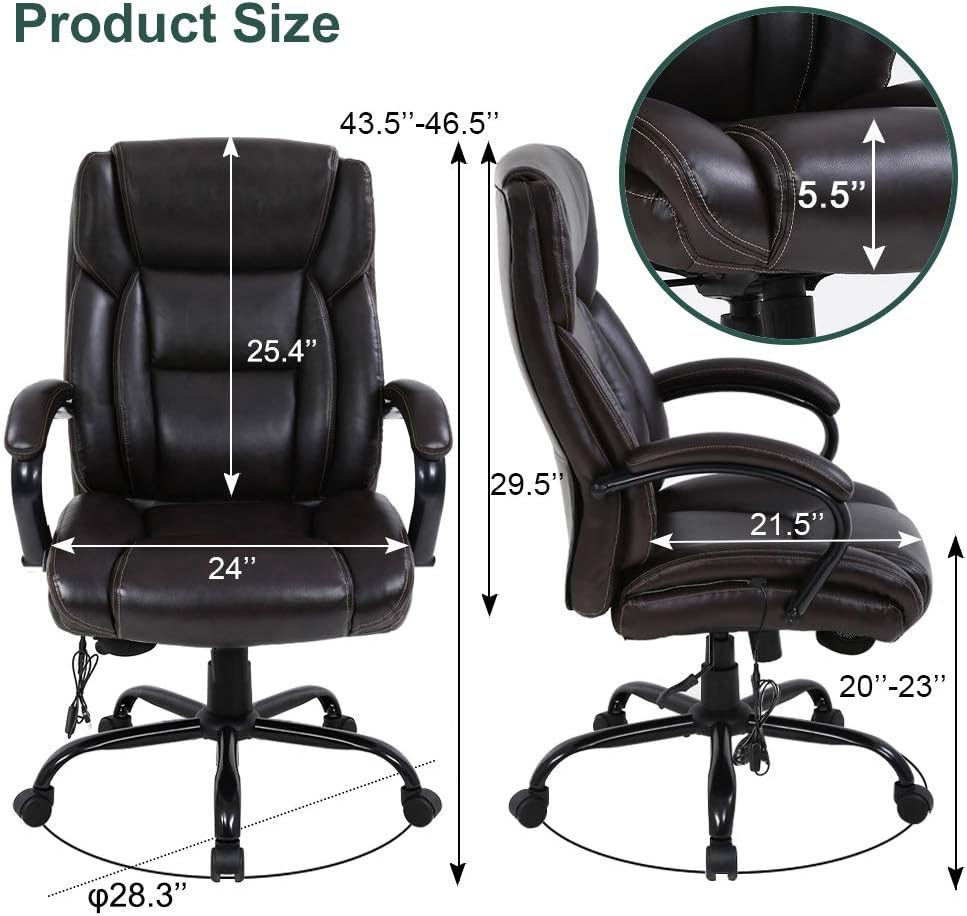
To adjust the seat height, lift the lever located under the seat on the right side. While seated, lift the lever to lower the seat. To raise the seat, lift the lever while standing or with minimal weight on the seat. The seat height can be adjusted from 20 inches to 23 inches.
Tilt and Rocking Function
The chair features a tilt mechanism allowing the backrest to recline. Pull the lever on the left side of the chair outwards to unlock the rocking function. Push the lever inwards to lock the chair in an upright position (90 degrees). The chair can recline up to 120 degrees.

Tilt Tension Control
Adjust the tension of the tilt mechanism by rotating the round knob located under the front of the seat. Turn clockwise to tighten the tension (making it harder to recline) and counter-clockwise to loosen the tension (making it easier to recline).
USB Massage Lumbar Support
The chair is equipped with a USB-powered massage lumbar support. Connect the USB cable, located in the receive bag under the seat, to a compatible USB power source (e.g., computer, power bank, or USB wall adapter). The massage function is designed to help relieve waist fatigue.


Maintenance
- Cleaning: Wipe clean with a damp cloth. Avoid harsh chemicals or abrasive cleaners that may damage the PU leather finish.
- Casters: Periodically check casters for debris (hair, dust) and clean as needed to ensure smooth rolling.
- Fasteners: Regularly inspect all screws and bolts to ensure they are tight. Re-tighten if necessary to maintain stability.
- Gas Lift: Do not attempt to disassemble or repair the gas lift cylinder. If it malfunctions, contact customer support for assistance.
Troubleshooting
| Problem | Possible Cause | Solution |
|---|---|---|
| Chair does not stay at desired height or sinks. | Gas lift cylinder malfunction. | Contact customer support for a replacement gas lift. |
| Wobbly armrests. | Loose screws connecting armrests to seat/backrest. | Tighten the screws securing the armrests. Avoid over-tightening. |
| Massage function not working. | USB cable not connected or power source issue. | Ensure the USB cable is securely connected to a working power source. Try a different USB port or power bank. |
| Chair is unstable or makes noise. | Loose assembly screws or damaged components. | Check and tighten all assembly screws. Inspect for any visible damage to the base or other parts. Do not exceed the 500lb weight limit. |
| Difficulty rolling the chair. | Debris in casters or damaged casters. | Clean any hair or debris from the caster wheels. If casters are damaged, they may need replacement. |
Specifications
- Brand: BestOffice
- Model Name: 500lb Wide Seat Massage Desk Chair Ergonomic Computer Chair
- Product Dimensions: 27"D x 30"W x 43.5"H
- Maximum Weight Recommendation: 500 Pounds
- Seat Depth: 21.5 inches
- Chair Backrest Width: 22.75 inches
- Seat Height Adjustment: 20 inches - 23 inches
- Material: Faux Leather (Upholstery), Sponge (Fill Material), Nylon (Base Finish)
- Special Feature: Adjustable height, Tilt mechanism, USB Massage Lumbar Support
- Assembly Time: Approximately 10-30 minutes
- Product Care: Wipe Clean


Warranty and Support
For warranty information or customer support, please refer to the documentation included with your purchase or visit the BestOffice official website. For issues related to missing parts or defects, it is recommended to contact the seller directly. Please retain your proof of purchase for any warranty claims.
Customer Support: Visit the BestOffice Store on Amazon
