
1. Introduction and Overview
The RENPHO White Noise Machine is designed to create a peaceful and relaxing environment by providing a variety of high-fidelity soothing sounds. It is ideal for improving sleep quality for babies and adults, enhancing privacy in offices, and aiding focus during work or study. Its portable design makes it suitable for use at home, during travel, or in any setting where a calm atmosphere is desired.
This device features 36 high-quality soothing sounds, including 7 white noises, 11 fan sounds, and a diverse collection of natural sounds such as birds, ocean waves, rain, wind, and thunder. It also includes a smart memory function and customizable timer settings to suit your preferences.

Image: The RENPHO White Noise Machine, showcasing its compact and modern design.
2. Product Features
- 36 High-Quality Soothing Sounds: Includes 7 white noises, 11 fan sounds, and 18 natural sounds (e.g., birds, ocean, rain, wind, thunder) to help relax your mind and body.
- Aids Baby and Toddler Sleep: Provides lullaby-like recordings to help infants and toddlers fall asleep faster and stay asleep longer, supporting healthy development.
- Masks Background Noise: Effectively covers disruptive internal and external sounds like snoring, traffic, or alarms, promoting uninterrupted sleep or focus. Can also be used in offices for privacy.
- Customizable Timer and Memory Function: Offers 3 timer settings (30, 60, or 90 minutes) or continuous play. The smart memory function automatically saves your last sound, volume, and timer preferences.
- Portable and Easy to Use: Compact and lightweight design for easy portability during travel or daily use. Simple operation via Micro USB charging port and integrated headphone jack.

Image: The RENPHO White Noise Machine offers 36 soothing sounds, including white noises, fan sounds, and pink noises.

Image: The compact size of the RENPHO White Noise Machine, suitable for any bedside table.
3. Package Contents
Please check the package contents upon unboxing to ensure all items are present:
- RENPHO White Noise Machine (Model RP-WNM007)
- Micro USB Charging Cable
- User Manual
4. Setup
Charging the Device
Before first use, fully charge the RENPHO White Noise Machine. Connect the provided Micro USB cable to the device's charging port and the other end to a compatible USB power source (e.g., wall adapter, computer, power bank). The charging indicator light will show the charging status. A full charge provides approximately 9 hours of continuous use.

Image: Multiple charging methods for the device.
5. Operating Instructions
The RENPHO White Noise Machine is designed for intuitive operation. Refer to the diagram below for button functions.
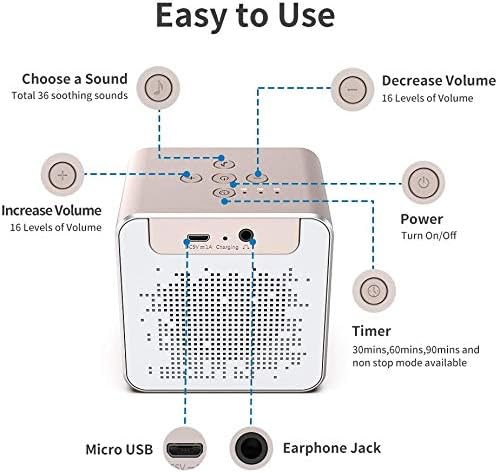
Image: Easy-to-use controls and ports.
Power On/Off
- Press the Power button (circle with vertical line) to turn the device on or off.
Sound Selection
- Press the Sound Selection button (musical note icon) to cycle through the 36 available soothing sounds.
Volume Adjustment
- Press the Volume Up button (+) to increase the volume. There are 16 levels of volume.
- Press the Volume Down button (-) to decrease the volume.
Timer Function
- Press the Timer button (clock icon) to set an auto-off timer for 30, 60, or 90 minutes. Pressing it again will cycle through the options, including a non-stop mode.
Memory Function
- The device features a smart memory function that automatically saves your last selected sound, volume level, and timer setting. When you turn the device on again, it will resume with your previous preferences.

Image: The memory mode feature for convenience.
Headphone Jack
- An integrated headphone jack allows for private listening, providing more flexibility for use in shared spaces without disturbing others.
6. Maintenance
- Cleaning: Wipe the device with a soft, dry cloth. Do not use abrasive cleaners or immerse the device in water.
- Storage: Store the device in a cool, dry place away from direct sunlight and extreme temperatures when not in use for extended periods.
- Battery Care: To prolong battery life, avoid fully discharging the device frequently. Charge it regularly, even if not in constant use.
7. Troubleshooting
| Problem | Possible Cause | Solution |
|---|---|---|
| Device does not turn on. | Battery is low or depleted. | Connect the device to a power source using the Micro USB cable and allow it to charge for at least 30 minutes before attempting to turn it on. |
| No sound or low sound output. | Volume is too low or muted. | Increase the volume using the Volume Up button. Ensure no headphones are plugged in if you intend to use the speaker. |
| Device stops playing unexpectedly. | Timer function is active. | Check the timer setting. If you desire continuous play, ensure the timer is set to non-stop mode. |
| Charging issues (e.g., not charging). | Faulty cable or power adapter; charging port issue. | Try a different Micro USB cable and power adapter. Ensure the charging port is clean and free of debris. If the issue persists, contact customer support. |
8. Specifications
- Model Number: RP-WNM007
- Color: White
- Item Weight: 400 g
- Package Dimensions: 11.4 x 11 x 8.2 cm
- Product Depth: 12.7 cm
- Material Type: Metal
- Power Source: Battery Powered
- Battery Type: Lithium
- Connector Type: USB
- Sound Categories: White Noise, Fan, Natural Sounds
- Number of Sounds: 36
- Age Range (Description): Infant
- Date First Available: September 3, 2020
9. Safety Information
- Do not use in the bathroom or near water.
- Keep the USB charging port dry.
- This is not a toy - keep out of reach of children.
- Avoid high sound volumes to prevent noise-induced hearing loss.
10. Warranty and Support
RENPHO products are designed with quality and customer satisfaction in mind. For information regarding warranty coverage, product support, or any issues not covered in this manual, please contact RENPHO customer service. Keep your purchase receipt for warranty claims.
For the latest support information and contact details, please visit the official RENPHO website or refer to the contact information provided with your product packaging.

