
Introduction
The Current USA Satellite Freshwater LED Plus is a full-spectrum RGB+White aquarium light designed to enhance the aquatic environment. It features wireless remote control for adjusting color and brightness, and a 24-hour timer for automated lighting schedules. This manual provides detailed instructions for the installation, operation, and maintenance of your 36-48 inch Satellite LED Plus light fixture (Model 4507).

The Satellite LED Plus light provides comprehensive illumination for freshwater aquariums.
Setup
Package Contents
Verify that all components are present in the package:
- 1 Satellite LED Plus light fixture
- 1 24-Hour LED Timer Controller
- 2 Adjustable docking mounts
- 1 12V DC UL transformer
- 1 Wireless LED remote control (with battery)
- 1 Remote IR Sensor (optional, 24-inch length cable)

All components included with the Satellite LED Plus light fixture.
Installation
- Attach Docking Mounts: Slide the adjustable docking mounts onto the ends of the LED light fixture. These mounts allow for quick and easy adjustments to fit various aquarium sizes.
- Position Light Fixture: Place the light fixture securely on top of your aquarium glass. The sliding docking legs can be extended or retracted to fit tanks between 36 and 48 inches.
- Connect Controller: Plug the LED light fixture cable into the 24-Hour LED Timer Controller.
- Connect Power: Connect the 12V DC UL transformer to the timer controller, then plug the transformer into a standard electrical outlet.
- Optional IR Sensor: If desired, plug the optional remote IR sensor into the controller for improved remote signal reception.

The light fixture is designed for secure placement on aquarium edges.
Operation
Remote Control Functions
The wireless IR remote control provides full command over the light's features. Ensure the remote has a working CR2025 battery and is pointed towards the IR sensor on the controller.

The remote control allows for comprehensive adjustment of light settings.
- Main Power ON/OFF: Turns the light on or off.
- Intensity: Adjusts brightness (OFF / 50% / 100%).
- RGB Fade / Color Fades: Cycles through various color transitions.
- Custom Color: Allows selection of specific colors.
- Custom Scene: Activates pre-programmed lighting scenes.
- Adjust Color Spectra: Fine-tunes individual RGB+W channels.
- Daylight/Sunrise/Sunset/Moonlight: Activates specific natural light cycles.
- Dynamic Effects: Includes various lighting effects like clouds, storms, and more.
- Audio Sounds: (Requires optional speakers) Activates ambient sound effects.
- Clock & 24 Hr. Timer: Accesses timer programming.
- Lock/Unlock: Prevents accidental changes to settings.
24-Hour Timer Control
The 24-Hour LED Timer Controller allows for automated lighting schedules, mimicking natural day-night cycles.

The timer controller supports both simple ON/OFF and advanced circadian lighting schedules.
- Timer Mode 1 (Simple Dynamic ON/OFF): Set specific ON and OFF times for the light. This mode also supports on-demand main light, background light, and audio programs.
- Timer Mode 2 (24 Hour Circadian Timer): Program a full 24-hour cycle including adjustable color spectrums for sunrise, daylight, sunset, and moonlight phases. Each phase can be customized for duration and intensity.
Lighting Features
The Satellite LED Plus offers advanced lighting capabilities for optimal aquarium health and aesthetics:

Key features include scheduling, adjustable colors, full spectrum output, and natural sunrise/sunset effects.
- Full Spectrum LED Lighting: Provides natural-looking light essential for vibrant aquatic life and plant growth.
- RGB+W Technology: Integrates Red, Green, Blue, and White LEDs to create a wide color spectrum, allowing for endless custom color blends and improved visibility.
- Slow Sunrise/Sunset: Mimics natural dawn and dusk conditions, gradually increasing and decreasing light intensity to reduce stress on aquarium inhabitants.
Accessory Connection
The controller includes ports for connecting optional accessories to enhance your aquarium experience.

Connect an accessory background light or audio speakers for an immersive experience.
Utilize the USB port for an optional background light or the 3.5mm audio jack for external speakers to integrate sound effects, creating a more dynamic and relaxing aquatic environment.
Maintenance
Regular maintenance ensures optimal performance and longevity of your LED light fixture.
- Cleaning: Periodically wipe the light fixture and acrylic protective lens with a soft, damp cloth to remove dust, water spots, and algae. Ensure the light is unplugged before cleaning. Do not use abrasive cleaners or solvents.
- Ventilation: Ensure the light fixture has adequate airflow around it to prevent overheating. Do not cover the fixture.
- Cable Inspection: Regularly check power cords and connections for any signs of damage or wear. Replace damaged components immediately.
Troubleshooting
Refer to the table below for common issues and their solutions.
| Problem | Possible Cause | Solution |
|---|---|---|
| Light does not turn on. | Power cord disconnected, power outlet not working, faulty transformer, remote battery dead. | Check all power connections. Test the outlet with another device. Replace remote battery. Contact customer support if issues persist. |
| Remote control is unresponsive or has poor range. | Remote battery low, IR sensor obstructed, remote too far or not pointed correctly. | Replace remote battery. Ensure a clear line of sight to the IR sensor. Move closer to the sensor. Consider using the optional external IR sensor. |
| Timer function is not working correctly. | Incorrect timer settings, power interruption, faulty controller. | Review and re-program timer settings according to the manual. Ensure consistent power supply. If issues persist, contact customer support. |
| Light intensity or color is inconsistent. | Loose connection, internal component issue. | Check all connections. If the problem continues, contact customer support. |
Specifications
Detailed technical specifications for the Current USA Satellite Freshwater LED Plus Light (Model 4507, 36-48 inch).

Detailed specifications and light spectrum for the Satellite LED Plus.
| Feature | Detail |
|---|---|
| Model Number | 4507 |
| Product Dimensions (D x W x H) | 3" x 36" x 1" |
| Aquarium Compatibility | 36-48 inch |
| Wattage | 40 watts |
| Number of LEDs | 48 |
| Total Lumens | 3000 |
| Light Source Type | LED (6500K White, Full Spectrum RGB) |
| Control Method | Wireless IR Remote Control |
| Power Source | 12V DC UL Transformer (120V input) |
| Material | Aluminum (Powder Coated) |
| Water Resistance Level | Not Water Resistant (IP65 rated LEDs, but fixture is for above-water use) |
| Connectivity Technology | IR |
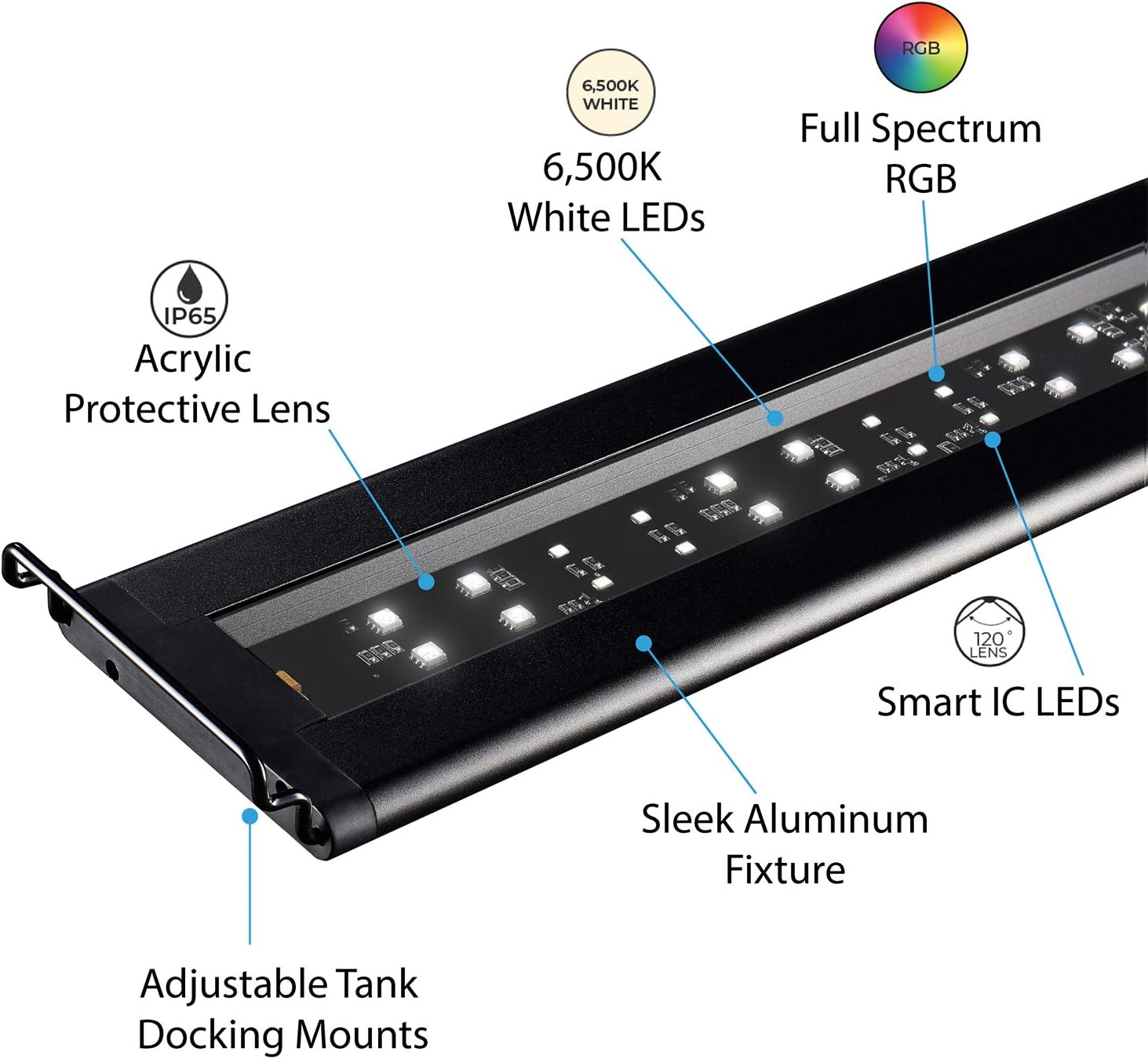
The sleek aluminum fixture features 6500K White and Full Spectrum RGB Smart IC LEDs with an acrylic protective lens.
Warranty Information
Current USA, Inc. warrants to the original end-user purchaser, when delivered in new condition in its original packaging, that its product will be free from defects in materials and workmanship for a period of one (1) year from the date of the original purchase. Lamps, refurbished products, and replacement parts have a three (3) month warranty. A copy of the original purchase receipt is required for all product warranty support and replacement parts.
Customer Support
If you encounter any issues not covered in this manual or require further assistance, please contact Current USA customer support. Have your product model number (4507) and proof of purchase ready when contacting support.
For the most up-to-date contact information, please visit the official Current USA website or refer to the packaging of your product.


