
SENSSUN IF2062D
SENSSUN Digital Body Fat Bathroom Scale User Manual
Model: IF2062D
1. Introduction
Thank you for choosing the SENSSUN Digital Body Fat Bathroom Scale. This smart scale is designed to provide comprehensive insights into your body composition, helping you track your health and fitness journey. It measures not only body weight but also 14 other essential body metrics, all synchronized with the 'SenssunLife' app via Bluetooth.

Image: The SENSSUN Digital Body Fat Bathroom Scale, featuring a sleek black tempered glass surface and an LED display.
This manual provides detailed instructions on how to set up, operate, and maintain your scale, along with troubleshooting tips and product specifications.
2. Setup
2.1 Unboxing and Battery Installation
Carefully remove the scale from its packaging. Locate the battery compartment on the underside of the scale. Insert 3 AAA batteries (included) ensuring correct polarity as indicated inside the compartment.

Image: Close-up view of the scale's internal components, highlighting the high-precision anti-slip sensors, safely rounded corners, large LED display, and the battery compartment for 4 AAA batteries.
2.2 App Download and Pairing
To utilize the full features of your smart scale, download the 'SenssunLife' app on your smartphone. The app is compatible with Bluetooth 4.0, Android 4.3, and iOS 7.0 or higher.
- Download the App: Search for "SenssunLife" in your device's app store (e.g., Google Play Store or Apple App Store).
- Enable Bluetooth: Ensure Bluetooth is enabled on your smartphone.
- Create Profile: Open the 'SenssunLife' app and create your user profile by entering personal data such as name, gender, date of birth, height, and activity level.
- Pair the Scale: Follow the in-app instructions to add a device. Step onto the scale to activate it, and the app should detect it for pairing. Confirm the connection within the app.
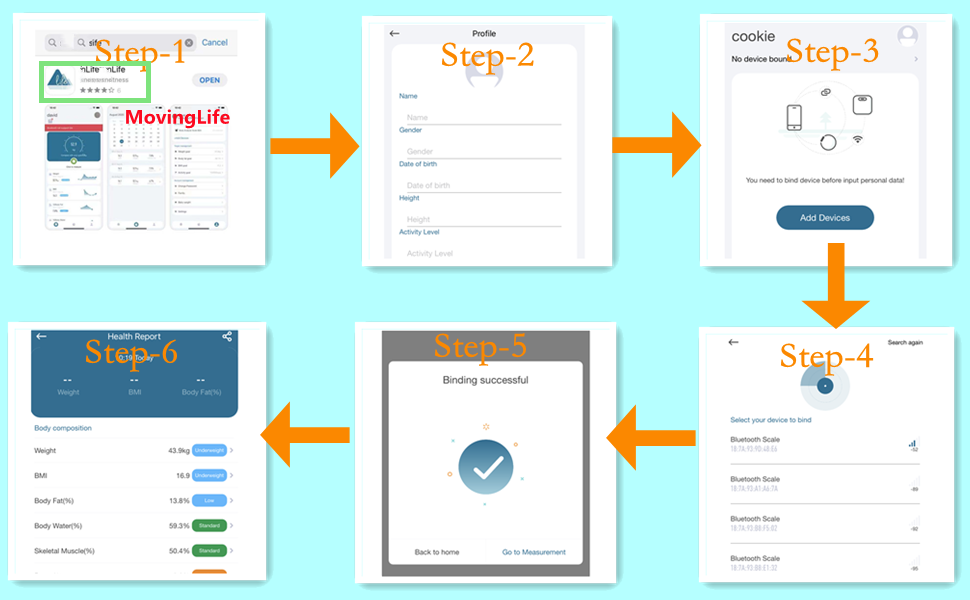
Image: Step-by-step guide for setting up the SenssunLife app, including downloading, creating a profile, binding the device via Bluetooth, and viewing the health report.
3. Operating Instructions
3.1 Taking a Measurement
- Place the scale on a hard, flat surface. Avoid carpets or uneven floors, as this can affect accuracy.
- Step onto the scale barefoot. Ensure your feet are placed on the four metal electrodes for accurate body composition analysis.
- Stand still until the LED display shows your weight and other measurements. The data will automatically sync with the 'SenssunLife' app if your phone is nearby and Bluetooth is enabled.

Image: A close-up of the scale's LED display showing body weight (62.8 kg), body fat percentage (36.0 F%), and body water percentage (46.2 W%).
3.2 Understanding Body Composition Measurements
The SENSSUN scale analyzes 15 essential body composition metrics, providing a comprehensive overview of your health. These include:
- Body Weight
- Body Mass Index (BMI)
- Body Fat Percentage
- Body Water Percentage (Hydration)
- Skeletal Muscle
- Subcutaneous Fat
- Body Age
- Somatotype (Body Shape)
- Body Bone Mass
- Protein Percentage
- Body Muscle Mass
- Visceral Fat Index
- Basal Metabolic Rate (BMR)
- Active Metabolic Rate (AMR)
- Lean Body Mass

Image: Visual representation of the 15 essential body composition measurements analyzed by the SenssunLife App, including Weight, BMI, Body Fat, Body Water, Skeletal Muscle, Subcutaneous Fat, Body Age, Somatotype, Body Bone, Protein, Body Muscle, Visceral Fat Index, BMR/AMR, Body Score, and Lean Body Mass.
3.3 Multi-User Recognition
The scale supports an unlimited number of users within the 'SenssunLife' app. Once a user profile is created, the scale can automatically recognize individual users based on their weight and body composition data. Each user's data is kept private within their own app account.
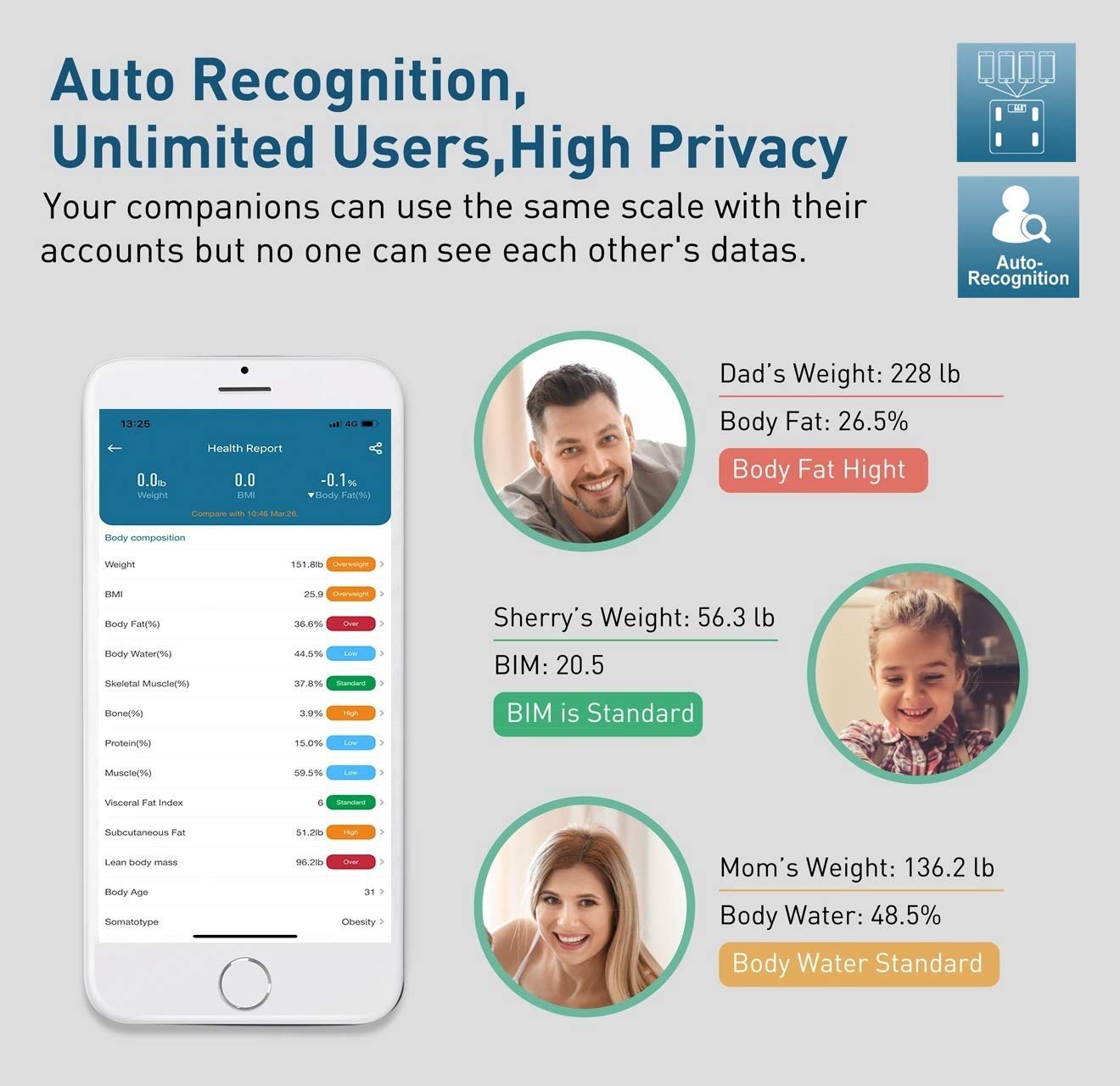
Image: Illustration of the auto-recognition feature, showing different family members (Dad, Sherry, Mom) with their individual weight and body composition data displayed in the app, emphasizing privacy.
3.4 Baby Mode
The 'SenssunLife' app includes a convenient Baby Mode, allowing you to accurately weigh infants or pets. To use this feature:
- Weigh Yourself First: Step onto the scale alone and let it record your weight.
- Weigh with Baby: Step onto the scale again while holding the baby.
- Get Baby's Weight: The app will automatically calculate and display the baby's weight by subtracting your weight from the combined weight.

Image: A mother holding a baby, demonstrating the three steps for using Baby Mode: weigh yourself first, then weigh yourself with the baby, and finally, the app displays the baby's weight.
4. Maintenance
4.1 Cleaning
To clean the scale, wipe the surface with a damp cloth and a mild detergent. Do not use abrasive cleaners or immerse the scale in water. Ensure the scale is dry before storage or next use.
4.2 Storage
Store the scale in a cool, dry place. Avoid extreme temperatures or direct sunlight. Do not place heavy objects on the scale when not in use.
5. Troubleshooting
Common Issues and Solutions
- "Lo" displayed: This indicates low battery. Replace the 3 AAA batteries immediately.
- "Err" displayed: This indicates an overload. The scale's maximum capacity is 180 kg (400 lb). Remove weight from the scale to prevent damage.
- Inaccurate readings:
- Ensure the scale is placed on a hard, flat, and stable surface.
- Make sure your feet are clean, dry, and making full contact with all four electrode pads.
- Avoid moving or shifting weight during measurement.
- No Bluetooth connection/data sync:
- Ensure Bluetooth is enabled on your smartphone.
- Make sure the 'SenssunLife' app is open and running in the foreground or background.
- Step on the scale to activate it before attempting to connect.
- Try restarting your phone and the app.
- If issues persist, try unpairing and re-pairing the device in the app settings.
6. Specifications
| Feature | Detail |
|---|---|
| Model Number | IF2062D |
| Brand | SENSSUN |
| Color | Black |
| Material | Tempered Glass |
| Weight Limit | 180 Kilograms (400 lbs) |
| Display Type | LED |
| Special Function | Body Fat Measurement |
| Power Source | 3 x AAA Batteries (included) |
| Dimensions | 26 x 26 cm (approx. 10.2 x 10.2 inches) / Package: 30.4 x 29.4 x 4.7 cm |
| Weight | 1.48 kg |
7. Warranty and Support
SENSSUN provides a 12-month warranty for this product, ensuring quality and reliability. For any questions, technical support, or warranty claims, please contact SENSSUN customer service through the contact information provided with your purchase or via the 'SenssunLife' app's support section.
Please retain your proof of purchase for warranty purposes.
Related documentsIF2062D

Ask a question about this manual
Ask about setup, troubleshooting, compatibility, parts, safety, or missing instructions. Manuals+ will review the question and use this page’s manual context to help answer it.