
1. Introduction
The Wouxun KG-805G is a professional-grade GMRS (General Mobile Radio Service) two-way radio designed for reliable and clear communication. This device features a robust design, including IP55 water resistance, and offers a comprehensive set of functions for various applications. This manual provides essential information for the safe and effective use of your radio.
Package Contents:
- Wouxun KG-805G GMRS Two Way Radio
- 2600mAh Li-Ion Battery (with USB-C charging support)
- USB-C Charging Cable
- Wall Adapter
- Removable Antenna
- Belt Clip
- Wrist Strap
- Instruction Manual
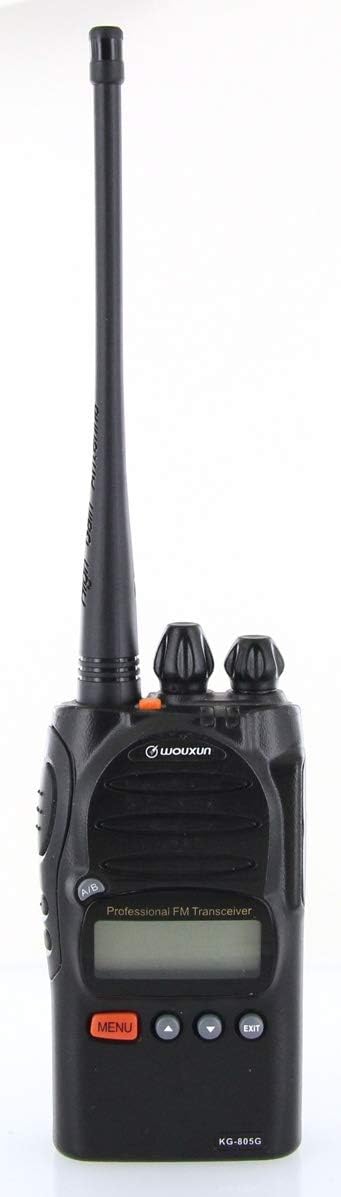
Figure 1.1: Wouxun KG-805G GMRS Two Way Radio with included antenna.
2. Safety Information
Please read and understand all safety precautions before operating the radio. Failure to comply with these guidelines may result in injury or damage to the device.
- Battery Safety: Use only the specified battery and charger. Do not short-circuit, incinerate, or disassemble the battery.
- Antenna: Do not touch the antenna during transmission. Avoid using the radio with a damaged antenna.
- Explosive Environments: Do not operate the radio in potentially explosive atmospheres (e.g., near flammable gas, dust, or powders).
- Interference: Turn off the radio in areas where radio devices are prohibited or can cause interference (e.g., hospitals, aircraft).
- Water Resistance: The radio is rated IP55 water resistant. This means it is protected against dust and low-pressure water jets. It is not designed for submersion. Ensure all port covers are securely closed.
- FCC Compliance: This radio is FCC approved for GMRS use. An FCC license is required for GMRS operation.
3. Product Overview
Familiarize yourself with the radio's components and controls.
Radio Components:
- Antenna Connector: For attaching the removable antenna.
- Power/Volume Knob: Turns the radio on/off and adjusts volume.
- Channel Selector Knob: Selects operating channels.
- PTT (Push-To-Talk) Button: Press to transmit, release to receive.
- Side Buttons: Programmable function buttons (e.g., Monitor, Scan).
- LCD Display: Shows channel number, frequency, battery status, and other indicators.
- MENU Button: Accesses the radio's menu system.
- Up/Down Arrow Buttons: Navigate menu options or adjust settings.
- EXIT Button: Exits menu or cancels current operation.
- USB-C Port: For direct battery charging.

Figure 3.1: Front view of the Wouxun KG-805G, highlighting the display and control buttons.

Figure 3.2: Side view of the Wouxun KG-805G, showing the Push-To-Talk (PTT) button and two programmable side buttons.
4. Setup
4.1 Battery Installation
- Align the battery pack with the grooves on the back of the radio.
- Slide the battery upwards until it clicks into place.
- To remove, press the battery release latch (if present) and slide the battery downwards.

Figure 4.1: Back view of the Wouxun KG-805G, showing the battery contacts and mounting area.
4.2 Antenna Attachment
- Screw the antenna clockwise onto the antenna connector on top of the radio until it is finger-tight. Do not overtighten.
4.3 Charging the Battery
The 2600mAh Li-Ion battery can be charged using the included desktop charger or directly via the USB-C port.
- Desktop Charger: Place the radio with the battery installed into the charging cradle. Ensure the charging contacts align. The indicator light will show charging status.
- USB-C Charging: Connect the USB-C cable to the radio's USB-C port and the other end to the wall adapter or a compatible USB power source. The radio can be operated while charging via USB-C.
4.4 Initial Power On
- Rotate the Power/Volume knob clockwise until you hear a click. The radio will power on, and the LCD display will illuminate.
- Adjust the volume to a comfortable level by rotating the Power/Volume knob.
5. Operating Instructions
5.1 Channel Selection
The KG-805G supports 22 simplex GMRS channels and 8 GMRS repeater channels.
- Rotate the Channel Selector Knob on top of the radio to select the desired channel (e.g., CH-001 to CH-030).
- The selected channel number will be displayed on the LCD.

Figure 5.1: The radio's LCD display showing 'CH-001', indicating the selected channel.
5.2 Transmitting and Receiving
- To transmit, press and hold the PTT button on the side of the radio. Speak clearly into the microphone. The transmit indicator will illuminate.
- To receive, release the PTT button. The receive indicator will illuminate when a signal is detected.
5.3 CTCSS/DCS Codes (Privacy Tones)
CTCSS (Continuous Tone-Coded Squelch System) and DCS (Digitally Coded Squelch) codes help filter out unwanted conversations on a channel.
- Press the MENU button.
- Use the Up/Down Arrow buttons to navigate to the CTCSS/DCS setting.
- Press MENU again to enter the setting. Use Up/Down to select the desired code.
- Press MENU to confirm, then EXIT to return to normal operation.
- CTCSS/DCS can be set separately for transmit and receive.
5.4 VOX Function (Voice Operated Transmit)
VOX allows hands-free transmission when your voice is detected.
- Press the MENU button.
- Navigate to the VOX setting.
- Enter the setting and use Up/Down to adjust the VOX sensitivity level (higher number for lower sensitivity).
- Confirm with MENU and EXIT.
5.5 FM Radio
The KG-805G includes a built-in FM radio for entertainment.
- Refer to the menu system for activating and tuning the FM radio function.
5.6 Channel Scan
The channel scan feature allows the radio to automatically scan through active channels.
- Activate channel scan via the menu or a programmed side button. The radio will stop on an active channel.
5.7 PC Programming (Optional)
While the KG-805G can be fully operated from the front panel, optional PC programming software is available for advanced customization, such as adding/removing channels, customizing channel names, bandwidth, transmit power, or CTCSS/DCS codes. A specific Wouxun programming cable is required.
6. Maintenance
6.1 Cleaning the Radio
- Wipe the radio's surface with a soft, damp cloth. Do not use harsh chemicals or abrasive cleaners.
- Ensure all port covers are sealed to maintain IP55 water resistance.
6.2 Battery Care
- Charge the battery fully before initial use.
- Avoid overcharging or completely draining the battery to prolong its lifespan.
- Store the battery in a cool, dry place when not in use for extended periods.
6.3 Storage
- Store the radio in a dry, dust-free environment away from direct sunlight and extreme temperatures.
- Remove the battery if storing the radio for a long duration.
7. Troubleshooting
If you encounter issues with your Wouxun KG-805G, refer to the following common problems and solutions:
| Problem | Possible Cause | Solution |
|---|---|---|
| Radio does not power on | Battery is low or not installed correctly. | Charge the battery or re-install it securely. |
| Cannot transmit or receive | Incorrect channel selected; antenna not attached; out of range; squelch too high. | Verify channel; attach antenna; move closer to other radios; adjust squelch level. |
| Poor audio quality | Low battery; out of range; interference. | Charge battery; move closer; check for sources of interference. |
| Programming software issues | Incorrect cable; driver issues; software compatibility. | Ensure you are using the official Wouxun programming cable and software. Consult Wouxun support for driver assistance. |
8. Specifications
| Feature | Specification |
|---|---|
| Brand | Wouxun |
| Model Number | KG-805G |
| Color | Black |
| Number of Channels | 128 (22 GMRS simplex, 8 GMRS repeater pre-programmed) |
| Frequency Range | 400-470 MHz (GMRS) |
| Output Power | Up to 5 Watts |
| Battery Type | 2600mAh Li-Ion (updated version) |
| Charging | USB-C and Desktop Charger |
| Water Resistance Level | IP55 |
| Voltage | 7.4 Volts (DC) |
| Special Features | CTCSS/DCS, VOX, Channel Scan, FM Radio, Lighted LCD Display |
9. Warranty and Support
Wouxun products are designed for reliability and performance. For specific warranty details, please refer to the warranty card included with your product or contact Wouxun customer support directly. If you require technical assistance or have questions not covered in this manual, please reach out to the manufacturer or your authorized dealer for support.


