
Magic Chef HMM770B
Magic Chef HMM770B Countertop Microwave User Manual
Model: HMM770B | Brand: Magic Chef
1. Introduction
This user manual provides detailed instructions for the safe and efficient operation of your Magic Chef HMM770B Countertop Microwave. Please read this manual thoroughly before using the appliance and retain it for future reference.
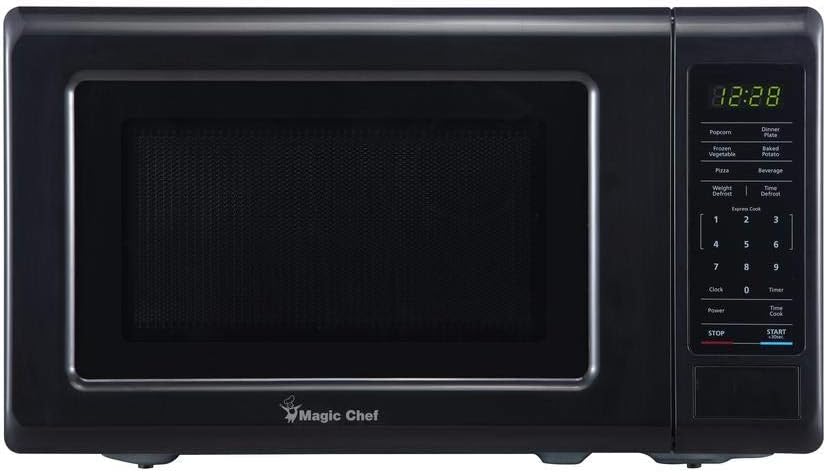
Figure 1: Front view of the Magic Chef HMM770B Countertop Microwave. It features a black finish, a large door with a viewing window, and a control panel on the right with a digital display and various buttons for cooking functions.
2. Important Safety Instructions
When using electrical appliances, basic safety precautions should be followed, including the following:
- Read all instructions before using the appliance.
- Do not operate the microwave if it has a damaged cord or plug, if it is not working properly, or if it has been dropped or damaged.
- Ensure proper ventilation around the microwave. Do not block any ventilation openings.
- Do not use corrosive chemicals or vapors in this appliance.
- Do not heat liquids or other foods in sealed containers as they are liable to explode.
- Do not attempt to operate this oven with the door open since this can result in harmful exposure to microwave energy.
- Always ensure the glass turntable is correctly positioned before operation.
- This appliance is intended for household use only.
3. Product Features
The Magic Chef HMM770B Countertop Microwave is designed for convenience and efficiency in a compact form factor.
- Compact Design: 0.7 cubic feet capacity, ideal for small spaces, countertops, dorm rooms, or Airbnb units.
- Power Output: Delivers 700 Watts of cooking power.
- Power Levels: Features 10 adjustable power levels for versatile cooking.
- Quick-Set Buttons: Eight pre-programmed buttons for common food items such as Popcorn, Dinner Plate, Frozen Vegetable, Baked Potato, Pizza, and Beverage.
- Glass Turntable: Ensures even and consistent cooking, and is easy to clean.
- Child Lock Function: Provides added safety by preventing unintended operation.
- Control Type: User-friendly button controls with a clear digital display.
4. Setup
- Unpacking: Carefully remove the microwave and all packing materials. Ensure all components, including the glass turntable and turntable ring, are present and undamaged.
- Placement: Place the microwave on a flat, stable surface, such as a kitchen countertop. Ensure there is adequate space (at least 4 inches) around the sides, back, and top for proper ventilation. Do not place it near heat sources or in direct sunlight.
- Power Connection: Plug the microwave into a grounded electrical outlet. Ensure the voltage matches the requirements specified on the appliance label.
- Initial Cleaning: Before first use, wipe the interior and exterior with a damp cloth.
5. Operating Instructions
Setting the Clock
- Press the Clock button.
- Use the number pad to enter the current time (e.g., 12:30).
- Press the Clock button again to confirm.
Using Quick-Set Buttons
The microwave features 8 quick-set buttons for common food items:
- Popcorn: For standard popcorn bags.
- Dinner Plate: For reheating a dinner plate.
- Frozen Vegetable: For cooking frozen vegetables.
- Baked Potato: For baking potatoes.
- Pizza: For reheating pizza slices.
- Beverage: For heating beverages.
- Simply press the desired quick-set button to start cooking.
Manual Cooking
- Time Cook: Press Time Cook, enter desired cooking time using the number pad, then press Start/+30Sec.
- Power Level: After setting time, press Power, then use the number pad (1-10) to select a power level (10 being full power). Press Start/+30Sec.
- Express Cook: For quick cooking, press a number button (1-6) for 1 to 6 minutes of cooking at full power. Press Start/+30Sec to add 30 seconds during cooking.
Defrosting
- Weight Defrost: Press Weight Defrost, enter the weight of the food, then press Start/+30Sec.
- Time Defrost: Press Time Defrost, enter the defrosting time, then press Start/+30Sec.
Child Lock
To activate the child lock, press and hold the STOP button for 3 seconds. The display will show "LOCK" or an indicator. To deactivate, press and hold the STOP button again for 3 seconds.
6. Maintenance
- Interior Cleaning: Clean the interior of the microwave regularly with a mild detergent and a soft cloth. For stubborn stains, place a bowl of water with lemon slices inside and microwave for a few minutes to loosen residue.
- Exterior Cleaning: Wipe the exterior surfaces with a soft, damp cloth. Avoid abrasive cleaners.
- Turntable Care: The glass turntable and ring can be removed for cleaning. Wash them in warm, soapy water or in the dishwasher. Ensure they are dry before placing them back in the microwave.
- Odor Removal: To remove odors, combine 1 cup of water with several tablespoons of lemon juice or vinegar in a microwave-safe bowl. Microwave on high for 5-7 minutes.
7. Troubleshooting
| Problem | Possible Cause | Solution |
|---|---|---|
| Microwave does not start. | Door not closed properly; Power cord unplugged; Fuse blown or circuit breaker tripped. | Ensure door is securely closed; Check power cord connection; Check household fuse/circuit breaker. |
| Food not heating. | Incorrect cooking time/power level; Door not closed properly. | Adjust cooking time/power level; Ensure door is securely closed. |
| Turntable not rotating. | Turntable not properly seated; Debris under turntable. | Reposition turntable and ring; Clean under the turntable. |
| Unusual noises during operation. | Food container touching interior walls; Turntable not properly seated. | Adjust food container position; Reposition turntable. |
8. Specifications
- Model: HMM770B
- Brand: Magic Chef
- Capacity: 0.7 Cubic Feet
- Wattage: 700 Watts
- Product Dimensions (W x D x H): 17.3 x 12.8 x 10.3 inches
- Item Weight: 20.6 pounds
- Material: Glass (Turntable)
- Color: Black/Gray
- Installation Type: Countertop
- Controller Type: Button
- Included Components: Turntable
9. Warranty and Support
For warranty information or technical support, please refer to the warranty card included with your purchase or contact Magic Chef customer service directly. Keep your proof of purchase for any warranty claims.
For further assistance, visit the official Magic Chef website or contact their customer support line.
Related documentsHMM770B


Ask a question about this manual
Ask about setup, troubleshooting, compatibility, parts, safety, or missing instructions. Manuals+ will review the question and use this page’s manual context to help answer it.