
Introduction
Thank you for choosing the Xiaomi Mi Smart Standing Fan 2 Lite. This manual provides essential information for the safe and efficient operation, maintenance, and troubleshooting of your new smart fan. Please read this manual thoroughly before use and retain it for future reference.

A full view of the Xiaomi Mi Smart Standing Fan 2 Lite, showcasing its minimalist white design and standing structure.
Safety Instructions
To ensure safe operation, always adhere to the following precautions:
- Do not use this fan in damp environments such as bathrooms or near water sources.
- Ensure the power cord is not damaged and is properly connected to a suitable power outlet.
- Keep fingers, hair, and loose clothing away from the fan blades during operation.
- Do not allow children to operate the fan unsupervised.
- Unplug the fan before cleaning or performing any maintenance.
- Do not attempt to repair or modify the fan yourself. Contact qualified service personnel for assistance.
Package Contents
Verify that all components are present in the package:
- 1 x Xiaomi Mi Smart Standing Fan 2 Lite
- 1 x Power Cable
- 1 x Bag of Screws
- 1 x User Manual (this document)
Setup and Assembly
The Xiaomi Mi Smart Standing Fan 2 Lite is designed for easy assembly. Follow these general steps:
- Unpack all components from the box.
- Attach the fan pole to the base using the provided screws.
- Mount the motor unit onto the top of the fan pole.
- Install the rear grille, fan blades, and front grille, securing them according to the visual instructions in the included quick start guide.
- Connect the power cable to the fan and then to a power outlet.
Operating the Fan
Control Panel
The fan features an intuitive control panel located on the top of the motor unit. Refer to the image below for button identification:

A detailed view of the fan's top-mounted control panel, featuring buttons for power on/off, oscillation, fan mode selection, and timer settings. LED indicators are also visible.
- Power Button: Press to turn the fan on or off.
- Oscillation Button: Press to activate or deactivate the oscillation function.
- Mode/Speed Button: Press to cycle through fan speeds or modes.
- Timer Button: Press to set a timer for automatic shutdown.
Fan Speeds and Airflow
The fan offers multiple speed settings to suit your comfort needs:

This image visually represents the three distinct fan speed settings. Speed 1 is depicted as a gentle breeze, Speed 2 as a cool and comfortable airflow, and Speed 3 as a powerful, invigorating air current.
- Speed 1: Gentle breeze, ideal for quiet environments or light air circulation.
- Speed 2: Cool and comfortable airflow for general use.
- Speed 3: Invigorating air current for maximum cooling.
Oscillation and Tilt
The fan features a wide oscillation angle and adjustable tilt for comprehensive air distribution:
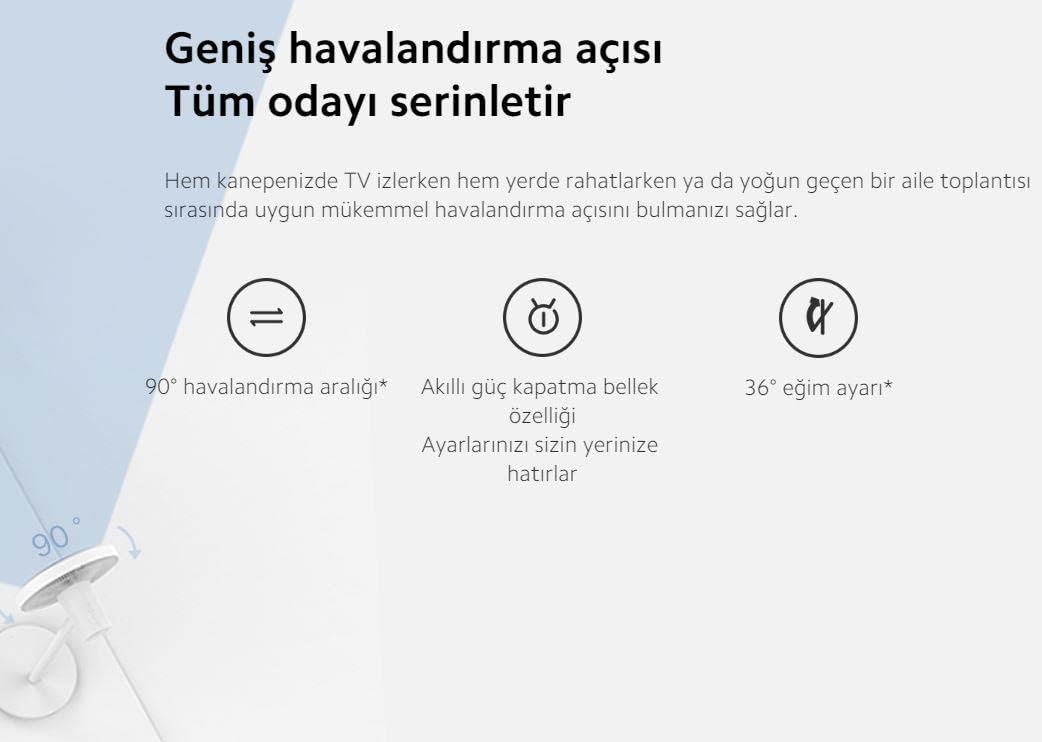
An illustration highlighting the fan's wide 90-degree oscillation range and 36-degree tilt adjustment capability. It also mentions a smart power-off memory feature that retains user settings.
- 90° Oscillation: Distributes air across a wide area, cooling the entire room.
- 36° Tilt Adjustment: Manually adjust the fan head vertically to direct airflow as needed.
- Smart Memory Feature: The fan remembers your last settings even after being powered off.
Smart Features (App & Voice Control)
Enhance your experience by connecting the fan to the Mi Home app or integrating with voice assistants:
- Mi Home App: Download the Mi Home app to control the fan remotely, set schedules, and access additional features.
- Google Assistant & Alexa: The fan is compatible with Google Assistant and Amazon Alexa, allowing for voice control of basic functions like power on/off and speed adjustment.
Maintenance
Regular cleaning ensures optimal performance and longevity of your fan.
Cleaning Instructions
- Unplug the Fan: Always disconnect the fan from the power outlet before cleaning.
- Clean Exterior: Wipe the exterior surfaces with a soft, damp cloth. Do not use abrasive cleaners or solvents.
- Clean Fan Blades and Grilles: The fan can be disassembled for thorough cleaning of the blades and grilles. Carefully remove the front grille, then the fan blade assembly, and finally the rear grille. Use a soft cloth or brush to remove dust. Ensure all parts are completely dry before reassembling.
- Reassembly: Reassemble the fan in reverse order, ensuring all parts are securely fastened.
Troubleshooting
If you encounter issues with your fan, refer to the following common problems and solutions:
| Problem | Possible Cause | Solution |
|---|---|---|
| Fan does not turn on | No power supply; Power cord not connected; Fan is off. | Check power outlet; Ensure power cord is securely plugged in; Press the power button. |
| Fan makes unusual noise | Loose parts; Obstruction in fan blades; Fan not on a stable surface. | Check for loose components and tighten; Ensure nothing is blocking the blades; Place fan on a flat, stable surface. |
| Cannot connect to Mi Home app | Wi-Fi issue; Incorrect pairing process; App version outdated. | Ensure Wi-Fi is active and fan is within range; Follow app pairing instructions carefully; Update Mi Home app to the latest version. |
| Weak airflow | Fan speed too low; Dust accumulation on blades/grilles. | Increase fan speed; Clean fan blades and grilles as per maintenance section. |
Product Specifications
Detailed technical specifications for the Xiaomi Mi Smart Standing Fan 2 Lite:
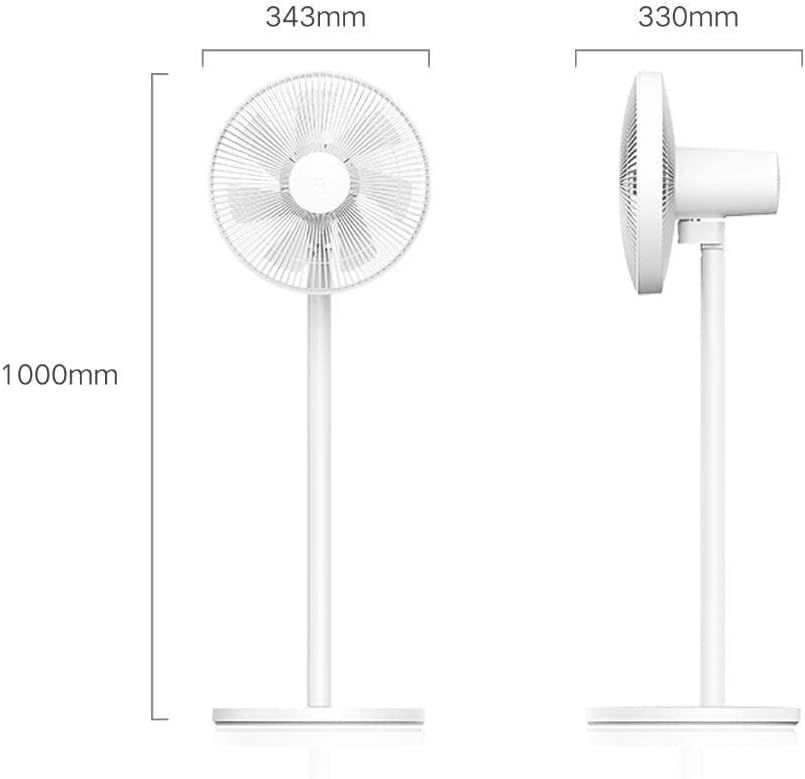
An illustration detailing the physical dimensions of the fan, including its height (1000mm), fan head width (343mm), and base depth (330mm).
| Feature | Detail |
|---|---|
| Brand | XIAOMI |
| Model | Mi Smart Standing Fan 2 Lite |
| Item Weight | 3.5 Kilograms |
| Product Dimensions | 33D x 34.3W x 100H centimetres |
| Power Source | Corded Electric |
| Electric Fan Design | Blower / Pedestal |
| Special Features | Adjustable Height, Smart Control (App/Voice) |
| Assembly Required | Yes (Minor Assembly) |
| Included Components | Fan unit, Power Cable, Screws, User Manual |
| Certifications | CE |
Warranty Information
The Xiaomi Mi Smart Standing Fan 2 Lite comes with a 12 Months Warranty from the date of purchase. This warranty covers manufacturing defects under normal use. Please retain your proof of purchase for warranty claims. For specific terms and conditions, refer to the warranty card included with your product or contact customer support.
Customer Support
If you require further assistance, have questions not covered in this manual, or need to make a warranty claim, please contact Xiaomi customer support through their official website or the contact information provided in your product packaging. When contacting support, please have your product model and purchase details ready.