
Beldray EH3139V2
Beldray Ice Cube Plus+ Personal Space Cooler - Instruction Manual
Model: EH3139V2
Important Safety Instructions
Please read these instructions carefully before using your Beldray Ice Cube Plus+ Personal Space Cooler. Retain this manual for future reference.
- Ensure the product is placed on a stable, flat, and dry surface.
- Do not immerse the unit, power cord, or plug in water or any other liquid.
- Unplug the cooler from the power supply when not in use, before filling or emptying water tanks, and before cleaning.
- Keep out of reach of children and pets. This appliance is not intended for use by persons with reduced physical, sensory or mental capabilities, or lack of experience and knowledge, unless they have been given supervision or instruction concerning use of the appliance by a person responsible for their safety.
- Do not block air inlets or outlets. Ensure adequate ventilation around the unit.
- Only use the provided USB cable and mains adaptor.
- Do not attempt to repair or modify the appliance yourself. Refer all servicing to qualified personnel.
- Avoid tipping the unit when water tanks are filled to prevent spillage.
- Do not use the appliance in areas with high humidity or near water sources like bathtubs, showers, or swimming pools.
Product Overview
The Beldray Ice Cube Plus+ is a compact and portable personal space cooler designed to provide cool, humidified air. It features two removable water tanks, a machine-washable filter, three speed settings, and seven color-changing LED lights.

Figure 1: Overview of the Beldray Ice Cube Plus+ with key features highlighted, such as easy portability, freezable water tanks, 3 speed settings, machine washable filter, cooling and humidifying function, and USB & mains plug connectivity.
Components:
- Main Unit with Fan and Controls
- 2 x 300 ml Removable Water Tanks (600 ml combined capacity)
- Machine Washable Filter
- USB Cable
- Mains Adaptor
Setup
Getting Started:
- Unpack: Carefully remove the Beldray Ice Cube Plus+ from its packaging. Ensure all components listed in the "Product Overview" section are present.
- Positioning: Place the cooler on a flat, stable surface in your desired location, such as an office desk, bedside table, or kitchen worktop. Ensure there is clear space around the air inlets and outlets.
- Prepare Water Tanks:
- Remove the two 300 ml water tanks from the sides of the unit.
- For enhanced cooling, you can freeze the water tanks and the central filter. Ensure the screw caps are removed from the tanks before freezing to prevent damage.
- Fill the water tanks with clean, cold water. The combined capacity is 600 ml.
- Carefully reinsert the filled water tanks into their respective slots on the sides of the unit. Ensure they are securely fitted.
- Connect Power: Insert the USB cable into the port on the back of the unit. Connect the other end of the USB cable to the provided mains adaptor, and then plug the adaptor into a suitable wall socket. Alternatively, you can connect the USB cable to a compatible USB power source.

Figure 2: The Beldray Ice Cube Plus+ ready for use, emphasizing its key features for personal cooling.
Operation
Operating Your Ice Cube Plus+:

Figure 3: Control panel of the Beldray Ice Cube Plus+.
- Power On/Off: Press the Power Button (⑁) located on the top panel to turn the unit on or off. The unit will start on the lowest fan speed.
- Adjust Fan Speed: Press the Fan Speed Button (☀) repeatedly to cycle through the three available fan speeds: Low, Medium, and High. Select the speed that best suits your comfort level.
- LED Mood Lights: Press the Light Button (☼) to activate the seven color-changing LED lights. Press again to cycle through the colors or turn them off.
- Airflow Adjustment: Manually adjust the vertical louvers on the front of the unit to direct the airflow as desired.

Figure 4: The Beldray Ice Cube Plus+ with its vibrant LED mood lighting feature activated.
The cooler is designed to provide up to 8 hours of cool air, depending on the fan speed and water tank preparation (freezing). It is ideal for personal use in small spaces.
Maintenance
Care and Cleaning:
Regular cleaning will help maintain the performance and longevity of your Beldray Ice Cube Plus+.
- Before Cleaning: Always unplug the unit from the power supply and remove the water tanks.
- Water Tanks: Empty any remaining water from the tanks. Clean the tanks with warm, soapy water and rinse thoroughly. Allow them to air dry completely before reinserting.
- Filter: The filter is machine washable. Carefully remove the filter from the unit. Wash it according to the instructions on the filter itself or by hand with mild soap and water. Ensure the filter is completely dry before placing it back into the unit to prevent mold or mildew growth.
- Main Unit: Wipe the exterior of the unit with a soft, damp cloth. Do not use abrasive cleaners or solvents. Do not allow water to enter the fan or electrical components.
- Storage: If storing the unit for an extended period, ensure all components are clean and dry. Store in a cool, dry place away from direct sunlight.
Troubleshooting Guide
If you experience issues with your Beldray Ice Cube Plus+, please consult the following table before contacting customer support.
| Problem | Possible Cause | Solution |
|---|---|---|
| Unit does not turn on. | Not plugged in correctly; Power outlet issue; Faulty cable/adaptor. | Ensure the USB cable and mains adaptor are securely connected and plugged into a working power outlet. Try a different outlet. |
| Air is not cool. | Water tanks not filled with cold/frozen water; Filter is dry; Ambient temperature is too high for personal cooler. | Fill water tanks with cold or frozen water. Ensure the filter is moist. Remember this is a personal space cooler, not a room air conditioner. |
| Water leakage. | Water tanks not properly sealed or inserted; Unit tipped over. | Ensure water tank caps are tightly secured and tanks are correctly seated in their slots. Avoid moving or tipping the unit when water tanks are full. Empty excess water from the base if present. |
| Unit is noisy. | Fan speed is too high; Obstruction in fan; Unit not on a stable surface. | Reduce fan speed. Check for any obstructions near the fan blades. Ensure the unit is on a flat, stable surface. |
Technical Specifications
Detailed specifications for the Beldray Ice Cube Plus+ Personal Space Cooler.
| Brand | Beldray |
| Model Number | EH3139V2 |
| Colour | White |
| Product Dimensions | 16.5 x 15.7 x 16.2 cm (L x W x H) |
| Item Weight | 1.06 kg |
| Power | 5 W |
| Voltage | 230 Volts |
| Number of Speeds | 3 |
| Reservoir Capacity | 600 ml (2 x 300 ml tanks) |
| USB Cable Length | 1.5 Metres |
| Special Features | Quiet Operation, 7 Colour Changing LED Lights, Slip Resistant Feet, Easy to Use Controls, Machine Washable Filter, Cools & Humidifies, Personal Space Cooler, Up to 8 Hours of Cool Air. |
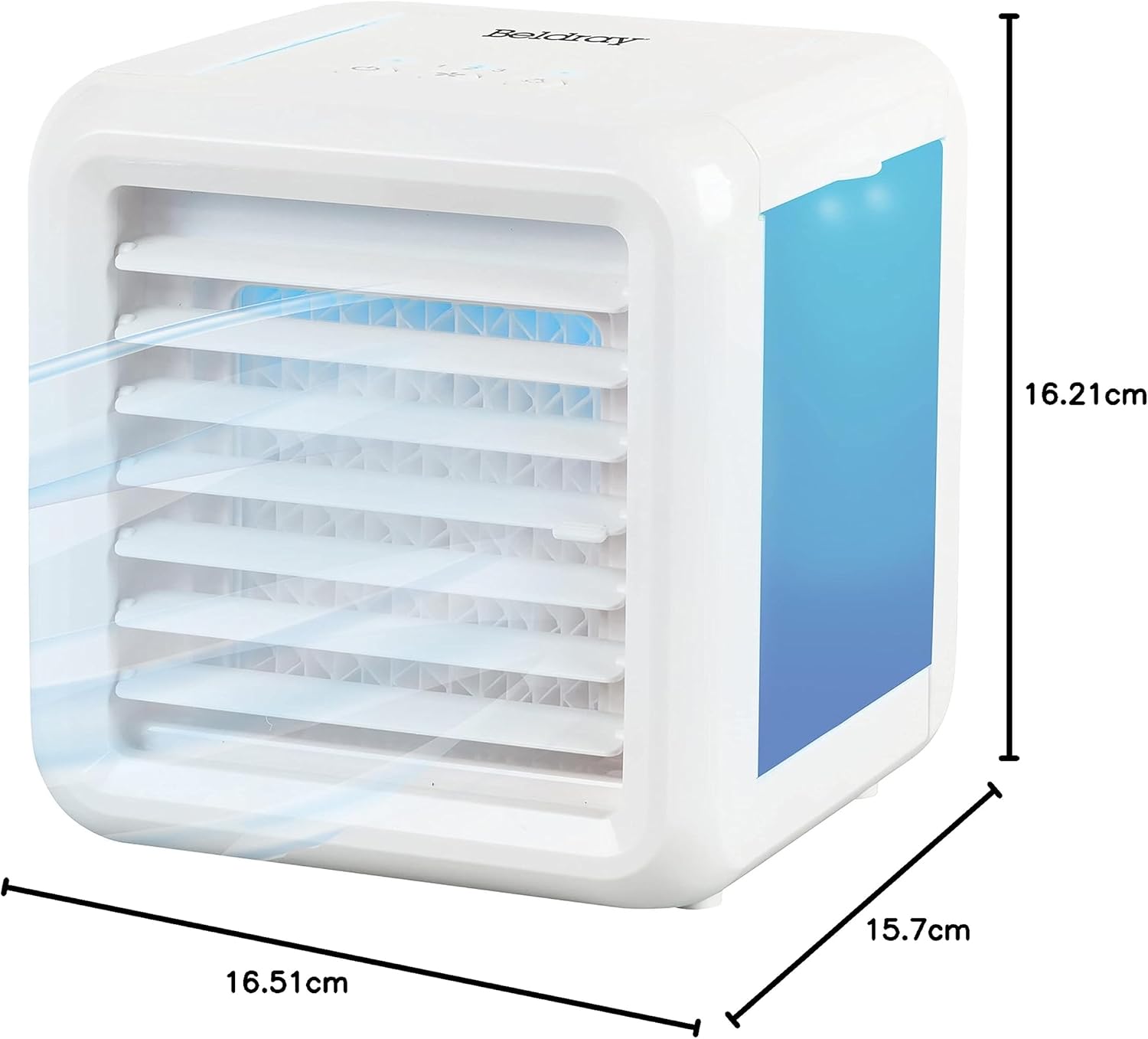
Figure 5: Dimensions of the Beldray Ice Cube Plus+.
Warranty Information and Customer Support
For warranty details, please refer to the documentation provided with your purchase or contact Beldray customer support. Beldray products are designed for quality and reliability.
If you require further assistance or have questions not covered in this manual, please visit the official Beldray website or contact their customer service department. Contact details can typically be found on the product packaging or the brand's official website.
Website: www.beldray.com
Related documentsEH3139V2


Ask a question about this manual
Ask about setup, troubleshooting, compatibility, parts, safety, or missing instructions. Manuals+ will review the question and use this page’s manual context to help answer it.