
Rii RK105
Rii RK105 USB RGB Backlit Keyboard and Mouse Combo User Manual
Model: RK105 | Brand: Rii
1. Introduction
This manual provides detailed instructions for the Rii RK105 USB RGB Backlit Keyboard and Mouse Combo. Designed for both home and office use, this combo offers a full-size French AZERTY keyboard with customizable RGB backlighting and an ergonomic, responsive mouse. Please read this manual thoroughly to ensure proper setup and operation of your new device.

The Rii RK105 keyboard and mouse combo features a full-size keyboard with blue backlighting and an ergonomic mouse.
2. Package Contents
Please verify that all items are present in your package:
- Rii RK105 USB RGB Backlit Keyboard
- Rii USB Mouse
- User Manual

The retail packaging for the Rii RK105 keyboard and mouse combo, showing the included items.
3. Setup Instructions
The Rii RK105 keyboard and mouse combo is designed for plug-and-play functionality, requiring no additional drivers or software installation.
- Locate an available USB port on your computer (desktop or laptop).
- Connect the USB cable from the Rii keyboard to the USB port.
- Connect the USB cable from the Rii mouse to another available USB port.
- Your operating system (Windows 98/XP/7/8/10/Vista, Mac OS) will automatically detect and install the necessary drivers.
- The keyboard and mouse are now ready for use.
For optimal comfort during extended use, the keyboard features foldable feet on the underside, allowing you to adjust the typing angle.
4. Operating Instructions
4.1 Keyboard Backlight Control
The Rii RK105 keyboard features RGB backlighting with multiple modes and adjustable brightness:
- FN + LIGHT Key: Press this combination to cycle through different backlight modes. This includes a breathing light mode and various static single-color modes (three distinct colors).
- FN + PGDN / PGUP Keys: While in a static backlight mode, use this combination to adjust the brightness level. There are three brightness levels available.
- Triple Click LIGHT Key: To turn off the backlight completely for discreet use, press the LIGHT key three times consecutively.
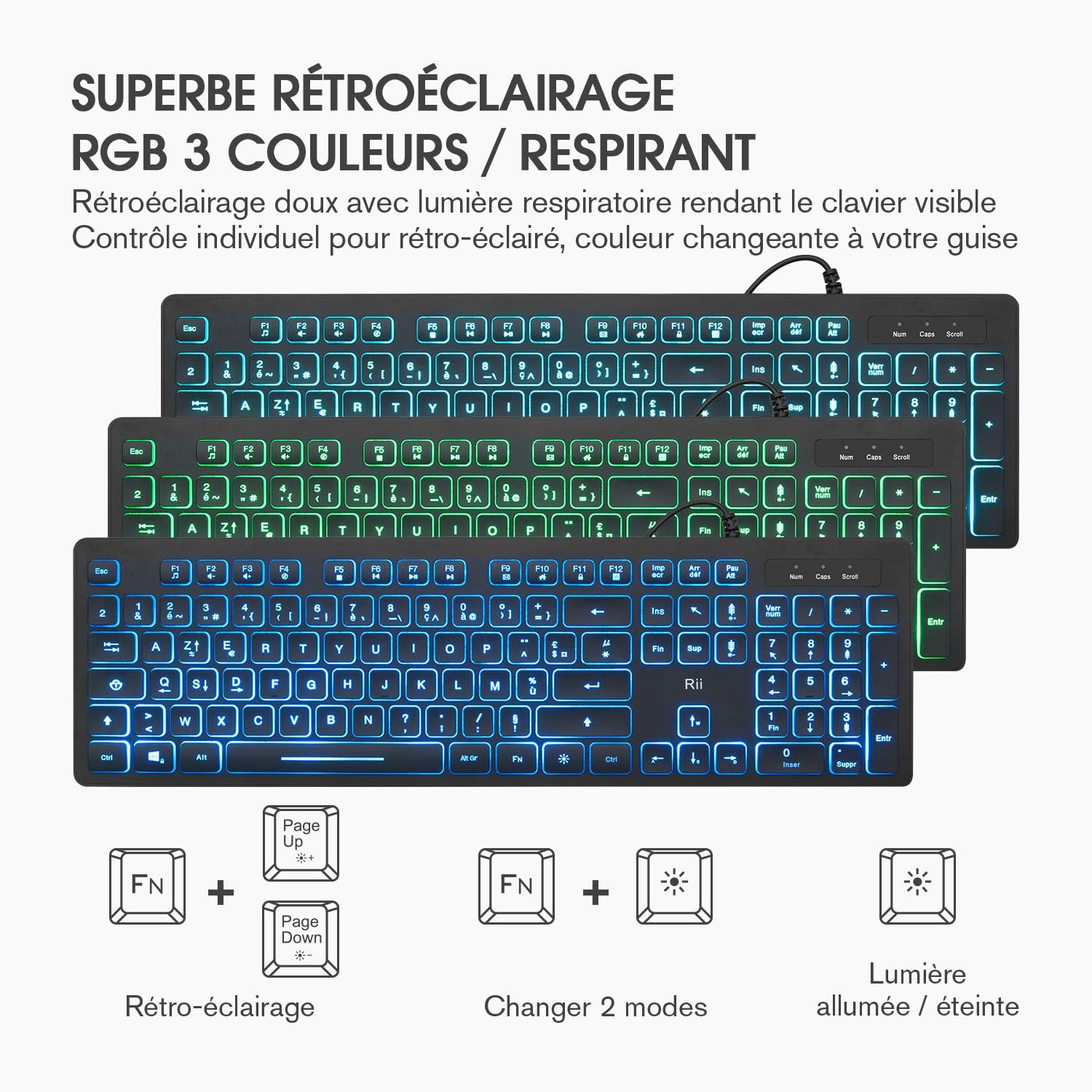
This image shows the Rii RK105 keyboard displaying different RGB backlight colors and modes, including static and breathing effects.

A close-up view of the Rii RK105 keyboard keys illuminated with blue backlighting.
4.2 Multimedia Hotkeys
The keyboard includes 12 multimedia shortcut keys for quick access to common functions. These are activated by holding the FN key and pressing the corresponding F1-F12 key:
| Key Combination | Function |
|---|---|
| FN + F1 | Media Player |
| FN + F2 | Volume Down |
| FN + F3 | Volume Up |
| FN + F4 | Mute |
| FN + F5 | Play/Stop |
| FN + F6 | Previous Track |
| FN + F7 | Play/Pause |
| FN + F8 | Next Track |
| FN + F9 | |
| FN + F10 | Home Page |
| FN + F11 | My Computer |
| FN + F12 | Calculator |

A diagram detailing the multimedia functions accessible via the FN key combined with F1-F12 on the Rii RK105 keyboard.
4.3 Mouse Operation
The Rii mouse features a comfortable grip and a breathing backlight. It operates at 1200 DPI by default and includes a DPI adjustment button.
- DPI Button: Press the DPI button, located near the scroll wheel, to cycle through different sensitivity settings: 800 DPI, 1200 DPI, and 1600 DPI. This allows you to adjust cursor speed to your preference for various tasks or games.
- The mouse is designed to function effectively on various surfaces without requiring a mouse pad.

The Rii RK105 mouse features a DPI button to cycle through 800, 1200, and 1600 DPI settings for adjustable cursor sensitivity.
5. Maintenance
To ensure the longevity and optimal performance of your Rii RK105 keyboard and mouse combo, follow these maintenance guidelines:
- Cleaning: The keyboard features premium ABS keycaps with UV light-transmitting characters that are resistant to fading and oil. To clean, gently wipe the surfaces of the keyboard and mouse with a soft, damp cloth. Avoid using harsh chemicals or abrasive materials.
- Spills: While the keyboard design offers some protection against light splashes, avoid direct exposure to liquids. In case of a spill, immediately disconnect the device from your computer and allow it to dry completely before reconnecting.
- Storage: Store the keyboard and mouse in a clean, dry environment away from extreme temperatures and direct sunlight.
6. Troubleshooting
If you encounter any issues with your Rii RK105 combo, please refer to the following common solutions:
- Device Not Responding:
- Ensure the USB cables are securely plugged into your computer's USB ports.
- Try plugging the keyboard and mouse into different USB ports.
- Restart your computer.
- Keyboard Backlight Not Working:
- Press FN + LIGHT to cycle through backlight modes.
- Press FN + PGDN / PGUP to adjust brightness.
- Ensure the backlight hasn't been turned off by triple-clicking the LIGHT key.
- Inverted 'Sup' and 'Fin' Keys (Common Issue):
- Some units may have the 'Sup' (Delete) and 'Fin' (End) keycaps inverted during manufacturing. The underlying switch functions are correct, only the keycaps are swapped.
- To correct this, gently pry off the 'Sup' and 'Fin' keycaps using a small, flat tool or your fingernails. Apply minimal force to avoid damage.
- Swap the keycaps and press them firmly back onto their correct switches until they click into place.
- Mouse Cursor Movement is Erratic or Slow:
- Clean the optical sensor on the underside of the mouse.
- Press the DPI button to adjust the sensitivity.
- Ensure the mouse is used on a clean, non-reflective surface.
7. Specifications
| Feature | Detail |
|---|---|
| Brand | Rii |
| Model Number | RK105 |
| Color | Black |
| Connectivity Technology | USB Wired |
| Compatible Devices | Personal Computer, Laptop |
| Operating System Compatibility | Windows 98/XP/7/8/10/Vista, Mac OS |
| Keyboard Layout | French AZERTY (105 keys) |
| Keyboard Backlight | RGB (3 colors, breathing mode, adjustable brightness) |
| Mouse DPI | 800/1200/1600 DPI (adjustable) |
| Keyboard Dimensions (L x W x H) | 43.9 x 13.2 x 3.0 cm (approx. 17.28 x 5.20 x 1.18 inches) |
| Mouse Dimensions (L x W x H) | 13.1 x 7.3 x 4.2 cm (approx. 5.15 x 2.87 x 1.65 inches) |
| Special Features | Portable, Wrist Rest (integrated design), Foldable Feet |

This image illustrates the physical dimensions of the Rii RK105 keyboard (435mm x 137mm) and mouse (131mm x 73mm x 42mm).
8. Warranty and Support
The Rii RK105 USB RGB Backlit Keyboard and Mouse Combo comes with a 12-month warranty from the date of purchase.
If you encounter any problems during use or require technical assistance, please contact the seller or manufacturer directly. Provide your purchase details and a clear description of the issue for prompt support.
Ask a question about this manual
Ask about setup, troubleshooting, compatibility, parts, safety, or missing instructions. Manuals+ will review the question and use this page’s manual context to help answer it.