
Introduction
This manual provides instructions for the ALLIMITY RC1994906 replacement remote control. This remote is designed to function with various Thomson LCD TV models, offering a direct replacement experience without complex setup procedures. It is compatible with the following Thomson LCD TV models: 22E92NH22, 26E92NH22, 32E92NH22, 32E92NH22W, 46E91NF32, 40E90NH22, 32E90NH22.
Setup
The ALLIMITY RC1994906 remote control requires no programming or pairing. Simply insert two AAA alkaline batteries (not included) into the battery compartment, ensuring correct polarity. Once batteries are installed, the remote is ready for immediate use with your compatible Thomson LCD TV.

Image 1: Angled view of the ALLIMITY RC1994906 remote control. The battery compartment is located on the back of the device.
Battery Installation
- Locate the battery compartment cover on the back of the remote control.
- Slide the cover downwards or press the latch to open it.
- Insert two new AAA alkaline batteries, matching the positive (+) and negative (-) terminals as indicated inside the compartment.
- Replace the battery compartment cover, ensuring it clicks securely into place.
Note: Batteries are not included with the remote control. Always use new alkaline batteries for optimal performance and to prevent leakage.
Operating Instructions
This remote control operates using infrared (IR) technology. For proper function, ensure there is a clear line of sight between the remote control and the IR receiver on your Thomson LCD TV. Obstructions can interfere with the signal.
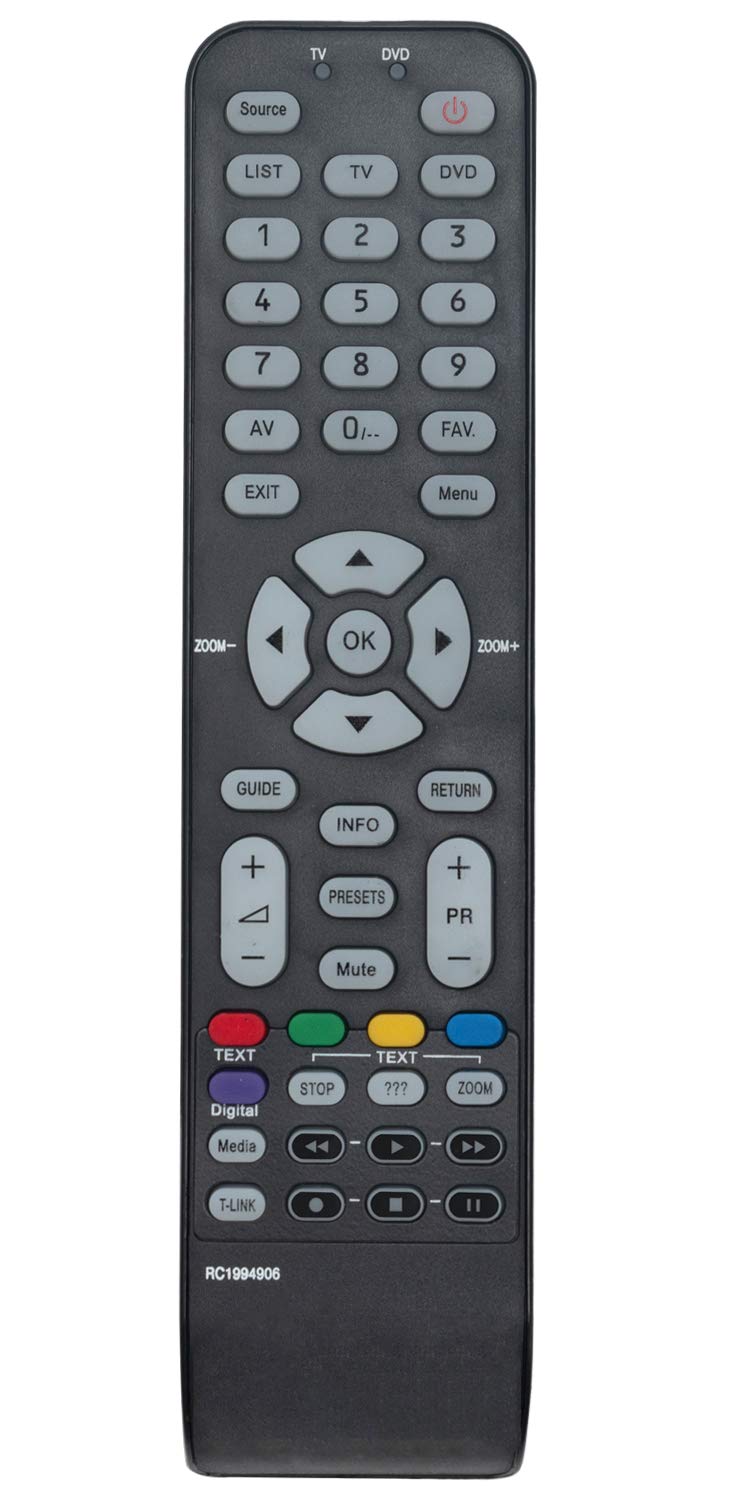
Image 2: Top-down view of the ALLIMITY RC1994906 remote control, showing all buttons.
Key Functions
- Power (Red Button): Turns the TV on or off.
- TV/DVD: Switches between TV and DVD modes (if applicable to your TV model).
- Source/List: Selects input sources (HDMI, AV, etc.) or displays a list.
- Number Buttons (0-9): Direct channel selection.
- Volume Up/Down (+/-): Adjusts the sound volume.
- Channel Up/Down (PR +/-): Changes TV channels.
- Mute: Silences the TV audio.
- Navigation Pad (Up, Down, Left, Right, OK): Navigates menus and confirms selections.
- Exit: Exits current menu or function.
- Info: Displays program information.
- Guide: Accesses the electronic program guide.
- Return: Returns to the previous screen or channel.
- Color Buttons (Red, Green, Yellow, Blue): Functions vary depending on the TV menu or application.
- Media Control Buttons (Play, Pause, Stop, Rewind, Fast Forward): Controls media playback (if applicable).
Maintenance
Proper maintenance ensures the longevity and reliable performance of your remote control.
- Cleaning: Wipe the remote control with a soft, dry cloth. For stubborn dirt, slightly dampen the cloth with water or a mild cleaning solution, then wipe dry immediately. Avoid using abrasive cleaners or solvents.
- Battery Replacement: Replace batteries when the remote's response becomes sluggish or stops working. Always replace both batteries at the same time with new ones of the same type.
- Storage: If the remote control will not be used for an extended period, remove the batteries to prevent leakage and potential damage to the device. Store in a cool, dry place away from direct sunlight and extreme temperatures.
- Avoid Drops: Protect the remote from physical impact. Dropping it can damage internal components.
Troubleshooting
If you experience issues with your remote control, refer to the following common troubleshooting steps:
| Problem | Solution |
|---|---|
| Remote control is not working. |
|
| Remote control has short range or intermittent response. |
|
| Specific buttons are not responding. |
|
Specifications
| Feature | Detail |
|---|---|
| Model Number | RC1994906 |
| Brand | ALLIMITY |
| Compatible TV Models | Thomson LCD TV models: 22E92NH22, 26E92NH22, 32E92NH22, 32E92NH22W, 46E91NF32, 40E90NH22, 32E90NH22 |
| Connectivity Technology | Infrared (IR) |
| Power Source | 2 x AAA Alkaline Batteries (not included) |
| Maximum Range | Approximately 10 meters (33 feet) |
| Dimensions (L x W x H) | 17 x 6 x 0.5 cm (6.7 x 2.4 x 0.2 inches) |
| Weight | 80 g (2.8 oz) |
| Special Feature | No programming required |
Warranty and Support
For warranty information and customer support, please refer to the documentation provided at the time of purchase or contact your retailer. Specific warranty terms may vary depending on the region and point of sale. For technical assistance, ensure you have your product model number (RC1994906) and purchase details available.
