
SURKER Electric Pro Li Clippers
SURKER Electric Pro Li Clippers User Manual
Model: Electric Pro Li Clippers
Introduction
Thank you for choosing the SURKER Electric Pro Li Clippers. This professional-grade hair clipper is designed for precise and comfortable grooming, featuring a durable T-blade, waterproof design, and convenient USB charging. Please read this manual thoroughly before use to ensure proper operation and maintenance.
Safety Information
Although specific safety warnings are not provided, users should take general precautions such as avoiding use near water, being careful not to cut the skin, keeping the device away from children, and following recommended cleaning and maintenance procedures.
- Do not immerse the charging cable or adapter in water.
- Keep the appliance dry when charging.
- Ensure the blades are clean and free of debris before each use.
- Store in a cool, dry place, out of reach of children.
- Do not disassemble the unit beyond routine cleaning.
Package Contents

Image: The SURKER Electric Pro Li Clipper shown with its included accessories: three guide combs, a USB charging cable, and a cleaning brush.
Your SURKER Electric Pro Li Clippers package should include the following items:
- 1 x SURKER Electric Pro Li Clipper (Silver)
- 3 x Guide Combs (1mm, 2mm, 3mm)
- 1 x USB Type-C Charging Cable
- 1 x Cleaning Brush
Product Features
- 100% IPX7 Waterproof Design: The entire clipper is designed to be waterproof, allowing for quick and easy cleaning under running water after each use.

Image: The clipper is shown with water splashing around it, demonstrating its IPX7 waterproof capability for easy cleaning.
- USB Fast Charge: A full charge takes approximately 2 hours and provides up to 120 minutes of cordless use. The USB Type-C charging port offers versatile charging options via USB adapters, laptops, car chargers, or power banks, making it ideal for travel.
- Titanium Ceramic T-Blade: The T-shaped Titanium Ceramic cutter head is designed to stay sharp for comfortable trimming. Its zero-distance oil head design and ultra-short pitch ensure a close cut without hurting the scalp.

Image: A detailed view of the clipper's T-shaped Titanium Ceramic blade, highlighting its zero-distance oil head design for precise cutting.
- Professional Trimmer with Guide Combs: Equipped with three guide combs (1mm, 2mm, 3mm) of different lengths, suitable for various trimming needs, including inch head, patterns, and general hair trimming. The S-shaped obtuse angle 360 skin-friendly design helps prevent scratching the skin.

Image: A diagram illustrating key features of the cordless hair clipper, including the Titanium Ceramic Blade, T-Shaped Cutter Head, One-Touch Switch Button, Strong Power, Charging Port, and the three included Guide Combs.
- R-shaped Rounded Cutter Head: The R-shaped obtuse angle 360-degree design ensures a skin-friendly experience, making shaving hair feel like a gentle massage and reducing the risk of skin irritation.

Image: A close-up of the clipper's R-shaped rounded cutter head, emphasizing its skin-friendly design for comfortable use.
Setup
Charging the Clipper
- Ensure the clipper is turned off before charging.
- Insert the USB Type-C charging cable into the charging port at the bottom of the clipper.
- Connect the other end of the USB cable to a compatible USB power source (e.g., USB adapter, laptop, power bank).
- The blue indicator light at the bottom of the clipper will blink during charging and become solid when fully charged.
- A full charge takes approximately 2 hours. Do not overcharge the battery.
Attaching Guide Combs
- Select the desired guide comb (1mm, 2mm, or 3mm) based on the hair length you wish to achieve.
- Align the guide comb with the clipper blade and press firmly until it clicks into place.
- To remove, gently pull the comb away from the blade.
Operating Instructions
General Operation
- To turn the clipper ON, press the power button located at the bottom of the unit. The blue indicator light will illuminate.
- To turn the clipper OFF, press the power button again.
Trimming Hair
- Ensure hair is clean and dry for best results, unless performing a wet shave.
- Attach the appropriate guide comb for your desired hair length. For close cuts or edging, use without a guide comb.
- Hold the clipper firmly and move it against the direction of hair growth.
- Use slow, controlled strokes for an even cut.
- For detailing and outlining, use the T-blade without a guide comb, carefully guiding it along the desired lines.
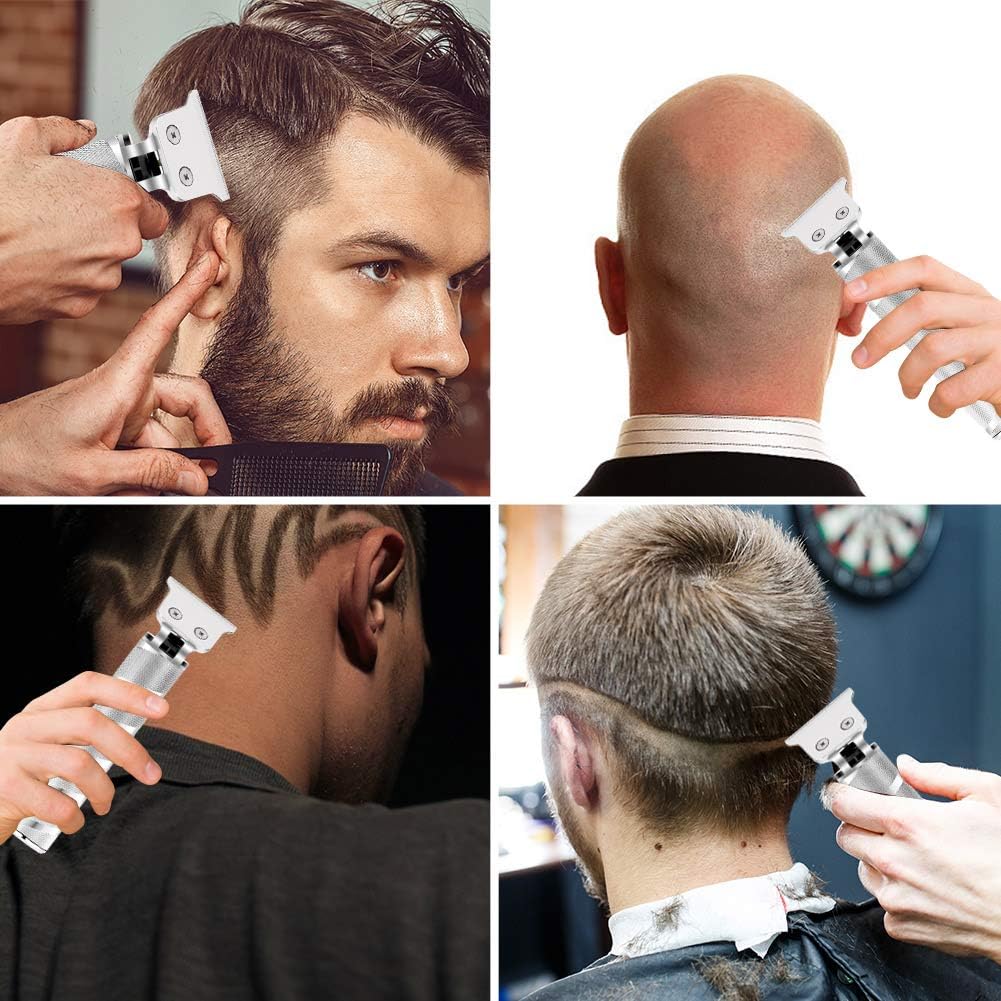
Image: Four examples demonstrating the versatility of the clipper for trimming beards, shaving heads, and creating intricate hair patterns.
Maintenance
Cleaning the Clipper
The SURKER Electric Pro Li Clipper is IPX7 waterproof, allowing for easy cleaning.
- After each use, turn off the clipper and remove any attached guide combs.
- Use the included cleaning brush to remove loose hairs from the blade and body of the clipper.
- Rinse the blade head and the entire clipper body under running water. Ensure the charging port cover is securely closed if present, though the unit is fully waterproof.
- Shake off excess water and allow the clipper to air dry completely before storing or recharging.

Image: The clipper is shown submerged in water, illustrating its IPX7 waterproof rating for easy and thorough cleaning.
Blade Oiling (Recommended)
To maintain optimal performance and blade longevity, it is recommended to regularly oil the blades. While not explicitly included, a small amount of clipper oil can be applied.
- After cleaning and drying the blades, apply 1-2 drops of clipper oil across the top of the blades.
- Turn the clipper on for a few seconds to distribute the oil evenly.
- Wipe off any excess oil with a clean cloth.
Troubleshooting
| Problem | Possible Cause | Solution |
|---|---|---|
| Clipper does not turn on or has low power. | Battery is low or depleted. | Charge the clipper fully (approx. 2 hours). Ensure the charging cable is properly connected. |
| Clipper pulls hair or does not cut effectively. | Blades are dirty, dull, or misaligned. Insufficient lubrication. | Clean the blades thoroughly with the brush and rinse. Apply clipper oil to the blades. Check for proper blade alignment. If blades are dull, consider professional sharpening or replacement. |
| Excessive noise or vibration during operation. | Blades may be loose or require lubrication. | Ensure blades are securely attached. Apply clipper oil to the blades. If the issue persists, contact customer support. |
Specifications
| Feature | Detail |
|---|---|
| Brand | SURKER |
| Model | Electric Pro Li Clippers |
| Color | Silver |
| Blade Material | Titanium Ceramic |
| Waterproof Rating | IPX7 (Whole Body Waterproof) |
| Battery Type | Rechargeable Lithium-ion (Internal) |
| Charging Time | Approx. 2 hours |
| Cordless Use Time | Up to 120 minutes |
| Charging Port | USB Type-C |
| Guide Combs Included | 1mm, 2mm, 3mm |
| Recommended Uses | Beard, Head, Mustache Trimming |
| Item Weight | 0.38 Kilograms (approx. 13.44 ounces) |
| Package Dimensions | 9.29 x 6.14 x 2.2 inches |
Warranty and Support
SURKER is committed to providing high-quality products and customer satisfaction. If you encounter any problems or have questions regarding your Electric Pro Li Clippers, please do not hesitate to contact us. We are dedicated to providing you with a satisfactory solution.
For support, please refer to the contact information provided with your purchase or visit the official SURKER website.
Ask a question about this manual
Ask about setup, troubleshooting, compatibility, parts, safety, or missing instructions. Manuals+ will review the question and use this page’s manual context to help answer it.