Product Overview
The Addtam USB Wall Charger Surge Protector is a versatile power solution designed to expand your existing wall outlets. It provides multiple AC outlets and USB charging ports, including a USB-C port, along with robust surge protection to safeguard your electronic devices. Its compact, 3-sided design is ideal for various settings such as homes, offices, and travel.

Figure 1: Front view of the Addtam USB Wall Charger Surge Protector, showing AC outlets and USB ports.
Key Features
- 9-in-1 Functionality: This unit perfectly fits duplex outlets, offering 5 widely spaced AC outlets across three sides and 4 USB charging ports (including 1 USB-C). It also integrates an 1800 Joule surge protector to enhance power quality and protect electronics.
- USB-C Fast & Smart Charge: Equipped with 4 USB ports providing a total of 4.5A output. Each USB-A port delivers up to 2.4A, while the USB-C port offers a maximum of 3A. Smart technology automatically detects connected devices and delivers optimal charging speed. Note: The USB-C port does not support devices requiring 14-22V charging voltage.
- 1800J Surge Protection: Features 3 complementary Surge Protection Circuits (TVS, MOV, GDT) with a response speed of less than 1 nanosecond and a minimum energy-absorbing capacity of 1800 Joules. A "SURGE PROTECTED" indicator light confirms active protection for your devices.
- Enhanced Safety: ETL certified, this power strip includes multiple safety protections: overload protection, short-circuit protection, over-current protection, over-voltage protection, and overheating protection. It automatically cuts power to protect connected devices during overwhelming voltage surges. The fire-resistant casing further ensures safety.
- Wide Space Design: The 3-sided power strip design provides ample space between the 5 AC outlets, making it easier to plug in various types of equipment without blocking adjacent ports.

Figure 2: Visual representation of the 9-in-1 functionality, including USB ports, AC outlets, and surge protection.

Figure 3: Diagram detailing the 7-point safety system, including short-circuit, grounded, over-temperature, over-current, fire-resistance, internal safety shutters, and over-voltage protection.

Figure 4: Comparison showing the advantage of wide-spaced outlets on the Addtam unit versus standard power strips, allowing larger plugs to be used simultaneously.

Figure 5: Illustration of universal compatibility for both USB-C and USB-A ports with various devices like iPhones, iPads, Pixel phones, Samsung Galaxy, Nexus, and MacBooks.
Video 1: An official product video demonstrating the features and benefits of the Addtam USB Charger Surge Protector.
Setup
The Addtam USB Wall Charger Surge Protector is designed for simple plug-and-play installation. It is intended to be plugged directly into a standard duplex wall outlet.
- Locate a standard duplex wall outlet.
- Align the prongs of the Addtam unit with the top and bottom receptacles of the wall outlet. Ensure the white plastic prong (if present and not needed for your specific outlet type) can be removed or is compatible.
- Firmly push the unit into the wall outlet until it is securely seated. The "SURGE PROTECTED" indicator light should illuminate green, confirming proper connection and active surge protection.
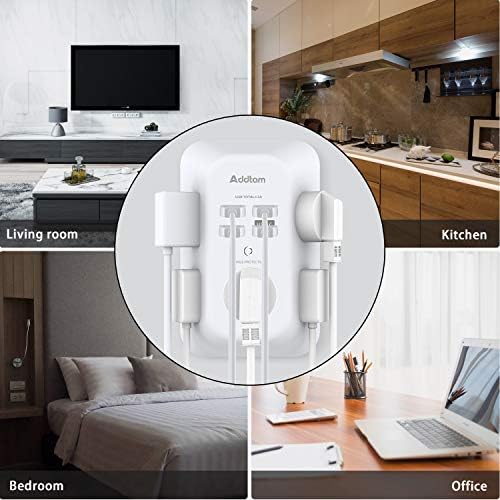
Figure 6: The Addtam unit installed in a wall outlet, demonstrating its compact fit and suitability for living rooms, kitchens, bedrooms, and offices.
Operating Instructions
Once the Addtam unit is securely plugged into a wall outlet and the "SURGE PROTECTED" light is green, you can begin connecting your devices.
- AC Outlets: Plug your standard electronic devices (e.g., lamps, small appliances, chargers) into any of the 5 widely spaced AC outlets located on the three sides of the unit.
- USB Charging Ports: Connect your USB-powered devices (e.g., smartphones, tablets, smartwatches) to the available USB-A or USB-C ports. The smart charging technology will automatically detect your device and deliver the optimal charging current.
- Surge Protection Indicator: The green "SURGE PROTECTED" light indicates that the surge protection feature is active and functioning. If this light is off, the surge protection may have been compromised, and the unit should be replaced to ensure continued protection for your devices.
Maintenance
To ensure optimal performance and longevity of your Addtam USB Wall Charger Surge Protector, follow these simple maintenance guidelines:
- Keep the unit clean by wiping it with a dry, soft cloth. Do not use liquid cleaners or aerosol sprays.
- Ensure the unit is unplugged from the wall outlet before cleaning.
- Avoid exposing the unit to moisture or extreme temperatures.
- Regularly check the "SURGE PROTECTED" indicator light to confirm active protection.
Troubleshooting
If you encounter issues with your Addtam USB Wall Charger Surge Protector, refer to the following common troubleshooting tips:
- No Power to Devices:
- Ensure the unit is firmly plugged into a functioning wall outlet.
- Check if the "SURGE PROTECTED" light is illuminated green. If not, the unit's surge protection may have expired or the outlet may not be receiving power.
- Test the wall outlet with another device to confirm it is operational.
- "SURGE PROTECTED" Light is Off:
- This indicates that the surge protection components have absorbed a significant surge and are no longer providing protection. The unit will still function as a power extender, but its surge protection capability is exhausted. It is recommended to replace the unit for continued surge protection.
- USB Devices Not Charging:
- Verify that the USB cable is securely connected to both the unit and your device.
- Ensure your device is compatible with the USB-C port's voltage requirements (not for devices needing 14-22V).
- Try a different USB port or cable to rule out cable or port issues.
Specifications
| Attribute | Detail |
|---|---|
| Product Dimensions | 5.51 x 1.57 x 0.5 inches |
| Item Weight | 3.52 ounces |
| Item Model Number | AD5004 |
| Brand | Addtam |
| Color | White |
| Total Power Outlets | 5 AC outlets |
| USB Ports | 4 (3 USB-A, 1 USB-C) |
| USB Total Output | 4.5A |
| USB-A Max Output | 2.4A per port |
| USB-C Max Output | 3A |
| Surge Protection | 1800 Joules |
| Voltage | 125 Volts |
| Special Feature | Surge Protection, USB Slot |
| Certifications | ETL Listed |
| Country of Origin | China |

Figure 7: Detailed dimensions of the Addtam USB Wall Charger Surge Protector.
Warranty and Support
Addtam products are designed for reliability and performance. For specific warranty information, product support, or to address any concerns, please refer to the contact information provided on the product packaging or visit the official Addtam website. Keep your purchase receipt for warranty claims.
For further assistance, you may visit the Addtam Store on Amazon.