
1. Introduction
This manual provides essential instructions for the safe and effective use of your Globe Electric POWERSTRIP 3OUT 2USB BLK. Please read this manual thoroughly before operating the device and retain it for future reference.
2. Important Safety Instructions
WARNING: To reduce the risk of electric shock, fire, or injury, observe the following safety precautions:
- Do not exceed the electrical ratings of this power strip. Refer to the specifications section for details.
- This product is intended for indoor use only. Do not expose to moisture or wet conditions.
- Do not plug into another relocatable power tap.
- Do not use with extension cords. Plug directly into a grounded wall outlet.
- Keep children away from the power strip.
- Do not disassemble or modify the device. There are no user-serviceable parts inside.
- Ensure the plug is fully inserted into the wall outlet.
- Avoid placing the power strip in areas with poor ventilation or near heat sources.
3. Package Contents
Verify that all items are present in your package:
- 1 x Globe Electric POWERSTRIP 3OUT 2USB BLK (Model: 3002619)
4. Product Features
The Globe Electric POWERSTRIP 3OUT 2USB BLK is designed to provide convenient power distribution and surge protection for your electronic devices. Key features include:
- 3 Grounded AC Outlets: Provides power for multiple electronic devices.
- 2 USB Charging Ports: Delivers 2.4 Amps for efficient charging of smartphones, tablets, and other USB-powered devices.
- 6-Foot Braided Cord: Offers extended reach and enhanced durability.
- 300 Joules Surge Protection: Helps protect connected electronics from power surges.
- Cruise Ship Approved: Designed to meet specific safety requirements for use on cruise ships.
- Flat Plug Design: Allows furniture to be placed closer to the wall.
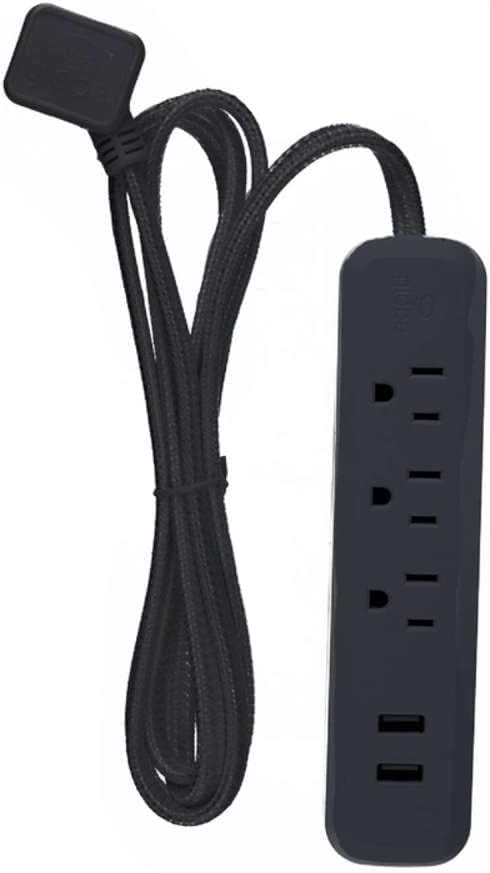
Image 1: The Globe Electric POWERSTRIP 3OUT 2USB BLK, showcasing its three AC outlets, two USB ports, and the durable braided power cord with a flat plug.
5. Setup Instructions
- Unpack the Power Strip: Carefully remove the power strip from its packaging.
- Choose a Location: Select a dry, indoor location away from heat sources and moisture. Ensure the 6-foot cord can reach a standard 125V AC wall outlet without being stretched or obstructed.
- Plug into Wall Outlet: Insert the power strip's flat plug firmly into a grounded 125V AC wall outlet.
- Connect Devices: You can now connect your AC-powered devices into the three grounded outlets and your USB-powered devices into the two USB ports.
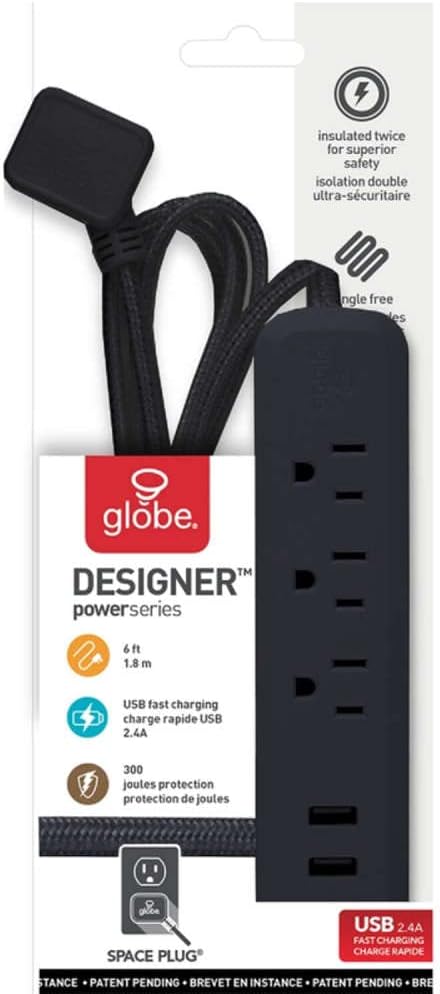
Image 2: The Globe Electric POWERSTRIP 3OUT 2USB BLK shown in its retail packaging, illustrating key features and design elements.
6. Operating Instructions
Once the power strip is properly plugged into a wall outlet, it is ready for use.
- AC Outlets: Plug your electronic devices (e.g., lamps, chargers, small appliances) into any of the three AC outlets. Ensure the total power draw does not exceed the power strip's maximum rating.
- USB Ports: Connect your USB charging cables to the two USB ports to charge compatible devices. The ports provide 2.4 Amps of power for efficient charging.
- Surge Protection: The power strip provides 300 Joules of surge protection. In the event of a power surge, the power strip is designed to absorb excess voltage to protect connected devices.
7. Maintenance and Care
- Cleaning: Disconnect the power strip from the wall outlet before cleaning. Use a soft, dry cloth to wipe the exterior. Do not use liquid cleaners or abrasive materials.
- Inspection: Periodically inspect the power cord and the power strip for any signs of damage, such as frayed wires, cracks, or discoloration. If damage is found, discontinue use immediately and replace the unit.
- Storage: When not in use, store the power strip in a cool, dry place away from direct sunlight and extreme temperatures.
8. Troubleshooting
If you encounter issues with your power strip, refer to the following common problems and solutions:
- No Power to Devices:
- Ensure the power strip's plug is fully inserted into a working wall outlet.
- Check if the wall outlet itself is functioning by plugging in another device directly.
- Verify that the connected devices are properly plugged into the power strip and are turned on.
- USB Devices Not Charging:
- Ensure the USB cable is securely connected to both the power strip and the device.
- Try a different USB cable or a different USB port on the power strip.
- Confirm that your device is compatible with USB charging and is not fully charged.
- Power Strip Feels Warm:
- A slight warmth during operation is normal. However, if the power strip becomes excessively hot, immediately unplug it and all connected devices. This may indicate an overload or a malfunction.
9. Specifications
| Model Number | 3002619 |
| Brand | Globe Electric |
| AC Outlets | 3 Grounded Outlets |
| USB Ports | 2 (2.4 Amps total) |
| Voltage | 125 Volts |
| Amperage Capacity | 2.4 Amps (USB) |
| Surge Protection | 300 Joules |
| Cord Length | 6 feet (1.8 meters) |
| Dimensions | 12 x 2 x 4 inches (approximate) |
| Weight | 15.5 ounces (approximate) |
| Color | Black |
| Material | Plastic |
| Special Feature | Cruise Ship Approved |
10. Warranty and Support
This Globe Electric power strip comes with a manufacturer's warranty. For specific warranty details, terms, and conditions, please refer to the documentation included with your purchase or visit the official Globe Electric website.
For technical support, product inquiries, or warranty claims, please contact Globe Electric customer service through their official website or the contact information provided on your product packaging.
Manufacturer: GLOBE ELECTRIC COMPANY USA INC


