
OMOTON 3
OMOTON Adjustable Cell Phone Stand User Manual
Model: 3
Brand: OMOTON
Introduction
This user manual provides detailed instructions for the OMOTON Adjustable Cell Phone Stand. Designed for convenience and ergonomic comfort, this stand allows for hands-free use of your mobile device, reducing neck strain and improving viewing angles for various activities.
Product Features
- Adjustable Height & Angle: Features adjustable height (6.29-8.29 inches) and tilt range (up to 45 degrees) for comfortable hands-free use, helping to fix posture and reduce neck strain.
- Wide Compatibility: Compatible with all cellphones between 3.5 to 7.0 inches, even with a case (up to 0.75 inch in thickness), including iPhone SE 2 /11/11 Pro/11 Pro Max/ X/ Xs Max, Samsung Galaxy S20/ S10e / S9 Plus / S8/, Note 10 Plus/ Note G G8, Nexus 6P, etc.
- Thoughtful Design: Includes a reserved charging hole for convenient charging and a base that can be used for storing small items.
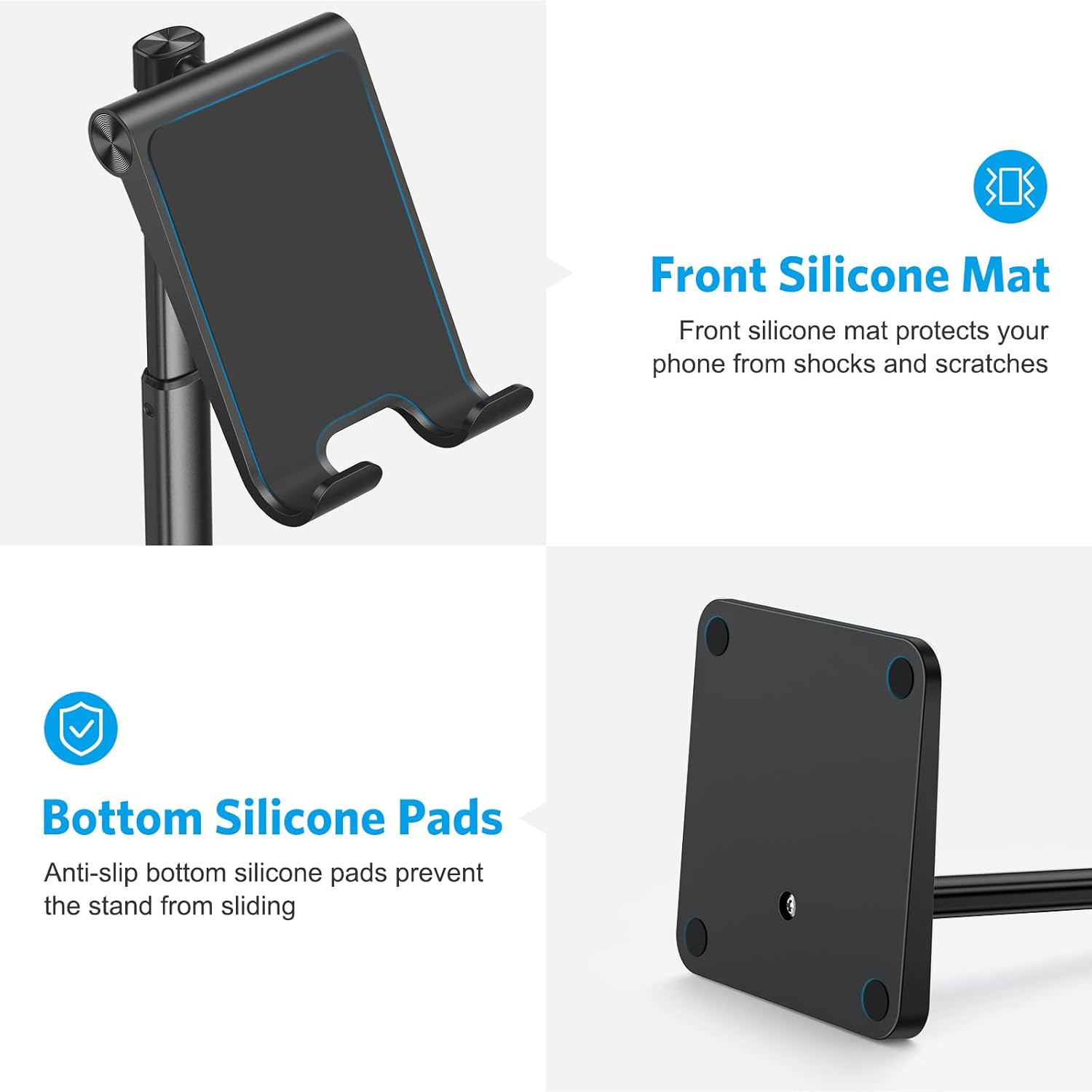
- Weighted Anti-Slip Base: Equipped with a reinforced base and an aluminum alloy rod for steady device support. Non-slip silicone pads on the bottom enhance stability.
- Easy Installation: Simple assembly by knocking in the aluminum rod. The stand is compact and lightweight, suitable for travel.
What's in the Box
- Cell phone stand (unassembled components)
Setup and Installation
The OMOTON Cell Phone Stand is designed for quick and easy assembly. Follow these steps for proper setup:
Step 1: Identify Correct Orientation
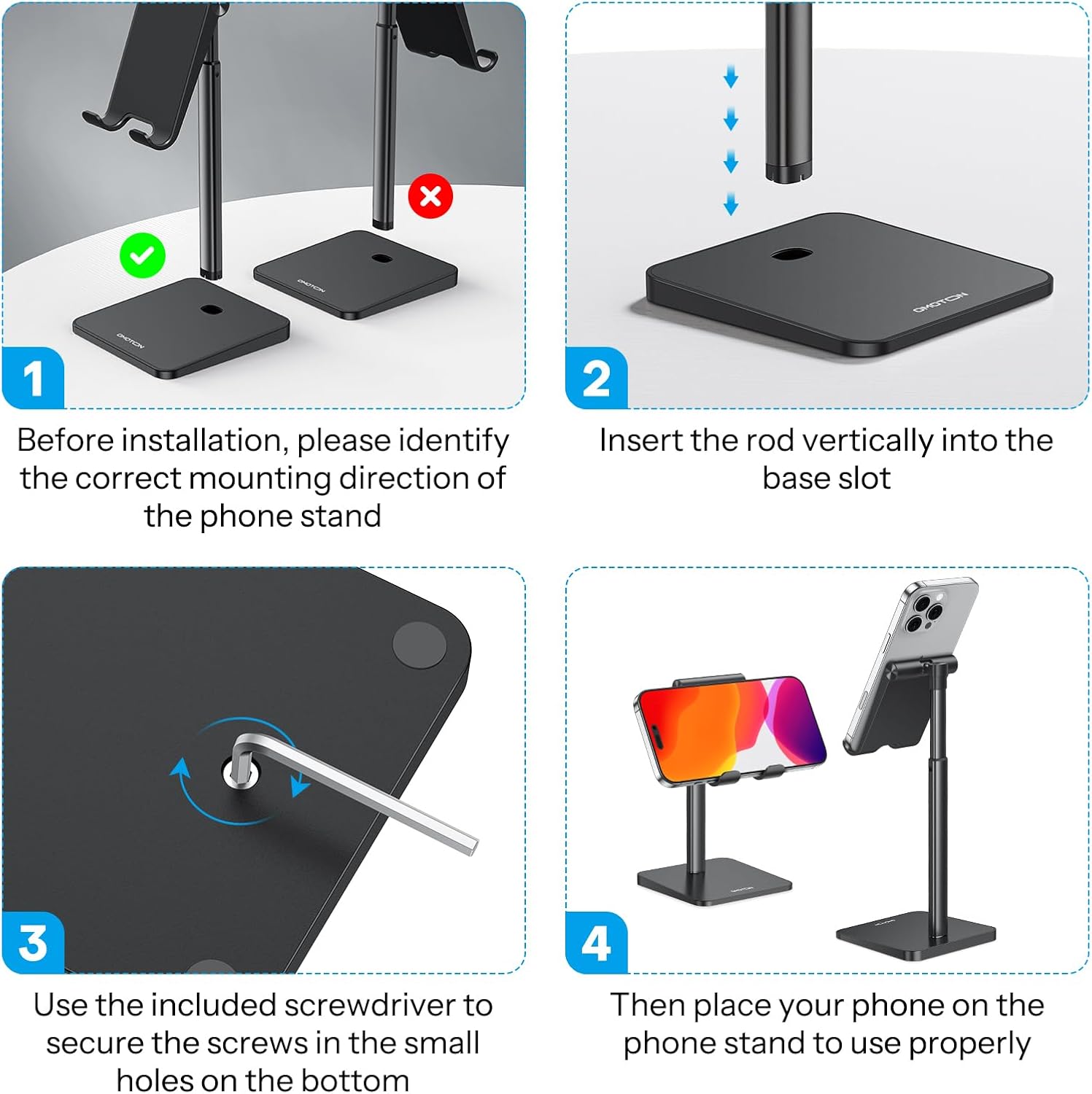
Before installation, carefully identify the correct mounting direction of the phone stand. Ensure the phone holder part is oriented correctly to avoid permanent assembly in the wrong direction.
Step 2: Insert Rod into Base

Insert the aluminum rod vertically into the designated slot on the base. Apply gentle pressure to secure it in place.
Step 3: Secure with Screwdriver (if applicable)

Use the included screwdriver to secure any screws in the small holes on the bottom of the base, ensuring a firm and stable connection.
Step 4: Place Your Phone

Once assembled, place your phone on the stand to use it properly. The stand is now ready for adjustment and use.
For a visual guide, you may refer to the official installation video:
Official OMOTON Installation Guide Video. This video demonstrates the assembly process and key features of the adjustable phone stand.
Operating Instructions
The OMOTON Cell Phone Stand offers versatile adjustments for optimal viewing and convenience.
Adjusting Height and Angle

The stand's height can be adjusted between 6.29 and 8.29 inches. Gently pull or push the aluminum rod to achieve your desired height. This helps in fixing your posture and reducing neck strain.

The phone holder can be tilted up to 45 degrees. Adjust the angle by hand to find the most comfortable viewing experience for watching videos, making calls, or browsing.
Device Placement and Compatibility

The stand supports phones between 3.5 to 7.0 inches, even with a case up to 0.75 inches thick. You can place your device both vertically and horizontally.

The design ensures universal compatibility, accommodating a wide range of smartphones and even some smaller tablets.
Charging and Storage

A reserved charging hole on the lower part of the holder allows for convenient charging while your device is on the stand.
The sturdy base of the stand can also be utilized for storing small items, helping to keep your desk organized.
Maintenance
To ensure the longevity and optimal performance of your OMOTON Cell Phone Stand, follow these simple maintenance guidelines:
- Cleaning: Wipe the stand regularly with a soft, dry cloth to remove dust and fingerprints. For stubborn marks, a slightly damp cloth can be used, followed by immediate drying. Avoid abrasive cleaners or solvents.
- Storage: When not in use, store the stand in a clean, dry place. Its compact and lightweight design makes it easy to store or transport.
- Handling: While durable, avoid dropping the stand or subjecting it to excessive force, which could damage the adjustable mechanisms or the base.
Troubleshooting
If you encounter any issues with your OMOTON Cell Phone Stand, refer to the following common troubleshooting tips:
- Stand is Wobbly:
- Ensure the aluminum rod is fully inserted and secured into the base. If applicable, check that any securing screws are tightened.
- Verify that the surface the stand is placed on is flat and stable.
- Phone is Sliding:
- Check that the silicone pads on the phone holder and base are clean and free of dust or debris. Clean them with a damp cloth if necessary.
- Ensure your phone's size is within the compatible range (3.5-7.0 inches) and that its case thickness does not exceed 0.75 inches.
- Difficulty Adjusting Angle/Height:
- Apply firm but gentle pressure when adjusting. The mechanisms are designed to hold positions securely, so some resistance is normal.
- Ensure no foreign objects are obstructing the moving parts.
If the issue persists, please contact OMOTON customer support for further assistance.
Specifications
| Brand | OMOTON |
| Model Number | 3 |
| Product Dimensions | 3.5 x 3.6 x 6 inches |
| Item Weight | 7.4 ounces |
| Adjustable Height Range | 6.29 - 8.29 inches |
| Adjustable Tilt Angle | Up to 45 degrees |
| Compatible Devices | Smartphones (3.5-7.0 inches, up to 0.75 inch case thickness) |
| Material | Aluminum alloy rod, reinforced base, silicone pads |
| Color | Black |
| Date First Available | April 27, 2020 |
Warranty and Support
OMOTON stands behind the quality of its products. For any warranty claims, technical support, or inquiries regarding your cell phone stand, please refer to the following:
- Official User Guide: A detailed installation manual is available in PDF format for additional guidance. You can access it here.
- Contact Support: For specific product support or warranty information, please visit the official OMOTON website or contact their customer service directly through the platform where the product was purchased.
Related documents3


Ask a question about this manual
Ask about setup, troubleshooting, compatibility, parts, safety, or missing instructions. Manuals+ will review the question and use this page’s manual context to help answer it.