
1. Introduction
Thank you for choosing the INSMART Wireless Smart Meat Thermometer. This device is designed to help you achieve perfectly cooked meats every time, whether grilling, smoking, roasting, or pan-frying. With its advanced sensors and wireless connectivity, you can monitor your food's temperature remotely via a dedicated mobile application, ensuring optimal results and convenience.
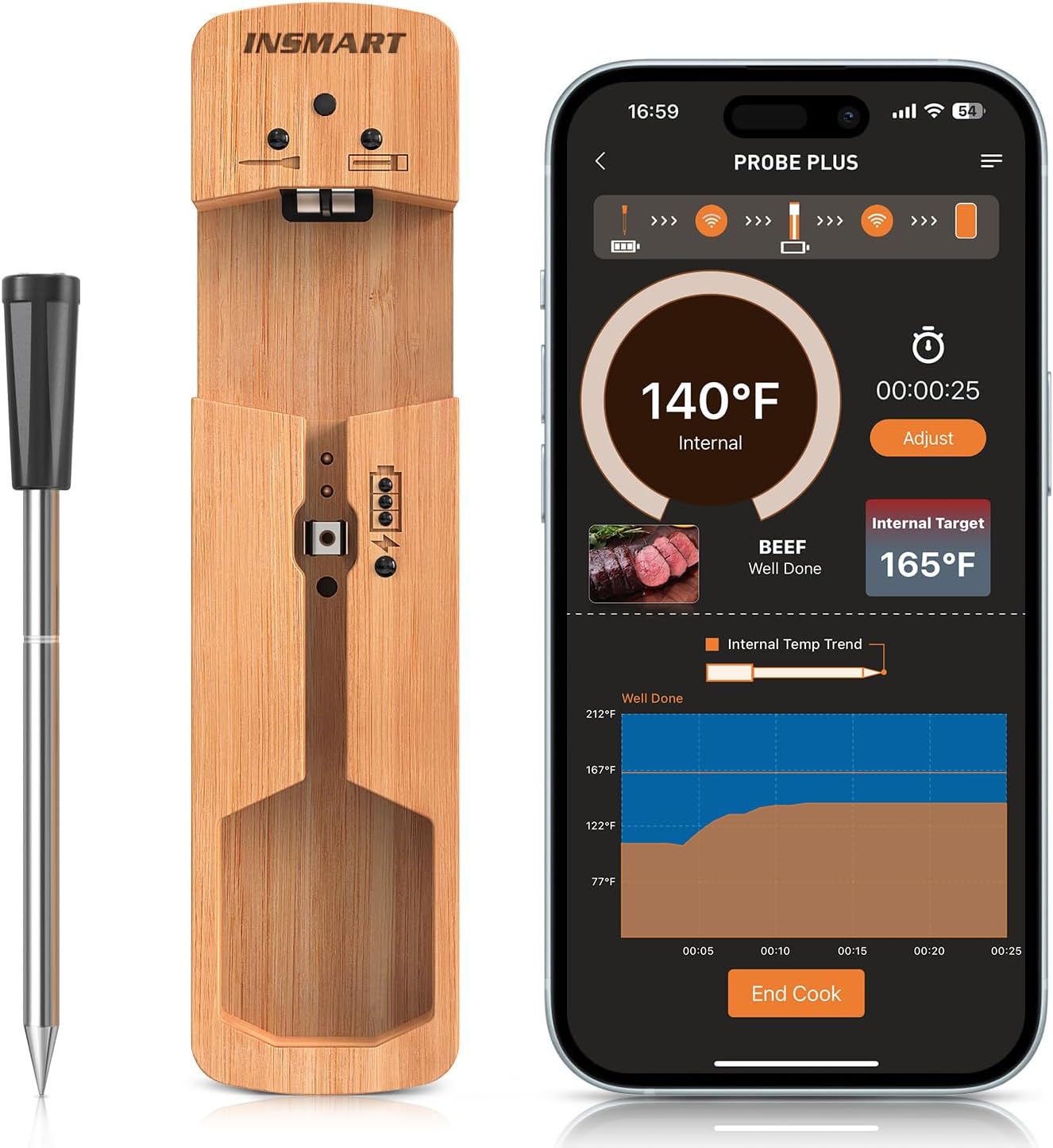
The INSMART Wireless Smart Meat Thermometer and its intuitive mobile application interface.
2. Safety Information
- Do not immerse the charging base in water or any other liquid. The probe is IPX7 waterproof, but the base is not.
- Always handle the probe by its heat-resistant handle. The metal tip will become very hot during use.
- Keep out of reach of children.
- Ensure the probe is fully inserted into the thickest part of the meat, avoiding bones, for accurate readings.
- Do not expose the probe to temperatures exceeding its maximum specified limit (212°F / 100°C for internal temperature).
- Use caution when removing the probe from hot food.
3. Package Contents
Please check the package for the following items:
- INSMART Wireless Smart Meat Thermometer Probe
- Charging and Storage Base
- USB Charging Cable
- User Manual (this document)
4. Product Overview
4.1 Thermometer Probe
The probe features multiple sensors for accurate internal and ambient temperature readings. It is constructed from FDA 304 Stainless Steel with a heat-resistant ceramic handle.

The probe features smart temperature multisensors for quick and accurate readings.

Key features and proper usage of the INSMART probe, including its IPX7 waterproof rating and recommended insertion depth.
4.2 Charging and Storage Base
The wooden charging base not only stores the probe securely but also charges it. It typically includes indicator lights for charging status and a pairing button.
5. Setup
5.1 Initial Charging
- Place the thermometer probe into the charging base.
- Connect the USB charging cable to the base and a 5V USB power adapter (not included).
- Allow the probe to fully charge before first use. A full charge provides approximately 16 hours of continuous use.
5.2 App Download and Installation
Search for the "INSMART Cook" or "Smart Thermometer" app (refer to packaging for exact name) on your smartphone's app store (iOS App Store or Google Play Store) and install it.
5.3 Pairing with Your Device
- Ensure Bluetooth is enabled on your smartphone.
- Open the INSMART Cook app.
- Remove the probe from the charging base to activate it. The app should automatically detect the probe.
- Follow the on-screen instructions in the app to complete the pairing process.
6. Operating Instructions
6.1 Probe Placement
Insert the probe into the thickest part of the meat, ensuring the notch on the probe is fully covered by the meat. Avoid bones, as they can affect temperature accuracy.
6.2 Using the App
- Once the probe is inserted and paired, the app will display the current internal temperature of the meat.
- Select the type of meat and desired doneness from the app's preset options, or set a custom target temperature.
- The app will provide real-time temperature graphs and estimated cooking times.
- An alarm will sound on your phone when the target temperature is reached.

The INSMART thermometer is suitable for a wide range of indoor and outdoor cooking applications.

Enjoy cooking freedom with an ultra-long wireless range of up to 300 feet.
6.3 Wire-Free Cooking
The completely wire-free design allows for hassle-free cooking without tangled wires, providing complete freedom and flexibility.

Experience complete freedom and flexibility with the 100% wire-free design.
7. Maintenance and Care
7.1 Cleaning the Probe
After each use, clean the probe thoroughly with warm, soapy water. The probe is IPX7 waterproof and can be rinsed under running water. Dry completely before storing.
7.2 Cleaning the Base
Wipe the charging base with a soft, damp cloth. Do not immerse the base in water or use abrasive cleaners.
7.3 Storage
Store the probe in its charging base in a cool, dry place when not in use. Ensure the probe is clean and dry before storage.
8. Troubleshooting
| Problem | Possible Cause | Solution |
|---|---|---|
| Probe not connecting to app | Bluetooth off; Probe not activated; App issue; Out of range. | Ensure Bluetooth is on. Remove probe from base. Restart app. Move closer to base/phone. |
| Inaccurate temperature readings | Probe not inserted correctly; Probe damaged. | Re-insert probe into thickest part, avoiding bones. Contact support if damage suspected. |
| Short battery life | Not fully charged; Old battery. | Ensure full charge. If issue persists, battery may need replacement (contact support). |
| App crashes or freezes | Software bug; Phone memory low. | Restart app. Update app. Free up phone memory. |
9. Specifications
- Model: SKZ-02
- Brand: INSMART
- Probe Material: FDA 304 Stainless Steel
- Base Material: Plastic (likely wood-look plastic)
- Internal Temperature Range: 32°F to 212°F (0°C to 100°C)
- Temperature Accuracy: +/- 1.8°F
- Response Time: 1-2 seconds
- Waterproof Rating: IPX7 (Probe only)
- Wireless Range: Up to 300 feet (line of sight)
- Battery Life: Up to 16 hours (fully charged)
- Power Source: Corded Electric (via USB for charging base)
- Item Weight: Approximately 1.81 pounds (including packaging)
10. Warranty and Support
For warranty information and customer support, please refer to the warranty card included with your product or visit the official INSMART website. You can also contact INSMART customer service directly for assistance with product setup, troubleshooting, or any other inquiries.
Website: Visit the INSMART Store on Amazon
