
1. Introduction
The ENONEO Key Safe Box G11 is a robust, wall-mounted key storage solution designed for secure key access. Constructed from durable zinc alloy, it offers waterproof and pry-resistant properties, protecting internal contents. This key safe is ideal for homes, offices, schools, and for providing emergency access to authorized individuals.
This manual provides detailed instructions for the installation, operation, and maintenance of your ENONEO Key Safe Box G11.
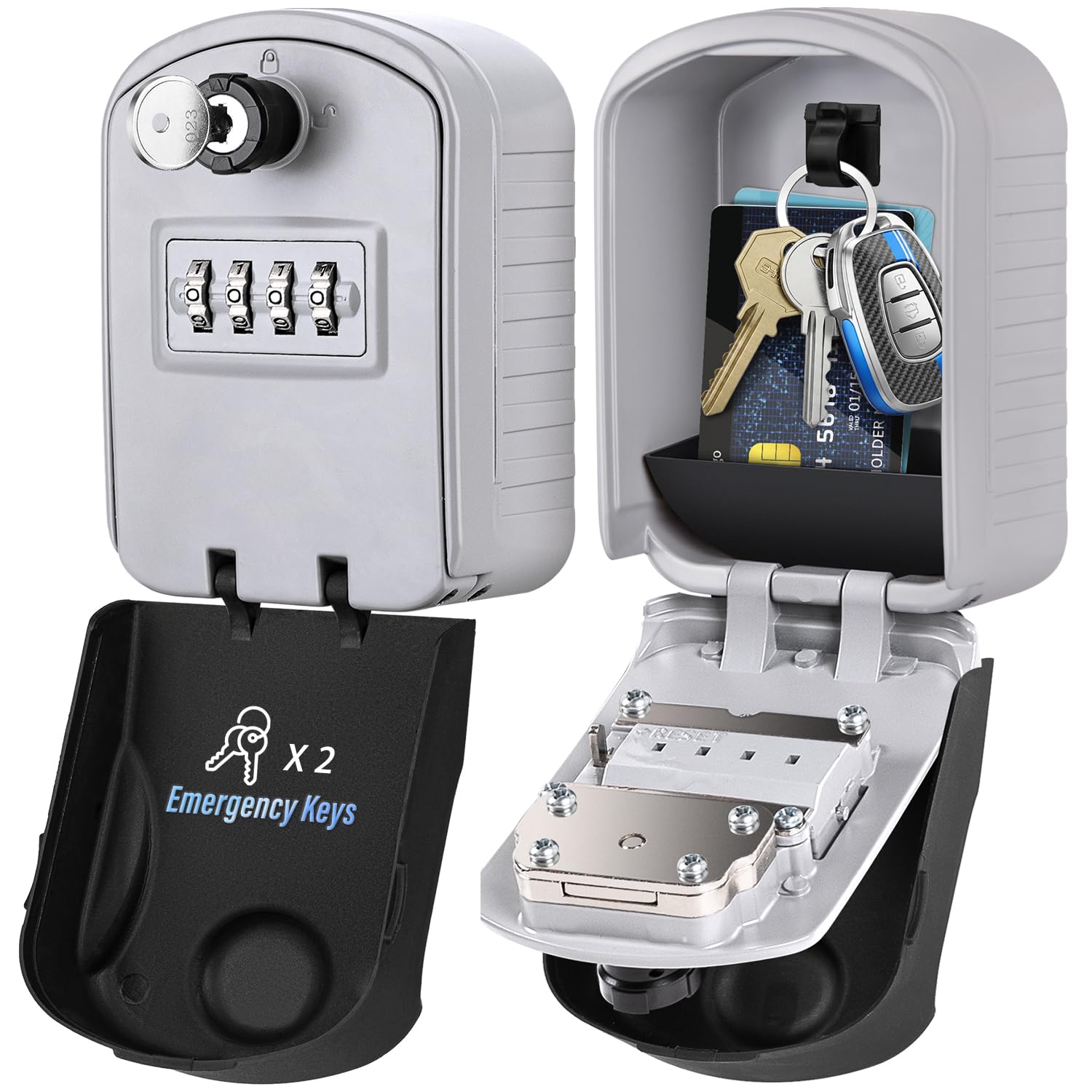
Image: The ENONEO Key Safe Box G11, showcasing its robust design and internal storage capacity.
2. Package Contents
Please verify that all components are present in the package:
- 1 x ENONEO Key Safe Box G11
- 1 x Waterproof Cover
- 2 x Emergency Keys
- 4 x Mounting Screws
- 4 x Expansion Plugs
- 1 x User Manual
3. Setup and Installation
Follow these steps to securely mount your key safe box:
- Choose a Location: Select a discreet and secure location on a solid surface, such as a wall.
- Mark Drilling Points: Place the key safe box against the wall and use a pencil to mark the four drilling points through the pre-drilled holes on the back of the box.
- Drill Holes: Use an appropriate drill bit to drill holes at the marked points. Ensure the depth is sufficient for the expansion plugs.
- Insert Expansion Plugs: Insert the provided expansion plugs into the drilled holes. Tap gently with a hammer if necessary until they are flush with the wall surface.
- Mount the Key Box: Align the key safe box with the holes and secure it to the wall using the provided mounting screws. Tighten firmly.
- Install Key Pocket: Place the removable key pocket inside the safe box if desired, to organize keys or other small items.

Image: Step-by-step guide for wall mounting the key safe box, including marking, drilling, and securing.
4. Operating Instructions
4.1 Setting Your Combination Code
The default combination code is 0-0-0-0. It is highly recommended to change this immediately after installation.
- Open the Key Box: Dial the current combination (default is 0-0-0-0) to open the key safe box.
- Locate Reset Lever: Inside the box, on the back of the door, locate the reset lever (usually marked A and B).
- Move Lever to 'B': Push the reset lever from position 'A' to position 'B'.
- Set New Combination: While the lever is in position 'B', scroll the number dials to set your desired 4-digit combination. Choose a memorable but secure code.
- Move Lever to 'A': Push the reset lever back to position 'A'. Your new combination is now set.
- Test New Code: Close the box, scramble the dials, and then dial your new combination to ensure it opens correctly.

Image: Visual guide for resetting and setting a new 4-digit combination code.
4.2 Using the Emergency Key
The ENONEO Key Safe Box G11 includes emergency keys for situations where the combination code is forgotten or inaccessible.
- Insert the emergency key into the keyhole located above the combination dials.
- Turn the key to unlock and open the safe box.
- Once opened with the emergency key, you can reset the combination code by following the steps in Section 4.1.
Important: Never store the emergency key inside the key safe box. Keep it in a separate, secure location.
5. Maintenance
To ensure the longevity and proper functioning of your ENONEO Key Safe Box G11, follow these maintenance guidelines:
- Regular Cleaning: Wipe the exterior with a soft, damp cloth to remove dust and dirt. Avoid abrasive cleaners.
- Check Waterproof Cover: Periodically inspect the waterproof cover for any damage or signs of wear. Ensure it fits snugly to maintain water resistance.
- Lubrication: If the dials or opening mechanism become stiff, apply a small amount of silicone-based lubricant. Avoid oil-based lubricants as they can attract dust.
- Inspect Mounting: Regularly check that the mounting screws are tight and the box is securely attached to the wall.
6. Troubleshooting
- Box will not open with combination:
- Ensure the correct combination is entered. Double-check each digit.
- Make sure the dials are aligned precisely with the indicator line.
- Try using the emergency key to open the box. If successful, reset the combination.
- Dials are stiff or difficult to turn:
- Clean the dials and surrounding area to remove any debris.
- Apply a small amount of silicone lubricant to the dials.
- Water inside the box:
- Ensure the waterproof cover is properly installed and not damaged.
- Check for any cracks or damage to the main body of the safe box.
7. Specifications
| Attribute | Specification |
|---|---|
| Brand | ENONEO |
| Model Number | G11 |
| Color | Grey |
| External Dimensions (L x W x H) | 13 x 8.5 x 13 cm |
| Internal Dimensions (L x W) | 12 x 8 cm |
| Material | Zinc Alloy / Aluminum |
| Weight | 650 grams |
| Features | Waterproof, 4-digit Combination Lock, Emergency Key Access |
| Mounting Type | Wall Mount |

Image: Detailed dimensions and storage capacity of the key safe box.
8. Warranty and Support
For warranty information and customer support, please contact ENONEO directly through their official website or the retailer from whom the product was purchased. Keep your purchase receipt as proof of purchase.

