
Introduction
This manual provides detailed instructions for the proper use and maintenance of your CASIO G-SHOCK GMA-S140-8A watch. Please read this manual carefully to ensure optimal performance and longevity of your timepiece. Keep this manual for future reference.
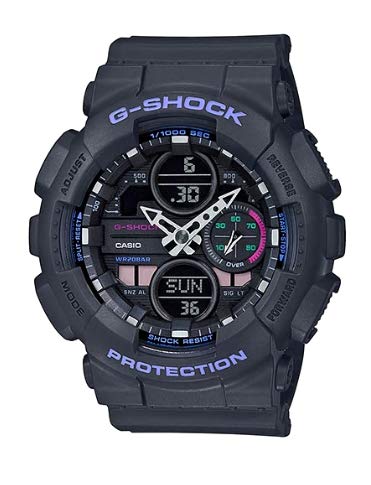
Image: CASIO G-SHOCK GMA-S140-8A watch, featuring a robust black design with both analog and digital time displays.
Key Features
- Display: Analog-Digital
- Watch Movement Type: Quartz
- Water Resistance Depth: 30 Meters
- Case Material Type: Plastic
- Crystal: Mineral Glass
- Clasp Type: Deployment Clasp
- Additional Features: Second Hand
- Style: Modern Sports Watch
Initial Setup and Time Synchronization
Your G-SHOCK watch features both analog and digital time displays. It is crucial for these to be synchronized for accurate timekeeping. Follow these steps to set the time and synchronize the analog and digital displays:
- Enter Timekeeping Mode: Ensure your watch is in the standard timekeeping mode. If not, press the 'MODE' button (usually bottom-left) repeatedly until the current time and date are displayed.
- Initiate Hand Setting: Press and hold the 'FORWARD' button (usually top-right) for approximately 4 seconds. The watch will display "SUB" and "H SET" (Hand Set), indicating it's ready for analog hand adjustment.
- Align Analog Hands: The small dial (sub-dial) should point to 50, and both the hour and minute hands should point to the 12 o'clock position. If they are not aligned, use the 'FORWARD' and 'REVERSE' buttons (top-right and bottom-right, respectively) to move the hands until they are perfectly aligned at 12 o'clock. Holding the button down will make the hands move continuously.
- Confirm Alignment: Once all hands are aligned at 12 o'clock, press the 'ADJUST' button (usually top-left) once. The watch will then automatically move the analog hands to match the digitally set time.
- Verify Synchronization: After the hands stop moving, check that both the analog and digital displays show the correct and synchronized time.
For a visual guide on synchronizing the analog and digital time, please refer to the video below:
Video: This video demonstrates how to synchronize the analog and digital time displays on a Casio G-Shock watch, addressing common issues where the hands do not match the digital readout.
Operating Modes
Your G-SHOCK watch offers various modes accessible via the 'MODE' button. Pressing the 'MODE' button cycles through the following functions:
- Timekeeping Mode: Displays the current time, date, and day of the week. This is the default mode.
- World Time Mode: Allows you to view the current time in different time zones around the world.
- Alarm Mode: Set up to multiple daily alarms and an hourly time signal.
- Stopwatch Mode: Measure elapsed time, split times, and two finishes.
- Countdown Timer Mode: Functions as a countdown timer with an alarm when the countdown reaches zero.
Refer to the detailed instructions in the full user manual for specific operations within each mode, including setting alarms, using the stopwatch, and configuring world time cities.
Maintenance
To ensure the longevity and optimal performance of your CASIO G-SHOCK watch, follow these maintenance guidelines:
- Cleaning: Wipe the watch regularly with a soft, dry cloth. For stubborn dirt, use a soft brush and mild soap solution, then rinse thoroughly with fresh water and dry.
- Water Resistance: The watch is water-resistant up to 30 meters. This means it is suitable for everyday use and can withstand splashes or brief immersion in water. Avoid operating buttons underwater. Do not use for diving or prolonged water exposure.
- Temperature Exposure: Avoid exposing the watch to extreme temperatures (hot or cold) for extended periods, as this can affect battery life and internal components.
- Chemicals: Keep the watch away from gasoline, cleaning solvents, aerosol sprays, adhesives, paints, and other chemicals, as they can damage the resin case and band.
- Battery Replacement: When the battery runs low, have it replaced by an authorized CASIO service center to ensure proper sealing and water resistance.
Troubleshooting
If you encounter issues with your CASIO G-SHOCK GMA-S140-8A watch, refer to the following common problems and solutions:
- Analog Hands Do Not Match Digital Time: This is a common issue that can be resolved by manually synchronizing the analog hands with the digital time. Follow the steps outlined in the "Initial Setup and Time Synchronization" section above, or refer to the embedded video for a visual demonstration.
- Display is Blank or Faint: The battery may be low. Replace the battery at an authorized service center.
- Buttons are Unresponsive: Ensure the watch is not in a locked mode. If the issue persists, a reset may be required (refer to the full user manual for reset procedures), or contact customer support.
- Incorrect Time After Battery Change: After a battery replacement, the time and date will need to be reset and the analog hands synchronized as described in the "Initial Setup and Time Synchronization" section.
For more complex issues, it is recommended to contact CASIO customer support or an authorized service center.
Specifications
| Feature | Detail |
|---|---|
| Model Number | GMA-S140-8A |
| Brand | CASIO |
| Display Type | Analog-Digital |
| Watch Movement Type | Quartz |
| Water Resistance Depth | 30 Meters |
| Case Material | Plastic |
| Crystal Material | Mineral Glass |
| Case Diameter | 34 mm |
| Case Thickness | 15.8 Millimeters |
| Strap Type | Two Piece Strap |
| Clasp Type | Deployment Clasp |
| Dial Color | Black |
| Department | Mens |
| Date First Available | October 25, 2023 |
Warranty and Support
Your CASIO G-SHOCK GMA-S140-8A watch is covered by a manufacturer's warranty. Please refer to the warranty card included with your purchase for specific terms and conditions. For technical support, service, or to inquire about replacement parts, please visit the official CASIO website or contact their customer service department.
Official CASIO Website: www.casio.com


