
1. Introduction
The ELIVED EV007 is a high-quality tilting TV wall mount designed for flat or curved LCD, LED, and OLED televisions ranging from 26 to 55 inches. This mount offers a low-profile design, saving space while providing an optimal viewing experience through its adjustable tilt mechanism. It supports VESA patterns from 75x75mm up to 400x400mm and can safely hold TVs weighing up to 45 kg (99 lbs).
This manual provides essential information for safe and correct installation and operation of your ELIVED EV007 TV wall mount. Please read all instructions carefully before beginning installation.
2. Safety Information
- Weight Capacity: Do not exceed the maximum weight capacity of 45 kg (99 lbs).
- TV Size: Ensure your TV size is within the recommended range of 26-55 inches.
- Wall Type: This mount is designed for installation on solid concrete walls, brick walls, or wood studs with 16-inch (40.6 cm) spacing. DO NOT install on drywall or plasterboard alone.
- Professional Installation: If you are unsure about the installation process or wall type, consult a qualified professional.
- Component Check: Verify all parts are present and undamaged before installation. Do not use damaged parts.
- Tighten Fasteners: Ensure all screws and bolts are securely tightened, but do not overtighten.
3. Package Contents
Please check that all components are included in your package:
- Wall Plate Assembly
- TV Brackets (2 pieces)
- Mounting Hardware Kit (various screws, washers, spacers for TV and wall mounting)
- Bubble Level

Image: Included mounting hardware, including various screws, anchors, and a bubble level.
4. Specifications
| Feature | Specification |
|---|---|
| Model Number | EV007 |
| TV Size Compatibility | 26 - 55 inches |
| Weight Capacity | Up to 45 kg (99 lbs) |
| VESA Compatibility | 75x75mm, 100x100mm, 200x100mm, 100x200mm, 200x200mm, 200x300mm, 300x200mm, 300x300mm, 400x200mm, 400x300mm, 400x400mm |
| Tilt Angle | -10° to +10° |
| Distance from Wall | 47 mm (1.85 inches) |
| Material | Metal |
| Color | Black |

Image: Diagram illustrating VESA compatibility, weight capacity, and TV size range.
5. Compatibility Check
Before installation, ensure the mount is compatible with your television and wall type:
- TV VESA Pattern: Check the four mounting holes on the back of your TV. Measure the horizontal and vertical distance between these holes. This measurement is your TV's VESA pattern. The EV007 supports VESA patterns from 75x75mm to 400x400mm.
- TV Weight: Confirm your TV weighs less than 45 kg (99 lbs).
- TV Size: Ensure your TV screen size is between 26 and 55 inches.
- Wall Type: The mount is suitable for solid concrete walls, brick walls, and wood stud walls (with 16-inch stud spacing). It is not suitable for drywall or plasterboard walls alone without proper reinforcement.
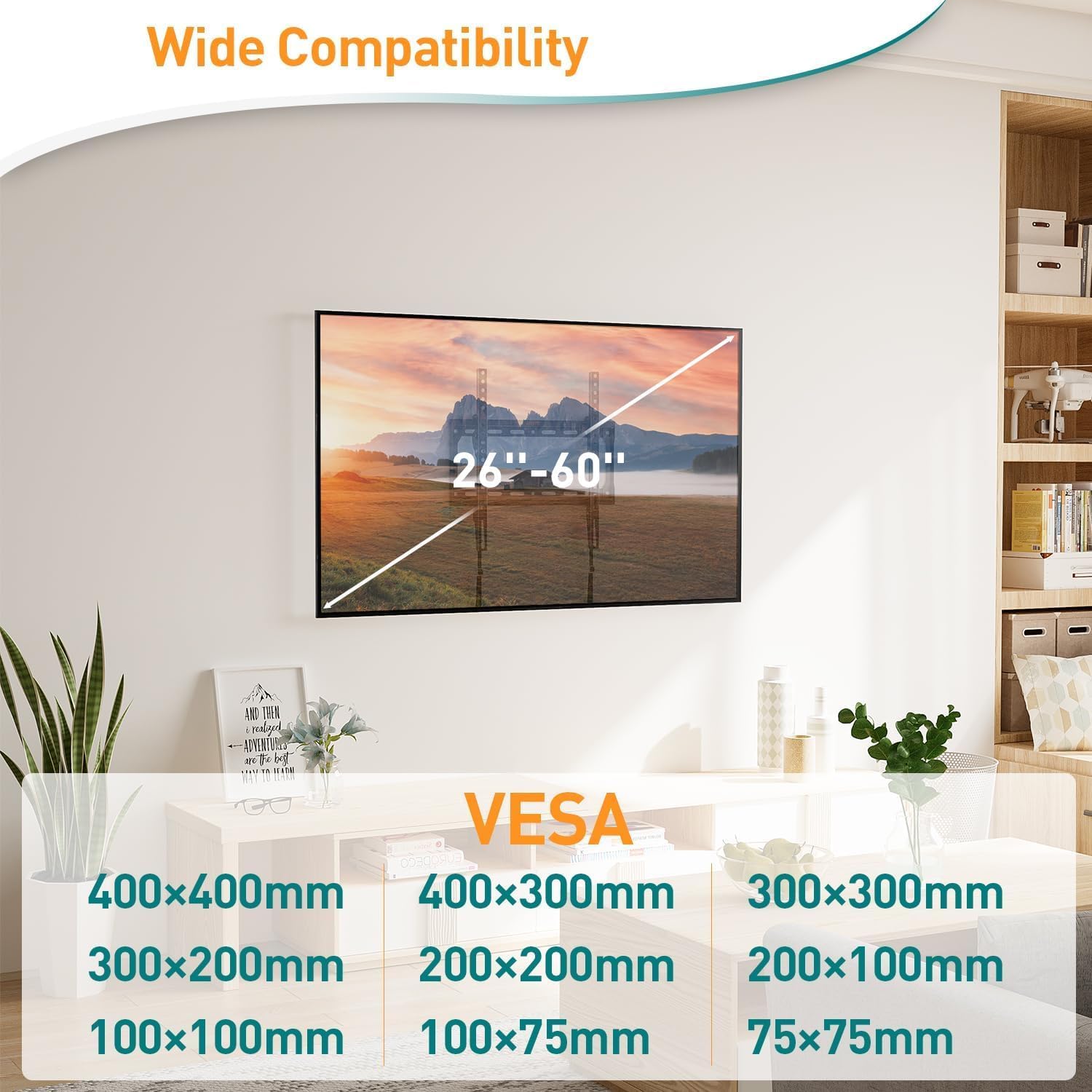
Image: Visual representation of wide compatibility for TV sizes (26-60 inches) and various VESA patterns.
Image: Illustrations of compatible wall types: concrete, brick, and wood studs (max 16 inches). Warning against drywall-only installation.
6. Setup and Installation
6.1. Tools Required (Not Included)
- Pencil
- Drill
- Stud Finder (for wood stud installation)
- Phillips Head Screwdriver
- Tape Measure
6.2. Attaching TV Brackets to Your TV
- Carefully place your TV face-down on a soft, clean surface to prevent screen damage.
- Identify the VESA mounting holes on the back of your TV.
- Select the appropriate screws, washers, and spacers from the hardware kit that fit your TV's VESA holes.
- Attach the two TV brackets to the back of your TV, ensuring they are centered and securely fastened. Do not overtighten.
6.3. Mounting the Wall Plate to the Wall
- For Wood Stud Walls: Use a stud finder to locate the edges and center of two adjacent wood studs. Mark the desired height for the top of your TV on the wall. Position the wall plate against the wall, ensuring it is level using the included bubble level, and mark the drilling points within the stud centers.
- For Concrete/Brick Walls: Mark the desired height for the top of your TV. Position the wall plate against the wall, ensure it is level, and mark the drilling points.
- Drill pilot holes at the marked locations. The size of the drill bit will depend on the type of wall anchors used (refer to hardware kit instructions).
- Insert wall anchors (if required for concrete/brick) into the pilot holes.
- Secure the wall plate to the wall using the appropriate lag bolts and washers. Tighten all bolts firmly.
6.4. Hanging the TV on the Wall Plate
- With assistance, carefully lift the TV (with brackets attached) and hook the TV brackets onto the top edge of the wall plate.
- Gently lower the TV until the brackets fully engage with the wall plate.
- Engage the quick-lock design by pushing the bottom of the TV brackets towards the wall until they click into place. This secures the TV to the mount and prevents accidental dislodging.

Image: Two people installing a TV onto the ELIVED wall mount, illustrating the quick and easy installation process.

Image: Diagram highlighting the anti-drop design, sturdy hook, and quick lock design for TV safety.
7. Operating Instructions
7.1. Adjusting the Tilt Angle
The ELIVED EV007 features an easy, tool-free tilt adjustment mechanism. To adjust the viewing angle:
- Locate the tilt adjustment knobs on the side of the TV brackets.
- Loosen the knobs slightly to allow the TV to tilt.
- Adjust the TV to your desired tilt angle, ranging from -10° (downward) to +10° (upward).
- Once the desired angle is achieved, tighten the tilt adjustment knobs firmly to secure the TV in position.

Image: Close-up of the easy tilt adjustment knob and a side view demonstrating the tilting capability.
7.2. Releasing the TV from the Mount
To remove the TV from the wall mount:
- Locate the quick release straps at the bottom of the TV brackets.
- Pull down on the straps to disengage the locking mechanism.
- With assistance, carefully lift the TV off the wall plate.

Image: Illustration of the quick release design, showing how to pull down straps to unlock and release the TV.
8. Maintenance
- Regular Inspection: Periodically check all screws and bolts to ensure they remain tight. Loose fasteners can lead to instability.
- Cleaning: Clean the mount with a soft, dry cloth. Avoid abrasive cleaners or solvents that could damage the finish.
- Lubrication: No lubrication is required for the tilt mechanism.
9. Troubleshooting
- TV is not level: Ensure the wall plate was installed level. If the TV brackets allow for minor horizontal adjustment, make small adjustments. Otherwise, the wall plate may need to be re-installed.
- Difficulty tilting the TV: Check if the tilt adjustment knobs are sufficiently loosened. If they are too tight, the mechanism will not move freely.
- TV feels unstable: Immediately remove the TV from the mount. Re-check all wall mounting bolts and TV bracket screws for tightness. Ensure the wall type is appropriate and the weight capacity has not been exceeded. If issues persist, contact customer support.
- Missing parts: Refer to the package contents list. If any parts are missing, contact ELIVED customer support for assistance.
10. Warranty and Support
ELIVED is committed to providing high-quality products and excellent customer service. If you have any questions or concerns regarding your ELIVED EV007 TV wall mount, please contact our professional customer support team. This includes inquiries about:
- Product compatibility with your TV.
- Installation assistance.
- Need for additional hardware (screws, spacers, washers, etc.).
- General support or troubleshooting.
Please refer to your purchase documentation or the ELIVED official website for specific warranty details and contact information.


