

1. Introduction
This manual provides essential information for the safe and efficient assembly, operation, and maintenance of your UNICOO Electric Height Adjustable 2-Tier Standing Desk, Model KT1002. Please read these instructions thoroughly before use and retain them for future reference.
Important Safety Information:
- This desk features a collision avoidance system and overheat protection for user safety.
- The maximum weight capacity of this desk is 225 lbs. Do not exceed this limit.
- Assemble the desk with care, following the provided instructions.
- Clean the desk with a damp cloth and avoid using abrasive materials.
- Always ensure the desk is stable and properly anchored if necessary.
2. Setup and Assembly
Careful assembly is crucial for the stability and functionality of your desk. While detailed step-by-step instructions are typically included in the product packaging, this section provides general guidance.
- Unpack Components: Carefully remove all parts from the packaging. Verify that all components listed in your product's packing list are present and undamaged.
- Assemble Frame: Follow the diagrams to connect the desk legs to the base and crossbar. Ensure all fasteners are securely tightened.
- Attach Desktop Panels: Secure the main desktop and the upper monitor stand to the frame using the provided screws. Pay attention to alignment to ensure a flush and stable surface.
- Install Motor and Control Unit: Connect the electric motor and control panel according to the wiring diagrams. Ensure all cables are properly routed and secured to prevent interference with movement.
- Choose Feet or Wheels: The desk includes both stationary feet and wheels. Attach your preferred option to the base of the desk. If using wheels, ensure they are locked when the desk is in a stationary position.
Note: It is recommended to have a second person assist with assembly, especially when handling larger components.

Image: The UNICOO Electric Height Adjustable 2-Tier Standing Desk, fully assembled, showcasing its dual-tier design and mobile base.

Image: The desk positioned in a home office environment, demonstrating its practical application with a laptop and monitor.
3. Operating Instructions
Your UNICOO Electric Standing Desk is designed for ease of use, allowing seamless transitions between sitting and standing positions.
3.1. Height Adjustment
- Control Panel: The desk is equipped with a 4-memory LED control panel, typically located on the front edge of the main desktop.
- Adjusting Height: Use the 'Up' and 'Down' arrow buttons on the control panel to raise or lower the desk to your desired height. The desk can adjust from a minimum height of approximately 30.5 inches to a maximum height of 53.2 inches.
- Memory Presets: To save a preferred height, adjust the desk to the desired level, then press the 'M' button followed by a number button (1, 2, 3, or 4). The desk will store this height. To recall a saved height, simply press the corresponding number button.
3.2. Dual-Tier Design
The desk features a two-tier design. The upper tier serves as an elevated monitor stand, promoting ergonomic screen positioning. The lower tier provides ample space for your keyboard, mouse, and other essentials.
3.3. Safety Features
- Collision Avoidance: The desk is equipped with a sensor that detects obstacles during height adjustment and will stop movement to prevent collisions.
- Overheat Protection: The motor includes an overheat protection system. If the motor is used continuously for an extended period, it may temporarily shut down to cool. Allow it to rest before resuming operation.
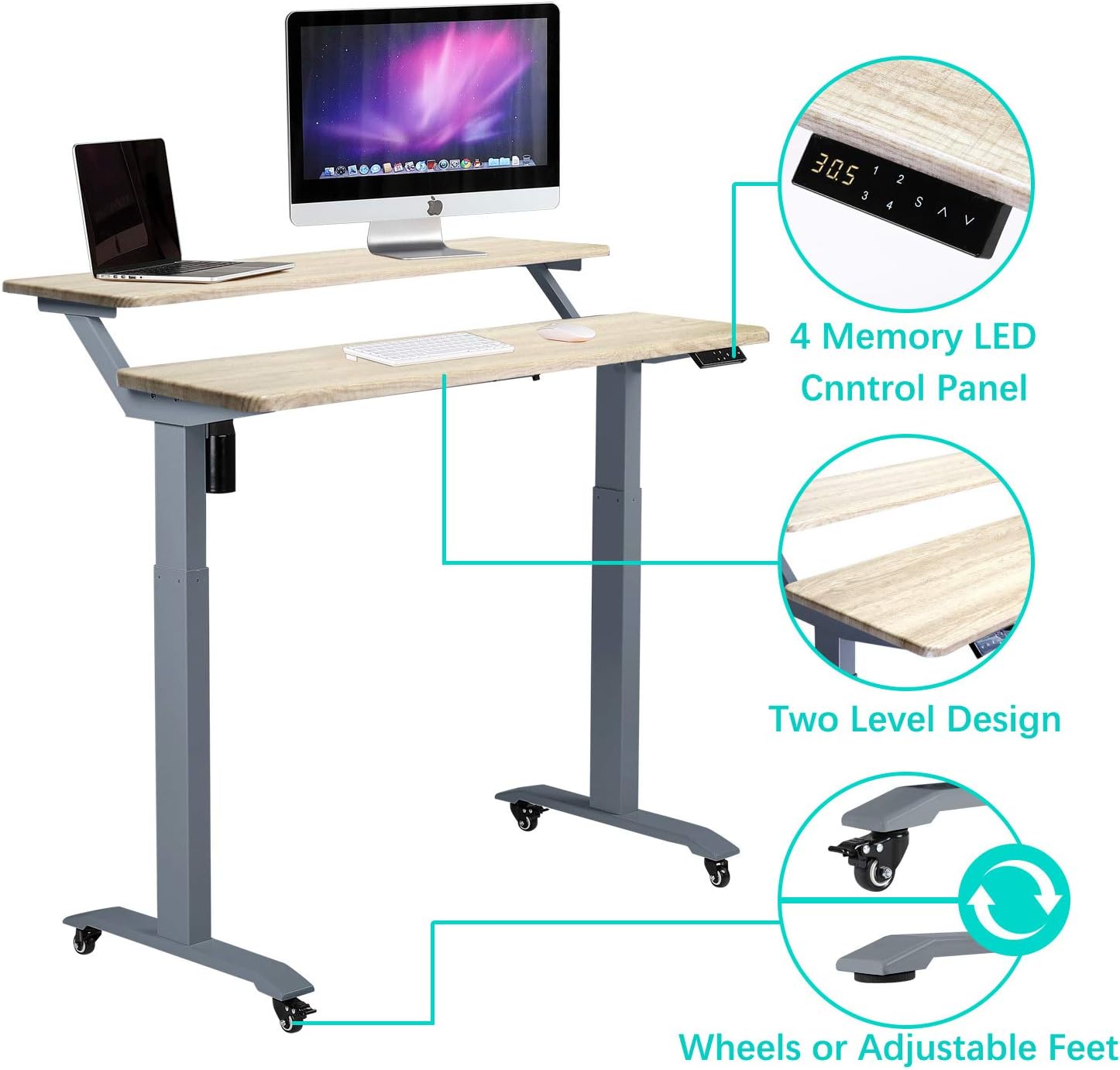
Image: An illustration highlighting the 4-memory LED control panel, the two-level design, and the option for wheels or adjustable feet.

Image: A diagram illustrating the adjustable height range of the desk (30.5-53.2 inches) and how it accommodates users of different heights for ergonomic posture.

Image: An illustration demonstrating the ergonomic benefits of the desk, showing proper back and neck alignment when using the desk in a standing position.
4. Maintenance
Regular maintenance ensures the longevity and optimal performance of your UNICOO standing desk.
- Cleaning: Wipe the desk surfaces with a soft, damp cloth. Avoid using harsh chemicals, abrasive cleaners, or solvents, as these can damage the finish.
- Inspecting Connections: Periodically check all screws and bolts to ensure they remain tight. Re-tighten if necessary.
- Cable Management: Ensure power cords and other cables are neatly managed and do not interfere with the desk's movement or pose a tripping hazard.
- Motor Care: Keep the motor and lifting columns free from dust and debris. Do not attempt to lubricate the motor or internal mechanisms.

Image: A close-up view of the desk's rounded edge, illustrating the smooth finish and construction quality.
5. Troubleshooting
If you encounter issues with your UNICOO Electric Standing Desk, refer to the following common troubleshooting steps:
- Desk Not Moving:
- Check if the power cord is securely plugged into both the desk and a working power outlet.
- Ensure no cables are pinched or obstructing the lifting mechanism.
- If the motor has been used continuously, it might be in overheat protection mode. Allow it to cool down for 20-30 minutes before trying again.
- Uneven Movement or Noise:
- Verify that the desk is on a level surface.
- Check all assembly fasteners to ensure they are tight. Loose connections can cause instability.
- Ensure the weight on the desk is evenly distributed and does not exceed the maximum capacity.
- Control Panel Not Responding:
- Unplug the desk from the power outlet for 10 seconds, then plug it back in to reset the system.
- If the issue persists, contact customer support for further assistance.
6. Specifications
| Feature | Detail |
|---|---|
| Brand | UNICOO |
| Model Number | KT1002 |
| Product Dimensions (D x W x H) | 24"D x 47.24"W x 30"H |
| Color | Gray Oak Top/Gray Legs |
| Top Material Type | Engineered Wood |
| Base Material | Alloy Steel |
| Item Weight | 55 Pounds |
| Minimum Height | 30 Inches |
| Maximum Height | 48 Inches (Note: Marketing materials indicate up to 53.2 inches, refer to actual product for precise range) |
| Maximum Weight Recommendation | 225 Pounds |
| Special Features | Adjustable Height, Electric, Rolling Desk, Dual-Tier Design |
| Required Assembly | Yes |
7. Warranty and Support
Your UNICOO Electric Height Adjustable 2-Tier Standing Desk comes with a warranty. Please refer to the warranty documentation included with your product for specific terms and conditions, including coverage details and duration. The manufacturer provides an extended combination warranty.
For technical assistance, missing parts, or warranty claims, please contact UNICOO customer support through the retailer where the product was purchased or visit the official UNICOO website for contact information.