
1. Introduction
The Helix V Twelve DSP is a high-performance 12-channel power amplifier with an integrated 14-channel digital signal processor (DSP), designed to deliver exceptional audio quality and precise sound customization for automotive applications. This manual provides essential information for the proper installation, operation, and maintenance of your V Twelve DSP.

Figure 1: Helix V Twelve DSP Amplifier - Top View. This image displays the sleek, black brushed aluminum casing of the amplifier, with the brand and model name prominently displayed on the top surface.
2. Key Features
- 12-Channel Power Amplifier: Provides ample power for a comprehensive multi-speaker setup.
- 14-Channel DSP: Integrated digital signal processor for precise audio tuning and optimization.
- Electronic Component Amplifier: Utilizes high-quality electronic components for superior sound reproduction.
3. Setup and Installation
Before beginning installation, ensure the vehicle's battery is disconnected. Always follow local regulations and safety guidelines. Professional installation is recommended.
3.1 Connections Overview

Figure 2: Helix V Twelve DSP - Input Side. This image details the various input terminals including USB, control input, optical input, high-level inputs (A-L), line inputs (A-F), and the gain adjustment knob with clip indicator.
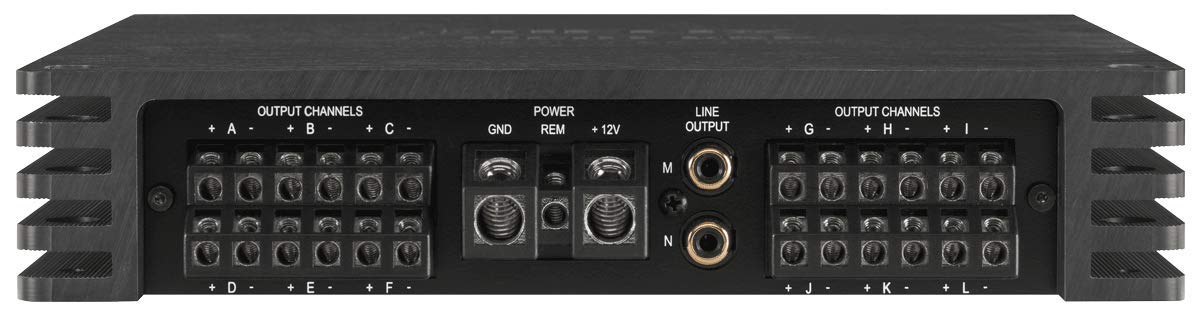
Figure 3: Helix V Twelve DSP - Output Side. This image shows the power input terminals (GND, REM, +12V), line output connections (M, N), and the twelve output channels (A-L) for speaker connections.
3.2 Power Connection
- GND (Ground): Connect to a clean, unpainted metal point on the vehicle chassis. Ensure a solid, low-resistance connection.
- REM (Remote): Connect to the remote turn-on output of your head unit or a switched 12V source.
- +12V (Power): Connect directly to the positive terminal of the vehicle's battery via a fused power cable. The fuse should be located within 30 cm (12 inches) of the battery.
3.3 Audio Input Connections
- High-Level Input: Connect to the speaker outputs of your factory or aftermarket head unit.
- Line Input: Connect to the RCA pre-out connections of your head unit.
- Optical Input: For digital audio signals from compatible sources.
3.4 Audio Output Connections
- Output Channels (A-L): Connect your speakers to these terminals. Ensure correct polarity for each speaker.
3.5 Control Connections
- USB: Connect to a computer for DSP configuration using the dedicated software.
- Control Input: For connecting optional remote controls or accessories.
4. Operating Instructions
Once installed, the V Twelve DSP requires configuration via a computer to optimize its audio performance for your specific vehicle and speaker setup.
4.1 DSP Configuration
Connect the amplifier to a computer via the USB port. Install the Helix DSP PC-Tool software (available from the manufacturer's website). This software allows you to adjust all DSP parameters, including equalization, crossovers, time alignment, and input/output routing.
4.2 Gain Adjustment
The GAIN knob adjusts the input sensitivity of the amplifier. Set the gain to match the output voltage of your head unit. The CLIP indicator LED will illuminate if the input signal is too high, indicating distortion. Adjust the gain until the CLIP LED only flashes briefly on peak signals, or remains off for optimal sound quality.
5. Maintenance
The Helix V Twelve DSP is designed for reliable operation with minimal maintenance. Keep the unit clean and free from dust and debris. Use a soft, dry cloth for cleaning. Do not use liquid cleaners or solvents. Ensure adequate ventilation around the amplifier to prevent overheating.
6. Troubleshooting
- No Power: Check all power connections (+12V, GND, REM). Verify the fuse in the power cable. Ensure the remote turn-on signal is present.
- No Sound: Check all audio input and output connections. Verify DSP settings (input routing, mute functions). Ensure speakers are correctly wired and functional.
- Distorted Sound: Reduce the input gain. Check for proper grounding. Ensure speaker impedance matches amplifier specifications. Verify DSP settings for clipping or excessive equalization.
- Protection Mode: If the amplifier enters protection mode (indicated by a status LED), check for short circuits in speaker wiring, overheating (ensure proper ventilation), or excessively low impedance loads.
7. Technical Specifications
| Specification | Value |
|---|---|
| Brand | Helix |
| Model Number | V-TWELVE-DSP |
| Manufacturer | Helix/Match |
| Voltage | 6 Volt (Operating Voltage Range) |
| Mounting Type | Freestanding |
| ASIN | B087LRPWZJ |
| First Available on Amazon.de | April 23, 2020 |
8. Warranty and Support
This product comes with a manufacturer's warranty. Please refer to the warranty card included with your product or visit the official Helix website for detailed warranty terms and conditions. For technical support, troubleshooting assistance, or service inquiries, please contact your authorized Helix dealer or the manufacturer's customer support.
Keep your purchase receipt as proof of purchase for warranty claims.


