
Introduction
The smartmi Evaporative Humidifier is designed to provide comfortable humidity levels in your home without producing mist or white residue. Utilizing natural evaporative humidification, it is suitable for various rooms including bedrooms, living rooms, and baby rooms. This manual provides essential information for the safe and efficient operation, maintenance, and troubleshooting of your humidifier.

Image: The smartmi Evaporative Humidifier, a sleek white unit, with water being poured into its top opening, demonstrating the top-fill feature.

Image: The smartmi Evaporative Humidifier displayed alongside logos for design awards, highlighting its aesthetic and functional recognition.
Safety Information
Please read all safety instructions carefully before using the appliance. Failure to follow these instructions may result in electric shock, fire, or serious injury.
- Always place the humidifier on a firm, flat, water-resistant surface.
- Do not place the humidifier near heat sources or in direct sunlight.
- Do not add essential oils, perfumes, or any chemical substances to the water tank, as this may damage the unit and void the warranty.
- Ensure the electrical components in the top part are kept separate from the water tank to maintain safety.
- Unplug the humidifier before cleaning or refilling.
- Keep out of reach of children and pets.
- Do not block the air inlets or outlets.
- The unit features an automatic shut-off if the top is separated from the water tank for enhanced safety.
Product Overview and Components
Familiarize yourself with the different parts of your smartmi Evaporative Humidifier.

Image: A detailed diagram showing the disassembled smartmi Evaporative Humidifier, labeling its main components: Control Panel, Exhaust/Water Refilling Port, Upper Casing, Evaporating Basin, 4L Water Tank, and Lower Casing.
- Upper Casing: Contains the control panel, fan, and electrical components.
- Control Panel: Buttons and indicators for operation.
- Exhaust/Water Refilling Port: Where humidified air exits and water is added.
- Evaporating Basin: Houses the evaporating elements and collects water.
- 4L Water Tank: The main reservoir for water.
- Lower Casing: The base of the unit.
Setup
Follow these steps for initial setup of your humidifier:
- Unpack: Carefully remove all components from the packaging.
- Placement: Place the humidifier on a flat, stable surface away from walls and furniture to allow for proper air circulation.
- Fill Water Tank:
The smartmi humidifier supports both top filling and water tank filling.
- Top Filling: Pour clean tap water directly into the exhaust/water refilling port on the top of the unit.
- Water Tank Filling: Separate the upper casing from the lower casing. Fill the 4L water tank directly with clean tap water. Ensure the evaporating basin is properly seated before reattaching the upper casing.
Do not exceed the maximum water level indicator. Do not add essential oils or hot water.
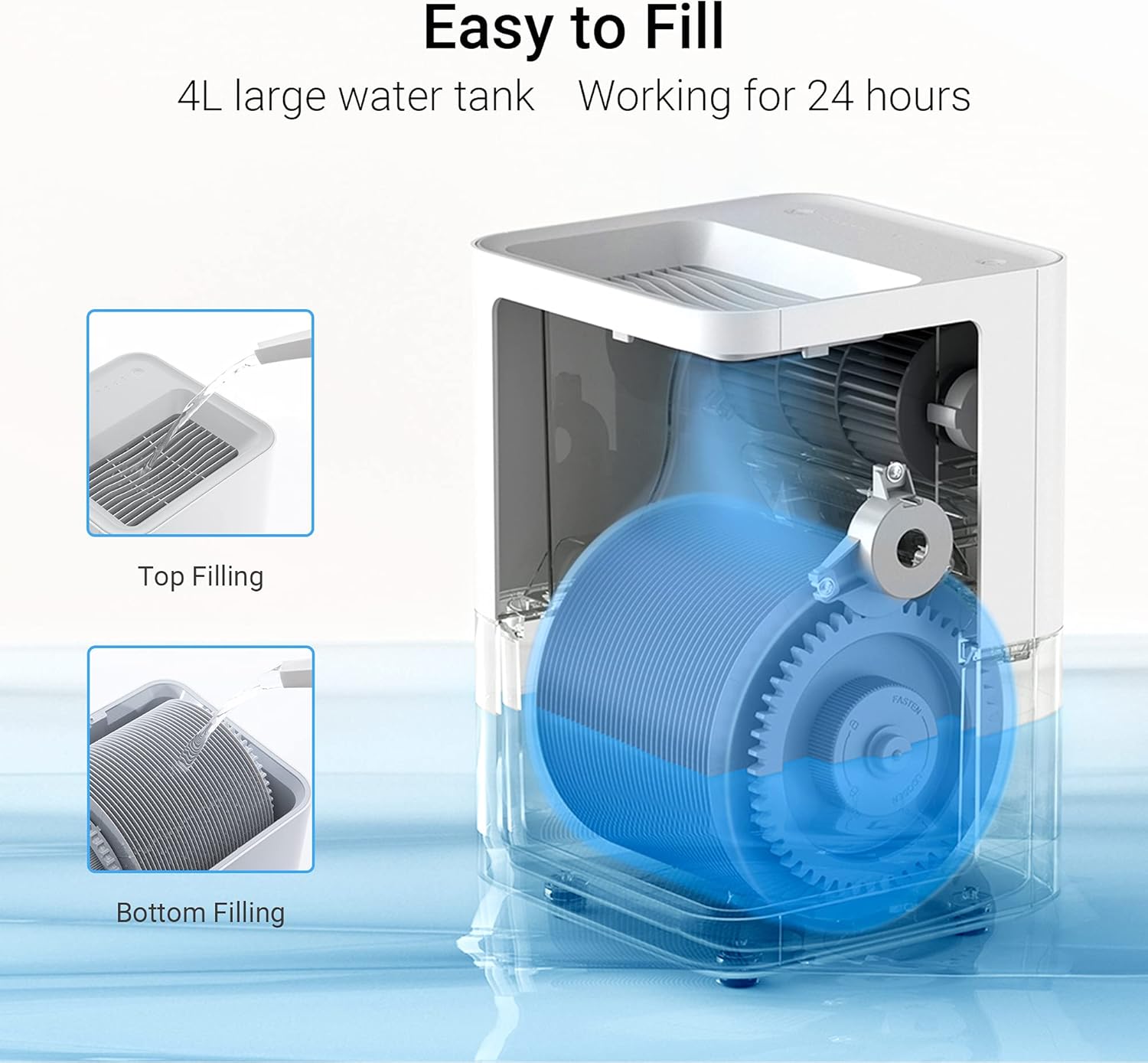
Image: A visual guide illustrating two methods for filling the humidifier: directly pouring water into the top (Top Filling) and filling the water tank after separating the upper casing (Bottom Filling).
- Connect Power: Plug the power cord into a suitable electrical outlet.
Operating Instructions
Your smartmi Evaporative Humidifier offers intuitive controls and smart app connectivity.

Image: A top-down view of the smartmi humidifier's control panel, highlighting the Water Level Indicator lights and the Power/Mode Button.
Control Panel Operation:
- Power On/Off: Press the Power/Mode button to turn the unit on or off.
- Mode Selection: Press the Power/Mode button repeatedly to cycle through different operating modes (e.g., Auto, Manual speeds).
- Water Level Indicator: The light panel on the control panel indicates the current water level in the tank.
Smart App Control:
The smartmi humidifier can be controlled via a dedicated mobile application, offering advanced features and remote control.
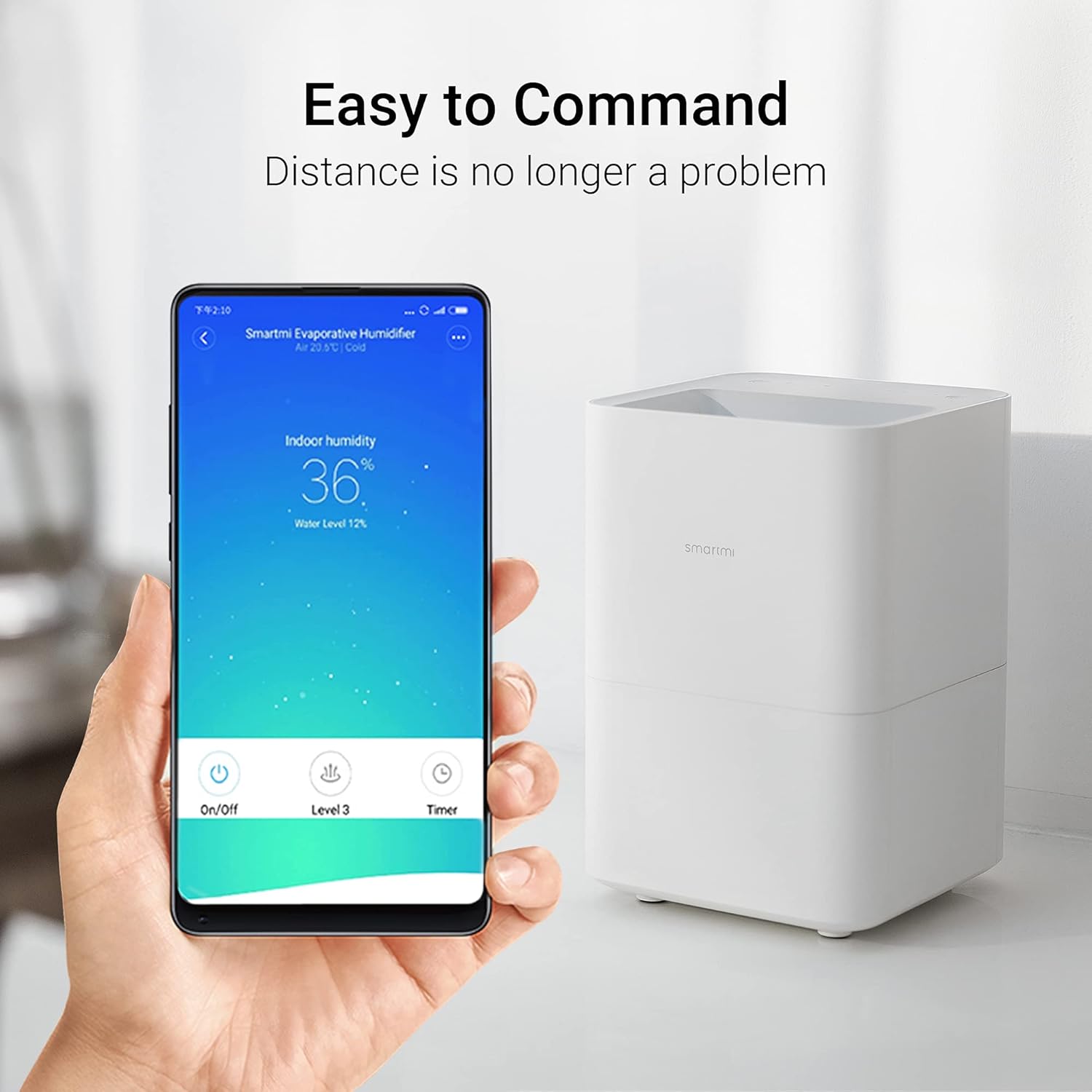
Image: A hand holding a smartphone displaying the smartmi app interface, showing indoor humidity, water level, and control options like On/Off, Level, and Timer, next to the humidifier unit.
- Download App: Download the smartmi app from your device's app store.
- Pair Device: Follow the in-app instructions to pair your humidifier with your smartphone.
- Features: Through the app, you can:
- Monitor indoor humidity and water level.
- Adjust fan speed and operating modes.
- Set timers and schedules.
- Access additional automation controls based on humidity or temperature.
Note: The app's humidity reading may be higher than an external hygrometer due to the sensor's proximity to the humidifier. For precise room humidity, use a separate hygrometer.
Quiet Operation:
The smartmi humidifier operates at a low noise level of 34dB, ensuring minimal disturbance, even during sleep.

Image: A person sleeping peacefully in a bedroom with the smartmi humidifier on a bedside table, emphasizing its quiet operation. Icons for Low Noise, Light On/Off, and 24 Hours are displayed.
Maintenance
Regular cleaning is crucial for maintaining the performance and longevity of your smartmi humidifier and ensuring healthy air quality. It is strongly recommended to clean the humidifier once a week if used frequently.
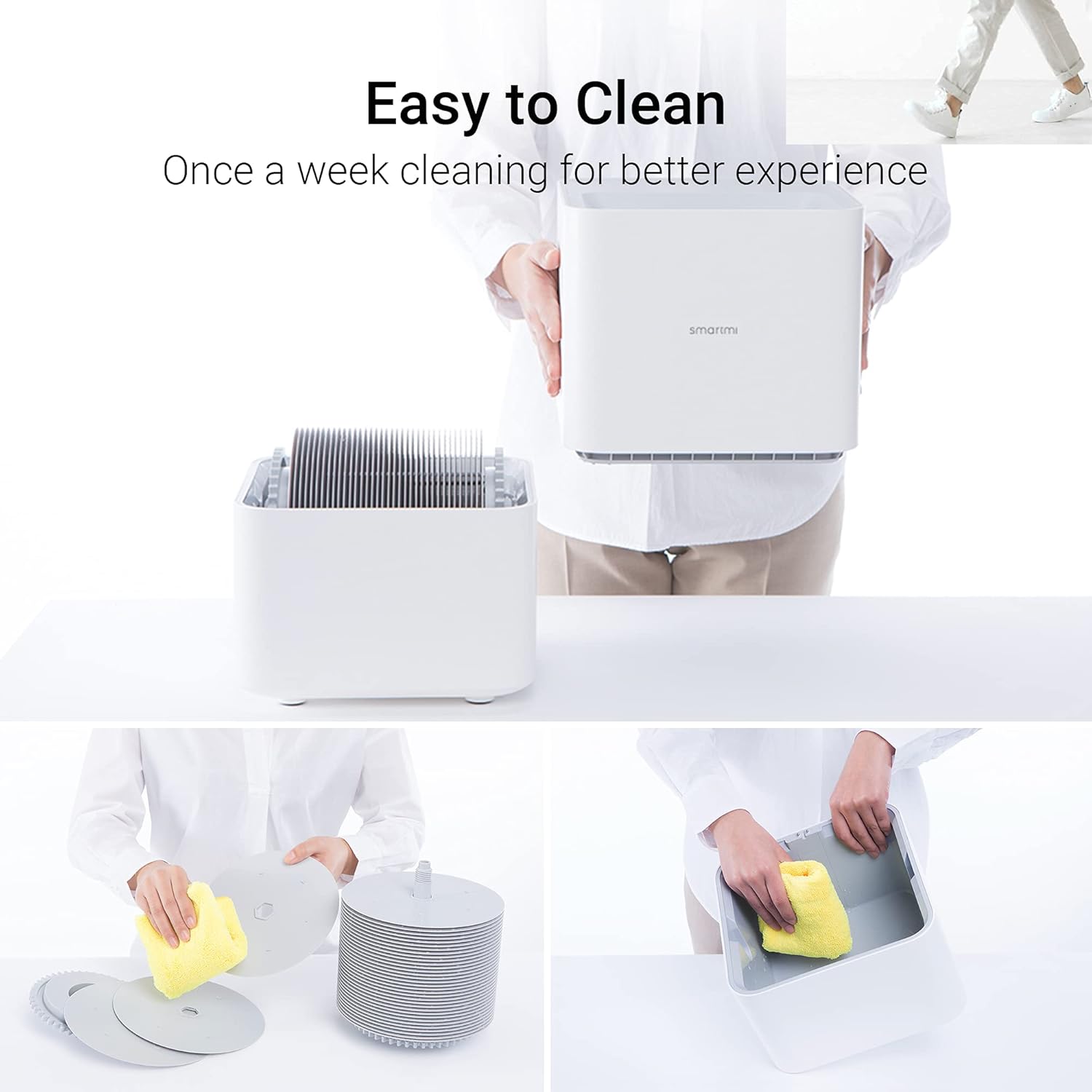
Image: A series of images demonstrating the ease of cleaning the smartmi humidifier, showing the separation of components and wiping down the water tank and evaporating basin with a cloth.
- Daily Water Change: To prevent mineral deposits and bacterial growth, drain the reservoir entirely and refill with fresh water daily, or at least every other day.
- Weekly Cleaning (Water Tank & Evaporating Basin):
- Unplug the humidifier and separate the upper and lower casings.
- Empty any remaining water from the water tank and evaporating basin.
- Add a splash of household vinegar to the empty water reservoir. Use a clean micro cloth to thoroughly wipe the reservoir to remove built-up mineral deposits. The surface should feel smooth.
- Rinse thoroughly with clean water.
- For deeper cleaning, add about a cup of household vinegar to the reservoir, fill halfway with water, reassemble the unit, and let it run for about 15 minutes. Vent the area or take the unit outside to avoid vinegar fumes.
- Drain the vinegar solution, rinse the reservoir, and fill with clean water. Run for another 15 minutes, then drain and rinse again.
- To remove any residual vinegar smell, add a half cup of baking soda (dissolved in a gallon of water) to the reservoir, fill halfway, and run for 15 minutes. Drain, rinse, and run with clean water again.
- Wipe the upper drive gear with vinegar occasionally to prevent mineral buildup.
- Periodic Disinfection (Optional): Every once in a while, you may add a teaspoon of bleach to a gallon of water. Use half of this solution in the machine, run for about 15 minutes, then fill to the line and run for another 15 minutes. Ensure proper ventilation. Follow with a baking soda rinse to neutralize odors.
- Drying: Allow all parts to air dry completely before reassembling or storing the humidifier.
Troubleshooting
If you encounter issues with your smartmi Evaporative Humidifier, refer to the following common problems and solutions:
| Problem | Possible Cause | Solution |
|---|---|---|
| Humidifier not turning on. | No power; unit not assembled correctly. | Check power connection. Ensure upper and lower casings are securely connected. |
| No mist or low humidity output. | This is a no-mist evaporative humidifier; low water level; dirty evaporating basin/elements. | This unit does not produce mist. Check water level and refill if necessary. Clean the evaporating basin and elements as per maintenance instructions. Ensure room door is closed for optimal performance. |
| Unit beeps and indicates empty tank when full. | Water level sensor malfunction or obstruction. | Clean the water tank and sensor area thoroughly. If the issue persists, contact customer support. |
| Unpleasant odor from humidifier. | Stagnant water or bacterial growth. | Perform a thorough cleaning of the water tank and evaporating basin, including the vinegar and baking soda steps. Change water daily. |
| Grinding noise during operation. | Mineral buildup on driving wheels/gears. | Clean the driving wheels and gears, especially the upper gear, with vinegar to remove mineral deposits. |
Specifications
| Feature | Detail |
|---|---|
| Brand | smartmi |
| Model Name | CJXJSQ02ZM (air humidifier, evaporative humidifier) |
| Special Feature | App Control, Quiet, Auto Shut Off |
| Color | White |
| Filter Type | Wick |
| Operation Mode | Evaporative |
| Product Dimensions (D x W x H) | 9.5"D x 9.5"W x 14.3"H |
| Item Weight | 9.48 pounds |
| Room Type | Bedroom (suitable for home, large room, baby room) |
| Water Tank Capacity | 4 Liters |
| Humidification Rate | Up to 240ml/hour |
| Noise Level | 34dB |
| Wattage | 8 watts |
| Control Method | App, Manual Buttons |
| UPC | 717390359099, 717390359105 |
| Date First Available | April 23, 2020 |
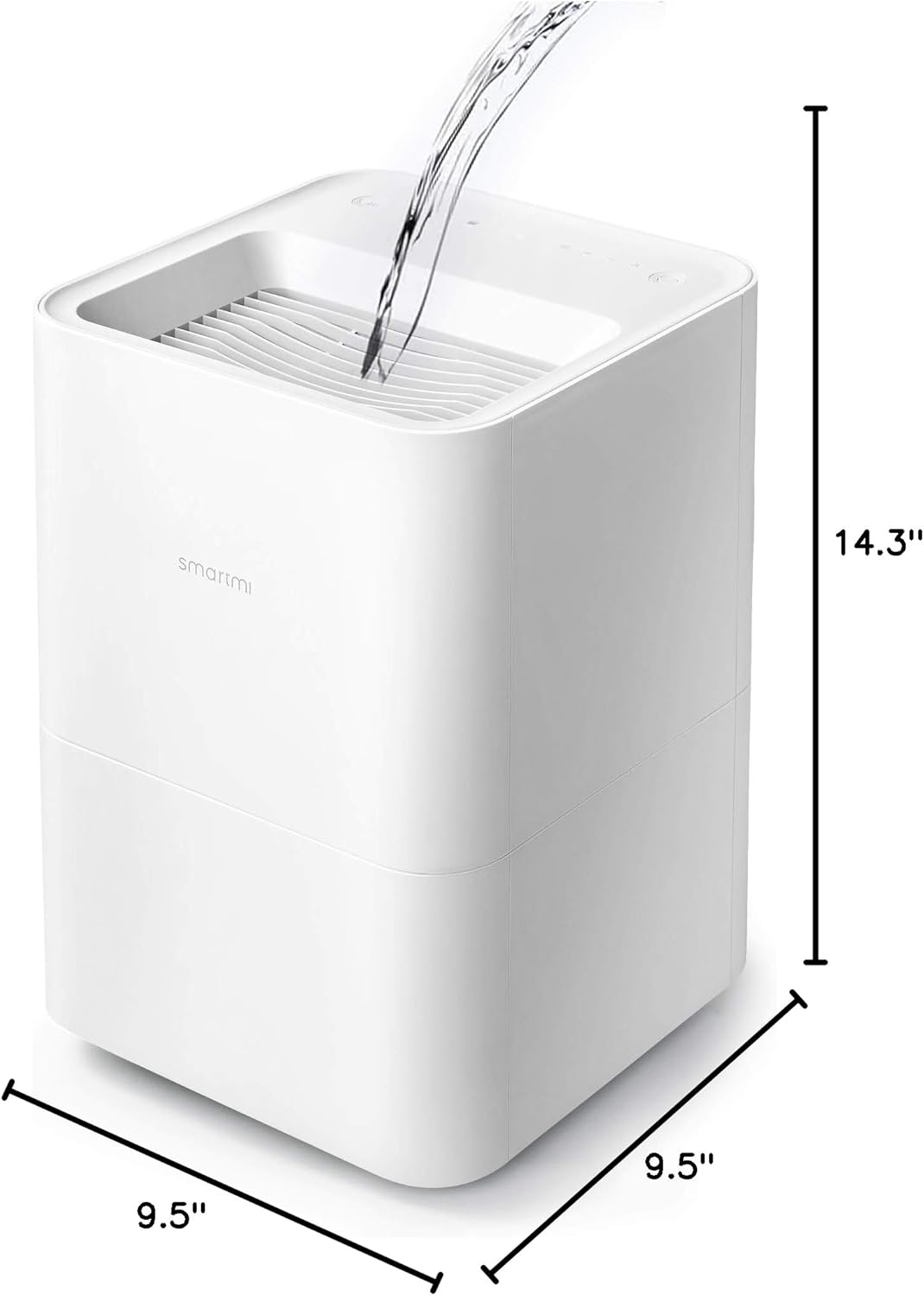
Image: The smartmi Evaporative Humidifier with its dimensions clearly marked: 9.5 inches (depth), 9.5 inches (width), and 14.3 inches (height).
Warranty and Support
The smartmi Evaporative Humidifier comes with a 1-Year Warranty from the date of purchase. This warranty covers defects in materials and workmanship under normal use.
For warranty claims, technical support, or any questions regarding your product, please contact smartmi customer service. You can typically find contact information on the smartmi official website or through your purchase platform.
Please have your model number (CJXJSQ02ZM) and proof of purchase ready when contacting support.


