
Product Overview
The Moto G Power (2020) is an unlocked smartphone designed for freedom and extended use. It features a powerful 5000 mAh battery, offering up to three full days on a single charge. Capture diverse moments with its versatile 16 MP triple camera system, including ultra-wide angle, portrait, and close-up shots. Enjoy immersive entertainment on its 6.4-inch Max Vision Full HD+ display and dual stereo speakers tuned by Dolby. The device ensures responsive performance with an octa-core processor and 4 GB of RAM.

Image: Front view of the Moto G Power (2020) smartphone, displaying the home screen.
Setup Guide
To begin using your Moto G Power (2020), follow these steps for initial setup:
- Insert SIM Card: Locate the SIM card tray on the side of the device. Use the included SIM ejector tool to open the tray. Carefully place your Nano SIM card into the tray, ensuring it is correctly oriented. If using a microSD card for expanded storage, insert it into the designated slot on the same tray. Gently push the tray back into the phone until it clicks into place.
- Power On: Press and hold the Power button (located on the right side of the phone) until the Motorola logo appears on the screen.
- Initial Configuration: Follow the on-screen prompts to select your preferred language, connect to a Wi-Fi network, and sign in with your Google account. If you do not have a Google account, you will be prompted to create one.
- Complete Setup: Continue following the instructions to set up security features (such as fingerprint unlock or PIN), review privacy settings, and customize your device preferences.

Image: Side view of the Moto G Power (2020) showing the SIM card tray and buttons.
Operating Your Device
The Moto G Power (2020) runs on the Android operating system, offering an intuitive user experience.
- Home Screen Navigation: The home screen displays app icons and widgets. Swipe up from the bottom of the screen to access the app drawer, which contains all installed applications.
- Notifications and Quick Settings: Swipe down from the top of the screen to view notifications and access quick settings toggles (Wi-Fi, Bluetooth, etc.).
- Camera Usage: Open the Camera app from your home screen or app drawer. Frame your shot using the display and tap the capture button to take a photo. You can switch between photo, video, and other modes like Portrait or Wide Angle within the app.
- Accessing Settings: Tap the 'Settings' icon in your app drawer to customize various aspects of your phone, including network connections, display, sound, security, and app management.

Image: The Moto G Power (2020) displaying its vibrant home screen with various app icons.
Maintenance and Care
Proper care ensures the longevity and optimal performance of your Moto G Power (2020).
- Battery Care: The device features a 5000 mAh battery designed for extended use. To maximize battery life, avoid extreme temperatures, use the provided Turbo Charger, and manage background app usage.
- Physical Care: Keep your phone clean by gently wiping it with a soft, dry cloth. Avoid exposing it to excessive moisture or harsh chemicals. Consider using a protective case and screen protector to prevent physical damage.
- Software Updates: Regularly check for and install software updates to ensure your device has the latest features, security patches, and performance improvements.
Troubleshooting Common Issues
Here are solutions for some common issues reported by users:
- Screen Issues (e.g., unresponsive areas, lines): If you experience unresponsive areas on the keyboard or unusual lines on the screen, try restarting your device. If the issue persists, ensure your software is up to date. A factory reset may be necessary as a last resort, but back up your data first.
- Poor Speakerphone Quality: Some users have reported issues with speakerphone sound quality. Ensure there are no obstructions to the microphone or speaker. Try adjusting the volume during a call. If the problem continues, it might indicate a hardware issue.
- Performance Lag: If the phone feels slow or apps are lagging, especially after extended use, try clearing the cache of frequently used apps or performing a soft reset. Regularly uninstall unused apps and ensure sufficient storage space is available.
Technical Specifications
| Feature | Specification |
|---|---|
| Model Number | XT2041 |
| Product Dimensions | 6 x 4 x 2 inches |
| Item Weight | 7 ounces |
| Operating System | Android |
| RAM | 4 GB |
| Memory Storage Capacity | 64 GB (expandable via microSD) |
| Screen Size | 6.4 Inches Max Vision Full HD+ |
| Resolution | 1920 x 1080 |
| CPU Model | Snapdragon (Octa-core) |
| CPU Speed | 2 GHz |
| Battery Capacity | 5000 Milliamp Hours |
| Phone Talk Time | 72 Hours |
| Charging Time | 2 Hours (with Turbo Charger) |
| Rear Camera | 16 MP Triple Camera System |
| Front Camera | Yes |
| Audio Jack | 3.5 mm |
| Connectivity | 4G, Wi-Fi, Bluetooth 5.0 |
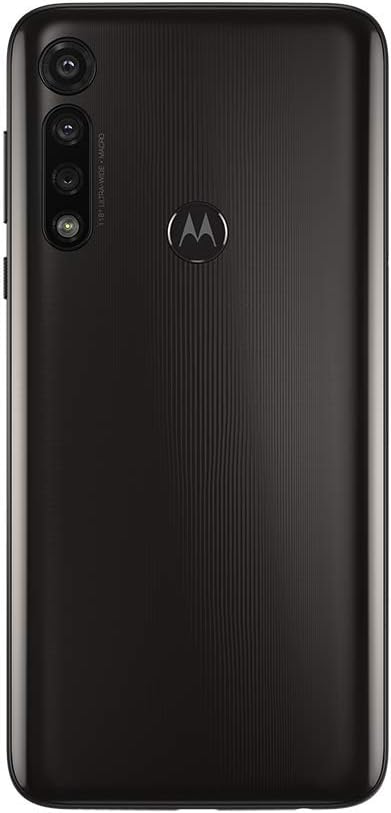
Image: Back view of the Moto G Power (2020) showing the triple camera system and Motorola logo.
Warranty & Support
Your Motorola Moto G Power (2020) is covered by Motorola's standard manufacturer warranty. For detailed information regarding warranty terms, conditions, and duration, please refer to the warranty card included in your product packaging or visit the official Motorola support website.
For technical assistance, troubleshooting, or service requests, please contact Motorola Customer Support. You can find contact information (phone numbers, chat support, and online resources) on the Motorola website or through the 'Device Help' app on your smartphone.


