
1. Introduction
Thank you for choosing the SURKER SK-755 Cordless Hair Clipper. This professional grooming tool is designed for precise hair and beard trimming, offering convenience and versatility. Please read this manual thoroughly before first use to ensure safe and effective operation.
Package Contents:
- 1 x SURKER SK-755 Hair Clipper
- 1 x USB Charging Cable
- 4 x Guide Combs (1mm, 2mm, 3mm, 4mm)
- 1 x Cleaning Brush
- 1 x User Manual
2. Safety Information
To reduce the risk of electric shock, injury, or damage, always follow these basic safety precautions:
- Do not use near water: Never operate the appliance near bathtubs, showers, basins, or other vessels containing water.
- Avoid use during charging: Do not use the clipper while it is connected to the charger.
- Sharp blades: Handle the blades with caution to prevent injuries.
- Children and pets: Keep the appliance out of reach of children and pets.
- Proper cleaning: Regularly clean and maintain the blades to ensure safe and hygienic operation.
- Power source: Only use the provided USB charging cable. Ensure the power adapter (not included) meets local safety standards.
- Damage inspection: Do not use the clipper if it is damaged, dropped, or if the charging cable is frayed. Contact customer support for assistance.
3. Product Overview
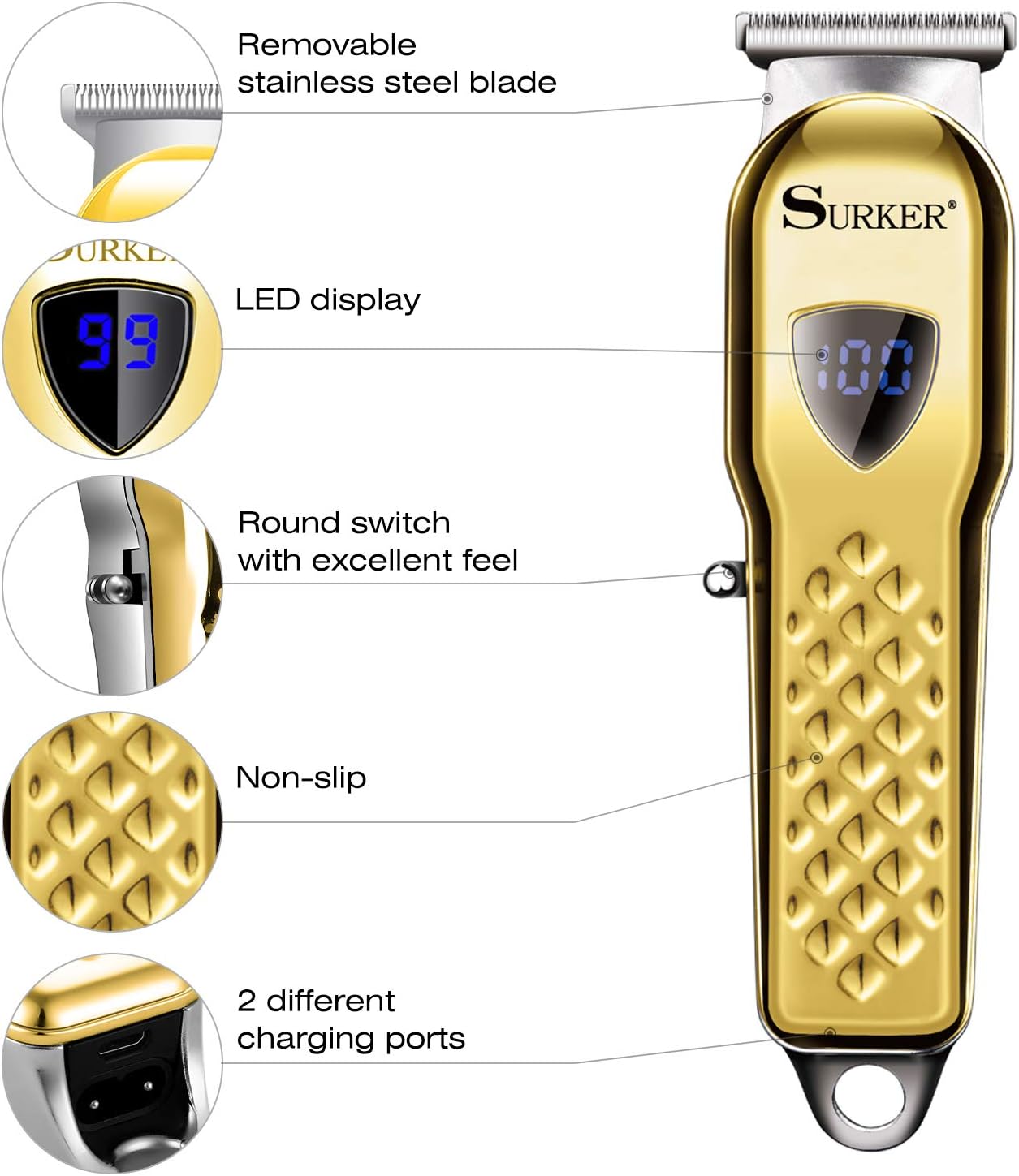
The SURKER SK-755 features a durable design with advanced cutting technology for a smooth grooming experience.
Key Features:
- Precision Stainless Steel Blades: Designed for sharp, close cuts without pulling hair.
- LED Display: Shows battery capacity and charging status.
- Ergonomic Design: Streamlined body with a non-slip grip for comfortable handling.
- Cordless Operation: Rechargeable battery provides up to 2 hours of runtime.
- Multiple Charging Ports: Offers flexibility for charging.

4. Setup
4.1 Charging the Clipper
- Ensure the clipper is switched off before charging.
- Connect the USB charging cable to the charging port on the clipper.
- Plug the other end of the USB cable into a compatible USB power source (e.g., computer, wall adapter).
- The LED display will indicate the charging status. A full charge takes approximately 2.5 hours and provides up to 2 hours of cordless operation.
4.2 Attaching Guide Combs
The clipper comes with 4 guide combs (1mm, 2mm, 3mm, 4mm) to achieve different hair lengths.
- Select the desired guide comb.
- Align the comb with the clipper blade and push it firmly until it clicks into place.
- To remove, gently pull the comb away from the blade.

5. Operating Instructions
5.1 General Hair Trimming
- Ensure hair is clean and dry before trimming.
- Attach the desired guide comb for the desired hair length.
- Turn on the clipper using the power switch.
- Hold the clipper with the blade flat against the hair and move it slowly against the direction of hair growth.
- For an even cut, use consistent pressure and speed.

5.2 Precision Trimming and Edging
For detailed work, such as outlining, edging, or creating designs, remove the guide comb.
- Carefully remove the guide comb.
- Hold the clipper at a slight angle, using only the edge of the blade for precise lines.
- Move the clipper slowly and deliberately to create desired shapes and edges.

6. Maintenance
6.1 Cleaning the Blades
Regular cleaning ensures optimal performance and hygiene.
- Turn off the clipper and disconnect it from any power source.
- Remove the guide comb.
- To remove the cutter head: Push with two thumb fingers to take off the cutting blade. (Refer to Figure 6).
- Use the provided cleaning brush to remove loose hairs from the blades and the clipper body.
- The blades are water-resistant. You can rinse the detached blade under running water. Ensure the blade is completely dry before reattaching. Do not immerse the entire clipper body in water.
- Reattach the cutter head by aligning it and pushing until it clicks into place.

6.2 Blade Lubrication (Optional)
For prolonged blade life and smooth operation, apply a small drop of clipper oil (not included) to the blades after every few uses, especially after rinsing with water. Turn on the clipper for a few seconds to distribute the oil.
6.3 Storage
Store the clipper in a cool, dry place, away from direct sunlight and moisture. Ensure the clipper is clean and dry before storing.
7. Troubleshooting
If you encounter issues with your SURKER SK-755 Hair Clipper, refer to the following common problems and solutions:
- Clipper not turning on:
- Ensure the battery is charged. Check the LED display for battery level.
- Verify the power switch is fully engaged.
- Poor cutting performance or pulling hair:
- Clean the blades thoroughly to remove any trapped hair or debris.
- Ensure the blades are properly lubricated.
- The blades may be dull. Consider replacing the blade assembly if available, or contact customer support.
- Battery not charging:
- Check if the USB charging cable is securely connected to both the clipper and the power source.
- Try a different USB power adapter or port.
- Ensure the charging cable is not damaged.
- Excessive noise or vibration:
- Ensure the blade assembly is correctly attached and secured.
- Clean and lubricate the blades.
If the problem persists after trying these solutions, please contact customer support.
8. Specifications
| Feature | Specification |
|---|---|
| Model Number | SK-755 |
| Power Source | Battery Powered |
| Battery Type | Rechargeable (1 A included) |
| Charging Time | Approx. 2.5 hours |
| Operating Time | Approx. 2 hours |
| Blade Material | Stainless Steel |
| Product Dimensions (L x W x H) | 5 x 16 x 20 cm |
| Product Weight | 522 grams |
| Included Components | Hair clipper, cleaning brush, 4 guide combs, USB charging cable, instructions |
9. Warranty and Support
Warranty information for the SURKER SK-755 Hair Clipper is not explicitly provided in the product details. For specific warranty terms, return policies, or technical support, please refer to the retailer's policy where the product was purchased or contact the manufacturer directly.
Always retain your proof of purchase for any warranty claims or support inquiries.
