
CAT HV0DF-18S
Caterpillar 18" Industrial Oscillating Floor Fan HV0DF-18S User Manual
Model: HV0DF-18S
Introduction
This manual provides essential instructions for the safe and efficient operation, maintenance, and troubleshooting of your CAT HV0DF-18S 18-inch Industrial Oscillating Floor Fan. Please read this manual thoroughly before using the product and retain it for future reference.
The CAT HV0DF-18S is designed for high-velocity air circulation, featuring a heavy-duty motor, metal drum cage, industrial aluminum fan blades, and an adjustable tilt fan cage. It provides up to 4000 CFM of airflow.
Important Safety Information
Always follow basic safety precautions when using electrical appliances to reduce the risk of fire, electric shock, and personal injury.
- Read all instructions before using this fan.
- Ensure the power supply matches the voltage specified on the fan's rating label.
- Do not operate any fan with a damaged cord or plug. Discard fan or return to an authorized service facility for examination and/or repair.
- Do not run cord under carpeting. Do not cover cord with throw rugs, runners, or similar coverings. Arrange cord away from traffic area and where it will not be tripped over.
- To disconnect fan, turn controls to OFF, then remove plug from outlet.
- Do not insert fingers or foreign objects into any ventilation or exhaust opening.
- Do not use outdoors.
- Unplug fan from outlet when not in use, when moving it from one location to another, and before cleaning.
- Use this fan only as described in this manual. Any other use not recommended by the manufacturer may cause fire, electric shock, or injury to persons.
- Do not use this fan near windows, in bathrooms, or in wet locations.
Product Overview
The CAT HV0DF-18S is an 18-inch industrial oscillating floor fan designed for powerful air circulation in various environments.
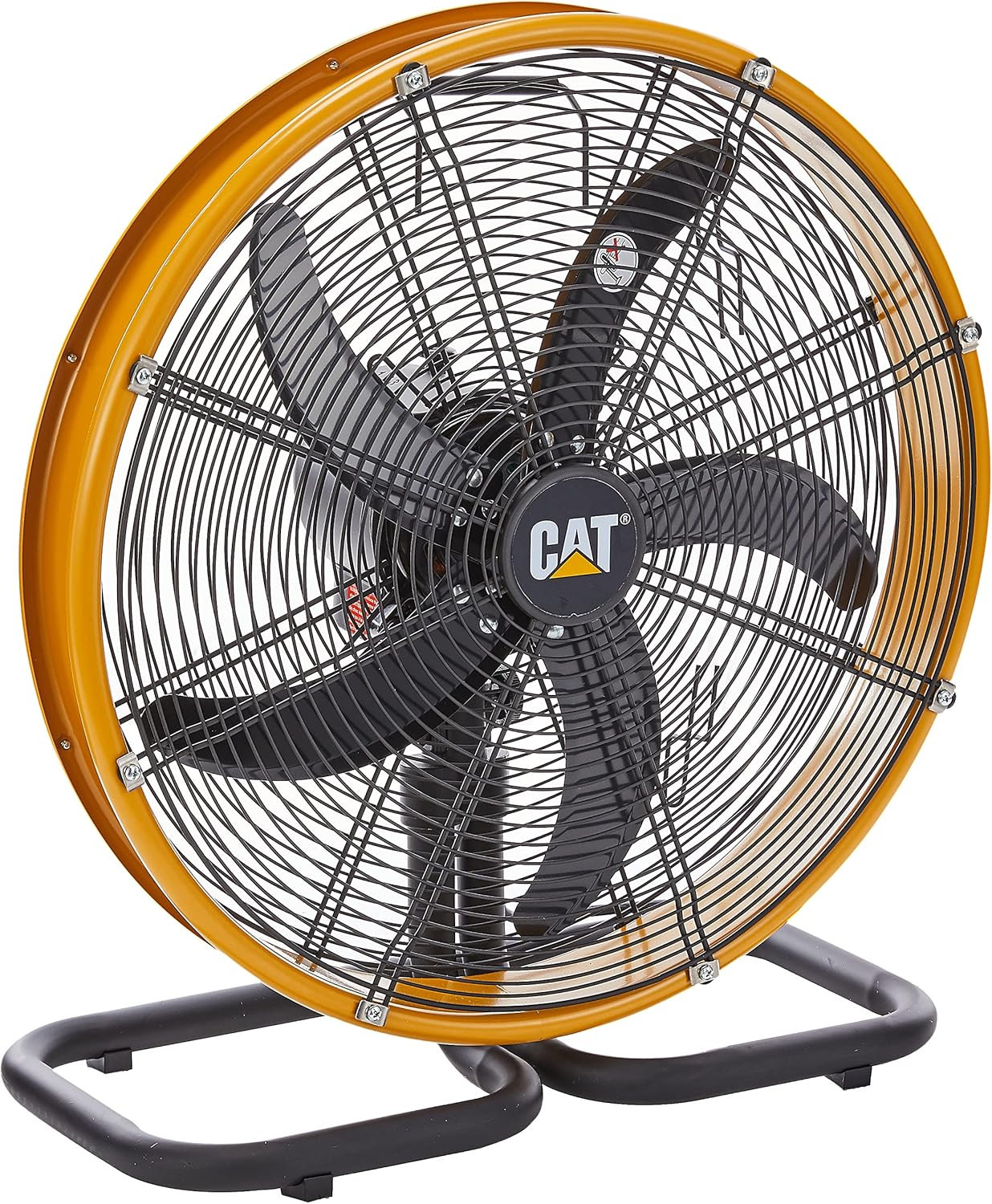
Figure 1: Front view of the CAT HV0DF-18S Industrial Oscillating Floor Fan, showing the yellow fan housing, black blades, and sturdy base.

Figure 2: Angled view of the CAT HV0DF-18S fan, highlighting its robust construction and design.

Figure 3: Rear view of the CAT HV0DF-18S fan, showing the motor housing and the integrated power cord wrap.

Figure 4: Close-up of the rotary speed switch on the CAT HV0DF-18S fan, indicating settings 0 (off), 1, 2, and 3.
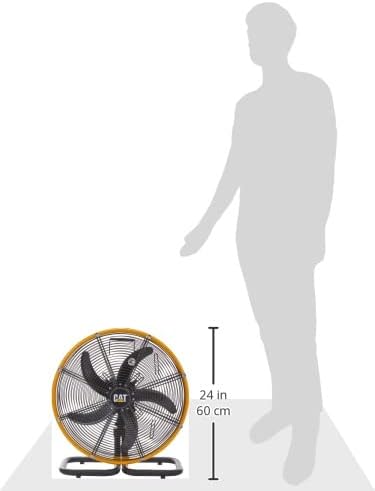
Figure 5: Size comparison of the CAT HV0DF-18S fan next to a person, illustrating its 24-inch (60 cm) height.
Setup
The CAT HV0DF-18S fan typically requires minimal assembly. It is designed for floor mounting and comes with a sturdy steel plate base.
- Unpacking: Carefully remove the fan from its packaging. Inspect for any damage that may have occurred during shipping.
- Placement: Place the fan on a stable, level surface. Ensure there is adequate space around the fan for optimal air circulation and to prevent obstruction of the air intake and exhaust.
- Power Connection: Unwind the 9.5-foot power supply cord. Ensure the fan's speed control is in the "0" (OFF) position before plugging the fan into a standard 220-240V, 50/60Hz electrical outlet.
Operating Instructions
The fan features a rotary speed switch and an adjustable tilt mechanism.
- Power On/Off: To turn the fan ON, rotate the speed control switch (refer to Figure 4) from "0" to your desired speed setting (1, 2, or 3). To turn the fan OFF, rotate the switch back to "0".
- Adjusting Fan Speed:
- Setting 1: Low speed for gentle air movement.
- Setting 2: Medium speed for moderate air circulation.
- Setting 3: High speed for maximum airflow (up to 4000 CFM).
- Adjusting Tilt: The fan cage can be tilted to direct airflow upwards or downwards. Loosen the adjustment knobs on the sides of the fan cage, adjust the angle as desired, and then securely tighten the knobs.
- Oscillation: The fan is designed with an oscillating function to distribute air across a wider area. The oscillation mechanism operates automatically when the fan is running.
Maintenance
Regular maintenance ensures optimal performance and extends the lifespan of your fan.
- Cleaning:
- Always unplug the fan from the power outlet before cleaning.
- Use a soft, damp cloth to wipe the exterior surfaces of the fan. Do not use abrasive cleaners or solvents.
- To clean the fan blades, the front grille may need to be removed. Refer to the assembly instructions (if applicable) for safe removal and reattachment. Use a soft brush or vacuum cleaner to remove dust and debris from the blades and grille.
- Ensure all parts are completely dry before plugging the fan back in.
- Storage: When not in use for extended periods, store the fan in a cool, dry place. Use the built-in cord wrap to neatly store the power cord.
- Lubrication: The fan motor is permanently lubricated and requires no additional lubrication.
Troubleshooting
Before contacting customer support, please refer to the following common issues and solutions:
| Problem | Possible Cause | Solution |
|---|---|---|
| Fan does not operate. | No power supply. Fan switch is OFF. | Ensure the power cord is securely plugged into a working electrical outlet. Turn the speed control switch to a desired speed setting (1, 2, or 3). |
| Reduced airflow. | Dust accumulation on blades/grille. Fan is on a low speed setting. | Unplug the fan and clean the blades and grilles as described in the Maintenance section. Increase the fan speed setting. |
| Unusual noise or vibration. | Loose parts. Fan not on a stable surface. Obstruction in fan blades. | Check for any loose screws or components and tighten them. Place the fan on a firm, level surface. Unplug the fan and carefully inspect the blades for any obstructions. Remove if safe to do so. |
| Oscillation not working. | Internal mechanism issue. | If troubleshooting steps do not resolve the issue, contact customer support. Do not attempt to repair internal components. |
Specifications
- Model: HV0DF-18S
- Brand: CAT (Caterpillar)
- Fan Type: Industrial Oscillating Floor Fan
- Blade Diameter: 18 inches
- Airflow: Up to 4000 CFM
- Power Source: Corded Electric
- Voltage: 220-240V
- Frequency: 50/60Hz
- Power Consumption: 140W
- Product Dimensions: 29.5D x 30.1W x 8.7H centimetres
- Item Weight: 5 Kilograms
- Special Features: Adjustable Tilt, Oscillating
- Included Components: 1 x Oscillating Floor Fan
- Material: Metal drum cage, industrial aluminum fan blade
Warranty Information
This product comes with a 1-Year Type of Guarantee. Please retain your proof of purchase for warranty claims. The warranty covers manufacturing defects under normal use. It does not cover damage resulting from misuse, accident, alteration, or unauthorized repair.
Customer Support
For technical assistance, warranty claims, or service inquiries, please contact the retailer or authorized service center where you purchased the product.
Seller: Aerogaz(S) PTE LTD
For further information, you may visit the CAT Store on Amazon.sg.
Related documentsHV0DF-18S


Ask a question about this manual
Ask about setup, troubleshooting, compatibility, parts, safety, or missing instructions. Manuals+ will review the question and use this page’s manual context to help answer it.