
1. Introduction
This manual provides essential information for the safe and effective installation, operation, and maintenance of your Cloudray CR90 CO2 Laser Tube. Please read this manual thoroughly before use and retain it for future reference. The Cloudray CR90 CO2 laser tube is designed for high-performance laser engraving and cutting applications, featuring a power output of 90W (maximum 100W), a length of 1250mm, and an outer diameter of 80mm.

Image: Cloudray CR90 CO2 Laser Tube with associated cooling unit.
2. Safety Information
WARNING: CO2 laser tubes operate with high voltage and produce invisible laser radiation. Improper handling or operation can cause serious injury, including electric shock, severe burns, and permanent eye damage. Always follow safety guidelines and consult a qualified professional if unsure.
- Ensure the laser machine is properly grounded before any installation or operation.
- Always disconnect power to the laser machine before performing any installation, maintenance, or troubleshooting.
- Wear appropriate laser safety eyewear when operating or working near the laser tube.
- Do not look directly into the laser beam or at reflections.
- Keep the work area clear of flammable materials.
3. Product Features
- High Power Output: Rated at 90W with a maximum output of 100W, suitable for various cutting and engraving tasks.
- Optimized Beam Quality: Features a nano gold catalyst coating, producing a TEM00 mode laser output for high-quality beam spot concentration and energy density.
- Enhanced Durability: Utilizes unique glass-metal sealing technology for a longer service life.
- Pre-connected Wiring: High voltage and low voltage ports are pre-connected with the high voltage connector for simplified installation.
- Standard Dimensions: Length of 1250mm and outer diameter of 80mm, making it a suitable replacement for similar power or size laser tubes.
4. Setup and Installation
4.1 Unpacking and Inspection
Carefully remove the laser tube from its secure packaging. Inspect the tube for any visible damage during transit. Each Cloudray laser tube undergoes thorough testing before shipping and is securely packaged.

Image: General installation diagram for a CO2 laser tube.
4.2 Mounting the Laser Tube
Mount the laser tube securely within your laser machine. Ensure adequate space for the tube's dimensions (1250mm length, 80mm diameter) and proper alignment.
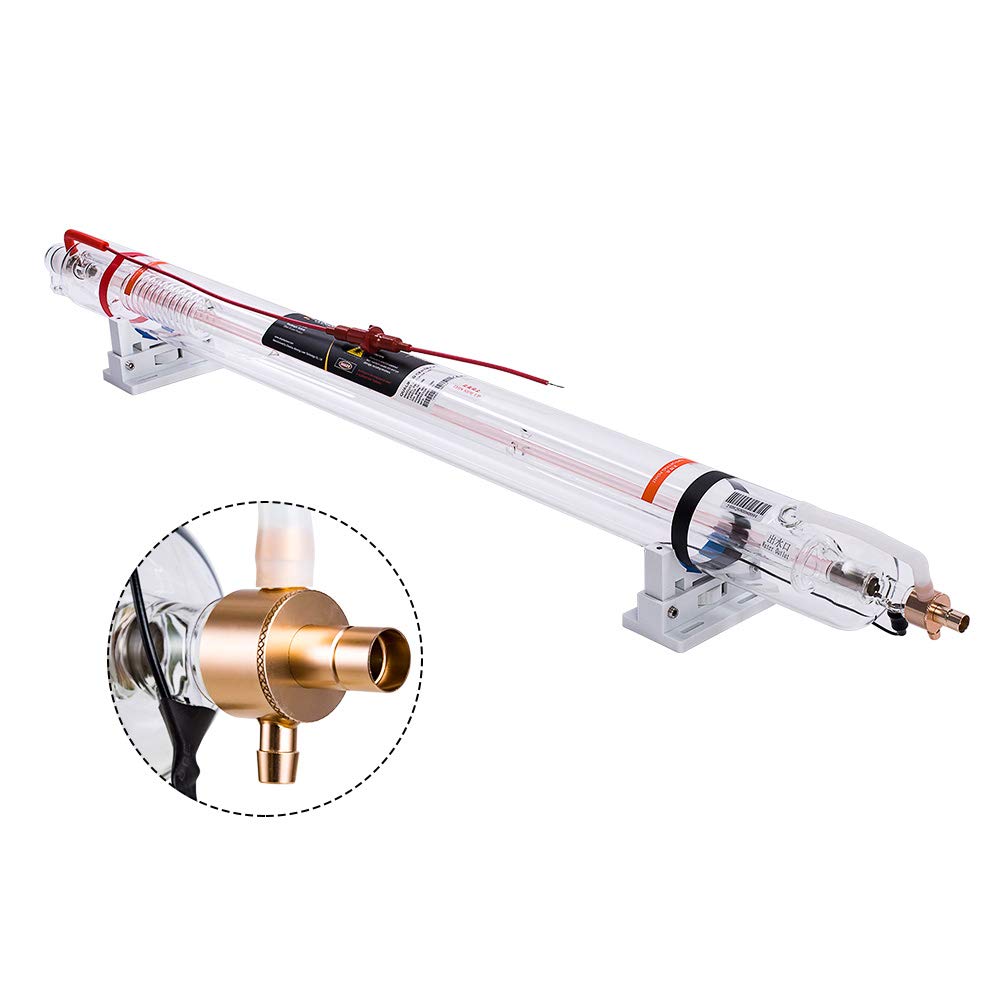
Image: Cloudray CR90 CO2 Laser Tube securely mounted on its supports.
4.3 Water Cooling Connection
Connect the water cooling system to the laser tube. The water inlet and outlet ports are clearly marked. Ensure a continuous flow of cooling water to prevent overheating and damage to the tube. The water temperature should not differ too much from the room temperature to avoid condensation on the laser tube surface.

Image: Diagram illustrating the water cooling connections for the CO2 laser tube.
Video: Demonstrates the setup and operation of a Cloudray CW5200 Industrial Water Chiller, which is essential for cooling the laser tube.
4.4 Electrical Connections
The Cloudray CR90 laser tube comes with pre-connected high voltage and low voltage ports, simplifying the electrical installation. Connect these to your laser power supply according to your machine's wiring diagram. Ensure all connections are secure and insulated.

Image: Close-up of the high-pressure connectors on the Cloudray CR90 CO2 Laser Tube.
Video: Detailed instructions on how to install a CO2 Laser mA Meter, which is crucial for monitoring laser tube current.
5. Operation
Once installed and connected, ensure all safety precautions are in place before powering on your laser machine. Monitor the laser current using an mA meter to ensure it operates within the recommended range for the CR90 tube (refer to specifications table). Operating outside the recommended current can shorten the tube's lifespan.
Video: Overview of the Cloudray 90W CO2 Laser Tube, highlighting its features and operation.
Video: Demonstrates the CR Series Laser Tube from Cloudray, showcasing its performance.
6. Maintenance
6.1 Water Cooling System Maintenance
Regularly check and replace the water in your cooling system to maintain optimal cooling efficiency. Reduced cooling can lead to decreased laser tube performance and lifespan. Ensure the water level is always within the 'Normal' range.

Image: Dust cover detail on the Cloudray CR90 CO2 Laser Tube, important for maintaining cleanliness.
6.2 Storage
CO2 laser tubes are consumable items. Prolonged storage may result in power attenuation. It is recommended to purchase the laser tube when you are ready to use it to ensure optimal performance.
7. Troubleshooting
If you encounter any issues with your Cloudray CR90 CO2 Laser Tube, first ensure all connections are secure, the cooling system is functioning correctly, and the laser power supply is operating within specifications. For complex issues, it is recommended to consult a qualified laser technician or contact Cloudray customer support.

Image: Overview of the Cloudray CR90 CO2 Laser Tube, showing electrical and water connections for troubleshooting.
8. Specifications
| Attribute | Value |
|---|---|
| Brand | Cloudray |
| Material | Glass |
| Product Dimensions | 49.21"L x 3.15"W (1250mm L x 80mm Dia.) |
| Operation Mode | Automatic |
| Item Model Number | CR90 |
| Item Weight | 16.5 pounds |

Image: Detailed specifications table for various Cloudray CO2 laser tube models, including CR90.
9. Warranty and Support
Cloudray is committed to providing superior service. If any issues arise within 10 months of receiving the laser tube (excluding man-made damage), please provide the laser tube serial number and proof of the problem (photo or video). Upon verification, a new Cloudray tube will be promptly dispatched.
For any assistance with your CO2 laser tube, please do not hesitate to reach out to Cloudray customer support.

