
1. Introduction
The PWAYTEK HDMI Extender Splitter HTS010X is designed to distribute a single HDMI source to multiple displays over long distances using Ethernet cables. This device supports high-definition video up to 1080P@60Hz and 3D signals, making it suitable for various applications including home entertainment, security systems, and professional presentations. It features Power Over Cable (POC) functionality, requiring only one power adapter for the entire system, simplifying installation.
2. Package Contents
Please verify that all items listed below are included in your package:
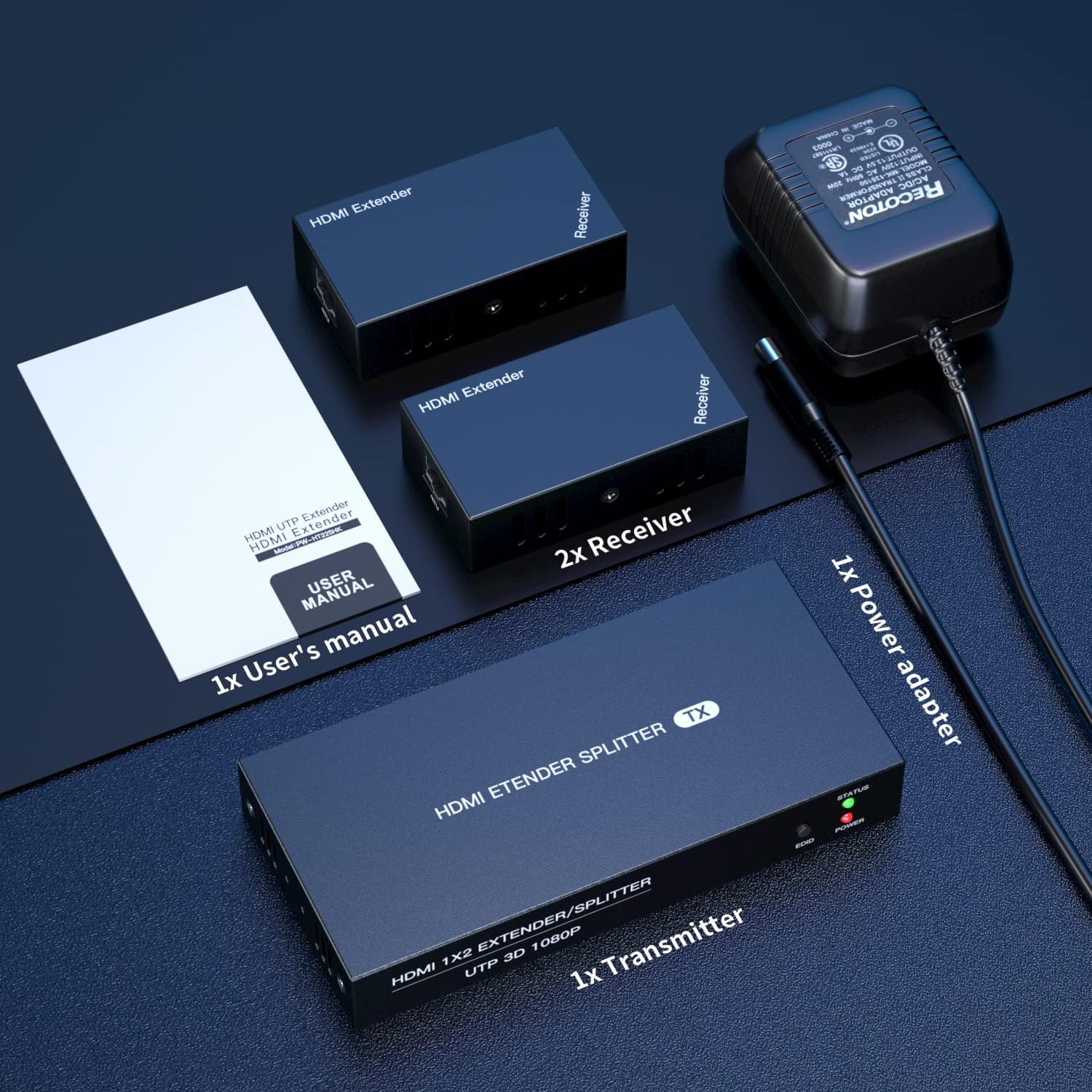
- 1x HDMI Transmitter Unit
- 2x HDMI Receiver Units
- 1x Power Adapter (DC 12V)
- 1x User Manual
- 1x Warranty Card

3. Product Overview
The PWAYTEK HDMI Extender Splitter system consists of a transmitter unit and two receiver units. Below are the descriptions of their ports and indicators.
3.1 Transmitter Unit (TX)
The transmitter unit is the central hub where the HDMI source connects and signals are distributed.
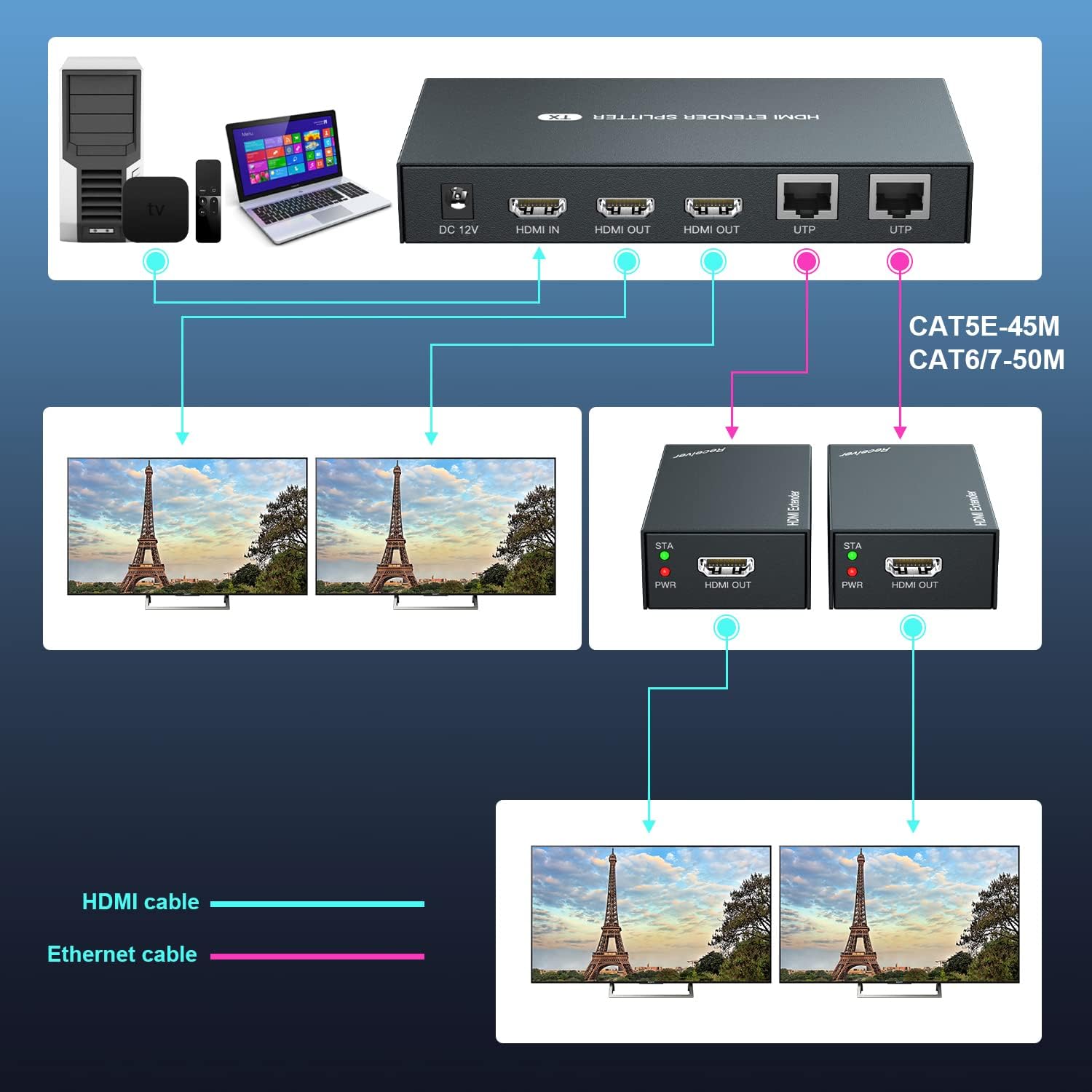
- DC-12V: Power input port for the included power adapter.
- HDMI IN: Connect your HDMI source device (e.g., laptop, TV box).
- HDMI OUT (x2): Two HDMI loop-out ports for connecting local monitors.
- UTP (x2): Two RJ45 ports for connecting to the receiver units via Ethernet cable.
- STATUS Indicator: Lights up when a stable connection is established.
- EDID Button: Used for EDID copy function.
- POWER Indicator: Lights up when the device is powered on.
3.2 Receiver Unit (RX)
Each receiver unit connects to a remote display and receives the HDMI signal from the transmitter via an Ethernet cable.
- HDMI OUT: Connect your remote HDMI display.
- UTP: RJ45 port for connecting to the transmitter unit via Ethernet cable.
- STA Indicator: Lights up when a stable connection is established with the transmitter.
- PWR Indicator: Lights up when the device is powered on (receives power via POC).

4. Setup and Installation
Follow these steps to set up your PWAYTEK HDMI Extender Splitter:
- Connect Power: Plug the included 12V power adapter into the DC-12V port on the transmitter unit. Connect the power adapter to an electrical outlet. The POWER indicator on the transmitter will light up.
- Connect HDMI Source: Connect an HDMI cable (not included) from your HDMI source device (e.g., laptop, Blu-ray player, TV box) to the HDMI IN port on the transmitter unit.
- Connect Local Displays (Optional): If you wish to use local monitors, connect HDMI cables from the HDMI OUT ports on the transmitter unit to your local displays.
- Connect Ethernet Cables: Connect Cat 5E/6/7 Ethernet cables from the UTP ports on the transmitter unit to the UTP ports on each receiver unit. Ensure the cables are securely connected.
- Connect Remote Displays: Connect an HDMI cable from the HDMI OUT port on each receiver unit to your remote displays.
- Verify Connection: Once all connections are made, the STATUS indicator on the transmitter and the STA indicator on the receivers should turn green, indicating a successful connection.
- EDID Copy Function: If your display does not show an image or experiences compatibility issues, you may need to perform an EDID copy. Connect a compatible monitor directly to the HDMI IN port of the transmitter. Power on the transmitter. Press and hold the EDID button on the transmitter for 3-5 seconds until the green light stops flashing. This copies the monitor's EDID information to the transmitter, which can resolve display issues.

5. Operating Instructions
Once the setup is complete, operating the HDMI Extender Splitter is straightforward:
- Ensure all devices (HDMI source, transmitter, receivers, and displays) are powered on.
- Select the correct HDMI input source on your connected displays.
- The content from your HDMI source will now be mirrored on all connected local and remote displays.


6. Maintenance
To ensure the longevity and optimal performance of your PWAYTEK HDMI Extender Splitter, follow these maintenance guidelines:
- Keep the devices in a cool, dry environment, away from direct sunlight and excessive heat.
- Avoid exposing the units to moisture or liquids.
- Clean the units with a soft, dry cloth. Do not use harsh chemicals or abrasive cleaners.
- Ensure all cables are securely connected and not bent or kinked, which can damage the cables or ports.
- Periodically check for firmware updates (if available from the manufacturer) to ensure compatibility and performance improvements.
7. Troubleshooting
If you encounter issues with your HDMI Extender Splitter, refer to the following troubleshooting tips:
- No Image on Display:
- Ensure all power connections are secure and the power indicator on the transmitter is lit.
- Verify that the HDMI source device is powered on and outputting a signal.
- Check that all HDMI and Ethernet cables are correctly and securely connected.
- Confirm that your display is set to the correct HDMI input source.
- Try performing the EDID Copy function as described in Section 4.
- Ensure the HDMI source provides a strong signal. Some sources may require a booster if the signal is weak.
- Flickering or Intermittent Signal:
- Check the quality and length of your Ethernet cables. High-quality Cat 6/7 cables are recommended for stable, long-distance transmission.
- If using Ethernet cables between 1-10 feet, try a longer cable as very short cables can sometimes cause issues.
- Ensure there are no kinks or damage to the Ethernet or HDMI cables.
- No Audio:
- Verify that your display's audio settings are correctly configured.
- Check the audio output settings on your HDMI source device.
- Remote Displays Not Working:
- Ensure the STA indicator on the receiver units is green, indicating a successful Ethernet connection.
- Confirm the Ethernet cable length is within the specified limits (50m/164ft for Cat6/7, 45m/147ft for Cat5e, 40m/131ft for Cat5).
8. Specifications
| Category | Specification |
|---|---|
| HDMI Standard | HDMI 1.3 |
| Maximum Pixel Clock | 165MHz |
| Maximum Data Rate | 6.75Gbps |
| Resolution Support | 1920x1080@60Hz, 3D (also compatible with 1080i/720p) |
| HDMI Connector | HDMI-A |
| Ethernet Interface | RJ45 |
| Transmission Distance (Cat6/7) | Up to 50m (164ft) |
| Transmission Distance (Cat5e) | Up to 45m (147ft) |
| Transmission Distance (Cat5) | Up to 40m (131ft) |
| Power Supply Input | 110~220V |
| Power Supply Output | 12V |
| Power Dissipation | MAX 12W |
| Operating Temperature | -5℃ ~ +70℃ |
| Operating Humidity | 5% ~ 90% (non-condensing) |
| Transmitter Dimensions (TX) | 150 x 71 x 23mm |
| Receiver Dimensions (RX) | 81 x 45 x 23mm |
| Item Weight | 1.43 pounds |
| ASIN | B087FVWQCT |
| Item Model Number | HTS010X |
9. Warranty
This product comes with a warranty. Please refer to the included Warranty Card in your package for detailed information regarding warranty terms, conditions, and duration. Keep your proof of purchase for warranty claims.
10. Support
For technical assistance, troubleshooting, or any questions regarding your PWAYTEK HDMI Extender Splitter HTS010X, please contact PWAYTEK customer support. Refer to the contact information provided on the warranty card or the official PWAYTEK website for the most up-to-date support details.
