
Product Overview
The NEWACALOX N-330-5B is a versatile tool designed for various applications, particularly soldering, electronics DIY, arts, and laboratory work. It functions as a desk lamp, a fume extractor (solder smoke absorber), and includes a small fan. This device is engineered to provide illumination, absorb harmful fumes, and offer magnification for detailed tasks.
Key features include:
- Multifunctional Design: Combines a desk lamp, fume extractor, and small fan for comprehensive workspace utility.
- High-Efficiency Fume Absorption: Effectively absorbs toxic fumes generated during soldering, contributing to air purification.
- Adjustable LED Lighting: Features 3 color modes (White, Warm, Yellow) and 10 brightness levels, powered via USB for flexible illumination.
- Flexible Adjustable Arm: The lamp head offers 220-degree up/down and 360-degree swivel adjustments. The extendable arm provides significant reach and stable positioning.
- ESD-Safe Construction: Designed with anti-static properties and a low-noise fan, making it suitable for sensitive electronic work.
- Replaceable Filter: Equipped with a filter composed of foam and activated carbon for efficient toxin absorption.
Setup Instructions
Follow these steps to assemble and set up your NEWACALOX N-330-5B Soldering Fan Desk Lamp:
- Attach the Clamp Base:

Image shows a six-step process for securing the clamp base. First, insert the threaded rod into the clamp. Second, attach the tightening knob. Third, slide the clamp onto the edge of a desk or workbench. Fourth, insert the lamp arm's base into the clamp. Fifth, tighten the side knob to secure the arm. Sixth, fully tighten the main knob to firmly attach the clamp to the surface.
Secure the clamp base to a stable desk or workbench edge. Ensure the clamp is tightened firmly to prevent movement during use. The clamp can be oriented vertically or horizontally depending on your desk edge configuration.

This image illustrates two ways to mount the clamp: 'Vertical' for standard desk edges and 'Horizontal' for thinner or differently shaped edges, demonstrating the clamp's adaptability.
- Connect the Flexible Arm to the Lamp Head:
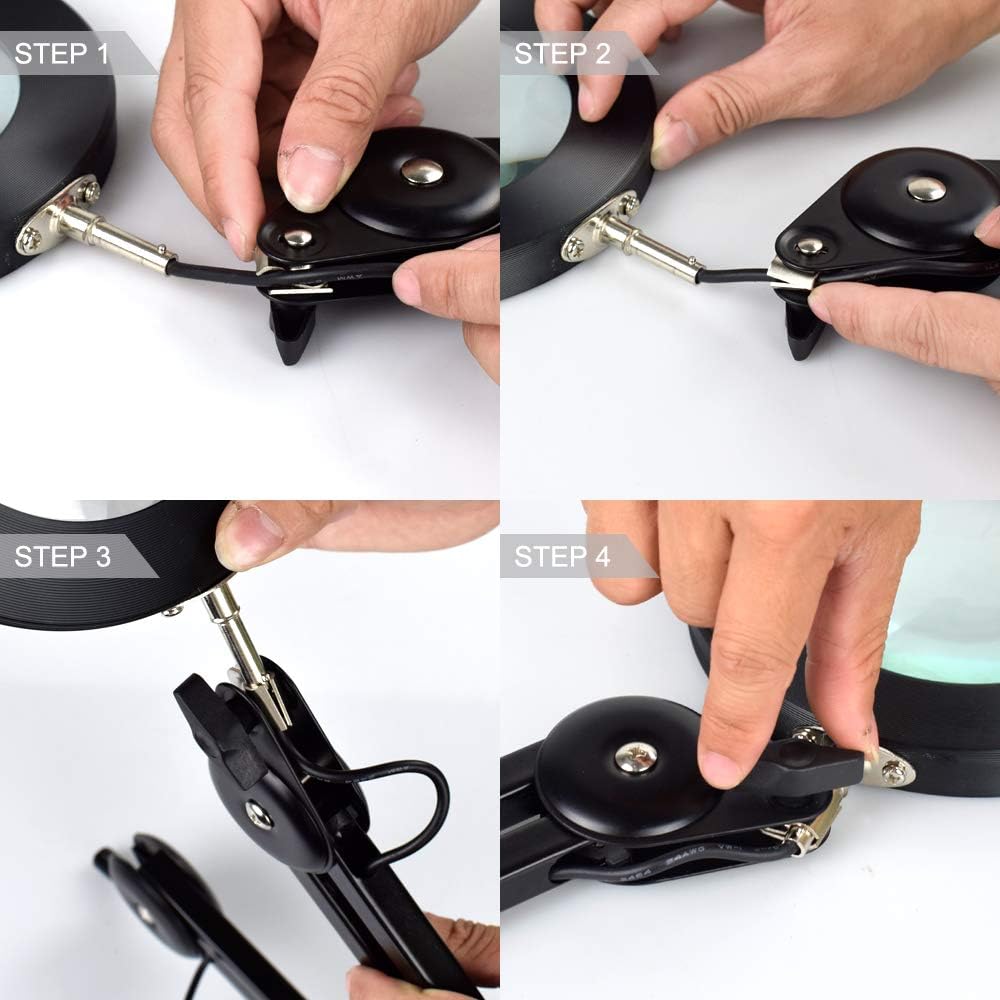
The image displays a four-step sequence for attaching the lamp head to the flexible arm. Steps involve aligning the connector, pushing it in, and securing it with a screw or locking mechanism.
Carefully align the connector on the flexible arm with the receptacle on the lamp head. Push them together and secure them using the provided screw or locking mechanism. Ensure a snug fit.
- Position the Lamp: Adjust the flexible arm and lamp head to your desired working position. The arm features multiple joints for extensive articulation.

This diagram shows the range of motion for the lamp: the base arm can move 110 degrees forward/back, the middle joint 120 degrees up/down, and the lamp head itself can move 220 degrees up/down and 360 degrees horizontally (whirl).
- Connect Power: Plug the USB power cable into a compatible 5V, 2A/3A USB power adapter (not included) or a computer USB port. For maximum brightness (6700Lux), a good quality 5V, 2A/3A mobile phone charger is recommended.
Operating Instructions
The NEWACALOX N-330-5B is operated via an inline control unit on the power cable.

This image details the 'Sensitive Button Switch' on the inline control unit. It shows buttons for 'LED Light Switch' (power on/off), 'Adjust the Color of the Light', 'Turn Down Brightness', and 'Turn Up the Brightness'.
- Power On/Off: Press the power button (usually marked with a circle and line) on the inline control unit to turn the lamp on or off.
- Adjust Light Color: Press the 'Adjust the Color of the Light' button to cycle through the three available color modes: White, Warm, and Yellow.

The image displays three distinct lighting environments: 'White' (cool, bright light), 'Warm' (neutral, slightly yellow light), and 'Yellow' (very warm, amber light), demonstrating the 3-color dimmable LED light feature.
- Adjust Brightness: Use the '+' and '-' buttons to increase or decrease the brightness level. There are 10 brightness modes available.
- Using the Magnifying Glass: The lamp head incorporates an ultra-clear magnifying glass for detailed work.
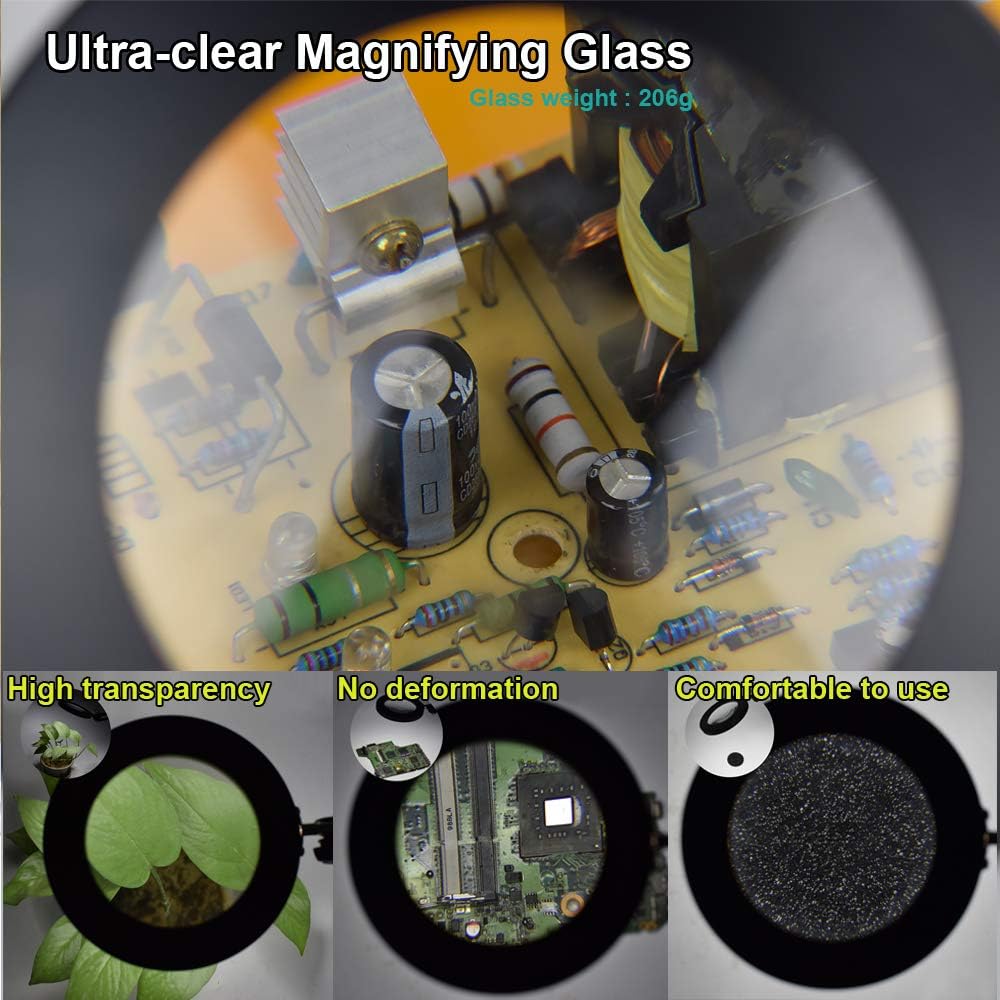
This image focuses on the 'Ultra-clear Magnifying Glass', showing a magnified view of a circuit board. Smaller insets emphasize its 'High transparency', 'No deformation', and that it is 'Comfortable to use'.
- Fume Extraction: The integrated fan acts as a fume extractor. For optimal smoke absorption, position the fan and the solder joint within 6 inches (15 cm) of each other.
- Adjusting the Arm: Utilize the fixed knobs and springs on the flexible arm to smoothly adjust the lamp's position without swaying or shaking.
Maintenance
Regular maintenance ensures the longevity and optimal performance of your device.
- Filter Replacement: The fume extractor features a unique disassemble design for easy filter replacement. The filter consists of foam and activated carbon, which are crucial for absorbing toxins. Replace the filter periodically based on usage and the amount of fumes absorbed to maintain effective air purification. (Replacement filters are typically sold separately.)
- Cleaning: Wipe the lamp and arm surfaces with a soft, dry cloth. For the magnifying glass, use a lens cleaning cloth and appropriate cleaning solution to avoid scratches. Do not use abrasive cleaners or immerse any part of the unit in water.
- Cable Inspection: Periodically check the power cable and inline control unit for any signs of damage. If damage is found, discontinue use and replace the cable.
Troubleshooting
If you encounter issues with your NEWACALOX N-330-5B, refer to the following common solutions:
- Lamp Does Not Turn On:
- Ensure the USB power cable is securely connected to both the lamp and a functional 5V, 2A/3A USB power source.
- Verify that the power source (e.g., wall adapter, computer USB port) is active and providing power.
- Check the inline control unit for any visible damage.
- Light Brightness or Color Not Changing:
- Ensure the lamp is powered on.
- Press the respective buttons on the inline control unit firmly.
- If using a low-power USB port, try a higher-amperage power adapter (e.g., 5V, 2A/3A) as some functions might require adequate power.
- Arm Does Not Stay in Position:
- Tighten all fixed knobs on the flexible arm joints.
- Ensure the clamp base is securely fastened to the desk.
- Check if the internal springs are properly connected (if accessible and safe to inspect). If the arm consistently fails to hold position despite tightening, it may indicate a mechanical issue.
- Ineffective Fume Absorption:
- Ensure the fan is operating.
- Verify that the fan and the soldering area are within 6 inches (15 cm) for optimal performance.
- Check and replace the activated carbon filter if it appears saturated or has been in use for an extended period.
- Product Damaged Upon Arrival: If you receive a damaged product, contact the seller or manufacturer immediately to request a replacement.
Specifications
| Model Number | N-330-5B |
| Brand Name | NEWACALOX |
| Product Dimensions | 7"D x 2"W x 5"H |
| Material Type | Acrylic, Glass, Metal |
| Finish Type | Polished/Brushed (Metal), Clear/Frosted (Glass) |
| Mounting Type | Tabletop Clamp |
| Power Source | USB |
| Voltage | 5 Volts (DC) |
| Wattage | 9 Watt-hours |
| Light Source Type | LED (42 lights) |
| Number of Light Colors | 3 (White, Warm, Yellow) |
| Brightness Modes | 10 |
| Additional Features | Magnifying Glass, Fume Extractor, ESD-Safe |
| Included Components | 1 x Flexible Arm Lamp, 1 x Inline Control Unit, 1 x Power Cable |
Warranty Information
Specific warranty details for the NEWACALOX N-330-5B Soldering Fan Desk Lamp are not provided in this manual. For information regarding warranty coverage, terms, and conditions, please refer to the product packaging, the seller's website, or contact NEWACALOX customer support directly.
Customer Support
If you require further assistance, have questions about your product, or need to report an issue, please contact NEWACALOX customer support through their official website or the platform where the product was purchased. Please have your model number (N-330-5B) and purchase details ready when contacting support.