
Introduction
Thank you for choosing the PHEANOO P27 2.1 Channel Soundbar with Wireless Subwoofer. This system is designed to enhance your audio experience with crystal clear sound and powerful bass, compatible with 4K, HD, and Smart TVs. This manual provides essential information for setting up, operating, maintaining, and troubleshooting your device to ensure optimal performance.
Package Contents
Please check the package carefully to ensure all items are present and in good condition.
- PHEANOO P27 Soundbar
- Wireless Subwoofer
- Remote Control
- Power Adapter/Cable
- HDMI ARC Cable
- Optical Cable
- RCA to 3.5mm AUX Cable
- Wall Mounting Kit (Stencils, EVA pads, Screws)
- User Manual
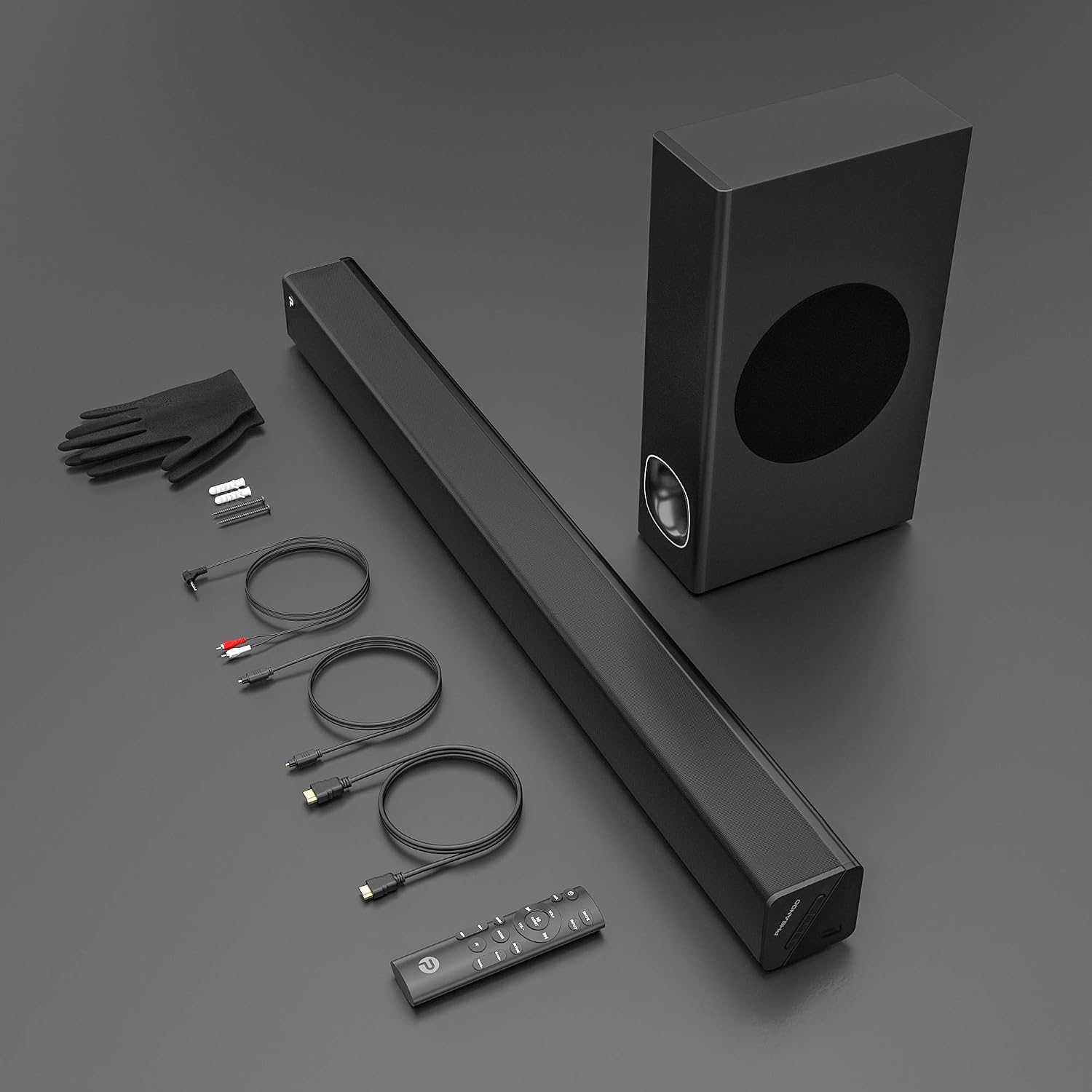
Image: All components included in the PHEANOO P27 Soundbar system package.
Product Features
The PHEANOO P27 Soundbar system offers a range of features designed for an immersive audio experience:
- Crystal Clear Sound: The soundbar features two 2.75-inch tweeter drivers, delivering crisp audio with less than 1% total harmonic distortion. This ensures every detail in music and dialogue is reproduced accurately.

Image: Soundbar positioned for clear audio output.
- Powerful Bass: The large wireless subwoofer, constructed from premium wood materials, houses a 5.25-inch speaker. It provides 60W of stable frequency and ultra-low 45Hz bass, enhanced by DSP technology for a deep, vibrant home theater experience.

Image: Subwoofer designed for powerful bass delivery.
- Multiple Connectivity Options: Connect your devices wirelessly via Bluetooth 5.0 with a reliable range of up to 10 meters. Wired connections include HDMI ARC, Optical, AUX, and USB inputs, ensuring compatibility with various TVs, PCs, and other audio sources.
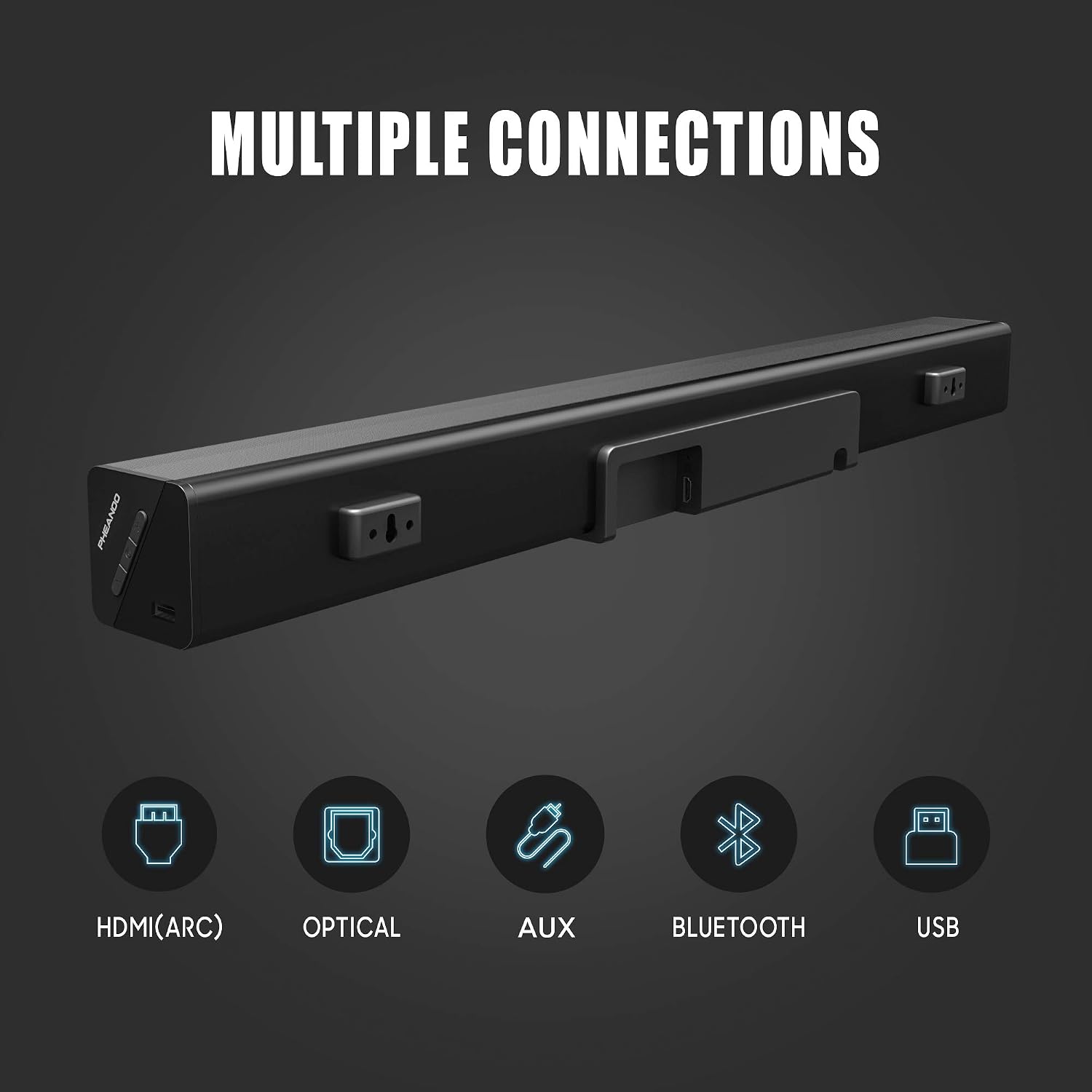
Image: Available input ports on the soundbar.
- Smart Remote Control and Sound Modes: The included remote allows you to adjust treble and bass intensity, and switch between various sound modes (e.g., Music, Movie, 3D) to optimize audio for different content.
- Easy and Flexible Installation: The soundbar can be placed directly on a surface or mounted on a wall. A wall mounting kit with stencils and EVA pads is provided for precise and stable installation.

Image: Flexible placement options for the soundbar.
Setup
Follow these steps to set up your PHEANOO P27 Soundbar system:
1. Placement
- Tabletop Placement: Place the soundbar on a stable, flat surface directly in front of your TV. Ensure the subwoofer is placed on the floor near the soundbar for optimal bass distribution.
- Wall Mounting: Use the provided wall mounting kit. Mark the desired positions on the wall using the stencil, drill holes, insert anchors, and secure the soundbar using the screws and EVA pads. Ensure the soundbar is level and securely fastened.
2. Connecting the Subwoofer
The subwoofer connects wirelessly to the soundbar. Simply plug both the soundbar and subwoofer into power outlets. They should automatically pair. If not, refer to the troubleshooting section for manual pairing instructions.
3. Connecting to Your TV/Audio Source
Choose one of the following connection methods:
- HDMI ARC (Recommended): Connect one end of the HDMI ARC cable to the HDMI ARC port on your soundbar and the other end to the HDMI ARC port on your TV. This allows for audio return channel functionality and TV remote control of the soundbar volume.
- Optical: Connect one end of the Optical cable to the OPTICAL port on your soundbar and the other end to the Optical Digital Audio Out port on your TV.
- AUX: Connect the RCA to 3.5mm AUX cable to the AUX port on your soundbar and the 3.5mm end to the headphone jack or AUX output on your TV or other audio device.
- USB: Insert a USB drive with audio files into the USB port on the soundbar for direct playback.
- Bluetooth: For wireless connection, ensure the soundbar is in Bluetooth mode. On your device (smartphone, tablet, laptop), search for "PHEANOO P27" in the Bluetooth settings and pair.
4. Power Connection
Connect the power cables to the soundbar and subwoofer, then plug them into a wall outlet.
Operating Instructions
Once set up, operate your soundbar using the included remote control or the buttons on the soundbar itself.
Remote Control Functions
- Power Button: Turns the soundbar on or off.
- Input/Source Button: Cycles through input sources (HDMI ARC, Optical, AUX, USB, Bluetooth).
- Volume +/-: Adjusts the master volume level.
- Bass +/-: Adjusts the bass level of the subwoofer.
- Treble +/-: Adjusts the treble level of the soundbar.
- Sound Modes (e.g., Music, Movie, 3D, News): Selects preset equalizer settings optimized for different audio content.
- Mute Button: Mutes or unmutes the sound.
Bluetooth Pairing
- Press the Input/Source button on the remote or soundbar until "BT" appears on the display.
- On your Bluetooth device, enable Bluetooth and search for "PHEANOO P27".
- Select "PHEANOO P27" to pair. A confirmation sound will indicate successful pairing.

Image: Immersive audio experience with the soundbar and subwoofer.
Maintenance
Proper maintenance ensures the longevity and performance of your soundbar system.
- Cleaning: Use a soft, dry cloth to clean the surfaces of the soundbar and subwoofer. Do not use liquid cleaners, aerosols, or abrasive materials, as they may damage the finish.
- Ventilation: Ensure adequate ventilation around the soundbar and subwoofer. Do not block any ventilation openings.
- Environment: Avoid placing the unit in direct sunlight, near heat sources, or in areas with high humidity or dust.
- Power: Disconnect the power cable from the wall outlet if the unit will not be used for an extended period.
Troubleshooting
If you encounter issues with your soundbar, refer to the following common problems and solutions:
| Problem | Possible Cause | Solution |
|---|---|---|
| No sound from soundbar | Power not connected; Incorrect input source; Muted; Volume too low; Incorrect TV audio settings. | Ensure power is connected and unit is on. Select correct input source. Unmute and increase volume. Check TV audio output settings (e.g., set to PCM for Optical/HDMI). |
| Subwoofer not producing bass | Subwoofer not paired; Bass level too low; Subwoofer power off. | Ensure subwoofer is powered on. If not paired, power cycle both soundbar and subwoofer. Increase bass level using remote. |
| Bluetooth device cannot pair | Soundbar not in Bluetooth mode; Device too far; Interference. | Ensure soundbar is in BT mode. Move device closer to soundbar. Avoid strong electromagnetic interference. Try restarting both devices. |
| Remote control not working | Batteries depleted; Obstruction; Remote out of range. | Replace batteries. Remove any obstructions between remote and soundbar. Ensure remote is within operating range and pointed at the soundbar's sensor. |
Specifications
| Model Name | P27 |
| Brand | PHEANOO |
| Max Speaker Output Power | 120 Watts |
| Surround Sound Channel Configuration | 2.1 |
| Connectivity Technology | Auxiliary, Bluetooth, HDMI (ARC), USB |
| Bluetooth Version | 5.0 |
| Bluetooth Range | 10 Meters (33 Feet) |
| Speaker Type | Soundbar, Subwoofer |
| Control Method | Remote Control |
| Compatible Devices | Desktop Computer, Laptop, Smartphone, Tablet, Television |
| Power Source | Electric Cable |
| Color | Black |
| Item Weight | 14.27 Kilograms |
| Package Dimensions | 92.71 x 40.64 x 17.78 cm |
Warranty and Support
For warranty information and technical support, please refer to the documentation included with your purchase or visit the official PHEANOO website. Keep your proof of purchase for any warranty claims.
If you require further assistance, please contact PHEANOO customer service through their official channels.


