
1. Introduction
Thank you for choosing the DELUX M625BU(3050) RGB Wired Gaming Mouse. This manual provides detailed instructions for setting up, operating, and maintaining your gaming mouse to ensure optimal performance and an enhanced gaming experience. Please read this manual thoroughly before use.
2. Package Contents
- DELUX M625BU(3050) RGB Wired Gaming Mouse
- User Manual
3. Product Overview
The DELUX M625BU(3050) is an ergonomic wired gaming mouse designed for precision and customization. It features a high-performance A3050 PixArt optical sensor, 7 programmable buttons, and customizable RGB lighting.
3.1 Mouse Layout and Buttons
Familiarize yourself with the buttons and their default functions:

Image: DELUX M625BU(3050) Gaming Mouse Button Layout
- Left Button: Primary click function.
- Right Button: Secondary click function.
- Scroll Wheel: Scroll up/down, middle click.
- DPI Button: Cycles through DPI settings.
- Forward Button: Navigates forward in web browsers/applications.
- Backward Button: Navigates backward in web browsers/applications.
- Fire Button: Rapid-fire function (default).
3.2 Ergonomic Design
The mouse features an ergonomic streamline structure and non-slip rubber sides, designed to fit comfortably in your palm for extended gaming sessions.
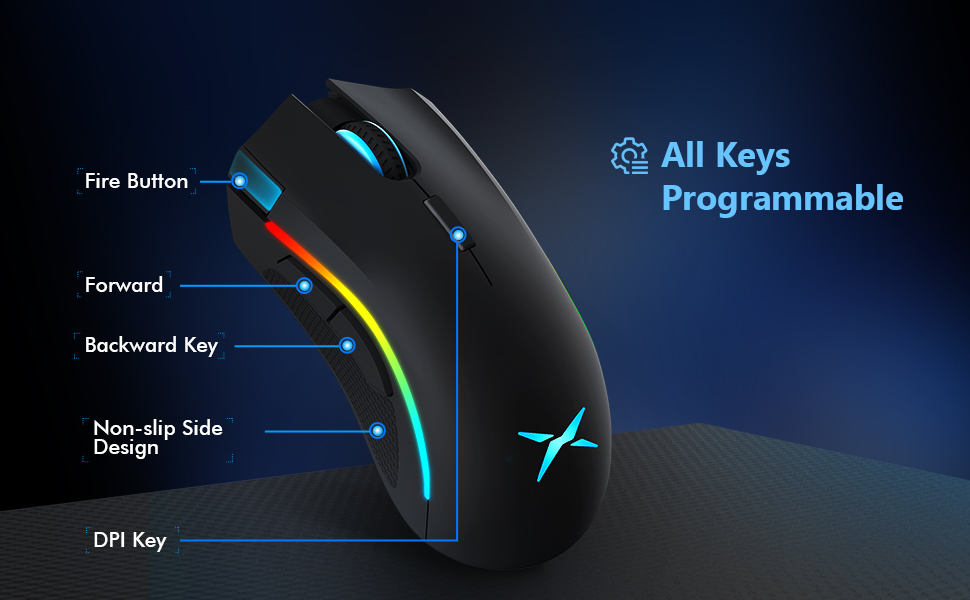
Image: Ergonomic Design Features
4. Setup
The DELUX M625BU(3050) mouse is a plug-and-play device, requiring no additional drivers for basic functionality.
- Connect the Mouse: Plug the USB connector of the mouse's 1.8m braided cable into an available USB port on your computer.
- System Recognition: Your operating system (Windows XP, Vista, 7, 8, or 10) will automatically detect and install the necessary drivers.
- Optional Software Installation: For advanced customization of buttons, DPI, and RGB lighting, download and install the DELUX Pro Game Software from the official DELUX website.

Image: Plug and Play Connectivity
5. Operating Instructions
5.1 Adjusting DPI (Dots Per Inch)
The mouse features an A3050 PixArt optical sensor with adjustable DPI settings. You can cycle through preset DPI levels by pressing the DPI button located behind the scroll wheel.

Image: DPI Adjustment Levels
- Available DPI levels: 800, 1600, 3200, 4000.
- Each press of the DPI button will switch to the next level.
- The current DPI level may be indicated by a specific LED color or pattern (refer to software for detailed customization).
5.2 RGB Lighting Effects
The mouse features customizable RGB lighting with various effects.
- Changing Lighting Modes: Press the Left Button, Scroll Wheel, and Right Button simultaneously for 3 seconds to cycle through different lighting modes (e.g., full lighting, breathing, floating).
- Customization via Software: Use the DELUX Pro Game Software to customize RGB backlight effects from 16.8 million colors, adjust lighting direction, and speed.
5.3 Programmable Buttons and Software
All 7 buttons on the M625BU(3050) mouse are programmable using the DELUX Pro Game Software.
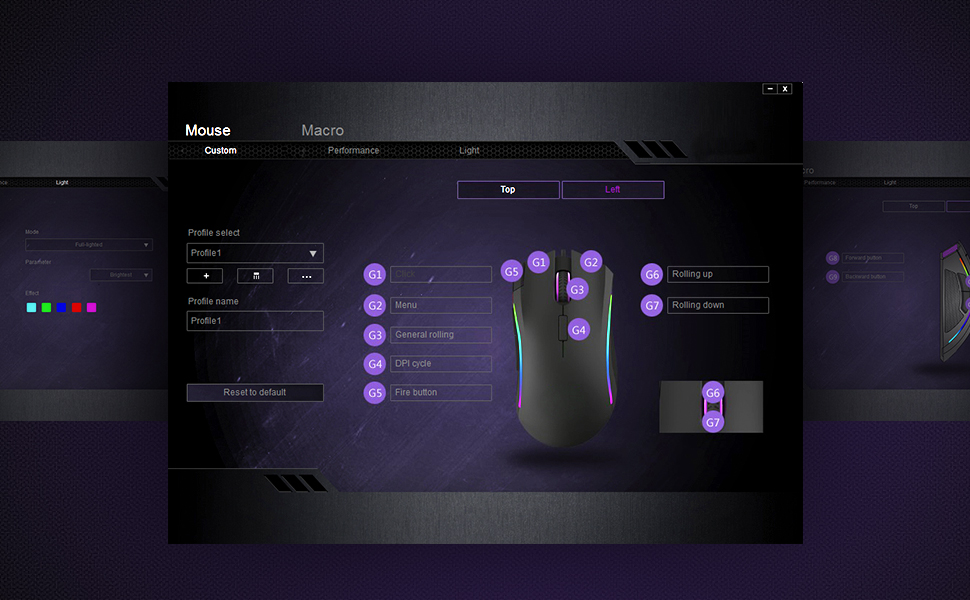
Image: Pro Game Software Interface for Customization
- Button Functions: Reassign any button to perform different functions, including keyboard keys, multimedia controls, or specific file execution.
- Macros: Create and assign complex macro sequences to buttons for automated actions.
- Sensitivity and Polling Rate: Fine-tune pointer speed, DPI sensitivity, and polling rate (125/250/500/1000Hz) for precise control.
6. Maintenance
To ensure the longevity and optimal performance of your DELUX M625BU(3050) gaming mouse, follow these maintenance guidelines:
- Cleaning: Use a soft, dry cloth to wipe the mouse surface. For stubborn dirt, slightly dampen the cloth with water or a mild cleaning solution. Avoid harsh chemicals.
- Sensor Care: Keep the optical sensor on the underside of the mouse clean and free from dust or debris. Use a cotton swab if necessary.
- Cable Care: Avoid sharp bends or excessive pulling on the braided cable to prevent damage.
- Storage: Store the mouse in a clean, dry environment when not in use.
7. Troubleshooting
If you encounter issues with your DELUX M625BU(3050) mouse, refer to the following common solutions:
| Problem | Possible Solution |
|---|---|
| Mouse not responding |
|
| Cursor movement is erratic or imprecise |
|
| RGB lighting not working or incorrect |
|
| Programmable buttons not functioning |
|
| Scroll wheel behaves erratically (e.g., scrolls opposite direction) |
|
8. Specifications
| Feature | Detail |
|---|---|
| Model Number | M625BU(3050) |
| Connectivity | Wired (1.8m Braided Cable) |
| Sensor | A3050 PixArt Optical Sensor |
| DPI Settings | 800 / 1600 / 3200 / 4000 DPI |
| Polling Rate | 125 / 250 / 500 / 1000Hz |
| Buttons | 7 Programmable Buttons |
| Lighting | Customizable RGB Lighting Effects |
| Ergonomics | Ergonomic Streamline Structure, Non-slip Rubber Side |
| Product Dimensions | 5.14 x 2.71 x 1.67 inches |
| Item Weight | 3.53 ounces |
| Compatibility | Windows XP, Vista, 7, 8, 10 |
9. Warranty and Support
All DELUX products include a 12-month warranty from the date of purchase. Additionally, DELUX provides free lifetime technical support for this product.
For warranty claims, technical assistance, or further inquiries, please contact DELUX customer support through the official DELUX website or your retailer.


