
Introduction and Overview
This manual provides essential instructions for the proper setup, operation, and maintenance of your Safariland 7377 ALS Concealment Belt Loop Holster. This holster is specifically designed for the Colt 1911 Commander firearm and is configured for right-hand use. It incorporates the Automatic Locking System (ALS) for secure retention and is constructed from durable SafariSeven material.
The Safariland 7377 holster offers reliable firearm retention while allowing for a quick and intuitive draw. Its robust construction ensures longevity and performance in various conditions.
Key Features
- ALS (Automatic Locking System): Secures the weapon automatically once holstered, providing enhanced retention.
- SafariSeven Construction: A proprietary nylon blend that is non-abrasive to the firearm's finish, fully submersible, and resistant to extreme temperatures (-50°F to 300°F).
- Raised Stand-off Surfaces: Interior design creates air space around the weapon, allowing dirt and moisture to clear quickly.
- QAS Fork Included: Equipped with a Quick Attachment System (QAS) fork for compatibility with various QAS accessories, offering flexibility in mounting options.
Setup
The Safariland 7377 holster comes with a belt loop attachment and an integrated QAS fork for versatile mounting. Ensure the holster is securely attached to your belt before use.
Attaching to a Belt:
- Identify the belt loop or paddle attachment on the holster.
- Thread your belt through the designated slots on the attachment. Ensure the holster sits firmly against your body.
- Adjust the position of the holster on your belt for optimal comfort and accessibility.

Side view of the Safariland 7377 ALS Concealment Holster, showing the belt loop attachment.
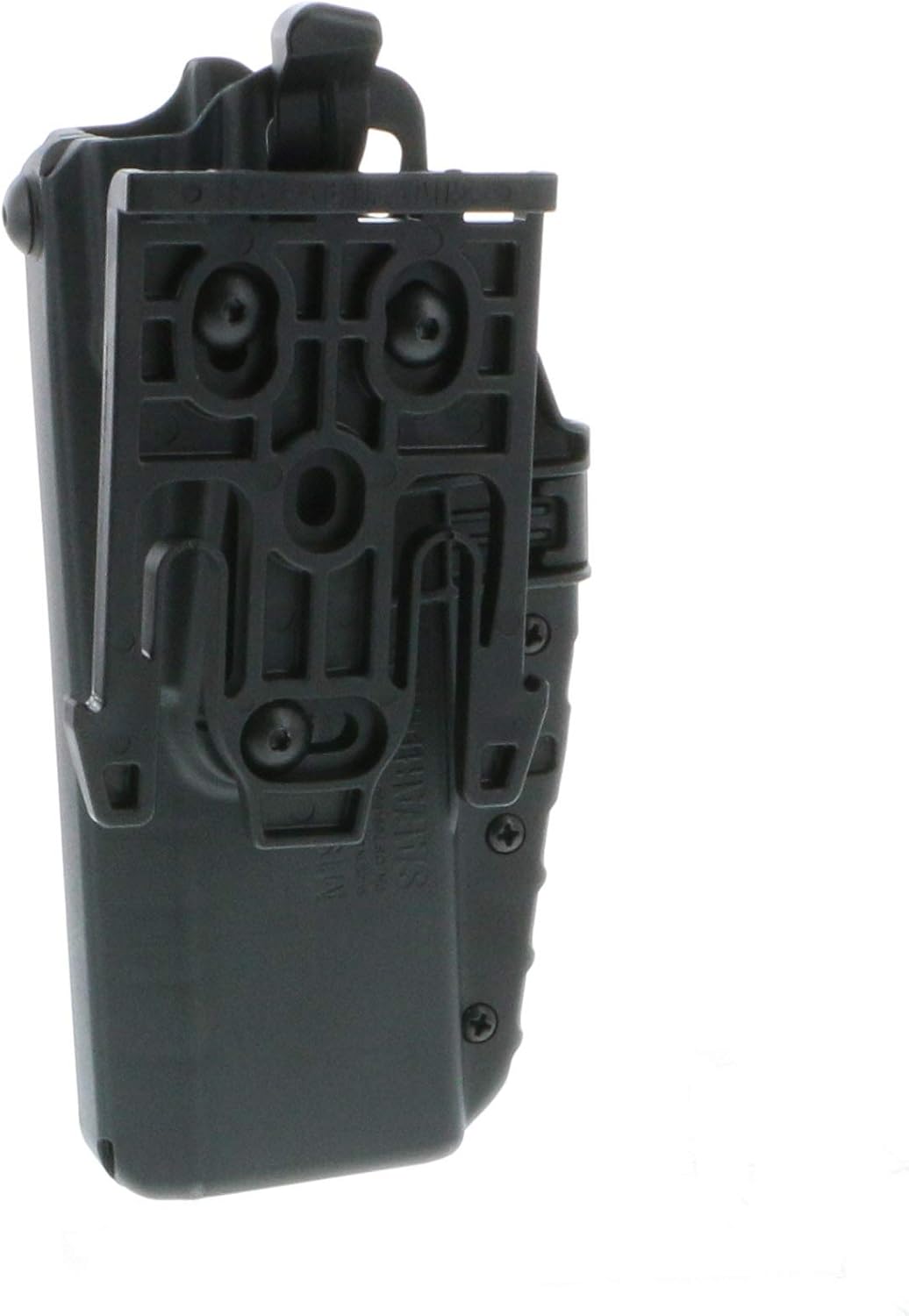
Rear view of the Safariland 7377 ALS Concealment Holster, displaying the mounting plate.
Using the QAS Fork:
The included QAS fork allows for quick interchangeability with other Safariland QAS-compatible mounting platforms. This provides flexibility to switch the holster between different belt setups or carry configurations.
Operating Instructions
The Automatic Locking System (ALS) provides a secure retention mechanism that is disengaged with a simple thumb release during the draw stroke.
Holstering Your Firearm:
- Ensure your firearm is in a safe condition before holstering.
- Insert the firearm into the holster. You will hear and feel a positive click as the ALS mechanism engages, securing the weapon.
- Gently tug on the firearm to confirm it is securely retained by the ALS.

Close-up of the Automatic Locking System (ALS) mechanism inside the holster.
Drawing Your Firearm:
- Establish a firm grip on your firearm.
- With your thumb, depress the ALS release lever located on the inside of the holster, adjacent to the firearm's slide.
- While maintaining pressure on the release lever, draw the firearm straight up and out of the holster. The ALS will disengage, allowing for a smooth, frictionless draw.

Diagram illustrating the Automatic Locking System (ALS) for quick weapon draw.

User wearing the Safariland 7377 holster with a firearm, demonstrating outside-the-waistband carry.
Maintenance
Proper maintenance ensures the longevity and reliable function of your Safariland 7377 holster.
Cleaning:
- The holster can be cleaned by hand washing.
- Use mild soap and water to clean the exterior and interior surfaces.
- The SafariSeven material is designed to allow dirt and moisture to clear quickly due to its raised stand-off surfaces. Ensure these areas are free of debris.
- Rinse thoroughly and allow to air dry completely before re-holstering a firearm.

Image highlighting the SafariSeven material's durability and water resistance.
Inspection:
- Regularly inspect the holster for any signs of wear, cracks, or damage, especially around the ALS mechanism and attachment points.
- Ensure all screws and fasteners are tight and secure.
- If any damage is found, discontinue use and contact Safariland support for assistance.
Troubleshooting
Pistol feels loose in the holster:
- Check Compatibility: Ensure your firearm is indeed a Colt 1911 Commander and that the holster is the correct model (7377) for it.
- Verify ALS Engagement: Make sure the Automatic Locking System fully engages when the firearm is holstered. You should hear and feel a distinct click.
- Inspect for Obstructions: Check the interior of the holster for any debris or foreign objects that might prevent proper seating of the firearm or engagement of the ALS.
Difficulty drawing the firearm:
- Ensure ALS Release: Confirm that the ALS release lever is fully depressed with your thumb during the draw stroke.
- Practice Draw Stroke: Practice a smooth, straight-up draw motion. Any twisting or pulling at an angle may impede the release.
- Check for Damage: Inspect the ALS lever and mechanism for any damage or obstruction that might prevent its proper function.
Specifications
| Feature | Detail |
|---|---|
| Model Number | 7377 |
| Compatibility | Colt 1911 Commander |
| Hand Orientation | Right |
| Material Type | SafariSeven |
| Closure Type | ALS (Automatic Locking System) |
| Included Components | Holster |
| Item Weight | 8.22 ounces |
| Manufacturer | Safariland |
| Origin | Made in the USA |
| UPC | 781602003599 |
Warranty and Support
Safariland products are manufactured to high standards and are backed by the manufacturer's warranty. For specific warranty details, claims, or technical support, please refer to the official Safariland website or contact their customer service directly.
You can visit the official Safariland store for more information and support: Safariland Store


