
Necchi NC-204D
Necchi NC-204D Computerized Sewing Machine User Manual
Model: NC-204D
1. Introduction
Welcome to the user manual for your new Necchi NC-204D Computerized Sewing Machine. This machine is designed to provide a versatile and user-friendly sewing experience, featuring a wide array of stitches and convenient functions. Please read this manual thoroughly before operating your machine to ensure safe and efficient use.
The Necchi NC-204D offers 439 stitch options, easily selectable with a button press and clear LCD display. It features 13 types of 1-step buttonholes and 3 sets of alphanumeric stitches for monogramming. Designed for optimal viewing and comfortable workspace.
2. Safety Instructions
Always follow basic safety precautions when using electrical appliances to reduce the risk of fire, electric shock, or injury.
- Ensure the machine is unplugged when not in use, when cleaning, or when changing parts.
- Keep fingers away from all moving parts, especially the needle.
- Use the correct power supply as indicated on the machine.
- Never operate the machine if it has a damaged cord or plug, or if it is not working properly.
- Do not allow children to operate the machine unsupervised.
- Always turn off the machine before making any adjustments in the needle area.
3. Product Components and Accessories
Your Necchi NC-204D comes with a variety of components and accessories to enhance your sewing projects.
Machine Overview

Image: The Necchi NC-204D sewing machine in white and purple, shown alongside a blue rolling carrying case. This illustrates the portability and included storage solution.

Image: The Necchi NC-204D sewing machine with its large white extension table attached, providing an expanded work surface for larger projects.

Image: A close-up front view of the Necchi NC-204D sewing machine, highlighting its compact design and the area around the needle and presser foot.
Control Panel and Display

Image: A detailed view of the Necchi NC-204D's LCD display and control panel, showing the stitch selection buttons, memory functions, and stitch information display.
Included Accessories

Image: A collection of various accessories included with the Necchi NC-204D, such as different presser feet, bobbins, needles, a seam ripper, and a screwdriver.

Image: A collage showcasing different types of presser feet and their applications, demonstrating the versatility of the Necchi NC-204D for various sewing tasks.
- Standard Presser Foot
- Electronic Buttonhole Foot
- Satin Stitch Foot
- Button Sewing Foot
- Overcast Foot
- Blind Hem Foot
- Hemming Foot
- Gathering Foot
- Quilting Foot
- Embroidery Foot
- Seam Ripper
- Brush
- Quilting Guide
- Needle Pack (#11, #14, #16)
- Twin Needle
- Spool Holders (L & S)
- Bobbins (4x)
- L-Screwdriver
- Second Spool Pin
- Felt
- Soft Cover
- Extension Table
4. Setup
4.1 Unpacking and Placement
- Carefully remove the machine from its packaging.
- Place the machine on a stable, flat surface.
- Ensure there is adequate space around the machine for fabric handling.
- Attach the extension table if desired for larger projects.
4.2 Power Connection
- Connect the power cord to the machine and then to a suitable electrical outlet.
- Ensure the power switch is in the "OFF" position before plugging in.
4.3 Winding the Bobbin
- Place a spool of thread on the spool pin.
- Follow the winding path indicated on the machine.
- Place an empty bobbin onto the bobbin winder spindle.
- Push the spindle to the right.
- Start the machine; it will automatically stop when the bobbin is full.
4.4 Inserting the Bobbin (Horizontal Drop-In System)
- Open the bobbin cover plate.
- Insert the bobbin so the thread unwinds counter-clockwise.
- Guide the thread through the tension spring and into the thread guide.
- Close the bobbin cover.
4.5 Threading the Upper Thread
- Raise the presser foot.
- Place the thread spool on the spool pin.
- Follow the numbered threading path on the machine.
- Use the automatic needle threader for convenience.
- Pull the upper thread under the presser foot.
5. Operating Instructions
5.1 Stitch Selection
The Necchi NC-204D features 439 built-in stitches.
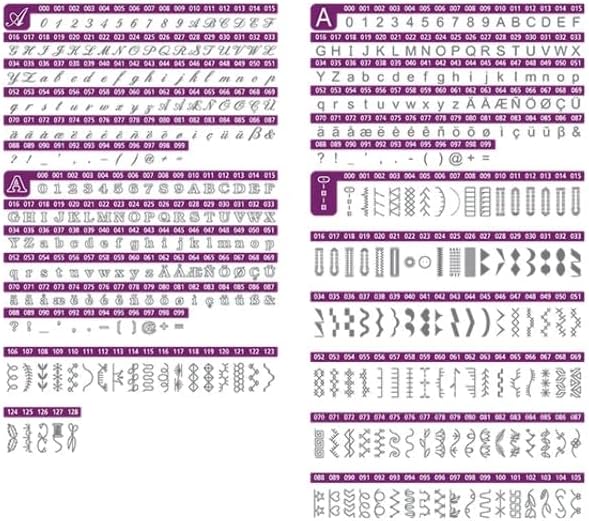
Image: A detailed chart displaying the wide variety of 439 built-in stitches available on the Necchi NC-204D, including utility, decorative, and alphanumeric stitches.
- Use the direct stitch selection buttons for common stitches.
- Navigate through the stitch categories using the control panel and LCD display.
- Adjust stitch length and width as needed using the dedicated buttons.
5.2 Starting and Stopping Sewing
- Use the Start/Stop button to begin and end sewing without the foot pedal.
- Adjust sewing speed using the speed control slider.
- Alternatively, use the foot pedal for variable speed control.
5.3 Automatic Thread Cutter
Press the automatic thread cutter button to trim both upper and bobbin threads at the end of a seam.
5.4 Buttonholes and Monogramming
- Select from 13 different 1-step buttonhole styles. Attach the electronic buttonhole foot.
- Utilize the 3 sets of alphanumeric stitches for personalized monogramming.
6. Maintenance
6.1 Cleaning
- Always unplug the machine before cleaning.
- Regularly remove the needle plate and clean out lint and dust from the bobbin case area using the provided brush.
- Wipe the exterior of the machine with a soft, dry cloth.
6.2 Lubrication
The Necchi NC-204D is designed to require minimal lubrication. Refer to the full instruction manual for specific lubrication points if necessary, or consult a qualified service technician.
7. Troubleshooting
| Problem | Possible Cause | Solution |
|---|---|---|
| Machine not starting | Power cord not connected; power switch off; foot pedal not connected. | Check power connections; turn on power switch; ensure foot pedal is securely plugged in. |
| Skipped stitches | Needle bent or dull; incorrect needle size for fabric; machine not threaded correctly. | Replace needle; use appropriate needle for fabric type; re-thread the machine. |
| Thread breaking | Incorrect threading; tension too tight; poor quality thread; needle inserted incorrectly. | Re-thread machine; adjust tension; use good quality thread; re-insert needle correctly. |
| Bobbin thread tangling | Bobbin incorrectly inserted; lint in bobbin case; upper thread tension too loose. | Re-insert bobbin correctly; clean bobbin case; adjust upper thread tension. |
For more detailed troubleshooting, please refer to the comprehensive manual or contact customer support.
8. Specifications

Image: A diagram showing the dimensions of the Necchi NC-204D sewing machine with the extension table attached, indicating its length, width, and height.
| Feature | Detail |
|---|---|
| Model Number | NC-204D |
| Built-in Stitches | 439 |
| Buttonhole Styles | 13 (1-step) |
| Alphanumeric Stitches | 3 sets with 2 memory functions |
| Bobbin System | Horizontal Drop-In |
| Lighting | LED |
| Display | Extra-large Backlit LCD |
| Automatic Features | Needle Threader, Thread Cutter |
| Dimensions (L x W x H) | Approx. 37.01 x 19.99 x 27.99 cm (14.57 x 7.87 x 11.02 inches) |
| Weight | Approx. 8.8 kg (19.4 lbs) |
| Power Source | Electric |
9. Warranty and Support
For warranty information and customer support, please refer to the documentation included with your purchase or visit the official Necchi website. Keep your proof of purchase for warranty claims.
If you encounter any issues not covered in this manual, please contact Necchi customer service for assistance.
Related documentsNC-204D


Ask a question about this manual
Ask about setup, troubleshooting, compatibility, parts, safety, or missing instructions. Manuals+ will review the question and use this page’s manual context to help answer it.