
LIHAN C87B
LIHAN C87B Bluetooth FM Transmitter Car Adapter User Manual
Model: C87B
Brand: LIHAN
Introduction
This manual provides detailed instructions for the LIHAN C87B Bluetooth FM Transmitter Car Adapter. This device allows you to stream audio wirelessly from your smartphone, make hands-free calls, and charge your devices quickly while driving. Please read this manual thoroughly before use to ensure proper operation and safety.
Product Overview
The LIHAN C87B is a versatile car accessory designed to enhance your in-car audio and charging experience. It features a dual-screen display, multiple music playback options, fast charging ports, and hands-free calling capabilities.
Key Features:
- Dual Screens: Displays FM channel and car voltage simultaneously.
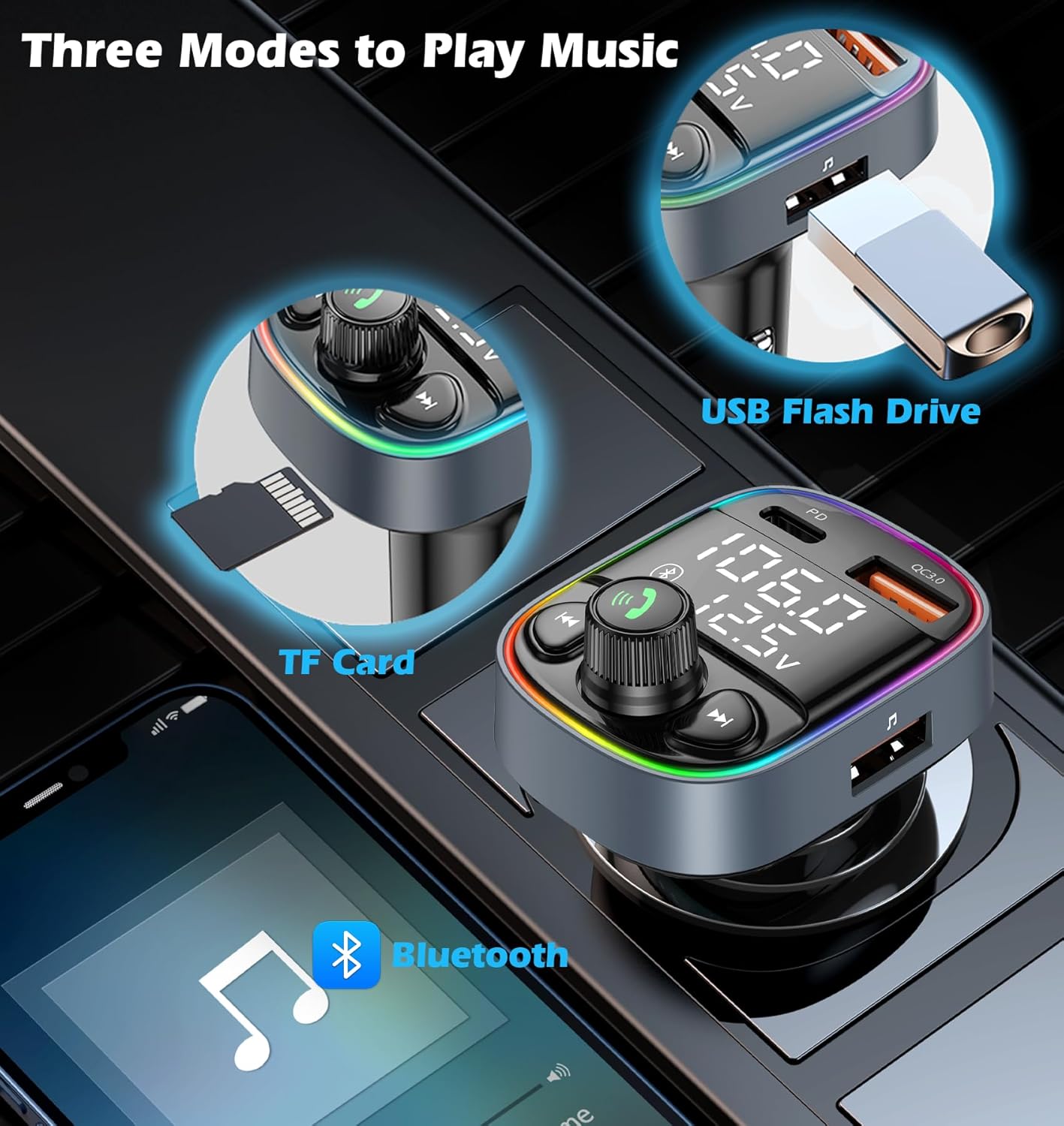
- Three Music Playback Modes: Bluetooth, TF Card (up to 64GB), and USB stick (up to 64GB).
- 42W Fast Charging: Equipped with QC3.0 and Type-C ports for charging two devices concurrently.
- Hands-Free Calls: Built-in microphone with CVC noise cancellation for clear conversations.
- Safety Protections: Integrated over-current, over-voltage, and short-circuit safeguards.
- 7-Color LED Backlight: Customizable ambient lighting with breathing mode.
Component Identification:
Refer to the diagram below for an overview of the device's components.

- LED Display 1: Shows FM frequency.
- LED Display 2: Shows car battery voltage.
- QC3.0 Quick Charging Port: For fast charging compatible devices.
- Type-C USB Charging Port: For fast charging compatible devices.
- USB Reading Port: For playing music from a USB stick.
- Microphone: For hands-free calls.
- Light Switch Key: To change LED backlight colors or turn lights on/off.
- Multi-function Key (Rotary Knob): For answering/rejecting calls, adjusting volume, and setting FM frequency.
- Previous Song Button: Skips to the previous track.
- Next Song Button: Skips to the next track.
- TF Card Port: For playing music from a TF (MicroSD) card.
Setup Instructions
Follow these steps to set up your LIHAN C87B Bluetooth FM Transmitter:
- Insert the Transmitter: Plug the FM transmitter into your car's cigarette lighter socket. The device will power on and display the car's voltage.
- Tune Car Radio: Turn on your car radio and find an unused, clear FM frequency. This should be a station with only static, no active broadcast.
- Set Transmitter Frequency: Hold the multi-function key (answer knob) on the transmitter until the LED display for the FM frequency starts flashing.
- Match Frequencies: Rotate the multi-function key to adjust the transmitter's FM frequency to match the clear station you found on your car radio.
- Confirm Frequency: Press the multi-function key once to fix the channel.
- Pair Bluetooth: On your smartphone, enable Bluetooth and search for available devices. Select "C87B" from the list to pair. Once paired, you will hear a confirmation tone.

Operating Instructions
Music Playback:
The LIHAN C87B supports three modes for playing music:
- Bluetooth: After successful Bluetooth pairing, open your phone's music player and start playback. Audio will be transmitted to your car's speakers via the selected FM frequency.
- TF Card: Insert a TF (MicroSD) card (up to 64GB) containing MP3/WMA/WAV/FLAC audio files into the TF card slot. The device will automatically detect and play music from the card.
- USB Stick: Insert a USB flash drive (up to 64GB) containing MP3/WMA/WAV/FLAC audio files into the USB reading port. The device will automatically detect and play music from the drive.
Use the 'Previous Song' and 'Next Song' buttons to navigate tracks. Rotate the multi-function key to adjust the volume.
Hands-Free Calling:
When your phone is connected via Bluetooth:
- Answer Call: Press the multi-function key once.
- Reject Call: Press and hold the multi-function key for 2 seconds.
- Hang Up: Press the multi-function key once during a call.
- Redial Last Number: Double-press the multi-function key.

Charging Devices:
The transmitter features two fast-charging ports:
- QC3.0 Port: Provides fast charging for compatible Android devices.
- Type-C Port: Provides fast charging for compatible devices, including many modern smartphones and tablets.
Simply connect your device's charging cable to the appropriate port on the transmitter. You can charge two devices simultaneously.

LED Backlight Control:
The device features a 7-color LED backlight. Press the 'Light Switch Key' (sun icon button) to cycle through the available colors or to turn the lights on/off. A breathing mode is also available.

Maintenance
- Cleaning: Use a soft, dry cloth to clean the device. Avoid using harsh chemicals or abrasive materials.
- Storage: When not in use for extended periods, store the device in a cool, dry place away from direct sunlight and extreme temperatures.
- Handling: Avoid dropping the device or subjecting it to strong impacts.
Troubleshooting
| Problem | Possible Solution |
|---|---|
| Static or Poor Audio Quality |
|
| Bluetooth Disconnection |
|
| Device Not Charging |
|
| No Power |
|
Specifications
| Feature | Detail |
|---|---|
| Model Number | C87B |
| Product Dimensions | 1.8 x 2 x 4 inches |
| Item Weight | 1.44 ounces |
| Connectivity Technology | Wireless (Bluetooth) |
| Power Source | DC (12V-24V Car Cigarette Lighter) |
| Charging Ports | QC3.0, Type-C (PD) |
| Total Charging Output | 42W |
| Music Playback Formats | MP3, WMA, WAV, FLAC (via TF Card/USB Stick) |
| TF Card/USB Stick Capacity | Up to 64GB |
| Special Features | Hands-Free Calls, USB/TF card player, Bluetooth adapter, Car phone charger, Music adapter, 7-Color LED Backlight, Dual LED Displays (FM/Voltage) |
| Material | Metal, Plastic |
| Manufacturer | INTRO UNION ELECTRONICS CO.,LIMITED |
Warranty and Support
Specific warranty details are not provided in this manual. For warranty information, please refer to the product packaging or contact the seller directly. For technical support or further assistance, please reach out to LIHAN customer service through the retailer where the product was purchased.
Related documentsC87B


Ask a question about this manual
Ask about setup, troubleshooting, compatibility, parts, safety, or missing instructions. Manuals+ will review the question and use this page’s manual context to help answer it.