
Graywind B0FGJ9QKVR
Graywind Smart Natural Bamboo Blinds User Manual
Brand: Graywind | Model: B0FGJ9QKVR
1. Introduction
Welcome to the user manual for your Graywind Smart Natural Bamboo Blinds. These blinds combine the natural beauty of bamboo with advanced smart home technology, offering effortless control and energy efficiency. This manual provides essential information for installation, operation, and maintenance to ensure optimal performance and longevity of your blinds.

Figure 1: Graywind Smart Natural Bamboo Blinds with various control methods.
2. Key Features
- Premium Natural Material: Crafted from authentic bamboo with a hidden motor, these blinds offer a minimalist, eco-friendly design. The natural bamboo grain and silent operation enhance any room.
- Effortless Smart Control: Operate your automatic blinds via remote, app, or voice commands (compatible with Alexa/Google Home). Schedule routines and group control for multiple blinds, ensuring seamless light management.
- Auto-Adjust & Energy Saving: Intelligent slat adjustment based on sun angle optimizes light, privacy, and reduces heat, contributing to lower energy costs. Optional solar charging further boosts efficiency.
- Safe & Versatile Use: Cord-free electric blinds eliminate hazards for children and pets. Easily controlled with remote, these motorized window blinds are perfect for kitchens, living rooms, or bedrooms.
- Custom Made-to-Order: Blinds are custom-made to your specified dimensions and details.
- Comprehensive After-Service: Includes mounting accessories, manuals, and video guides for easier self-installation. Long-term complimentary technical support is provided.
2.1 Intelligent Light Master
The intelligent light master feature allows precise control over the slat angle, enabling you to adjust the amount of light entering your room, optimize privacy, and manage indoor temperature effectively.

Figure 2: Intelligent Light Master for optimal light and privacy control.
2.2 Natural Bamboo Texture
Experience the beauty of nature with 100% natural, hand-polished bamboo slats that provide a unique and elegant aesthetic to your living space.

Figure 3: Detail of the natural bamboo texture.
2.3 Voice Control Integration
Seamlessly integrate your Graywind blinds with smart home ecosystems like Alexa and Google Home for convenient voice-activated control. Simply speak your commands to adjust your blinds.

Figure 4: Voice control functionality with smart speakers.
2.4 App and Remote Control
Control your blinds from anywhere using the dedicated Graywind app on your smartphone, or utilize the included 15-channel timing remote for direct adjustments, scheduling, and group control.

Figure 5: App and remote control options for your blinds.
2.5 Product Overview Video
Watch this official product video for a visual demonstration of the Graywind Smart Venetian Blinds features and operation.
Video 1: Product Show | Graywind Smart Venetian Blinds.
3. Specifications
| Attribute | Detail |
|---|---|
| Product Dimensions | Custom (Example: 109"L x 77"W) |
| Brand | Graywind |
| Color | Bamboo |
| Opacity | Blackout |
| Room Type | Bedroom, Home Theater, Hotels, Living Room, Restaurants |
| Operation Mode | Automatic |
| Special Features | APP Control, Blackout, Cordless, Voice Control, Window Treatments |
| Mounting Type | Outside Mount, Inside Mount |
| Fabric Type | Bamboo |
| Manufacturer | Graywind |
4. Setup and Installation
Proper measurement and installation are crucial for the optimal performance of your Graywind Smart Bamboo Blinds. Please follow these guidelines carefully.
4.1 Measurement Guide
Before ordering or installing, ensure accurate measurements. The method differs for Inside Mount and Outside Mount installations.
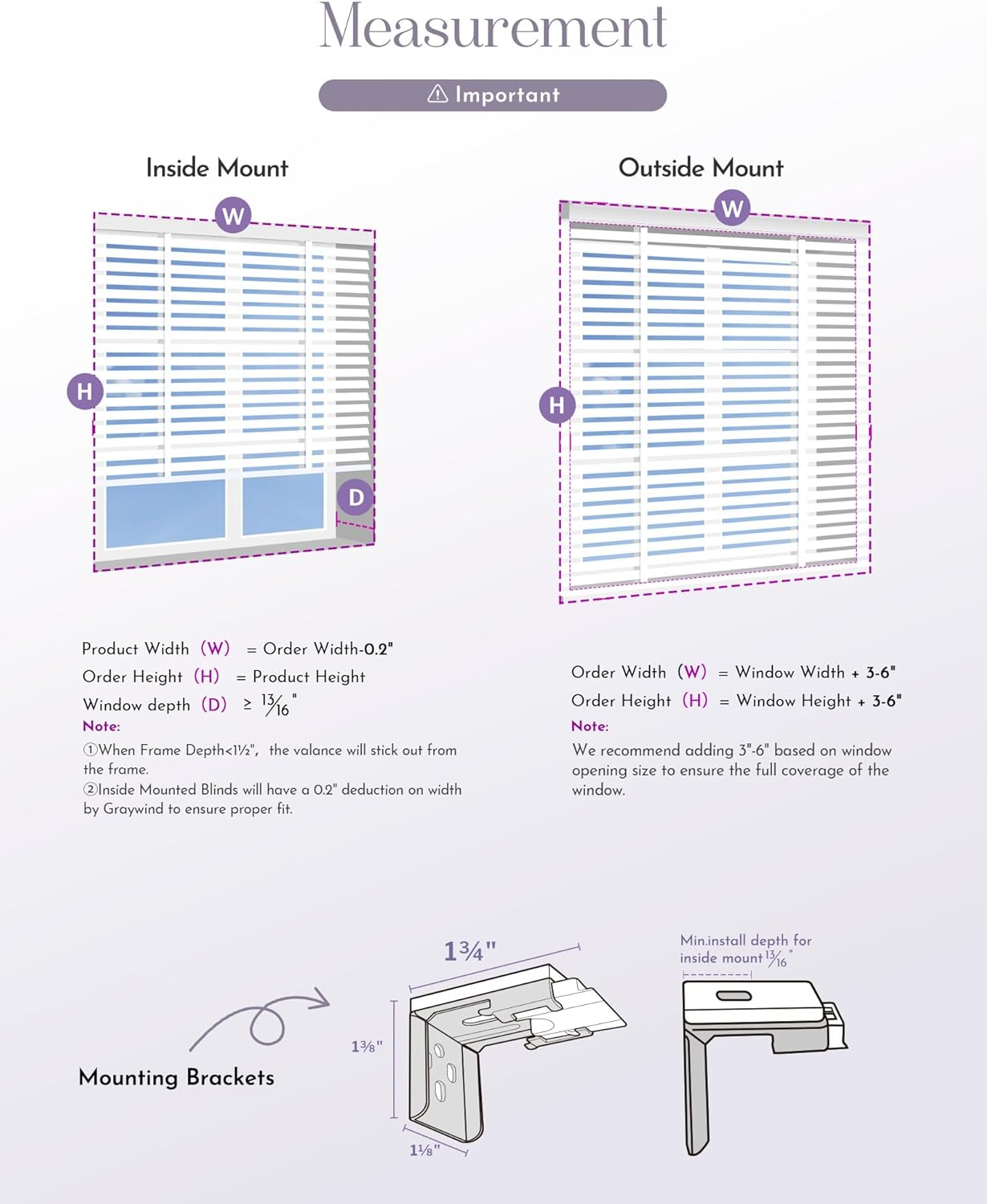
Figure 6: Detailed measurement instructions for Inside and Outside Mounts.
- Inside Mount:
- Product Width (W) = Order Width - 0.2"
- Order Height (H) = Product Height
- Window depth (D) ≥ 1 3/16"
- Note 1: When Frame Depth < 1 3/4", the valence will stick out from the frame.
- Note 2: Inside Mounted Blinds will have a 0.2" deduction on width by Graywind to ensure proper fit.
- Outside Mount:
- Order Width (W) = Window Width + 3-6"
- Order Height (H) = Window Height + 3-6"
- Note: We recommend adding 3-6" based on window opening size to ensure the full coverage of the window.
4.2 Mounting Brackets
The blinds come with specific mounting brackets designed for secure installation. Refer to the included physical manual and video guide for detailed step-by-step instructions on attaching these brackets and mounting the blinds.
- Mounting accessories are included with your purchase.
- A video guide is available to assist with self-installation. Please refer to the product page or contact Graywind support for access.
5. Operating Your Blinds
Your Graywind Smart Natural Bamboo Blinds offer multiple convenient ways to operate them.
5.1 Remote Control
The included remote control allows for direct adjustment of your blinds. Use the buttons to raise, lower, and tilt the slats. The 15-channel timing remote also supports scheduling and group control for multiple blinds.
- Press the Up button to raise the blinds.
- Press the Down button to lower the blinds.
- Use the Tilt buttons to adjust the angle of the slats for light control and privacy.
- Refer to the remote's specific instructions for setting up timing schedules and grouping blinds.
5.2 App Control
Download the Graywind app from your device's app store to control your blinds from your smartphone. The app provides advanced features such as:
- Remote operation from anywhere with an internet connection.
- Setting up custom routines and scenes.
- Precise percentage adjustment of blind opening.
- Managing multiple blinds and groups.
5.3 Voice Control (Alexa/Google Home)
For hands-free operation, connect your Graywind blinds to your Amazon Alexa or Google Home smart assistant. Follow the instructions in the Graywind app to link your blinds to your preferred smart home platform.
- Once linked, you can use voice commands such as:
- "Alexa, open the living room blinds."
- "Hey Google, close the bedroom blinds."
- "Alexa, set the kitchen blinds to 50%."
6. Care and Maintenance
To ensure the longevity and appearance of your Graywind Smart Natural Bamboo Blinds, follow these simple maintenance tips:
- Regular Cleaning: Dust the bamboo slats regularly with a soft, dry cloth or a feather duster. For deeper cleaning, a slightly damp cloth can be used, but ensure the bamboo dries quickly to prevent warping or discoloration.
- Avoid Harsh Chemicals: Do not use abrasive cleaners, solvents, or strong chemical solutions on the blinds, as these can damage the natural bamboo finish.
- Protect from Moisture: While bamboo is durable, excessive moisture can cause damage. Avoid installing in areas with high humidity without proper ventilation, or wipe down immediately if they get wet.
- Motor Care: The hidden motor requires no user maintenance. If you experience issues with motor function, refer to the troubleshooting section or contact customer support.
7. Troubleshooting
If you encounter any issues with your Graywind Smart Natural Bamboo Blinds, please refer to the common problems and solutions below. If the problem persists, contact Graywind customer support.
| Problem | Possible Cause | Solution |
|---|---|---|
| Blinds not responding to remote/app/voice. | Low battery in remote or blinds; remote not paired; Wi-Fi connectivity issue (for app/voice). | Replace remote battery. Charge blind motor battery (if applicable). Re-pair remote following manual. Check Wi-Fi connection and smart hub status. |
| Blinds move unevenly or make unusual noises. | Obstruction in the track; motor issue; improper installation. | Check for any obstructions. Ensure blinds are installed level and securely. If problem persists, contact support. |
| Voice control not working. | Blinds not linked to smart assistant; incorrect voice command; internet connectivity issue. | Verify blinds are correctly linked in the Graywind app and smart assistant app. Use precise voice commands. Check internet connection. |
8. Warranty and Support
Graywind is committed to providing high-quality products and excellent customer service. Your Graywind Smart Natural Bamboo Blinds come with comprehensive support.
- Technical Support: We provide long-term complimentary technical support for your blinds.
- Contact Information: For any questions, technical assistance, or warranty claims, please refer to the contact details provided on your purchase invoice or visit the official Graywind website.
Ask a question about this manual
Ask about setup, troubleshooting, compatibility, parts, safety, or missing instructions. Manuals+ will review the question and use this page’s manual context to help answer it.