
1. Introduction
This manual provides essential information for the safe and efficient installation, operation, and maintenance of the Walfront DDM75S Single Phase Din Rail KWh Energy Meter. Please read this manual thoroughly before using the device to ensure proper function and safety.
2. Safety Information
- Installation and maintenance should only be performed by qualified electricians.
- Ensure power is disconnected before any installation, wiring, or maintenance procedures.
- Do not operate the meter if it appears damaged.
- Observe all local and national electrical codes and regulations.
- The meter is designed for indoor use in a dry environment.
3. Product Overview
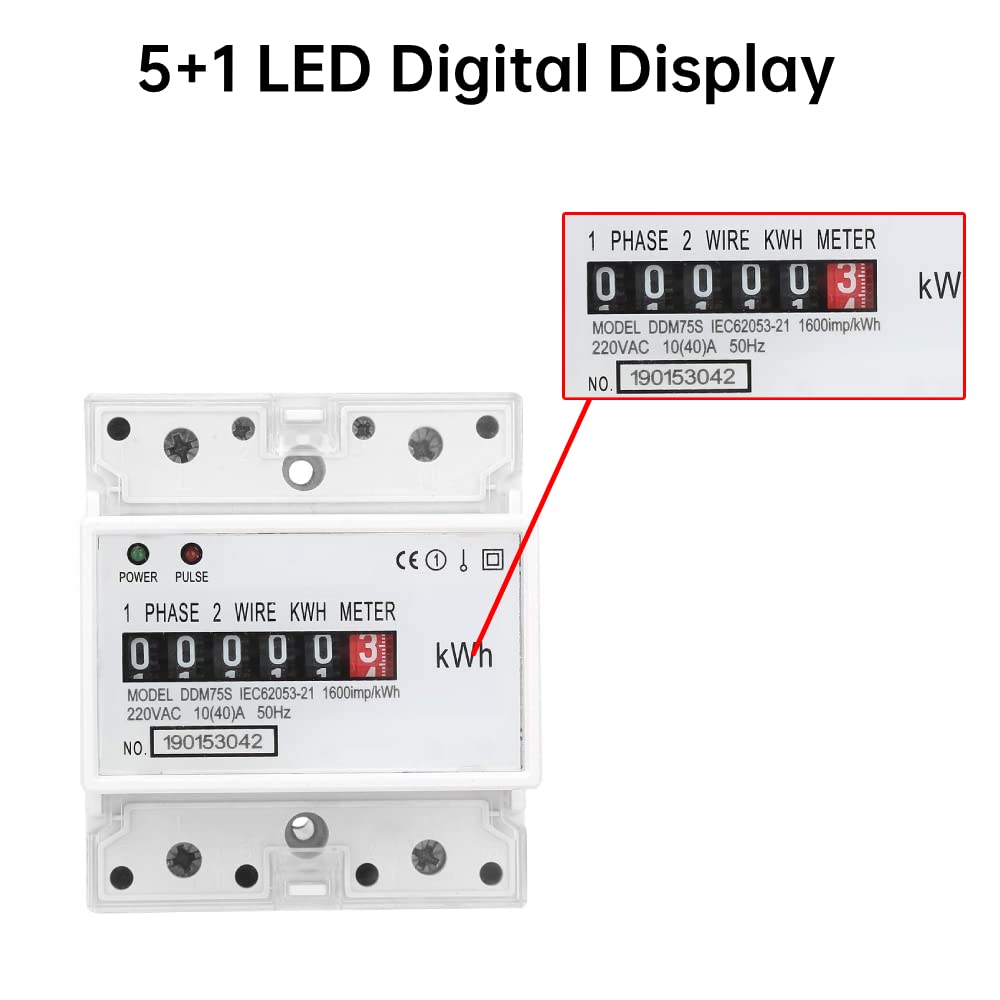
The Walfront DDM75S is a single-phase, two-wire active energy meter designed for measuring electrical power consumption. It features a compact design for DIN rail mounting and a clear 5+1 digital display.
Key Features:
- Standard DIN rail mounting (35 mm).
- 5+1 digital display for KWh readings.
- Dual-color LED indicators for power status (green) and energy pulse signal (red).
- One-way measurement of active energy consumption.
- Complies with IEC 62053-21, IEC 62053-31, and DIN43864 standards.

The meter is designed for easy integration with various Automatic Meter Reading (AMR) systems.

4. Setup and Installation
4.1 DIN Rail Mounting
The DDM75S meter is designed for standard 35 mm DIN rail mounting in accordance with DIN EN50022. Ensure the mounting location is stable, dry, and free from excessive vibration or direct sunlight.
4.2 Wiring Instructions
The meter supports direct connection with two primary wiring methods: S-type and U-type. The standard configuration is S-type wiring. Always ensure power is off before connecting any wires.

The terminal cover can be extended to enhance safety and protect connections.

5. Operating Instructions
5.1 Power-Up and Display
Once correctly installed and powered, the meter's 5+1 digital display will show the accumulated energy consumption in Kilowatt-hours (KWh). The display format is 99999.1 KWh.
5.2 LED Indicators
- POWER (Green LED): Illuminates when the meter is receiving power, indicating normal operation.
- PULSE (Red LED): Flashes to indicate energy consumption. Each flash represents a specific amount of energy (e.g., 1600 imp/KWh), as specified on the meter's faceplate. A faster flash rate indicates higher power consumption.
5.3 Pulse Output
The meter provides a standard passive (non-polar) pulse output, allowing it to interface with various AMR systems for remote energy monitoring. Refer to IEC 62053-31 and DIN43864 standards for pulse output specifications.
6. Maintenance
The Walfront DDM75S energy meter is designed for long-term, maintenance-free operation. However, periodic checks are recommended:
- Cleaning: Gently wipe the meter's exterior with a soft, dry cloth. Do not use abrasive cleaners or solvents.
- Connection Integrity: Periodically inspect wiring connections to ensure they remain secure. Loose connections can lead to inaccurate readings or operational issues.
- Environmental Conditions: Ensure the operating environment remains within specified temperature and humidity ranges to prevent damage.
7. Troubleshooting
- Meter not displaying: Check power supply and wiring connections. Ensure the green POWER LED is illuminated.
- Pulse LED not flashing: Verify that there is an active load connected and consuming power. If the load is active but the LED is not flashing, check wiring or contact support.
- Inaccurate readings: Ensure all connections are tight and correct according to the wiring diagram. Verify the meter's specifications match the electrical system.
If issues persist, consult a qualified electrician or contact Walfront customer support.
8. Specifications
| Specification | Value |
|---|---|
| Item Type | Din Rail Energy Meter |
| Model | DDM75S |
| Voltage Specifications | 220V/230V 50/60Hz |
| Current Specifications | 10(40)A |
| Insulation Performance | AC voltage 4KV, 1 minute; 1.2/50us waveform impact voltage 6KV |
| Display Mode | (5+1) Digital Display |
| Installation Method | 35mm DIN Rail Assembly |
| Weight | Approx. 246g |
| Product Dimensions (L x W x H) | 11 x 8 x 8 cm |
8.1 Dimensions

9. Warranty and Support
For warranty information, please refer to the product packaging or contact your retailer. For technical support or inquiries, please reach out to Walfront customer service through their official channels.
