
1. Introduction
The LituFoto R16 is a compact and versatile LED video light designed for photographers and videographers. Featuring an OLED display, built-in lithium battery, and adjustable color temperature, hue, and brightness, it provides professional lighting for various shooting scenarios, from live broadcasts to product photography.
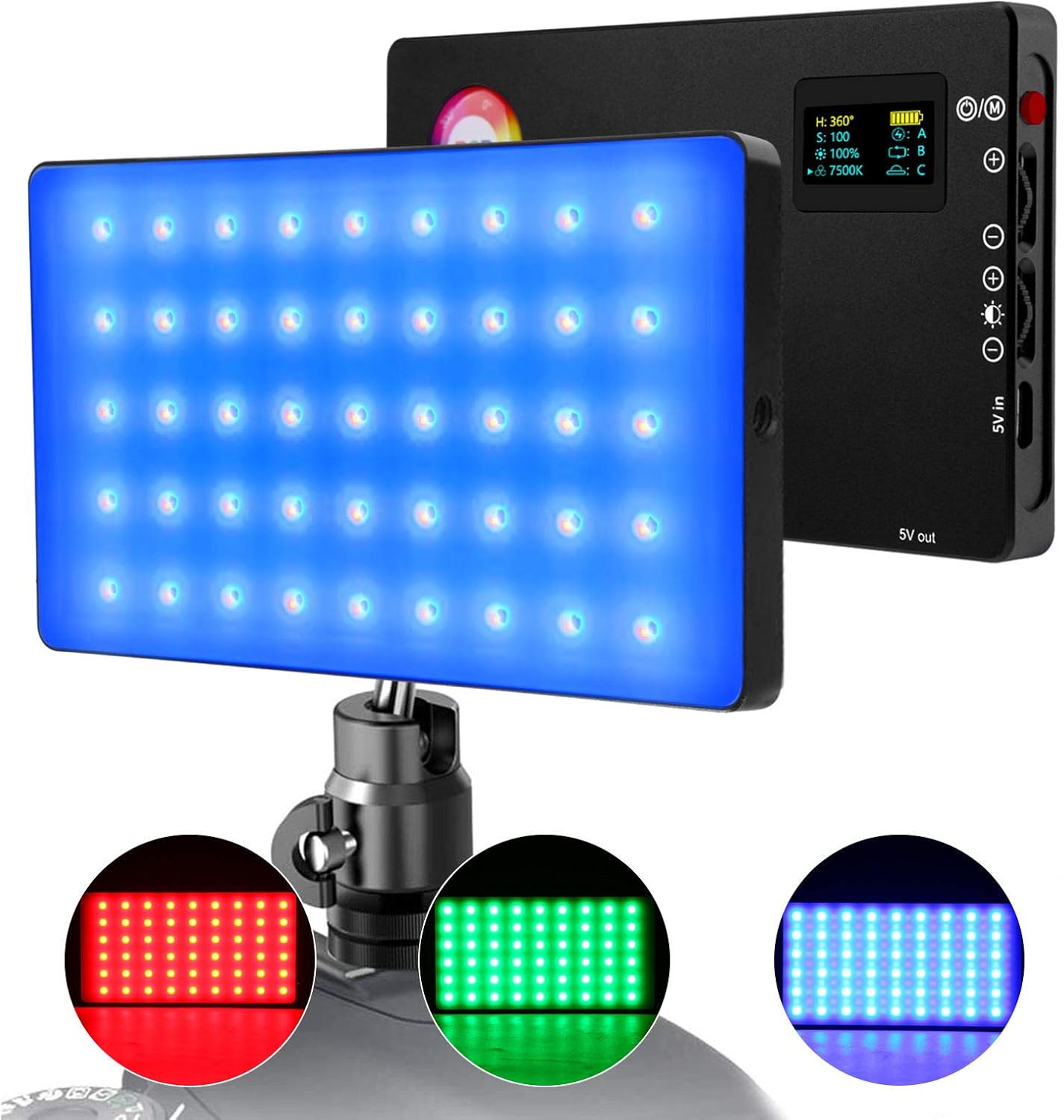
Figure 1.1: The LituFoto R16 LED Video Light, showcasing its compact design and various color outputs.
2. Product Overview
Familiarize yourself with the components of your LituFoto R16 LED Video Light.

Figure 2.1: Key components of the LituFoto R16 LED Video Light.
- OLED Display Screen: Provides real-time information on hue, saturation, brightness, color temperature, and battery status.
- Power/Switch Button: Used to power the device on/off and navigate menus.
- Function Adjustment Dial: Adjusts hue, color temperature, and cycles through lighting effects.
- Brightness Adjustment Dial: Controls the light output intensity from 1% to 100%.
- Type-C Charging Port: For charging the built-in lithium battery.
- USB Power Outlet (5V out): Can be used as a mobile power bank to charge other devices.
- 1/4'' Nut Mounts: Located on two sides for versatile mounting on tripods, cameras, or other accessories.

Figure 2.2: The OLED display provides comprehensive information for precise control.
3. Setup
3.1 Initial Charging
Before first use, fully charge the LituFoto R16. Connect the provided USB Type-C cable to the charging port on the device and the other end to a compatible USB power adapter (not included).
- The OLED display will indicate charging status.
- A full charge typically takes approximately 3 hours.
- The device supports charging while in use.
3.2 Mounting the Light
The R16 features 1/4'' screw mounts on two sides, allowing for flexible mounting options.
- Attach to a camera's hot shoe using a cold shoe adapter (often included).
- Mount on a tripod or light stand for standalone use.
- Connect to various brackets for custom setups.
4. Operating Instructions
4.1 Power On/Off
Press and hold the Power/Switch Button to turn the light on or off.
4.2 Adjusting Light Settings
The LituFoto R16 offers comprehensive control over light output:

Figure 4.1: Adjusting Hue, Color Temperature, and Brightness on the LituFoto R16.
- Brightness (1%-100%): Rotate the Brightness Adjustment Dial to increase or decrease the light intensity.
- Color Temperature (3200K-7500K): Press the Function Adjustment Dial to cycle to the CCT mode. Rotate the dial to adjust the color temperature from warm (3200K) to cold (7500K).
- Hue (0°-360°): Press the Function Adjustment Dial to cycle to the HUE mode. Rotate the dial to select any color across the 360-degree spectrum.
- Saturation (0-100): In HUE mode, press the Function Adjustment Dial again to select saturation. Rotate the dial to adjust color saturation.
4.3 Lighting Effects
The R16 offers 3 modes with 9 distinct lighting effects to enhance your creative shooting.

Figure 4.2: The LituFoto R16 offers various lighting effects for creative applications.
To access lighting effects, press the Function Adjustment Dial until you enter the effects mode. Rotate the dial to cycle through the available effects:
- Intermittent Flash
- Frequent Flash
- Monitor Simulation
- Slow Speed Color
- High Speed Color
- Candlelight Simulation
- Police Vehicle
- Ambulance Vehicle
- Fire Fighting Truck
5. Charging and Battery
The LituFoto R16 is equipped with a built-in 4040mAh lithium battery, providing approximately 2 hours of continuous output at 100% brightness.
- Charging: Use the Type-C charging port. The OLED display shows battery level.
- Power Bank Function: The 5V out USB port allows the R16 to function as a portable power bank, providing emergency power to other devices like smartphones. Note that using this feature will reduce the light's operational time.
6. Maintenance
- Cleaning: Use a soft, dry cloth to clean the light's body and screen. Do not use harsh chemicals or abrasive materials.
- Storage: Store the device in a cool, dry place away from direct sunlight and extreme temperatures.
- Battery Care: For optimal battery life, avoid fully discharging the battery frequently. Charge the device regularly, even if not in use, to maintain battery health.
- Water Resistance: This device is not water resistant. Avoid exposure to water or high humidity.
7. Troubleshooting
| Problem | Possible Cause | Solution |
|---|---|---|
| Light does not turn on. | Battery is depleted. | Charge the device using the Type-C port. |
| Controls (dials/buttons) are unresponsive. | Temporary software glitch or physical obstruction. | Restart the device. Ensure no debris is obstructing the buttons/dials. If issues persist, contact support. |
| Battery life is shorter than expected. | Operating at 100% brightness; battery degradation over time; using power bank function. | Reduce brightness settings. Ensure full charge before use. Avoid frequent full discharges. |
| OLED display is not showing correct information. | Calibration issue or internal error. | Restart the device. If the problem persists, contact LituFoto customer support. |
8. Specifications
| Feature | Detail |
|---|---|
| Model Number | LituFoto R16 |
| Dimensions | 13.11 x 7.98 x 1.17 cm |
| Weight | 350 g |
| Battery Type | Built-in Lithium Ion (4040mAh) |
| Battery Life (100% Brightness) | Approx. 2 hours |
| Color Temperature Range | 3200K - 7500K |
| Hue Adjustment | 0° - 360° Full Color |
| Brightness Adjustment | 1% - 100% |
| CRI | CRI96+ |
| Max Output | 9W |
| Illuminance | 2700lx/0.3M |
| Charging Port | USB Type-C |
| Output Port | USB (5V out) |
| Mounting | 1/4'' Screw Mounts (2 sides) |
| Water Resistance Level | Not Water Resistant |
9. Warranty and Support
LituFoto products are designed for reliability and performance. For warranty information and customer support, please refer to the official LituFoto website or contact your local distributor.
For further assistance, please visit the LituFoto Store on Amazon.
