
Strymon Sunset
Strymon Sunset Dual Overdrive Pedal
User Manual
Introduction
The Strymon Sunset is a versatile dual overdrive pedal designed to provide a wide range of classic overdrive and distortion tones. It features two independent channels, A and B, each offering distinct overdrive circuits, allowing for flexible tone shaping and stacking options. This manual provides detailed instructions on setting up, operating, and maintaining your Sunset pedal.
Setup
Follow these steps to properly set up your Strymon Sunset pedal:
- Power Connection: Connect a standard 9V DC power supply (center-negative, 200mA minimum) to the 9VDC input jack on the rear panel. Ensure the power supply meets the specified voltage and current requirements.
- Input Connection: Connect your guitar or other instrument to the IN jack on the rear panel using a standard 1/4-inch instrument cable.
- Output Connection: Connect the OUT jack on the rear panel to your amplifier or the next pedal in your signal chain using a standard 1/4-inch instrument cable.
- Optional Connections:
- Expression Pedal (EXP): For real-time control over parameters, connect an expression pedal to the EXP jack.
- Favorite Switch (FAV): Connect an external favorite switch to the FAV jack to recall a saved preset.
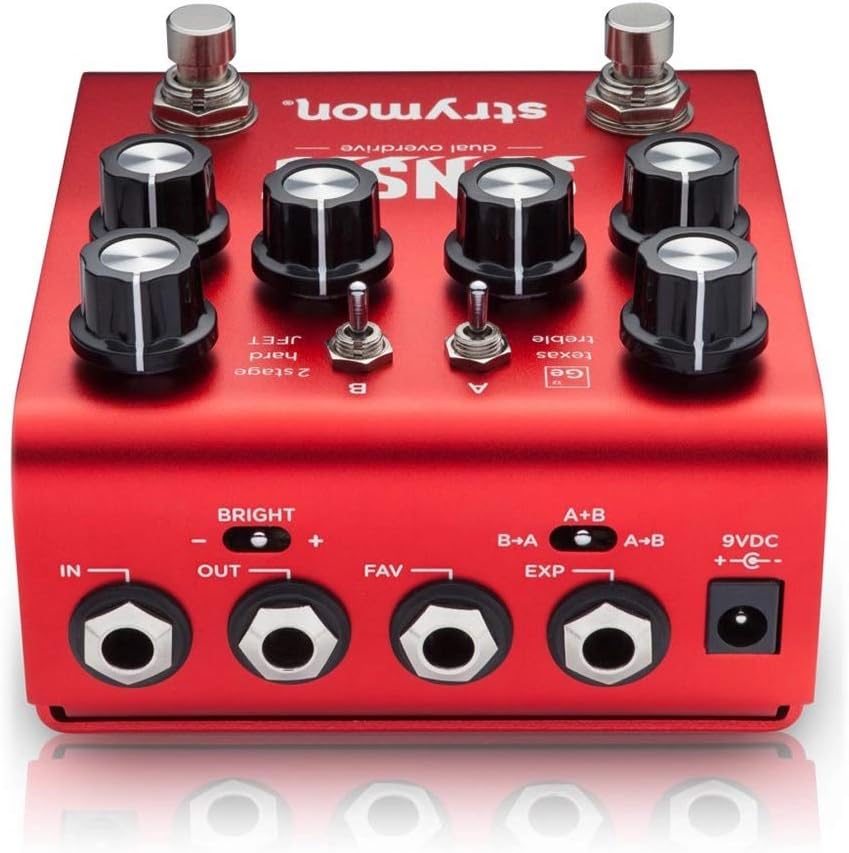
Figure 1: Rear panel connections of the Strymon Sunset pedal. This view highlights the IN, OUT, FAV, EXP, and 9VDC power input jacks, along with the B->A and A+B switches.
Operating Instructions
The Strymon Sunset features two independent overdrive channels, A and B, each with unique voicings and controls. Understanding these controls is key to unlocking the pedal's full potential.

Figure 2: Top panel controls of the Strymon Sunset pedal. This image displays the LEVEL, DRIVE, and TONE knobs for both channels, along with the A and B circuit type switches and footswitches.
Front Panel Controls
- Channel A Controls:
- LEVEL A: Adjusts the output volume of Channel A.
- DRIVE A: Controls the amount of gain/overdrive for Channel A.
- TONE A: Shapes the tonal character of Channel A, typically acting as a high-cut filter.
- A Circuit Switch: Selects between three distinct overdrive circuits for Channel A:
- Ge (Germanium): Smooth, warm, and dynamic overdrive, reminiscent of classic germanium diode circuits.
- Texas: Mid-focused, bluesy overdrive with a distinct character.
- Treble: A treble booster circuit, ideal for pushing an already overdriven amp or adding sparkle.
- Channel B Controls:
- LEVEL B: Adjusts the output volume of Channel B.
- DRIVE B: Controls the amount of gain/overdrive for Channel B.
- TONE B: Shapes the tonal character of Channel B.
- B Circuit Switch: Selects between three distinct overdrive circuits for Channel B:
- 2 Stage: A classic two-stage soft-clipping overdrive.
- Hard: A harder clipping overdrive with increased compression and sustain.
- JFET: A JFET-based circuit offering a more amp-like, natural overdrive.
- Footswitches:
- A Footswitch: Engages or bypasses Channel A. The corresponding LED indicates its status.
- B Footswitch: Engages or bypasses Channel B. The corresponding LED indicates its status.
Rear Panel Switches
- B->A / A+B Switch: This switch determines the stacking order when both channels are engaged:
- B->A: Channel B feeds into Channel A. This is useful for boosting Channel A with Channel B's gain.
- A+B: Channels A and B run in parallel. This allows for blending the two distinct tones.
- BRIGHT Switch: A global switch that adds a subtle high-end boost to the overall output.
- +: Engages the bright boost.
- -: Disengages the bright boost.
Maintenance
To ensure the longevity and optimal performance of your Strymon Sunset pedal, follow these maintenance guidelines:
- Cleaning: Use a soft, dry cloth to wipe down the pedal's enclosure. Avoid using abrasive cleaners or solvents, as they may damage the finish or internal components.
- Storage: Store the pedal in a cool, dry place away from direct sunlight, extreme temperatures, and high humidity.
- Power Supply: Always use a regulated 9V DC center-negative power supply that meets the pedal's current requirements (200mA minimum). Using an incorrect power supply can damage the unit and void the warranty.
- Connections: Periodically check all cable connections for wear and tear. Ensure jacks are free of dust and debris.
Troubleshooting
If you encounter issues with your Strymon Sunset pedal, refer to the following common problems and solutions:
| Problem | Possible Cause | Solution |
|---|---|---|
| No sound or weak signal. | Incorrect power supply, faulty cables, incorrect connections, pedal bypassed. |
|
| Unwanted noise or hum. | Ground loop, faulty power supply, interference from other electronics. |
|
| LEDs not lighting up. | No power, pedal malfunction. |
|
Specifications
| Model: | Sunset Dual Overdrive |
| Power Requirement: | 9V DC, Center-Negative, 200mA minimum |
| Signal Format: | Analog |
| Hardware Interface: | HP-HSC |
| Dimensions (L x W x H): | 8 x 5 x 4 inches (20.3 x 12.7 x 10.2 cm) |
| Weight: | 1.34 pounds (0.61 kg) |
| Color: | Red, Silver |
| ASIN: | B0875MSLCJ |
| Date First Available: | April 16, 2020 |
Warranty and Support
Strymon products are built with high-quality components and undergo rigorous testing. For information regarding warranty coverage, product registration, and technical support, please visit the official Strymon website or contact their customer service department. Keep your purchase receipt as proof of purchase for warranty claims.
Strymon Official Website: www.strymon.net
Related documentsSunset


Ask a question about this manual
Ask about setup, troubleshooting, compatibility, parts, safety, or missing instructions. Manuals+ will review the question and use this page’s manual context to help answer it.