
Introduction
This manual provides detailed instructions for the setup, operation, and maintenance of your Anker 553 USB-C Hub (8-in-1). Please read this guide thoroughly to ensure proper usage and to maximize the functionality of your device.
Setup
What's in the Box
- Anker 553 USB-C Hub (8-in-1)
- Welcome Guide
Connecting to Your Device
Connect the integrated USB-C cable from the Anker 553 USB-C Hub to a compatible USB-C port on your laptop or host device. Ensure your device supports USB-C, USB4, or Thunderbolt connections with DP Alt Mode and Power Delivery for full functionality.
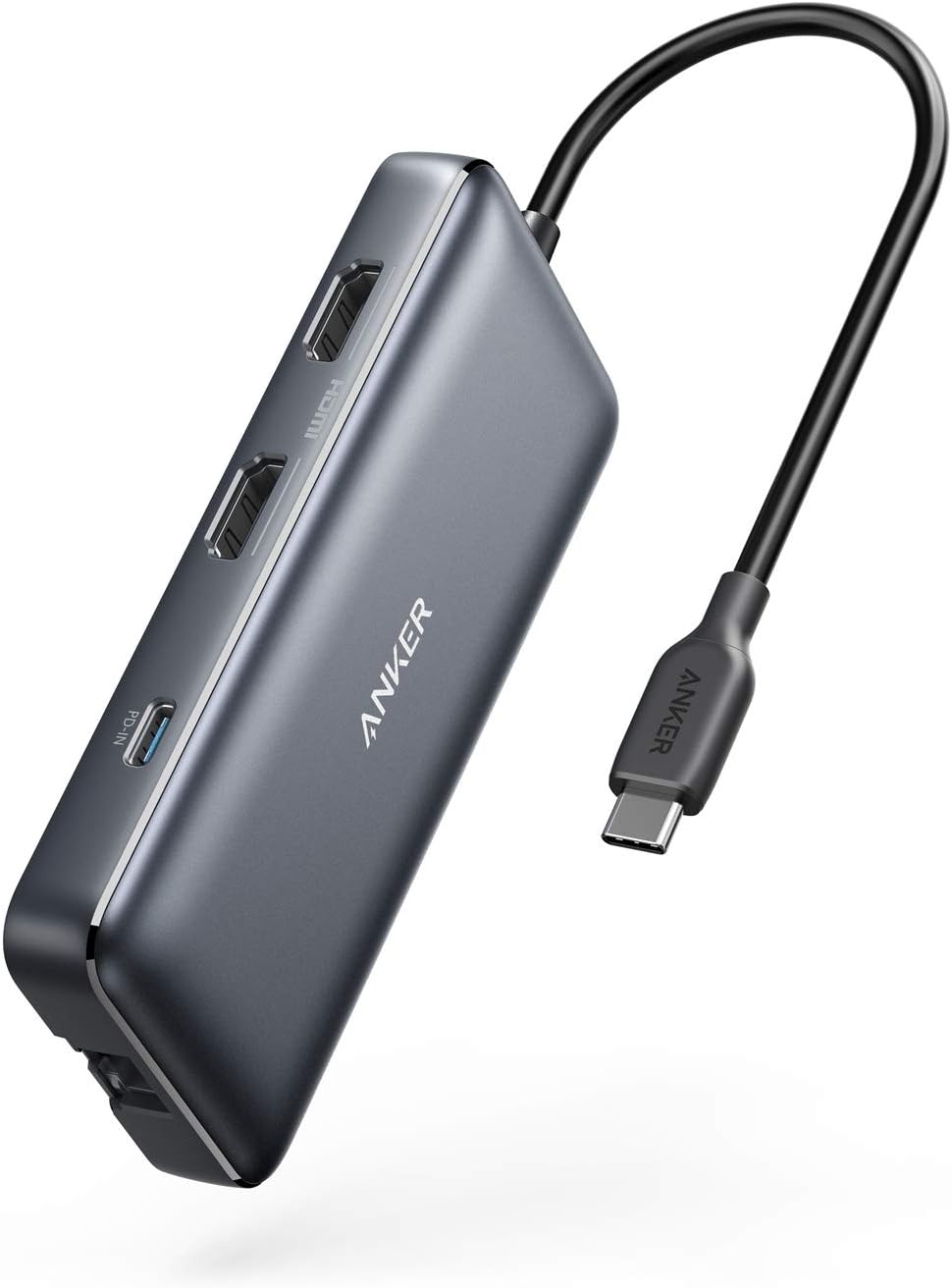
Official Product Overview
Video 1: An official overview of the Anker 553 USB-C Hub, showcasing its features and connectivity options.
Operating Instructions
Port Overview
The Anker 553 USB-C Hub provides a variety of ports for expanded connectivity:
- USB-C PD-IN Charging Port: For power input to charge your laptop.
- 2 USB-A Data Ports: For connecting USB peripherals and data transfer.
- 2 HDMI Ports: For connecting external displays.
- Ethernet Port: For a stable wired network connection.
- microSD/SD Card Reader: For accessing data from memory cards.

Power Delivery
The hub supports USB-C Power Delivery, allowing pass-through charging up to 85W for your connected laptop. A 100W PD wall charger and a USB-C to C cable are required for this functionality (charger and cable not included).

Dual Display Setup
Connect up to two external displays via the HDMI ports. You can stream or mirror content to a single device in 4K@60Hz, or connect two displays in 4K@30Hz. For macOS users, please note that the display on both external monitors will be identical (mirror mode only).


Data Transfer
The two USB-A data ports support high-speed data transfer. The integrated SD and microSD card readers also allow for quick access to photos and other media files.

Ethernet Connection
For a reliable and fast internet connection, use the 1 Gbps Ethernet port.

Compatibility
The Anker 553 USB-C Hub supports USB-C, USB4, and Thunderbolt connections. It is compatible with:
- MacBook (macOS 12 and newer)
- Windows 10 and 11
- ChromeOS
- Laptops equipped with DP Alt Mode and Power Delivery
Note: This device is not compatible with Linux. For macOS, the display on both external monitors will be identical (mirror mode).
Maintenance
To ensure the longevity and optimal performance of your Anker 553 USB-C Hub, follow these guidelines:
- Keep the device clean and free from dust. Use a soft, dry cloth for cleaning.
- Avoid exposing the hub to extreme temperatures or humidity.
- Do not attempt to disassemble or repair the device yourself. Contact customer support if issues arise.
- Store the hub in a safe place when not in use to prevent physical damage.
Troubleshooting
Display Issues
- No display or flickering: Ensure all HDMI cables are securely connected. Verify your laptop's USB-C port supports DP Alt Mode. Try restarting your laptop.
- Dual monitors showing identical content on macOS: This is expected behavior for macOS. The hub supports mirror mode for dual external displays on macOS.
Power Delivery Issues
- Laptop not charging or slow charging: Ensure you are using a 100W Power Delivery wall charger and a compatible USB-C to C cable. The hub reserves 15W for its own operation, providing up to 85W to the laptop.
Connectivity Issues
- USB devices not recognized: Ensure the hub is properly connected to your laptop. Try connecting the USB device directly to your laptop to rule out device-specific issues.
- Ethernet connection unstable: Check the Ethernet cable connection. Ensure your laptop's drivers are up to date.
Specifications
| Product Dimensions | 4.65 x 2.01 x 0.69 inches |
| Item Weight | 3.2 ounces |
| Model Number | A83800A1 |
| Brand | Anker |
| Color | Gray |
| Hardware Interface | USB |
| Special Feature | HDMI, Powered |
| Compatible Devices | Desktops, Laptops, Monitors, Smartphones, Tablets |
Warranty and Support
The Anker 553 USB-C Hub comes with an 18-month warranty. For any questions, technical support, or warranty claims, please refer to the contact information provided in your Welcome Guide or visit the official Anker support website. Our friendly customer service team is available to assist you.


