
1. Introduction
This manual provides essential information for the safe and effective use of your BORNMIO replacement Li-ion battery, model CS-ECR330VX. This battery is designed as a direct replacement for Ecovacs CEN330, CR330, and CR333 robotic vacuum cleaner models. Please read these instructions carefully before installation and use.
2. Safety Information
To prevent injury or damage to the battery and device, observe the following safety precautions:
- Do not attempt to disassemble, open, or service the battery pack. Unauthorized modification can lead to hazards.
- Do not crush, puncture, or short external contacts. This can cause fire or explosion.
- Do not dispose of the battery in fire or water. Improper disposal can lead to environmental damage and safety risks.
- Do not store the battery above 60°C (140°F). High temperatures can degrade battery performance and pose a safety risk.
- Keep the battery away from children and pets.
- If the battery shows signs of damage, swelling, or leakage, discontinue use immediately and dispose of it properly.
- Use only the charger specified for your Ecovacs device.
3. Product Overview
The BORNMIO CS-ECR330VX is a high-capacity Li-ion replacement battery designed for specific Ecovacs robotic vacuum cleaners. It features a robust design and a standard connector for easy installation.

Image 3.1: The BORNMIO CS-ECR330VX replacement battery, a blue cylindrical pack with a white securing strap.
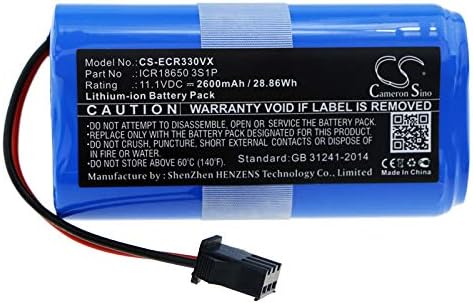
Image 3.2: Close-up view of the battery label, displaying model number CS-ECR330VX, part number ICR18650 3S1P, rating 11.1VDC 2600mAh/28.86Wh, and safety warnings. Manufacturer information is also visible, including a link to cameronsino.com.

Image 3.3: Detail of the battery's black two-pin connector with red and black wires, designed for compatibility with Ecovacs devices.
4. Installation
Follow these general steps to replace the battery in your compatible Ecovacs device. Refer to your device's original manual for specific instructions on accessing the battery compartment.
- Power Off Device: Ensure your Ecovacs robotic vacuum cleaner is completely powered off and disconnected from its charging base.
- Access Battery Compartment: Locate and open the battery compartment on your device. This usually involves removing screws or a cover.
- Remove Old Battery: Carefully disconnect the old battery's connector from the device's port. Remove the old battery.
- Insert New Battery: Place the BORNMIO replacement battery into the compartment, ensuring it fits securely.
- Connect Battery: Align the new battery's connector with the device's port and push firmly until it clicks into place. Ensure the connection is secure.
- Close Compartment: Replace the battery compartment cover and secure it with any screws removed earlier.
- Initial Charge: Place the device back on its charging base to allow the new battery to fully charge before its first use.
5. Operation
After successful installation and initial charging, your device should operate as normal. The battery is designed to provide reliable power for your Ecovacs robotic vacuum cleaner.
- First Use: For optimal performance, allow the battery to fully charge before the first operation.
- Regular Charging: Always return your device to its charging base when not in use to maintain battery health.
- Discharge Cycles: Li-ion batteries benefit from regular use. Avoid leaving the battery fully discharged for extended periods.
6. Maintenance
Proper maintenance can extend the lifespan of your battery:
- Storage: If storing the device for an extended period, ensure the battery is charged to approximately 50-70% and store it in a cool, dry place. Recharge every 3-6 months to prevent deep discharge.
- Cleaning: Keep the battery contacts clean and free of dust or debris.
- Temperature: Avoid exposing the battery to extreme temperatures, both hot and cold, as this can affect performance and lifespan.
7. Troubleshooting
If you encounter issues with your new battery, consider the following:
- Device Not Powering On:
- Ensure the battery is correctly installed and the connector is firmly seated.
- Verify the battery has been charged.
- Battery Not Charging:
- Check the charging base and power adapter for proper connection and functionality.
- Clean the charging contacts on both the device and the charging base.
- Ensure the battery is fully seated in the device.
- Reduced Run Time:
- New batteries may require a few charge/discharge cycles to reach full capacity.
- Ensure the device is not operating in a high-power mode unnecessarily.
- Verify the battery is fully charged before each use.
If problems persist, refer to the warranty and support section.
8. Specifications
| Model Number | CS-ECR330VX |
| Compatible Models | Ecovacs CEN330, CR330, CR333 |
| Battery Part Number | ICR18650 3S1P |
| Battery Type | Li-ion |
| Capacity | 2600mAh |
| Watt-Hours (Wh) | 28.86Wh |
| Voltage | 11.1V |
| Dimensions | 70.0 x 37.2 x 35.0mm (2.76 x 1.46 x 1.38 inches) |
| Weight | 246.0g (8.7 ounces) |
| Certifications | ISO9001, RoHS, CE, UN38.3, MSDS |
9. Warranty and Support
BORNMIO stands behind the quality of its products. This battery has passed strict quality inspections.
- Warranty: We offer a full refund or a free replacement without any reason if you encounter issues with the product.
- Customer Support: If you have any questions or require assistance, please contact BORNMIO customer service through the platform where you purchased the product.
