
1. Important Safety Instructions
Please read all instructions carefully before using this humidifier and retain them for future reference. Failure to follow these instructions may result in electric shock, fire, or serious injury.
- Do not immerse the humidifier in water or other liquids.
- Always unplug the humidifier from the power outlet before filling, cleaning, or moving it.
- Place the humidifier on a firm, flat, and waterproof surface at least 12 inches (30 cm) away from walls and appliances.
- Keep the humidifier out of reach of children and pets.
- Do not block the mist outlet or air intake vents.
- Use only clean, cool tap water. Distilled or demineralized water is recommended to prevent white dust.
- Do not add essential oils directly into the water tank. Use the dedicated aromatherapy box.
- If the power cord is damaged, it must be replaced by the manufacturer, its service agent, or similarly qualified persons to avoid a hazard.
2. Product Overview
The Deerma DEM-SJS600 is an ultrasonic humidifier designed to improve air quality and comfort in your home or office. It features a large 5-liter capacity, UV sterilization, an integrated aromatherapy box, and a gentle night light.

Figure 2.1: The Deerma DEM-SJS600 humidifier with its large 5-liter water tank, designed for extended operation and even mist distribution.

Figure 2.2: Illustrates convenient water refilling methods and the dedicated aromatherapy box for essential oils.
3. Setup
3.1 Unpacking
- Carefully remove the humidifier from its packaging.
- Remove all packaging materials and ensure all components are present: main unit, water tank, mist tube, and user manual.
3.2 Placement
- Place the humidifier on a flat, stable, and waterproof surface.
- Ensure it is at least 12 inches (30 cm) away from walls, furniture, and electronic devices.
- Avoid placing it on carpets or absorbent surfaces.
3.3 Filling the Water Tank
The DEM-SJS600 offers three convenient ways to add water:
- Top Fill: Directly pour water into the top opening of the humidifier.
- Remove Tank: Lift the water tank from the base, invert it, and fill it from the bottom cap.
- Partial Lift: Partially lift the top cover and pour water into the exposed tank opening.
Fill the tank with clean, cool tap water. Do not exceed the maximum water level indicator.
4. Operating Instructions
4.1 Power On/Off and Mist Control
- Plug the power cord into a suitable electrical outlet.
- Turn the rotary knob on the front panel clockwise to power on the unit and adjust the mist output level. Turn counter-clockwise to reduce mist and power off.
4.2 Night Light Function
- Press the touch button (light icon) on the front panel to turn the night light on or off.
- The night light also serves as a water level indicator: orange for sufficient water, red for water shortage.

Figure 4.1: The night light feature and water level indicators (humidified state and water shortage).
4.3 Aromatherapy Function
- Locate the aromatherapy box on the side of the humidifier base.
- Pull out the tray and add a few drops of your preferred essential oil onto the aroma pad.
- Slide the tray back into place. The mist will diffuse the scent into the air.

Figure 4.2: Adding essential oils to the dedicated aromatherapy box.

Figure 4.3: The humidifier creates a comfortable environment for improved breathing and sleep.
5. Maintenance
Regular cleaning is essential for optimal performance and hygiene.
5.1 Daily Maintenance
- Unplug the humidifier.
- Empty any remaining water from the tank and base.
- Wipe the tank and base dry with a clean cloth.
5.2 Weekly Cleaning
- Unplug the humidifier.
- Remove the water tank and mist tube.
- Clean the water tank and base with a soft brush and mild detergent. Rinse thoroughly.
- The mist tube is detachable for easy cleaning. Gently twist and pull to remove it, then wash with water and a soft cloth.
- To remove mineral buildup (white dust), fill the base with 1 cup of white vinegar and let it sit for 20 minutes. Gently scrub with a brush, then rinse thoroughly.
- Ensure all parts are completely dry before reassembling.

Figure 5.1: The detachable mist tube allows for easy and thorough cleaning.
5.3 UV Sterilization
The humidifier features an integrated UV-C light system that automatically sterilizes the water, eliminating 99.99% of bacteria and viruses to ensure clean and healthy mist output. This system operates automatically during humidification.
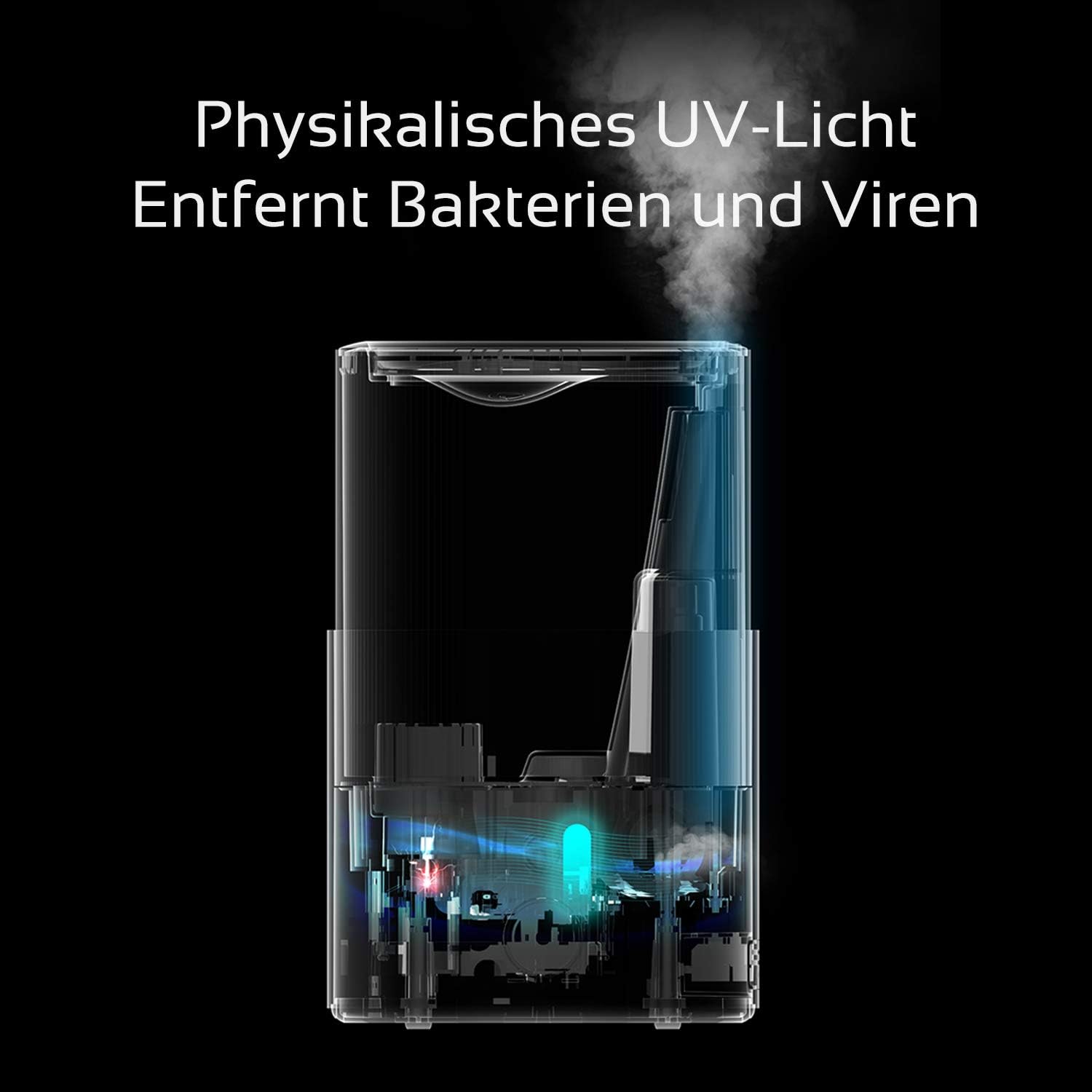
Figure 5.2: Internal view illustrating the UV light sterilization process within the humidifier.
6. Troubleshooting
If you experience issues with your humidifier, please refer to the following common problems and solutions:
| Problem | Possible Cause | Solution |
|---|---|---|
| No mist or low mist output | Low water level Mineral buildup on transducer Mist outlet blocked | Refill water tank Clean the transducer with a soft brush Ensure mist outlet is clear |
| Water leakage | Water tank not properly seated Overfilled water tank Damaged tank | Ensure tank is securely placed Do not overfill past max line Contact customer support if damaged |
| Unusual noise | Humidifier not on a level surface Foreign object in water tank/base | Place on a flat, stable surface Check and remove any foreign objects |
| No power | Power cord not plugged in Power outlet malfunction | Ensure power cord is securely plugged in Test outlet with another appliance |
If the problem persists after trying these solutions, please contact customer support.
7. Specifications
Technical specifications for the Deerma DEM-SJS600 Ultrasonic Humidifier:

Figure 7.1: Concentrated spray technology for fine mist and effective room coverage.
| Feature | Detail |
|---|---|
| Brand | Deerma |
| Model Number | DEM-SJS600 |
| Capacity | 5 Liters |
| Operating Mode | Ultrasonic |
| Run Time | Up to 24 hours |
| Mist Output | 270 ml/hour |
| Noise Level | Less than 34 dB |
| Special Features | UV Sterilization, Aromatherapy Box, Night Light, Humidistat |
| Control Method | Rotary Knob (Mist), Touch Button (Light) |
| Power Source | Corded Electric |
| Recommended Room Size | 20-25 square meters |
| Dimensions (Shipping) | 39 x 26 x 25.4 cm |
| Item Weight | 2.63 Kilograms |
| Color | White |
| Shape | Cylindrical |
8. Warranty and Support
This product comes with a standard manufacturer's warranty. Please refer to the warranty card included in your packaging for specific terms and conditions.
- Warranty Claims: For warranty service, please retain your proof of purchase (receipt or invoice).
- Customer Support: If you have any questions, require technical assistance, or need to report a problem, please contact Deerma customer support through their official website or the retailer where you purchased the product.
