
AILBTON DT2-60
AILBTON LED Strip Lights User Manual
Model: DT2-60
Brand: AILBTON
Introduction
Thank you for choosing AILBTON LED Strip Lights. This manual provides essential information for the safe and efficient operation of your 60ft Music Sync Color Changing LED Strip Lights. Please read this manual thoroughly before installation and use, and retain it for future reference.
These LED strip lights feature 5050 RGB LEDs, offering vibrant color-changing capabilities, music synchronization, and control via a Bluetooth app, IR remote, and a 4-button controller. They are designed for indoor use and are ideal for enhancing the ambiance of bedrooms, living rooms, kitchens, and for party decorations.
Package Contents
Verify that all components are present in your package:
- 2 × 30ft LED Strip Lights (Total 60ft)
- 1 × Power Adapter (12V, 12W)
- 1 × Button Control Box
- 1 × IR Remote Controller (20-key, 4 music modes)
- 1 × Adhesive for Controller
- 1 × User Manual (This document)

Image: Overview of the AILBTON 60ft LED Strip Lights package contents.
Specifications
| Feature | Detail |
|---|---|
| Brand | AILBTON |
| Model Number | DT2-60 |
| Light Source Type | LED (5050 RGB) |
| Total Length | 60ft (2 x 30ft rolls) |
| Color | Multicolor (RGB) |
| Indoor/Outdoor Usage | Indoor |
| Power Source | Corded Electric |
| Voltage | 12 Volts |
| Wattage | 12 Watts |
| Control Methods | Bluetooth App ("HiLighting"), IR Remote, 4-Button Controller |
| Special Features | Color Changing, Dimmable, Timer, Remote Controlled, App Control, Multiple Modes, Music Mode, Mic Mode, Music Sync |
| Material | Plastic |
| Item Dimensions (L x W x H) | 3 x 2.2 x 0.9 inches (Control Box) |
| Service Life | >50,000 hours |
Safety Information
- This product is designed for indoor use only. Do not expose to water or high humidity.
- Ensure the power adapter is connected to a suitable power outlet (12V).
- Do not cover the LED strips or power adapter with flammable materials.
- Avoid bending the LED strips sharply, especially at the LED components, as this may damage the circuit.
- Keep out of reach of children.
- If any part of the product is damaged, discontinue use immediately and contact customer support.
- The LED strips can be cut along the designated cutting marks (every 3 LEDs). Ensure power is disconnected before cutting.
Setup
- Prepare the Surface: Choose a clean, dry, and smooth surface for installation. Dust, dirt, or moisture can affect the adhesive.
- Unspool the Strips: Carefully unroll the LED strip lights from their reel. It is recommended to unspool the entire length before adhering to prevent overheating and ensure proper light distribution.

Image: Unspooling the LED strip lights.
- Connect Components:
- Connect the LED strip light connector to the control box.
- Connect the power adapter to the control box.
- Ensure all connections are secure.

Image: Connection diagram for the LED strip lights.
- Adhere the Strips: Peel off the protective backing from the 3M adhesive tape on the back of the LED strip. Press the strip firmly onto the desired surface. For corners, use the included adhesive clips or gently bend the strip without creasing the LEDs.

Image: Peeling the adhesive backing from the LED strip.
- Power On: Plug the power adapter into a wall outlet. The lights should illuminate.
- Remote Control Preparation: Before using the IR remote, remove the clear plastic battery insulator tab from the battery compartment.
Operating Instructions
1. App Control (HiLighting App)
The "HiLighting" app provides comprehensive control over your LED strip lights. It is available on Google Play Store and iOS App Store.
- Download the App: Scan the QR code on the control box or search for "HiLighting" in your device's app store.

Image: Scan the QR code on the controller to download the app.
Alternatively, download from: http://www.easytrack.net.cn/download/179RUIFANG
- Enable Bluetooth: Ensure Bluetooth is enabled on your smartphone.
- Open the App: The app will automatically search for and connect to your LED strip lights.
- Control Features:
- Color Adjustment: Select from a wide spectrum of colors using the color wheel.
- Brightness Control: Adjust the intensity of the lights.
- Scene Modes: Choose from pre-set dynamic lighting modes.
- Music Mode: The lights will pulsate and change colors in sync with music played through your phone.
- Mic Mode: The lights will respond to environmental sounds or your voice picked up by the built-in microphone on the control box.
- Timing ON/OFF: Set schedules for the lights to turn on or off automatically.
- Group Management: Control multiple AILBTON light strips simultaneously by creating groups within the app.
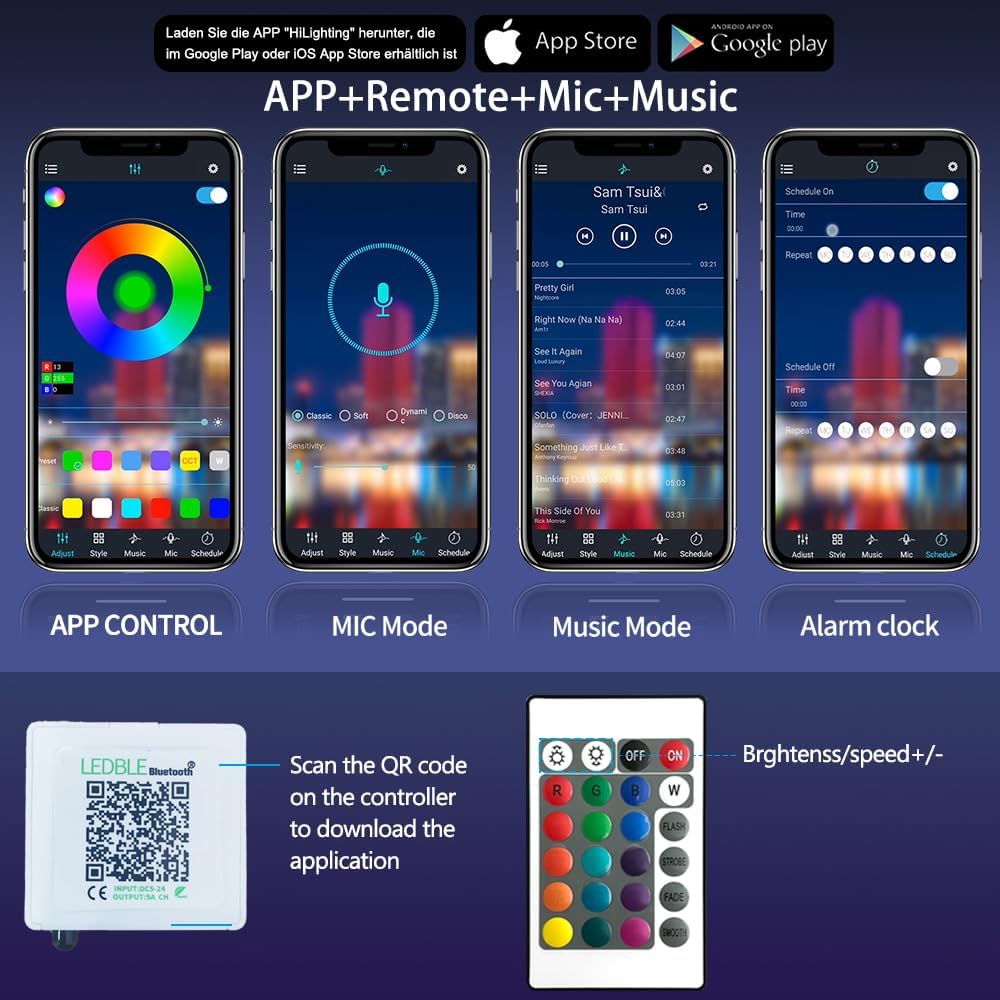
Image: HiLighting App interface for various control modes.
2. IR Remote Control
The included 20-key IR remote allows for basic control without the need for a smartphone.
- ON/OFF: Power the lights on or off.
- Color Selection: Directly select static colors (e.g., Red, Green, Blue, White, etc.).
- Brightness Adjustment: Increase or decrease light intensity.
- Dynamic Modes: Access pre-programmed modes like Flash, Strobe, Fade, and Smooth.
- Music Modes: The remote also features 4 dedicated music modes.
Image: IR Remote Controller layout.
3. 4-Button Controller
The physical 4-button controller on the power cable allows for quick adjustments:
- Power Button: Turns the lights on/off.
- Mode Button: Cycles through static colors, dynamic modes, and MIC mode.
- Brightness Up/Down Buttons: Adjusts the brightness.
Maintenance
- Cleaning: Gently wipe the LED strips with a dry, soft cloth. Do not use liquid cleaners or abrasive materials.
- Storage: If storing for an extended period, ensure the strips are clean and dry. Roll them loosely back onto their original reels to prevent damage. Store in a cool, dry place.
- Adhesive: The 3M adhesive is strong but may lose effectiveness if repositioned multiple times. Ensure the surface is clean and dry for optimal adhesion during initial installation.
Troubleshooting
| Problem | Possible Cause | Solution |
|---|---|---|
| Lights do not turn on. |
|
|
| Remote control not working. |
|
|
| App cannot connect to lights. |
|
|
| Lights are dim or colors are incorrect. |
|
|
Warranty and Support
AILBTON products are designed for quality and reliability. If you encounter any issues or have questions regarding your LED Strip Lights, please contact AILBTON customer support. We are committed to resolving any problems within 24 hours.
Please note that the LED Light Strip is non-waterproof. Damage caused by water exposure is not covered under warranty.
For further assistance, please refer to the contact information provided with your purchase or visit the official AILBTON store on Amazon: AILBTON Store.
Ask a question about this manual
Ask about setup, troubleshooting, compatibility, parts, safety, or missing instructions. Manuals+ will review the question and use this page’s manual context to help answer it.