
Deerma DX700s
Deerma DX700s Corded Bagless Vacuum Cleaner User Manual
Model: DX700s | Brand: Deerma
1. Important Safety Instructions
Please read all instructions carefully before using the Deerma DX700s vacuum cleaner. Retain this manual for future reference.
- Always ensure the power supply voltage matches the rating label on the appliance.
- Do not use the vacuum cleaner on wet surfaces or to pick up liquids.
- Do not pick up burning or smoking materials, such as cigarettes, matches, or hot ashes.
- Keep hair, loose clothing, fingers, and all parts of the body away from openings and moving parts.
- Unplug from the electrical outlet when not in use and before cleaning or servicing.
- Do not operate the vacuum cleaner with a damaged cord or plug.
- This appliance is for household use only.
2. Product Overview
The Deerma DX700s is a versatile corded bagless vacuum cleaner designed for efficient cleaning of various surfaces. It can be used as a stick vacuum for floors or easily converted into a handheld unit for upholstery and hard-to-reach areas.

Image 2.1: The Deerma DX700s vacuum cleaner showcasing its dual functionality as a stick vacuum and a handheld unit.

Image 2.2: The Deerma DX700s vacuum cleaner demonstrating its three main configurations: full stick, handheld with crevice tool, and handheld with brush tool for versatile cleaning.
3. Setup and Assembly
The Deerma DX700s is designed for easy assembly and conversion between stick and handheld modes.
3.1 Assembling the Stick Vacuum
- Insert the extension tube into the main motor unit until it clicks into place.
- Attach the floor brush to the other end of the extension tube, ensuring it is securely fastened.
- Ensure the dust cup is correctly installed on the main motor unit.

Image 3.1: A person using the Deerma DX700s in its stick vacuum configuration for floor cleaning.
3.2 Converting to Handheld Mode
- Press the release button on the extension tube to detach it from the main motor unit.
- Attach the desired accessory (e.g., crevice tool, brush tool) directly to the main motor unit.

Image 3.2: A person using the Deerma DX700s in handheld mode to clean a sofa, demonstrating its versatility for furniture and upholstery.
4. Operating Instructions
4.1 Powering On/Off
Plug the power cord into a suitable electrical outlet. Locate the power switch on the main motor unit and slide it to the 'ON' position to start the vacuum. Slide it to 'OFF' to stop the vacuum.
4.2 Using Attachments
The Deerma DX700s comes with three standard functional brush heads for various cleaning needs:
- Ground Brush: Ideal for cleaning hard floors and carpets in stick vacuum mode.
- Flat Nozzle Suction: Suitable for narrow gaps, corners, and edges.
- Round Nozzle Brush: Effective for cleaning upholstery, curtains, and delicate surfaces.
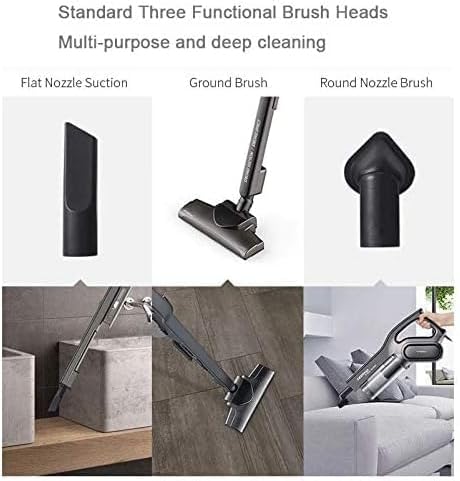
Image 4.1: Close-up view of the three standard functional brush heads included with the Deerma DX700s: flat nozzle suction, ground brush, and round nozzle brush, designed for multi-purpose and deep cleaning.
4.3 Storage
The vacuum cleaner can be stored upright when not in use, saving space.

Image 4.2: The Deerma DX700s vacuum cleaner standing upright against a wall, illustrating its compact and convenient storage capability.
5. Maintenance and Cleaning
Regular maintenance ensures optimal performance and extends the lifespan of your Deerma DX700s vacuum cleaner.
5.1 Emptying the Dust Cup
The dust cup should be emptied regularly, especially when the debris reaches the 'MAX' fill line. The separable dust box design makes this process convenient.
- Ensure the vacuum cleaner is unplugged.
- Press the dust cup release button to detach it from the main motor unit.
- Hold the dust cup over a trash bin and open the bottom lid to empty the contents.
5.2 Cleaning the Filters
The filters (Cyclone and HEPA) are washable and reusable. Clean them regularly to maintain suction power.
- Remove the filters from the dust cup.
- Rinse the filters under running water until the water runs clear.
- Allow the filters to air dry completely for at least 24 hours before reassembling. Do not use a dryer or direct heat.
- Reassemble the dry filters and dust cup into the main motor unit.

Image 5.1: Illustration of the separable dust box and the process of emptying dust and washing the reusable filter, highlighting the ease of maintenance.
6. Troubleshooting
If you encounter issues with your Deerma DX700s, refer to the following common problems and solutions:
| Problem | Possible Cause | Solution |
|---|---|---|
| Vacuum does not turn on | No power supply; Power cord damaged; Power switch faulty | Check if plugged in correctly; Inspect power cord for damage; Contact customer support if switch is faulty. |
| Loss of suction power | Dust cup full; Filters clogged; Nozzle/hose blocked | Empty dust cup; Clean or replace filters; Remove any blockages from nozzle or hose. |
| Unusual noise during operation | Blockage in brush head or hose; Motor issue | Check for and remove blockages; If noise persists, contact customer support. |
| Dust escaping from vacuum | Dust cup not properly installed; Filters missing or damaged | Ensure dust cup is securely attached; Check and properly install or replace filters. |
7. Specifications
Key technical specifications for the Deerma DX700s vacuum cleaner:
| Feature | Specification |
|---|---|
| Brand | Deerma |
| Model Number | DX700S-BLACK (6955578034992) |
| Power | 600 Watts |
| Voltage | 240 Volts |
| Dust Cup Capacity | 0.8 Liters (implied from product title, though specifications list 2.2 Kilograms for capacity which is likely weight) |
| Product Dimensions (L x W x H) | 16 x 22 x 66 cm |
| Item Weight | 1.9 Kilograms |
| Noise Level | 80 dB |
| Filter Type | Cyclone, HEPA filter |
| Special Features | Lightweight construction |
| Power Source | Corded Electric |
| Included Components | 3 brush heads (flat nozzle, ground brush, round nozzle) |
8. Warranty and Support
8.1 Warranty Information
Specific warranty details for the Deerma DX700s vacuum cleaner are typically provided with the product packaging or on the manufacturer's official website. Please refer to these sources for information regarding warranty duration, coverage, and terms.
8.2 Customer Support
For technical assistance, spare parts, or any other inquiries not covered in this manual, please contact Deerma customer support. Contact information can usually be found on the product packaging, the official Deerma website, or through your retailer.
Ask a question about this manual
Ask about setup, troubleshooting, compatibility, parts, safety, or missing instructions. Manuals+ will review the question and use this page’s manual context to help answer it.