
1. Safety Instructions
Please read these safety instructions carefully before installation and operation. Failure to follow these instructions may result in electric shock, fire, or other hazards.
- Ensure the power supply is disconnected before any installation, maintenance, or cleaning.
- Installation should be performed by a qualified electrician in accordance with local wiring regulations.
- Do not modify the product in any way. Unauthorized modifications may void the warranty and pose safety risks.
- The floodlight is rated IP66, and the motion sensor is IP65, making them suitable for outdoor use in various weather conditions. However, avoid submerging the product in water.
- The wiring thickness is 1mm², designed for enhanced safety. Ensure all connections are secure.
- Do not look directly into the LED light source when it is illuminated, as this may cause eye strain or damage.
- Keep packaging materials out of reach of children.
2. Product Overview
The MEIKEE FLB050 50W LED Floodlight with Motion Sensor is designed for efficient and reliable outdoor lighting. It features advanced SMD technology for high brightness and energy efficiency, combined with a sensitive motion sensor for automated operation.
Key Features:
- High Brightness & Energy Saving: 50W LED with 56 SMD LEDs producing up to 4300 lumens, replacing traditional 400W halogen bulbs and saving over 85% energy.
- Enhanced Motion Sensor: Detects movement up to 12 meters with a 180° detection range. Features a key switch for adjusting lighting duration (10s, 45s, 120s, 600s) and operating mode (24 hours or night-only).
- Durable & Weatherproof: IP66 rated floodlight and IP65 rated sensor, suitable for rain, sleet, and snow. Constructed with advanced nanomaterials for impact, drop, and scratch resistance.
- Safe Design: Insulated lamp body with high-quality materials and 1mm² thick wiring for improved safety.
- Easy Installation: Adjustable bracket allows for 180° floodlight rotation and 360° horizontal / 180° vertical sensor adjustment. Can be securely mounted on walls without specialized tools.
Component Diagram:

This diagram illustrates the internal and external components of the floodlight, highlighting the Nano Front Cover, 56-LED SMD, Aluminum Frame, Metal Bracket, and PIR Motion Sensor, all designed for durability and performance.
3. Specifications
| Feature | Specification |
|---|---|
| Brand | MEIKEE |
| Model Number | FLB050 |
| Power | 50W |
| Luminous Flux | 4300 lm |
| Color Temperature | 6500K (Cool White) |
| Material | Metal |
| Product Dimensions (L x W x H) | 18 x 2.1 x 18.5 cm |
| Item Weight | 1.43 kg |
| Waterproof Rating | Floodlight: IP66, Sensor: IP65 |
| Special Features | Motion Detector, Energy Efficient, IP66 Waterproof |
| Light Source Type | LED |
| Beam Angle | 120° |
| Motion Sensor Detection Range | Up to 12 meters (39 ft) |
| Motion Sensor Detection Angle | 180° |
| Adjustable Lighting Duration | 10s, 45s, 120s, 600s |
| Power Source | AC |
4. Setup and Installation
Follow these steps for proper installation of your MEIKEE LED Floodlight.
4.1 Mounting Location
- Choose a stable mounting surface, such as a wall or ceiling.
- The ideal mounting height for optimal motion detection is between 5 to 7 meters (16 to 23 feet).
- Ensure the chosen location allows for the desired beam angle (120°) and motion sensor coverage (180° detection angle, up to 12m range).
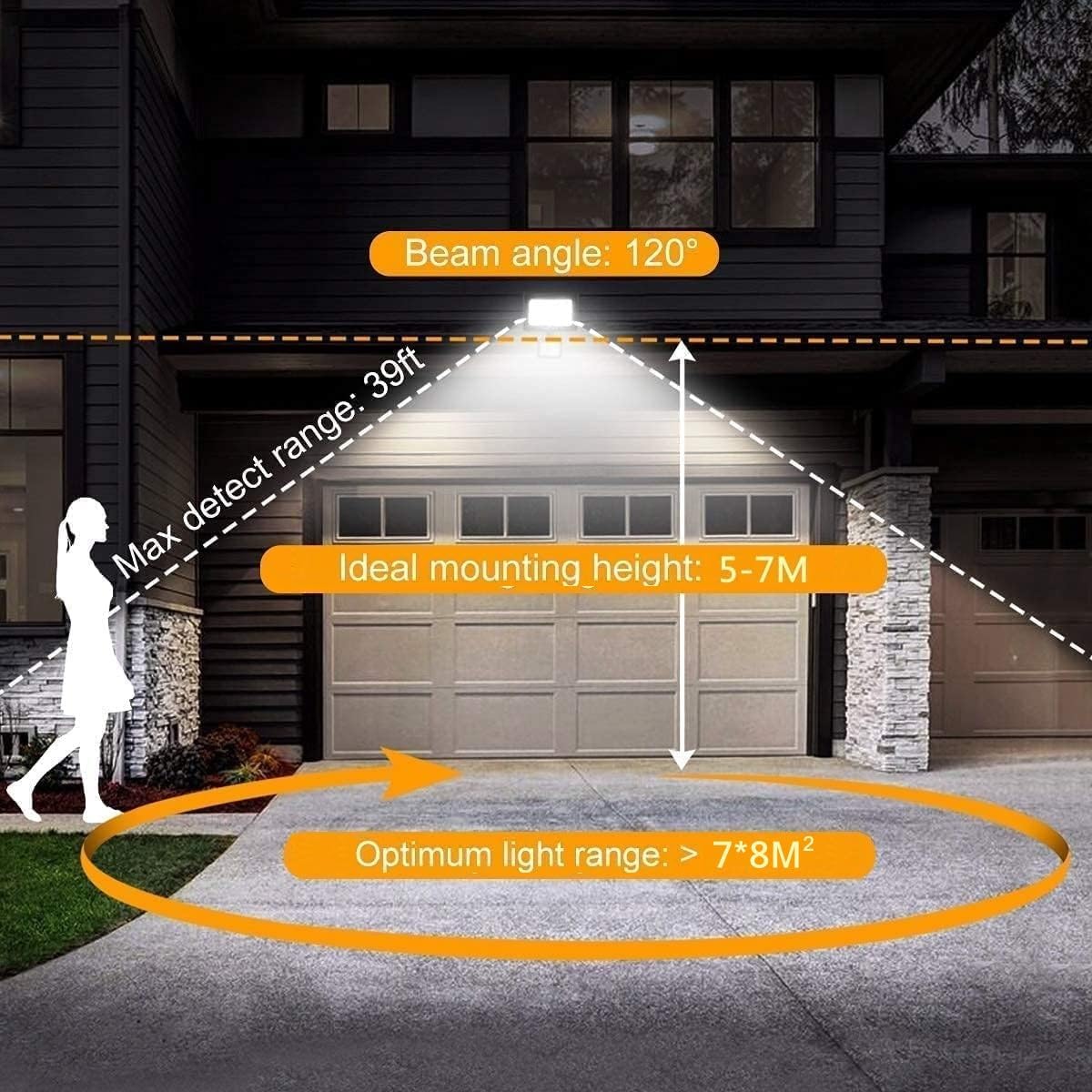
This image shows the recommended mounting height, maximum detection range, and beam angle for effective lighting coverage.
4.2 Installation Steps
- Mark Drilling Points: Use the mounting bracket to mark the desired drilling points on the wall or ceiling.
- Drill Holes: Drill holes at the marked points. Insert the provided wall plugs if necessary.
- Secure Bracket: Attach the mounting bracket to the surface using the screws.
- Adjust Angle: The floodlight can be adjusted 180° vertically. The motion sensor can be adjusted 360° horizontally and 180° vertically to achieve the desired coverage.

This image illustrates the simple three-step process for mounting the floodlight securely.

The integrated back design promotes efficient heat dissipation, contributing to the longevity of the LED floodlight.
4.3 Electrical Connection
Connect the floodlight to your main power supply. Ensure the power is OFF at the circuit breaker before making any electrical connections. The floodlight comes with a pre-wired cable. Connect the wires according to standard electrical codes:
- Live (Brown/Black)
- Neutral (Blue)
- Earth (Green/Yellow) - Note: The product is designed with double insulation and may not require an earth wire connection in some regions, but always follow local regulations.
5. Operating Instructions
The MEIKEE FLB050 features an adjustable motion sensor with TIME and LUX settings.

This image displays the TIME and LUX adjustment dials on the motion sensor.
5.1 TIME Setting
The TIME dial controls how long the light remains on after motion is detected and no further motion is sensed. Use the key switch to select the desired duration:
- 10S: Light stays on for approximately 10 seconds.
- 45S: Light stays on for approximately 45 seconds.
- 120S: Light stays on for approximately 120 seconds (2 minutes).
- 600S: Light stays on for approximately 600 seconds (10 minutes).
5.2 LUX Setting
The LUX dial determines the ambient light level at which the motion sensor becomes active. This allows you to choose whether the light operates during the day, at night, or both.
- Sun Icon (Daylight): The sensor will activate the light regardless of ambient light levels (day and night operation).
- Moon Icon (Night-only): The sensor will only activate the light when the ambient light level is low (dusk to dawn operation), saving energy.
6. Maintenance
Regular maintenance ensures optimal performance and longevity of your floodlight.
- Cleaning: Periodically clean the floodlight and sensor lens with a soft, damp cloth. Do not use abrasive cleaners or solvents. Ensure the power is off before cleaning.
- Inspection: Regularly inspect the power cable and housing for any signs of damage. If any damage is found, disconnect the power immediately and consult a qualified electrician for repair or replacement.
- Environmental Factors: While the product is IP66/IP65 rated, extreme weather conditions over prolonged periods may affect performance. Ensure proper drainage around the installation area.
7. Troubleshooting
If you encounter issues with your MEIKEE LED Floodlight, refer to the following common problems and solutions:
| Problem | Possible Cause | Solution |
|---|---|---|
| Light does not turn on. | No power supply. Incorrect LUX setting. Faulty sensor. | Check power connection and circuit breaker. Adjust LUX setting to 'Sun' icon for testing. Ensure sensor is not obstructed. |
| Light stays on continuously. | Continuous motion detected. TIME setting too long. LUX setting too high. | Check for constant movement in the detection area. Reduce TIME setting. Adjust LUX setting to 'Moon' icon if only night operation is desired. |
| Light flashes or flickers. | Unstable power supply. Loose wiring. | Check power source stability. Ensure all electrical connections are secure. Consult a qualified electrician if problem persists. |
| Motion sensor not detecting. | Sensor obstructed. Incorrect LUX setting. Detection range/angle issues. | Clear any obstructions from the sensor. Adjust LUX setting. Reposition sensor for optimal coverage. |
If the problem persists after attempting these solutions, please contact customer support or a qualified electrician.
8. Warranty and Support
MEIKEE products are covered by a 2-year warranty from the date of purchase. This warranty covers defects in materials and workmanship under normal use.
If you have any questions, require technical assistance, or need to make a warranty claim, please contact MEIKEE customer support. Provide your product model number (FLB050) and proof of purchase for faster service.
For further information or support, please visit the official MEIKEE website or contact your retailer.
9. Product Application Examples
The MEIKEE FLB050 LED Floodlight is versatile and suitable for various outdoor lighting needs.
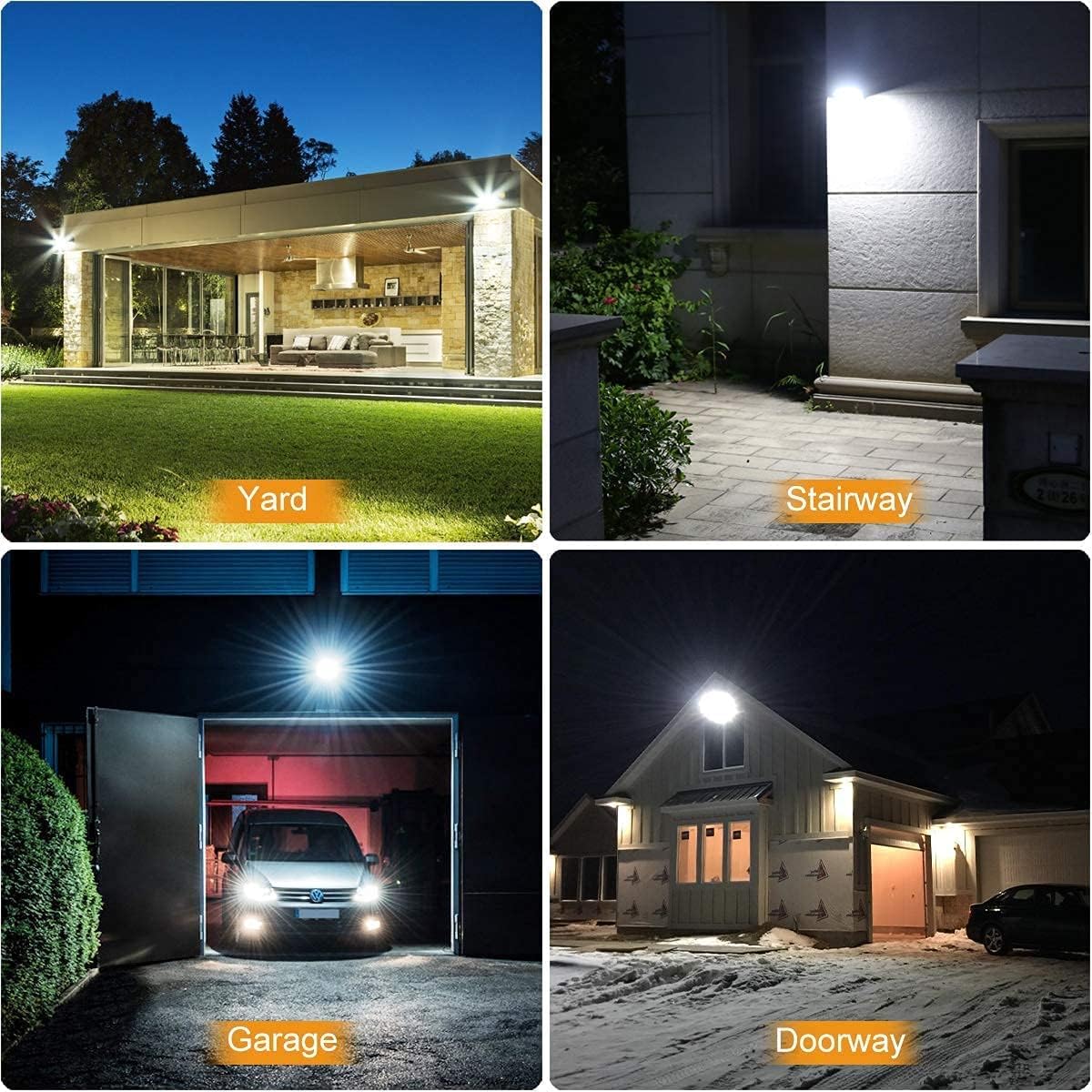
This image illustrates typical application scenarios for the floodlight, including yards, stairways, garages, and doorways.

The floodlight's IP66 rating ensures reliable operation in diverse weather conditions, from rain to extreme temperatures.


