
Introduction
The Movo PC-M6 is a high-quality cardioid condenser microphone designed for clear and precise audio capture. It is suitable for a variety of applications including podcasting, live-streaming, gaming, music recording, and remote work. This manual provides instructions for setting up, operating, and maintaining your PC-M6 microphone to ensure optimal performance.

Image: The Movo PC-M6 microphone set up for recording, showcasing its design and accessories.
What's Included
Your Movo PC-M6 package includes the following components:
- Movo PC-M6 Cardioid Condenser Microphone
- Shock Mount
- Foam Windscreen
- XLR to XLR Cable
- XLR to 3.5mm Cable
- Warranty Card
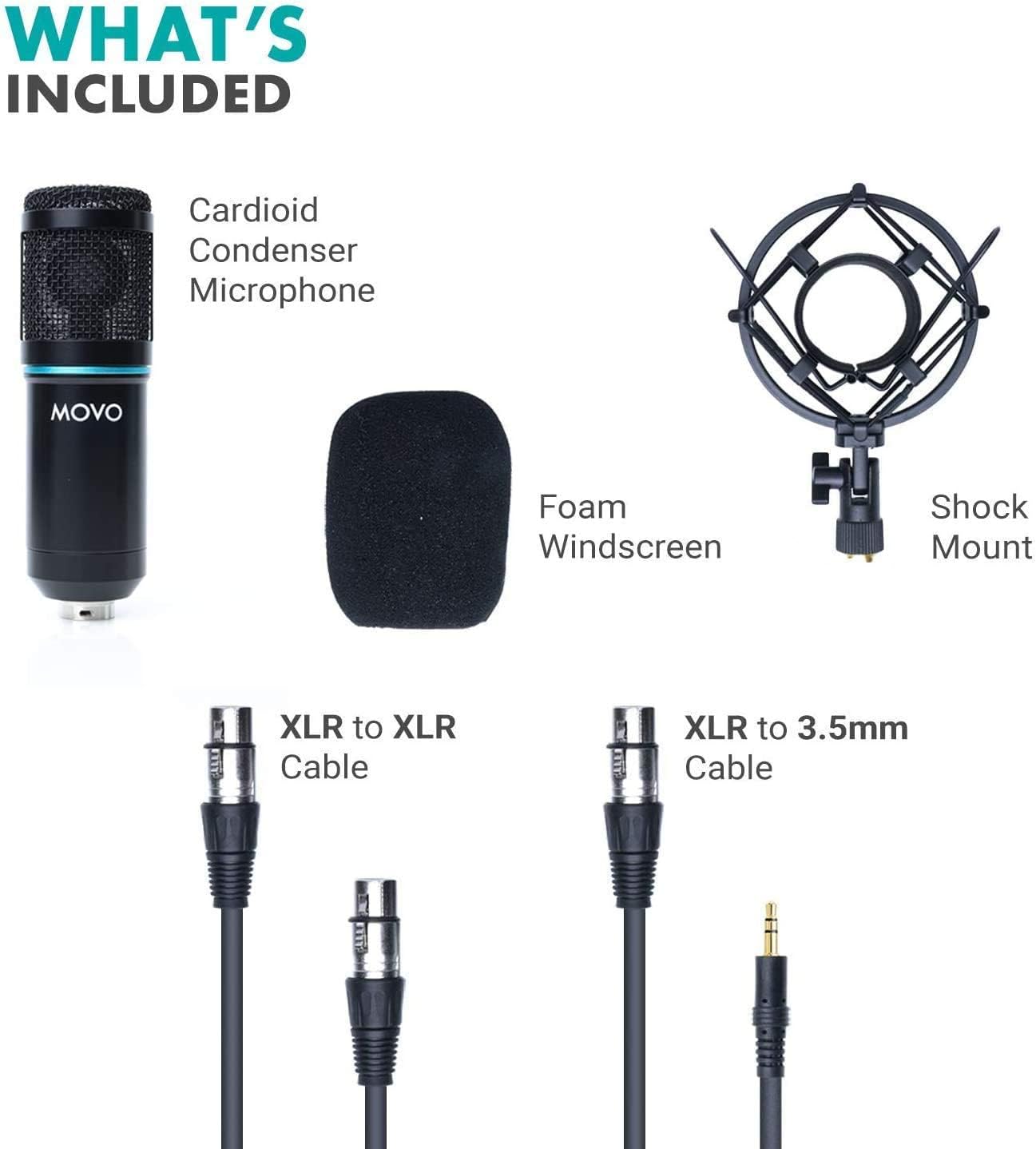
Image: All components included with the Movo PC-M6 microphone, laid out for clear identification.
Setup Instructions
- Attach the Shock Mount: Securely fasten the shock mount to a microphone stand (not included). The shock mount helps isolate the microphone from vibrations and handling noise.
- Insert the Microphone: Carefully place the Movo PC-M6 microphone into the shock mount. Ensure it is firmly seated.
- Apply the Foam Windscreen: Slide the foam windscreen over the microphone capsule. This reduces plosive sounds and light wind noise.
- Connect the Cable:
- For professional audio interfaces or mixers: Use the provided XLR to XLR cable. Connect one end to the microphone's XLR output and the other end to an XLR input on your audio device.
- For computers or devices with a 3.5mm input: Use the provided XLR to 3.5mm cable. Connect the XLR end to the microphone and the 3.5mm end to your device's microphone input.
- Position the Microphone: For optimal sound, position the microphone directly in front of the sound source. The PC-M6 features a cardioid polar pattern, meaning it primarily picks up sound from the front and rejects sound from the sides and rear.

Image: A visual representation of the cardioid polar pattern, indicating the microphone's directional sound pickup.

Image: The Movo PC-M6 microphone connected via XLR to an audio mixer and interface, illustrating its compatibility with professional setups.

Image: The Movo PC-M6 microphone connected to a laptop, highlighting its ease of use with standard computer audio inputs.
Operating Instructions
The Movo PC-M6 is designed for ease of use. Follow these guidelines for optimal performance:
- Power: The PC-M6 is a condenser microphone and requires phantom power (48V) when connected via XLR to an audio interface or mixer. Ensure your audio device provides phantom power. When using the 3.5mm connection, phantom power is not required as the microphone draws power from the device's input.
- Gain Settings: Adjust the gain (input level) on your audio interface or computer to achieve a strong signal without clipping (distortion). Start with a lower gain and gradually increase it while monitoring your audio levels.
- Proximity Effect: Due to its cardioid pattern, speaking closer to the microphone will increase bass response. Experiment with distance to find the desired vocal tone.
- Monitoring: If your audio interface or computer allows, monitor your audio with headphones to ensure sound quality and proper levels during recording or streaming.
Video: An official Movo video demonstrating the use of Movo podcasting microphones, including setup and recording scenarios.
Video: An official Movo review of the PC-M6 podcast microphone, providing insights into its features and performance.
Maintenance
Proper maintenance ensures the longevity and optimal performance of your Movo PC-M6 microphone:
- Cleaning: Use a soft, dry cloth to wipe the microphone body. Do not use liquid cleaners or solvents, as they can damage the microphone's internal components.
- Windscreen Care: The foam windscreen can be gently hand-washed with mild soap and water if it becomes dirty. Allow it to air dry completely before reattaching.
- Storage: When not in use, store the microphone in a clean, dry place, preferably in its original packaging or a protective case, to prevent dust accumulation and physical damage.
- Cable Care: Avoid sharply bending or twisting the cables. Always grasp the connector, not the cable, when plugging or unplugging.
Troubleshooting
| Problem | Possible Cause | Solution |
|---|---|---|
| No sound output |
|
|
| Low or distorted audio |
|
|
| Humming or buzzing noise |
|
|
Specifications
| Feature | Detail |
|---|---|
| Brand | Movo |
| Model Name | PC-M6 |
| Connectivity Technology | XLR |
| Connector Type | XLR, 3.5mm (via included cable) |
| Polar Pattern | Unidirectional (Cardioid) |
| Frequency Response | 20Hz - 20kHz |
| Signal-to-Noise Ratio | 78 dB |
| Power Source | Corded Electric (requires 48V Phantom Power for XLR connection) |
| Compatible Devices | Audio Interface, Voice Recorder, Mixers, Computers (with 3.5mm input) |
| Color | Black |
| Included Components | Microphone, Shock Mount, Foam Windscreen, XLR to XLR Cable, XLR to 3.5mm Cable, Warranty Card |
Warranty and Support
The Movo PC-M6 microphone comes with a 1-Year Warranty. For technical assistance, troubleshooting, or warranty claims, please contact Movo customer support.
Movo is committed to providing reliable products and support. Our US-based support team is available to assist you with any questions or concerns regarding your product.
For more information, visit the official Movo website or refer to the warranty card included in your package.


