
KINGSTAR HY929
King-Star HY929 High Strength Wall Microphone Voice Bug/Ear Listen Device +Recorder User Manual
Model: HY929 | Brand: KINGSTAR
Introduction
The King-Star HY929 is a highly sensitive audio listening device designed to amplify vibrations through various solid surfaces. This device allows users to hear conversations and sounds through walls, doors, windows, and steel plates. It operates by detecting and amplifying the subtle wavebands created by voices, providing clear audio output through earphones. The HY929 features an adjustable volume dial to enhance sensitivity for lower-note conversations.
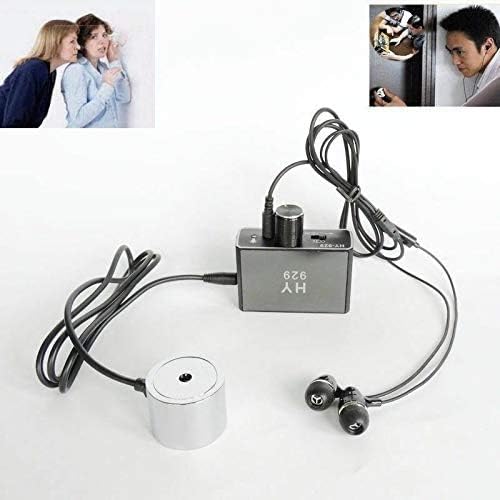
Figure 1: King-Star HY929 device with main unit, earphones, and wall microphone (sonde) connected. This image displays the King-Star HY929 device fully assembled, showing the central processing unit connected to a pair of earphones and the circular wall microphone (sonde). The cables are neatly arranged, illustrating the compact nature of the listening device.
Package Contents
- HY929 Main Unit
- Earphones
- Sonde (Wall Microphone)
- USB Charging Cable
- Power Adapter Plug
- Record Module (Optional/Included)
- Card Reader (Optional/Included)
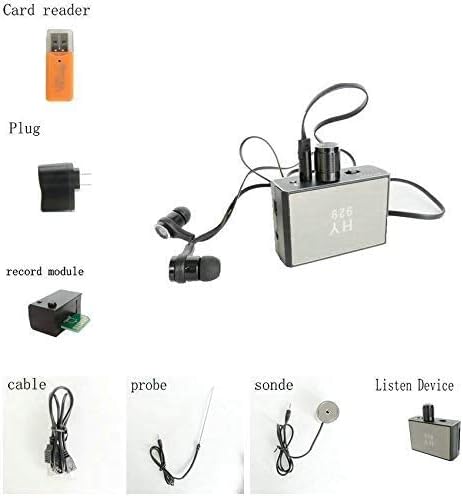
Figure 2: All components of the King-Star HY929 kit. This overview displays all items included in the King-Star HY929 package, such as the main listening device, earphones, the wall microphone (sonde), an additional probe, charging cables, the record module, and a USB card reader, providing a complete visual inventory.
Setup
- Charge the Device: Before first use, ensure the HY929 main unit is fully charged. Connect the USB charging cable to the device's USB interface and plug it into a power source using the provided adapter. The indicator light will show charging status. If the red LED is on during charging, shut down the device to prevent damage. A full charge takes approximately 5 hours.
- Connect Earphones: Insert the earphones into the headset interface on the main unit.
- Connect Sonde/Probe: Insert the sonde (wall microphone) or probe into the audio input hole on the main unit. Ensure a secure connection.
- Optional Recording Module: If using the recording module, insert it into the designated slot.

Figure 3: Main unit controls and interfaces. This detailed view of the HY929 main unit highlights its various ports and controls, including the ON/OFF/Volume dial, headset interface, indicator light, USB interface, and microphone interface.
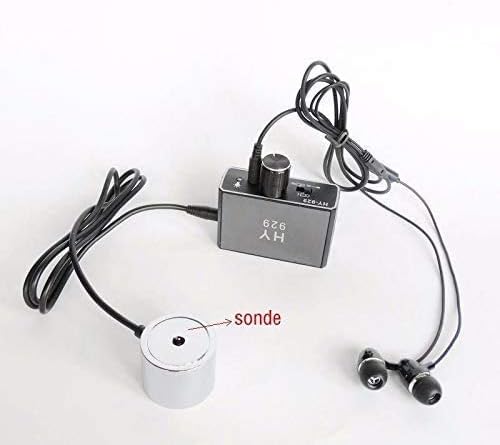
Figure 4: The Sonde (Wall Microphone). This image focuses on the sonde, the circular component responsible for detecting vibrations through surfaces. It is shown with its connecting cable, ready to be attached to the main unit.
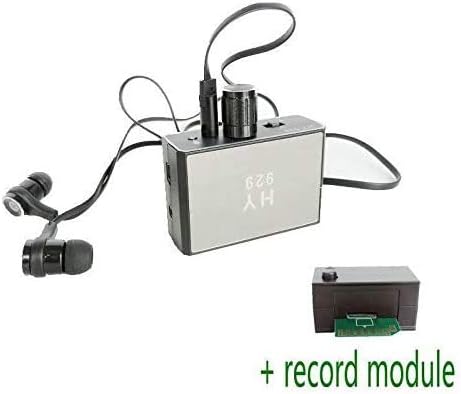
Figure 5: Optional Record Module. This image shows the optional record module, highlighting its TF card slot for memory expansion and recording capabilities. The module connects to the main HY929 unit, enabling audio recording.
Operation
- Placement: Place the end of the sonde or probe firmly against the surface you wish to listen through (e.g., wall, door, window, steel plate). Ensure the sonde is smoothly affixed to the surface and do not drag it.
- Power On: Turn on the device using the ON/OFF/Volume dial.
- Adjust Volume and Sensitivity: Slowly adjust the ON/OFF/Volume dial to increase the audio level. Simultaneously, use the sensitive adjustment/receiver switch and probe adjustment to fine-tune the sensitivity until the voices are heard most clearly. Be cautious when adjusting volume to avoid discomfort to your ears due to sudden loud sounds. The effect of monitoring depends on the thickness and materials of the wall; adjust sensitivity accordingly.
- Listening: Listen to the amplified sounds through the connected earphones.
- Recording (if applicable): If the recording module is connected, the device has audio recording functionality when working with an ordinary recording machine. Refer to the recording module's specific instructions for operation.
Maintenance
- Cleaning: Wipe the device with a soft, dry cloth. Do not use liquid cleaners or solvents.
- Storage: Store the device in a cool, dry place away from direct sunlight and extreme temperatures.
- Handling: Handle the sonde and probe with care as they are precision components. Avoid dropping or subjecting the device to strong impacts.
- Battery Care: To prolong battery life, avoid fully discharging the device frequently. Charge the device regularly, even if not in use for extended periods.
Troubleshooting
| Problem | Possible Cause | Solution |
|---|---|---|
| No sound or very faint sound. | Device not powered on; earphones or sonde not properly connected; low battery; incorrect sensitivity setting; wall too thick/dense. | Ensure device is powered on. Check all cable connections. Charge the device. Slowly adjust the volume and sensitivity dials. Try on a different surface. |
| Sound is distorted or too loud. | Volume set too high; sensitivity too high for the surface. | Slowly decrease the volume. Adjust the sensitivity dial downwards. |
| Device not charging. | Charging cable or adapter faulty; device not shut down during charging (as per manual). | Check charging cable and adapter. Ensure the device is powered off when charging if the red LED is on. |
Specifications
| Model | HY929 |
| Brand | KINGSTAR |
| Electric Current Exhaust | 10mA |
| Battery Type | 3.7V Li-battery (Rechargeable) |
| Continuous Monitoring Time | Up to 100 hours |
| Sonde Sensitivity | -70dB |
| Audio Amplification | Up to 2000 times |
| Penetration Capability | Concrete walls, wooden walls, iron walls, glass walls, air brick. |
Warranty and Support
For warranty information and technical support, please refer to the documentation provided with your purchase or contact the retailer/manufacturer directly. Specific warranty terms may vary by region and point of purchase.
Related documentsHY929


Ask a question about this manual
Ask about setup, troubleshooting, compatibility, parts, safety, or missing instructions. Manuals+ will review the question and use this page’s manual context to help answer it.