
Introduction
The Nitecore MH12 v2 is a high-performance tactical flashlight designed for various applications, including everyday carry, outdoor activities, and professional use. It features a 1200 lumen output, USB-C recharging capability, and multiple lighting modes. This manual provides essential information for the safe and effective use of your MH12 v2 flashlight.

Image: The Nitecore MH12 v2 flashlight, shown with its included USB-C charging cable and tactical holster.
Package Contents
- Nitecore MH12 v2 Flashlight
- Nitecore 21700 Li-ion Battery (NL2150 5000mAh)
- USB-C Charging Cable
- NTH10 Tactical Holster
- LumenTac Organizer
- Clip
- Lanyard
- Spare O-ring
- 18650 Battery Magazine

Image: The included LumenTac battery organizer, designed for safe storage of batteries.
Setup
1. Battery Installation
- Unscrew the tail cap of the flashlight counter-clockwise.
- Insert the included Nitecore 21700 Li-ion battery with the positive (+) terminal facing towards the head of the flashlight.
- Screw the tail cap back on clockwise until it is securely tightened.
- The MH12 v2 can also use 18650 batteries with the included battery magazine. Insert the 18650 battery into the magazine, then insert the magazine into the flashlight.
2. Charging
The MH12 v2 features a USB-C charging port for convenient recharging.
- Locate the USB-C charging port cover on the side of the flashlight head.
- Lift the rubber cover to expose the USB-C port.
- Connect one end of the included USB-C charging cable to the flashlight's port and the other end to a USB power source (e.g., USB adapter, computer, power bank).
- The power indicator light under the side switch will flash slowly during charging and become steady when charging is complete.
- Ensure the rubber cover is securely closed after charging to maintain water and dust resistance.

Image: Close-up view of the Nitecore MH12 v2 flashlight showing the USB-C charging port with the protective cover open.
Operating Instructions
1. Power On/Off
- To Turn On: Fully press the tail switch until a click is heard.
- To Turn Off: Fully press the tail switch again until a click is heard.
- Momentary Illumination: Half-press and hold the tail switch. Release to turn off.
2. Brightness Levels and Special Modes
With the flashlight turned on, press the side switch to cycle through the brightness levels: Ultralow → Low → Mid → High → Turbo.
- Accessing Special Modes (Strobe/Beacon/SOS): With the flashlight turned on, press and hold the side switch to activate Strobe mode. Press and hold the side switch again to cycle through Beacon and SOS modes. Release the side switch to exit special modes.
- Mode Memory: The MH12 v2 has a mode memory function. When reactivated, the flashlight will automatically access the previously memorized brightness level (excluding special modes).
3. User Modes
The MH12 v2 offers two user modes: Daily Mode and Tactical Mode. The default setting is Daily Mode.
- Daily Mode: Provides access to all 4 brightness levels (Ultralow, Low, Mid, High, Turbo) and special modes (Strobe, Beacon, SOS).
- Tactical Mode: Provides access to 4 brightness levels (Ultralow, Low, Mid, High, Turbo) and Strobe mode only. This mode is optimized for quick access to tactical functions.
To Switch User Modes: With the flashlight turned off, loosen the tail cap. Hold the side switch while simultaneously tightening the tail cap. The flashlight will indicate the current mode by flashing once for Daily Mode or twice for Tactical Mode.
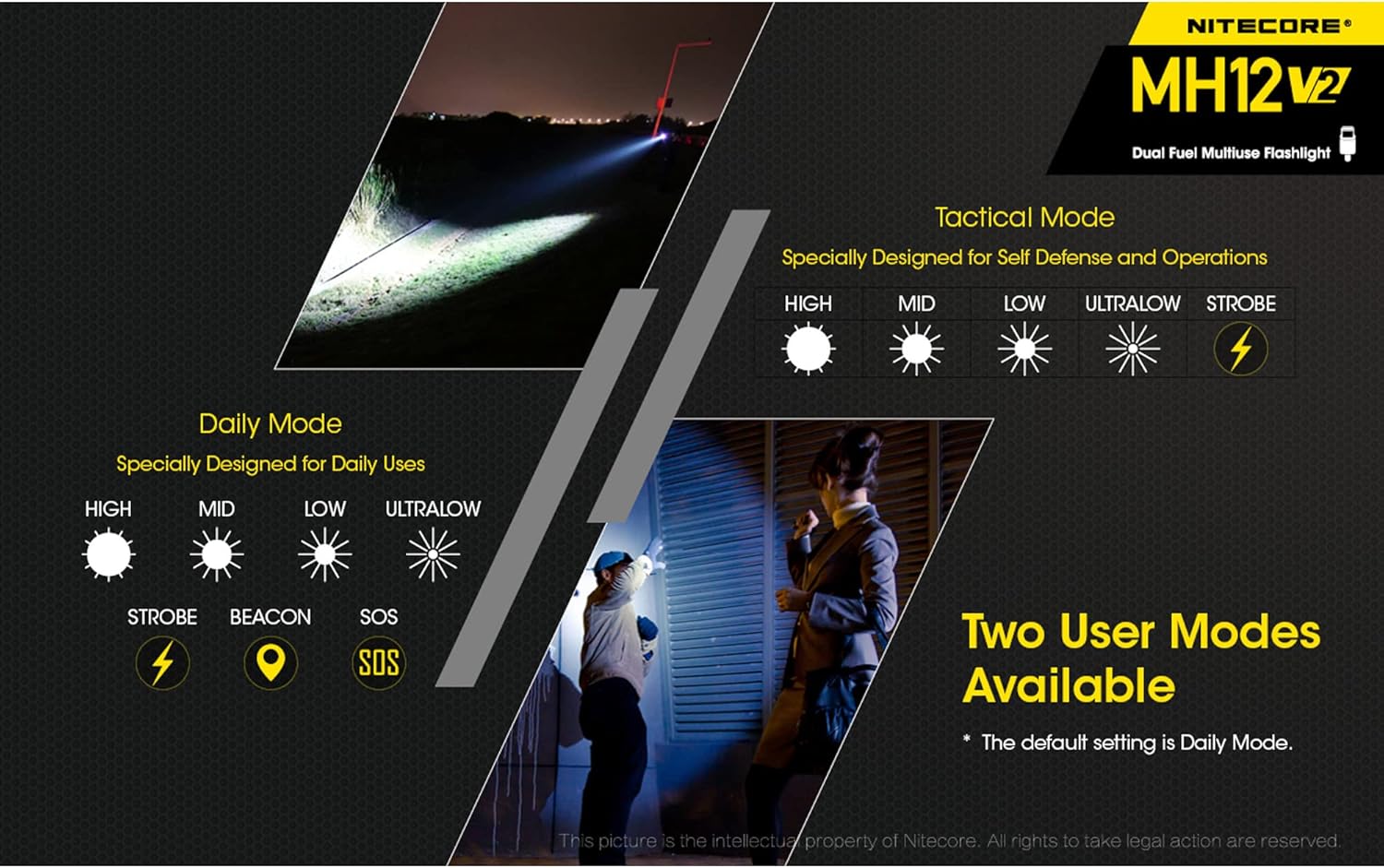
Image: Illustration comparing the available brightness levels and special functions in Daily Mode and Tactical Mode for the Nitecore MH12 v2.
Maintenance
- Cleaning: Periodically clean the threads and O-rings with a clean cloth. Lubricate threads with silicone grease to maintain water resistance.
- Water Resistance: The MH12 v2 is rated IPX8, meaning it is waterproof and submersible up to 2 meters. Ensure the USB-C port cover is securely closed before exposing the flashlight to water.
- Battery Care: If the flashlight is not used for an extended period, remove the battery to prevent leakage. Store batteries in a cool, dry place.
- Heat Dissipation: During prolonged use at high brightness levels, the flashlight head may become warm. This is normal and indicates efficient heat dissipation.
Troubleshooting
- Flashlight not turning on:
- Ensure the battery is inserted correctly with the positive (+) terminal facing the head.
- Check if the tail cap is fully tightened.
- Verify the battery has sufficient charge.
- Charging issues:
- Ensure the USB-C cable is properly connected to both the flashlight and the power source.
- Try a different USB-C cable or power source.
- Check if the charging port is clean and free of debris.
- Intermittent operation or flickering:
- Clean the battery contacts and flashlight threads.
- Ensure the battery is fully charged and properly installed.
- Replace the O-ring if it appears damaged.
If problems persist, please contact Nitecore customer support or your local distributor for assistance.
Specifications

Image: A table detailing the technical specifications of the Nitecore MH12 v2, including brightness levels, runtime, beam distance, and impact resistance.
| Feature | Detail |
|---|---|
| Max Output | 1200 Lumens |
| Max Beam Distance | 202 meters (220 yards) |
| Max Peak Beam Intensity | 10,200 cd |
| Max Runtime | 1500 hours (on Ultralow mode) |
| LED | CREE XP-L2 V6 LED |
| Battery | 1 × 21700 Li-ion (included), compatible with 1 × 18650 or 2 × CR123/RCR123 |
| Rechargeable | USB-C |
| Length | 158 mm (6.22") |
| Head Diameter | 25.4 mm (1") |
| Tube Diameter | 25.4 mm (1") |
| Tail Diameter | 27.2 mm (1.07") |
| Weight | 84.5 g (2.98 oz) (without battery) |
| Impact Resistance | 1 meter |
| Water Resistance | IPX8 (2 meters submersible) |
| Material | Aero grade aluminum alloy with HA III military grade hard-anodized finish |

Image: The Nitecore MH12 v2 flashlight held in a hand, illustrating its compact and lightweight design, alongside its detailed dimensions.
Warranty Information
The Nitecore MH12 v2 is covered by a manufacturer's warranty. For detailed warranty terms and conditions, please refer to the official Nitecore website or contact your authorized Nitecore dealer. Keep your purchase receipt for warranty claims.
Customer Support
For further assistance, technical support, or inquiries regarding your Nitecore MH12 v2 flashlight, please visit the official Nitecore website or contact their customer service department. Contact information can typically be found on the Nitecore official website.


