
Waterdrop WD-TSU-W
Contents
Waterdrop TSU 0.01µm Ultra-Filtration Under Sink Water Filter System User Manual
Model: WD-TSU-W
1. Introduction
Thank you for choosing the Waterdrop TSU 0.01µm Ultra-Filtration Under Sink Water Filter System. This system is designed to provide clean, great-tasting water directly from your tap, while retaining beneficial minerals. It features a 3-stage filtration process, a smart panel for filter lifespan reminders, and a compact, tankless design that requires no electricity or wastewater. This manual provides essential information for the proper installation, operation, maintenance, and troubleshooting of your new water filter system.

2. Product Overview
The Waterdrop TSU system utilizes advanced ultra-filtration technology to deliver purified water. Key components include the main filter unit, a dedicated faucet, and connection tubing. The system is engineered for efficiency and ease of use, providing a reliable source of filtered water without the need for a power outlet or generating wastewater.
2.1 Key Features
- 0.01µm Ultra-Filtration: Effectively reduces over 30 substances, including chlorine, PFAS, taste, odor, heavy metals, and 99.9% of bacteria, while retaining beneficial minerals.
- No Wastewater & No Electricity: An eco-friendly and cost-effective solution that does not produce drain water and operates without an electrical connection.
- Smart Lifespan Reminder: An intuitive black panel with four indicator lights provides real-time updates on filter status, indicating when replacement is needed.
- Long Filter Lifespan: The UF filter lasts up to 24 months, the CT filter up to 12 months, and the PP filter up to 6 months, reducing replacement frequency.
- Compact Design: Slim dimensions (4.68"W x 13.97"H x 14.81"L) allow for installation in small under-sink spaces, even with a garbage disposal.
- Easy Installation: Designed for straightforward setup, accommodating both 1/2" and 3/8" under-sink water pipes.
- Premium Faucet: Includes a high-quality brushed nickel faucet for durability and aesthetic appeal.
- Certified Safe Materials: IAPMO NSF/ANSI 372 certified for lead-free and BPA-free construction, ensuring water safety.


3. Setup and Installation
The Waterdrop TSU system is designed for easy installation. All necessary components for installation are included in the box. Please follow these general steps. For detailed instructions, refer to the included user manual PDF.
3.1 Pre-Installation Checklist
- Ensure you have adequate space under your sink (dimensions: 4.68"W x 13.97"H x 14.81"L).
- Verify your water pipes are either 1/2" or 3/8".
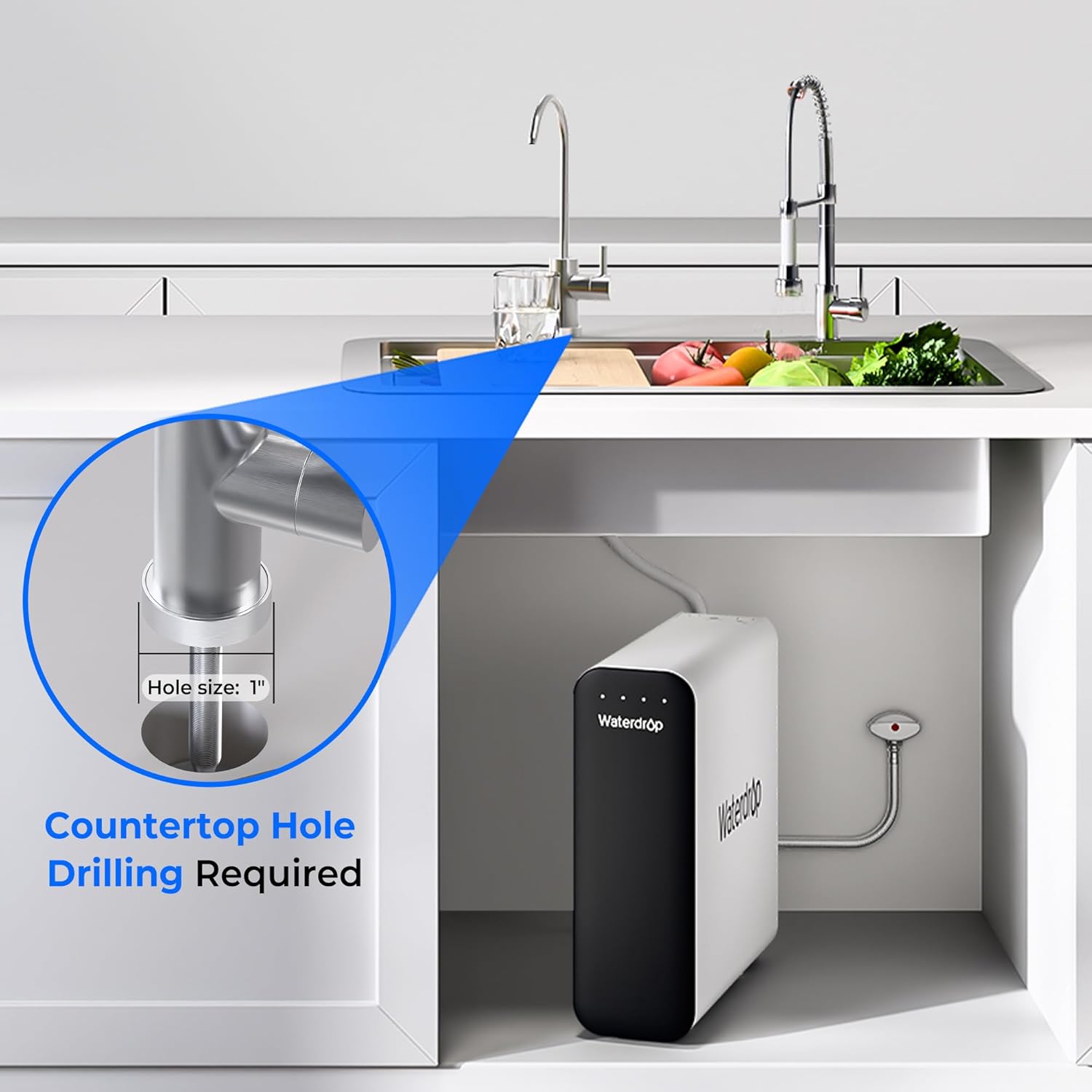
- Gather basic tools: adjustable wrench, drill (if new hole is needed for faucet), safety glasses.
3.2 Installation Steps (General)
- Turn off the cold water supply under your sink.
- Install the new dedicated faucet. This may require drilling a 1-inch hole in your countertop if one is not already present.
- Connect the inlet and outlet tubing from the main filter unit to your cold water line and the new faucet, respectively. The system accommodates both 1/2" and 3/8" pipes.
- Mount the filter unit securely under the sink. Its slim design allows it to fit even with a garbage disposal.
- Insert the three AA batteries (included) into the smart panel for the filter lifespan reminder.
- Slowly turn on the cold water supply and check for leaks.
- Flush the system by running water through the new faucet for at least 10 minutes to clear any air or carbon fines.

4. Operating Instructions
Once installed, operating your Waterdrop TSU system is simple. Use the dedicated faucet to dispense filtered water for drinking, cooking, and other needs.
4.1 Dispensing Water
Simply turn the handle on the dedicated brushed nickel faucet to get filtered water. The system provides a steady flow without pressure drop.

4.2 Smart Lifespan Reminder
The system features a smart panel with LED indicators to help you monitor the lifespan of each filter. The lights will change color to indicate the filter status:
- Blue Light: Filter is in good condition.
- Purple Light: Filter needs replacement soon.
- Red Light: Filter needs immediate replacement.


Video: This video explains the indicators on the front panel of the Waterdrop TSU system, helping you understand filter status and when to replace them.
5. Maintenance and Filter Replacement
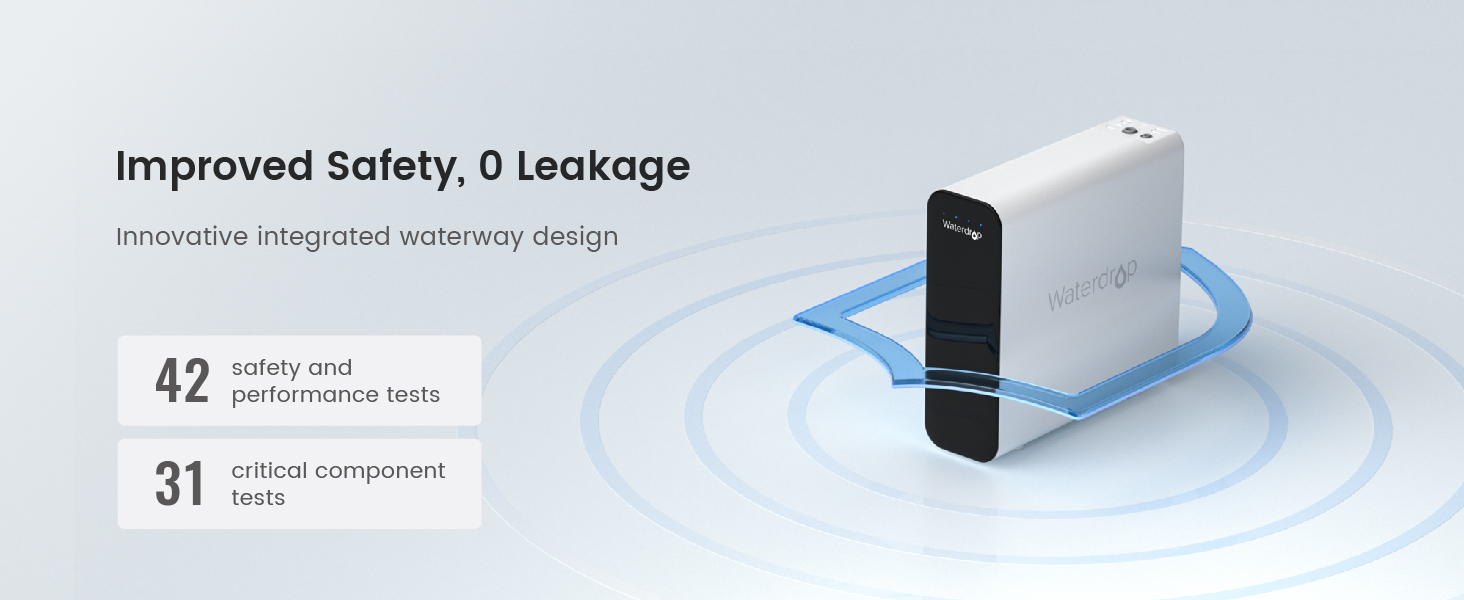
Regular maintenance, primarily filter replacement, is crucial for optimal performance and water quality. The Waterdrop TSU system features a convenient twist-and-pull design for easy filter changes.
5.1 Filter Lifespan
- PP Filter (Pre-sediment Filter): Approximately 6 months.
- CT Filter (Carbon Block Filter): Approximately 12 months.
- UF Filter (Ultra-Filtration Membrane): Approximately 24 months.
Actual filter lifespan may vary based on local water quality and usage.

5.2 Replacing Filters
Filter replacement is a one-step process that does not require turning off the main water valve or hiring a professional plumber.
- Identify the filter cartridge that needs replacement using the smart panel indicator.
- Twist the old cartridge counter-clockwise to unlock it.
- Pull the old cartridge downwards to remove it.
- Insert the new cartridge into the housing, aligning the arrows.
- Twist the new cartridge clockwise to lock it into place.
- After replacing, reset the filter life indicator on the smart panel (refer to the full manual for specific reset instructions).
- Flush the system for a few minutes after each filter replacement.
6. Troubleshooting
This section addresses common questions and issues you might encounter with your Waterdrop TSU system.
6.1 Water Taste/Odor Issues
- Issue: Water has an unusual taste or odor after installation.
- Solution: Ensure the system was flushed for the recommended 10 minutes after initial installation. If the issue persists, check if the CT (Carbon Block) filter needs replacement, as it is responsible for taste and odor reduction.
6.2 Low Water Flow
- Issue: Water flow from the filtered faucet is significantly reduced.
- Solution: This often indicates a clogged filter. Check the smart panel for filter replacement indicators. The PP (Pre-sediment) filter is usually the first to clog if there's a lot of sediment in your water. Replace the indicated filter.
6.3 TDS (Total Dissolved Solids) Reading Remains High
- Issue: My TDS meter shows the TDS level is similar to tap water.
- Explanation: The Waterdrop TSU 0.01µm Ultra-Filtration system is designed to retain beneficial minerals (like calcium, magnesium, potassium) in the water. These minerals contribute to the TDS reading. Therefore, this system will NOT significantly lower your TDS reading. If you require a system that drastically reduces TDS, a Reverse Osmosis (RO) system is needed, which typically removes beneficial minerals and generates wastewater.
Video: This video provides an explanation of what TDS (Total Dissolved Solids) truly represents in water quality, clarifying common misconceptions.
Video: Frequently Asked Questions about the Waterdrop Undersink Ultra Filtration System, covering various aspects of its use and performance.
7. Specifications
| Attribute | Detail |
|---|---|
| Product Dimensions | 14.81"L x 4.68"W x 13.97"H |
| Item Model Number | WD-TSU-W |
| Batteries Required | 3 AA batteries (included) |
| Installation Type | Under Sink |
| Power Source | Corded Electric (for smart panel, not filtration) |
| Upper Temperature Rating | 100 Degrees Fahrenheit |
| Filtration Accuracy | 0.01µm Ultra-Filtration |
| Certifications | IAPMO NSF/ANSI 372 (Lead-Free) |
| Included Components | Faucet, Tubing, Convertor |


8. Warranty and Support
Waterdrop is committed to providing reliable products and excellent customer service. Your Waterdrop TSU system comes with comprehensive after-sales support.
8.1 Customer Support
If you encounter any issues during installation or use, or if you have questions about your product, please contact Waterdrop customer service. Our professional team is ready to assist you and ensure your satisfaction.
- Contact Methods: Refer to the official Waterdrop website or the packaging for the most current contact information (phone, email, live chat).
- Assistance: Our team can help with damaged items, wrong items received, missing parts, or any operational concerns.

8.2 User Manual (PDF)
A detailed user manual in PDF format is available for download. This document contains comprehensive instructions and diagrams for installation, operation, and maintenance.
Download the official User Manual: Waterdrop TSU User Manual PDF
Documents and downloads
Ask a question about this manual
Ask about setup, troubleshooting, compatibility, parts, safety, or missing instructions. Manuals+ will review the question and use this page’s manual context to help answer it.