
Introduction
This manual provides instructions for the setup, operation, maintenance, and troubleshooting of your AIDITIYMI RMT-D171A replacement remote control. This remote is designed to be compatible with various Sony CD and DVD player models, offering a direct replacement for the original RMT-D171A remote.
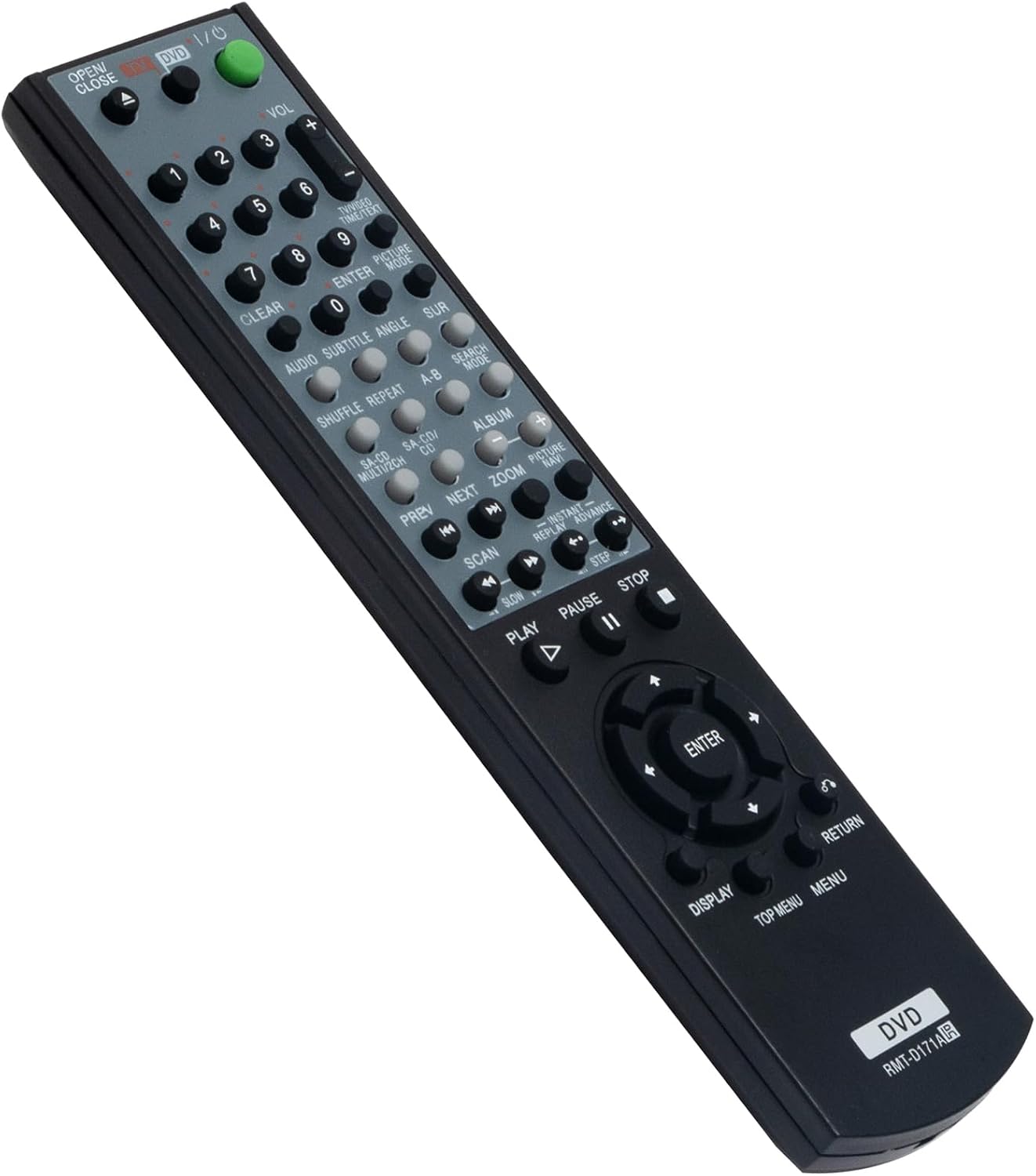
Image: Front view of the AIDITIYMI RMT-D171A replacement remote control, showing all buttons and layout.
Setup
1. Battery Installation
The remote control requires two (2) AA alkaline batteries for operation. Batteries are not included with the remote control.
- Locate the battery compartment on the back of the remote control.
- Slide the battery compartment cover downwards to open it.
- Insert two (2) AA batteries, ensuring the positive (+) and negative (-) terminals align correctly with the markings inside the compartment.
- Slide the battery compartment cover back into place until it clicks securely.

Image: Back view of the remote control with the battery compartment open, showing where to insert two AA batteries.
2. Initial Use
No programming or pairing is required for this replacement remote control. Once the batteries are correctly installed, the remote is ready for immediate use with compatible Sony CD DVD players.
3. Compatibility
This remote control is compatible with a wide range of Sony CD DVD Player models, including but not limited to:
- DVP-NS775V, DVP-F25, DVP-NC610, DVP-NC615, DVP-NC615B, DVP-NC615S, DVP-NC625, DVP-NC655, DVP-NC655P, DVP-NC655PB, DVP-NC655PS, DVP-NC665P, DVP-NC675, DVP-NC675B, DVP-NC675P, DVP-NC675PB, DVP-NC675PS, DVP-NC685V, DVP-NC80, DVP-NC80V, DVP-NC80V/B, DVP-NC80V/S, DVP-NC80VB, DVP-NC80VS, DVP-NC875, DVP-NC875B, DVP-NC875V, DVP-NC875V/B, DVP-NC875V/S, DVP-NC875VB, DVP-NC875VS, DVP-NS305, DVP-NS315, DVP-NS315B, DVP-NS315BX, DVP-NS315S, DVP-NS325, DVP-NS325B, DVP-NS415, DVP-NS425, DVP-NS425P, DVP-NS501, DVP-NS501P, DVP-NS501PS, DVP-NS575, DVP-NS575P, DVP-NS575PB, DVP-NS575PS, DVP-NS705V, DVP-NS715, DVP-NS725, DVP-NS725P, DVP-NS755, DVP-NS755V, DVP-NS75H, DVP-NS775SV, DVP-NS90V, DVP-NS975, DVP-NS975V, HT-1700D, HT-1750DP, HT-4800DP, HT-4850DP, HT-5500D, HT-5800DP, HT-6500D, HT-6500DP, HT-7700DP, RM-ADU003.
While this remote is designed to be broadly compatible, specific functions may vary or not be supported on all listed models, especially older or multi-disc changer units. Refer to your player's original manual for full functionality details.
Operating Instructions
Point the remote control directly at the infrared sensor on your Sony CD DVD player. Ensure there are no obstructions between the remote and the player.

Image: Angled view of the AIDITIYMI RMT-D171A remote control, providing a clear perspective of the button layout for operation.
Basic Functions
- OPEN/CLOSE: Opens and closes the disc tray.
- POWER (I/O): Turns the DVD player on or off.
- VOL (+/-): Adjusts the volume level.
- Number Buttons (0-9): Used for direct track selection or inputting numerical values.
- CLEAR: Clears numerical input or selections.
- ENTER: Confirms selections in menus.
Playback Controls
- PLAY (►): Starts or resumes disc playback.
- PAUSE (∥): Pauses playback. Press again to resume.
- STOP (■): Stops disc playback.
- PREV (◀◀): Skips to the beginning of the current track or the previous track.
- NEXT (►►): Skips to the next track.
- SCAN (◀◀◀ / ►►►): Fast reverse or fast forward through the disc.
- SLOW (◀ / ►): Plays in slow motion.
- INSTANT REPLAY / ADVANCE: Jumps back or forward a few seconds during playback.
Navigation and Menu Controls
- Arrow Buttons (↑ ↓ ← →): Navigate through menus and options.
- ENTER: Confirms selections.
- DISPLAY: Shows on-screen display information.
- TOP MENU: Accesses the disc's top menu.
- MENU: Accesses the disc's menu.
- RETURN: Goes back to the previous menu or screen.
Special Features
- AUDIO: Changes audio tracks or languages.
- SUBTITLE: Toggles or selects subtitle options.
- ANGLE: Changes camera angles on compatible discs.
- SUR: Activates or adjusts surround sound modes.
- SHUFFLE: Plays tracks in a random order.
- REPEAT: Repeats a track, chapter, or entire disc.
- A-B: Repeats a specific section of playback.
- SEARCH MODE: Accesses search functions.
- CD MULTI/CH: For multi-channel audio or multi-disc changers.
- SA-CD/CD: Selects between Super Audio CD and standard CD playback.
- ALBUM: Navigates through albums or folders.
- ZOOM: Zooms in on the picture.
- PICTURE MODE: Adjusts picture settings.
Maintenance
Battery Replacement
Replace batteries when the remote control's response becomes sluggish or stops working. Always replace both batteries at the same time with new AA alkaline batteries. Do not mix old and new batteries, or different types of batteries.
Cleaning
To clean the remote control, wipe it with a soft, dry cloth. Do not use liquid cleaners, sprays, or abrasive materials, as these can damage the remote's surface or internal components.
Storage
If the remote control will not be used for an extended period, remove the batteries to prevent leakage and potential damage to the device.
Troubleshooting
Remote Control Not Responding
- Check Batteries: Ensure batteries are inserted correctly with the correct polarity (+/-). Replace with fresh AA alkaline batteries if necessary.
- Line of Sight: Make sure there are no obstructions between the remote control and the infrared sensor on your DVD player. The remote uses infrared technology, which requires a clear line of sight.
- Distance: Ensure you are within the effective operating range (approximately 32 feet or 10 meters).
- Player Power: Confirm that your Sony CD DVD player is powered on.
Certain Functions Do Not Work
- Compatibility: While the remote is broadly compatible, some advanced or model-specific functions (e.g., disc skip for multi-disc changers) may not be fully supported. Refer to your player's original manual for expected remote functionality.
- Disc Type: Ensure the function you are trying to use is applicable to the current disc type (e.g., Angle button only works on DVDs with multiple angles).
Specifications
| Brand: | AIDITIYMI |
| Model Name: | RMT-D171A |
| Model Number: | AD-RMT-D171A RMTD171A-ad001 |
| Connectivity Technology: | Infrared |
| Compatible Devices: | Sony CD DVD Players (various models) |
| Battery Type: | AA |
| Number of Batteries: | 2 (not included) |
| Maximum Range: | 32 feet (approx. 10 meters) |
| Button Quantity: | 54 |
| Special Feature: | Ergonomic design |
Warranty Information
This AIDITIYMI RMT-D171A replacement remote control comes with a 1-Year Warranty from the manufacturer. Please retain your proof of purchase for warranty claims. For specific warranty terms and conditions, refer to the documentation provided at the time of purchase or contact the manufacturer directly.
Customer Support
If you encounter any issues or have questions regarding your AIDITIYMI RMT-D171A replacement remote control that are not addressed in this manual, please contact AIDITIYMI customer support. Contact information can typically be found on the product packaging or the seller's website.